


 Video Converter Ultimate
 Gravadora de pantalla
 Reparació de vídeo
 Baixada segura
Tot el que podeu aprendre sobre què és un fitxer PNG
Avui dia, el format de fitxer PNG és un dels formats d’imatge estàndard. El pots veure a internet, als ordinadors, als telèfons mòbils, etc. Tanmateix, alguns usuaris no tenen gaire clar en què consisteix aquest format. Afortunadament, aquesta publicació et donarà tota la informació que necessites. Descobriràs què és un fitxer PNG. A més, aquesta publicació t’oferirà mètodes excel·lents per convertir imatges al format de fitxer PNG.

Part 1. Informació detallada sobre el fitxer PNG
L'extensió Portable Network Graphics (PNG) de la família de ràsters realitza una compressió d'imatges sense pèrdues. No està patentat i es va crear com a reemplaçament del GIF, el format d'intercanvi de gràfics. A més de les imatges estàndard en escala de grisos que proporcionen transparència, es poden basar en una paleta. PNG no admet tipus de color addicionals com CMYK. És perquè una de les seves finalitats principals és enviar imatges per Internet. A més, no va tenir en compte cap tasca professional d'impressió. La imatge del fitxer es divideix en trossos amb informació. Inclou píxels o comentaris textuals codificats, i la verificació d'integritat es fa sota la RFC 2083. Molts usuaris troben el format PNG. És perquè és un dels formats més populars en l'actualitat. Pot ser un fitxer adjunt de correu electrònic o una imatge que hagis obtingut d'un lloc web. De vegades, les captures de pantalla també tenen aquesta resolució. És més útil per als professionals que el poden utilitzar.
Històricament, el format d'imatge PNG va començar l'any 1995. Oliver Fromme, un expert informàtic, va idear el format PING. Però més tard, es va convertir en PNG. Aquest format de fitxer és la propera evolució del format GIF. El format GIF és vuit anys més antic que el PNG. GIF té molts desavantatges. Necessita una llicència de patent i una gamma limitada de 256 colors. Aquesta limitació pot afectar la imatge en obrir-la a la pantalla de l'ordinador. Com a resultat, fer un fitxer PNG és la millor opció. No té patents i té una paleta de colors més gran.
Part 2. Com obrir un fitxer PNG
Com que ja sabeu què és un fitxer .png, aquesta part us indicarà com obrir aquest format als vostres dispositius i diferents navegadors. Podeu obrir les vostres fotos PNG en qualsevol navegador web popular. Inclou Firefox, Chrome, Explorer i molt més. El mètode és sense problemes.
Si fas servir el navegador, pots obrir la imatge PNG prement Ctrl + O al teclat. Escull la imatge PNG que vols obrir. Després, fes clic al botó Obre de la carpeta de fitxers.
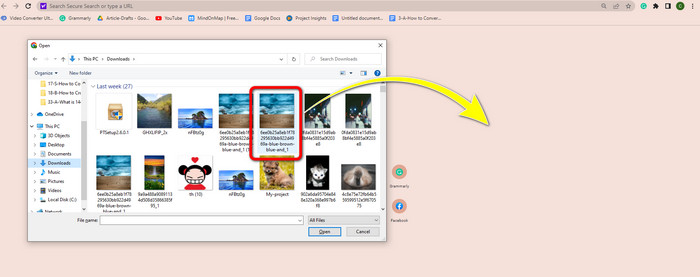
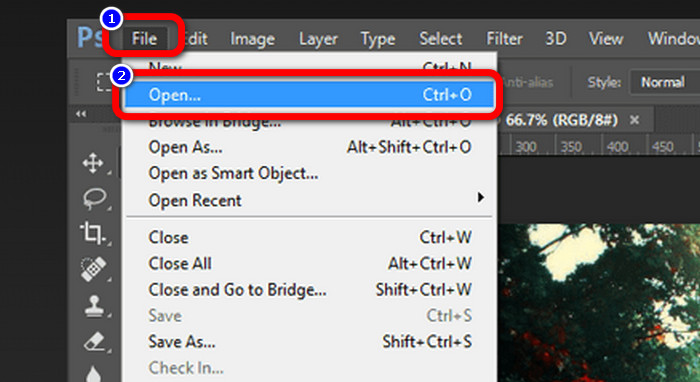
També hi ha maneres d’obrir imatges PNG al Photoshop, al Drive o en altres aplicacions. Pots anar a File > Open > Selecciona la foto. Després, prem Enter. D’aquesta manera, podràs veure la imatge PNG a l’aplicació.
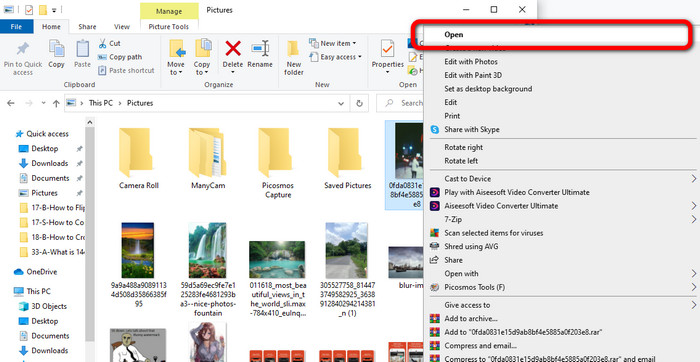
En un ordinador amb Windows és fàcil obrir un fitxer PNG. Fes clic a la Carpeta de fitxers de la barra de tasques per obrir-la. Ves a la pestanya Accés ràpid per veure la imatge PNG. Quan vegis la imatge, fes-hi clic amb el botó dret i selecciona l’opció Obre. Així podràs visualitzar la imatge en mode de pantalla completa.
Part 3. Forma eficaç de convertir imatges a format PNG
Converteix imatges a PNG amb FVC Free Image Converter
Pots utilitzar diversos convertidors en línia per convertir imatges al format PNG. Tot i això, alguns no són segurs. A més, altres convertidors són cars. Si vols un convertidor d’imatges segur i gratuït, fes servir FVC Free Image Converter. Aquesta eina és una de les aplicacions més destacades per convertir imatges en línia. La pots utilitzar gratuïtament, cosa que la fa accessible a tots els usuaris. També hi pots pujar imatges en diferents formats, com ara TIFF, JPG, PNG, GIF i més. A més, convertir imatges és senzill. Només ofereix tres passos per convertir les teves imatges al format PNG. També pots convertir moltes imatges alhora. Aquest convertidor ofereix un procés de conversió per lots. D’aquesta manera, pots estalviar més temps. A més, garanteix la privadesa eliminant les teves dades després del procés de conversió. A més a més, no cal registrar-se ni crear un compte a l’aplicació. El pots utilitzar tan bon punt obris el lloc web.
Pas 1: Primer, visita el lloc web de FVC Free Image Converter. Quan siguis a la pàgina principal, ves a l’opció de format i selecciona el fitxer PNG com a format de sortida desitjat.
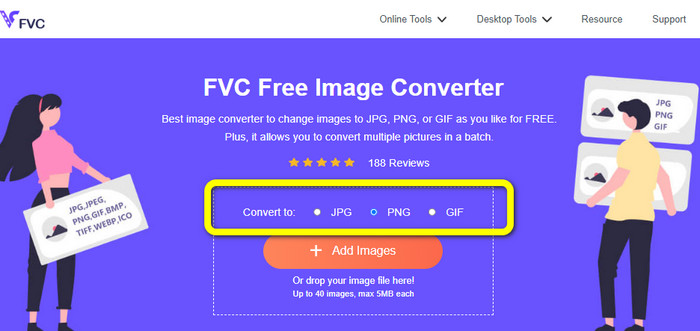
Pas 2: Fes clic al botó Add Images del centre de la interfície per pujar la foto. Obre la foto que vols convertir des de la carpeta de fitxers.
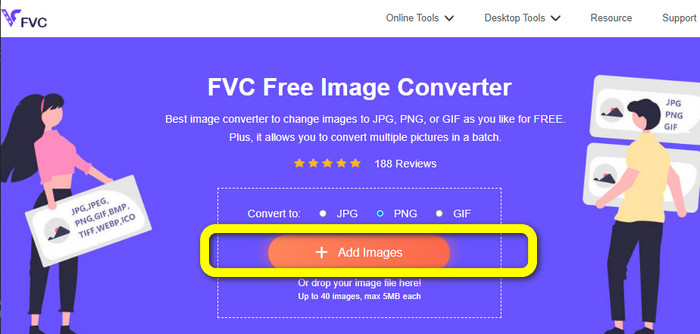
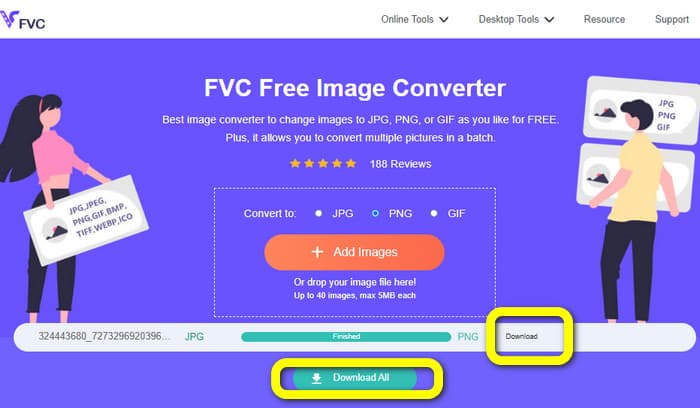
Pas 3: Després del procés de conversió, fes clic al botó Download per desar la imatge final. Després d’això, podràs obrir la teva imatge PNG a l’ordinador.
Converteix imatges a PNG amb Coolutils
Pots utilitzar el convertidor de fitxers d’imatge Coolutils en línia sense descarregar res. No cal esperar cap enllaç de correu electrònic, perquè aquest convertidor en línia realitza la conversió immediatament. Aquesta eina en línia et permet convertir imatges a PNG ràpidament. Un aspecte d’aquest servei que ens agrada és la possibilitat de girar i canviar la mida d’una imatge abans de convertir-la. Tot i això, no mostra cap previsualització de com quedarà la imatge girada després de la conversió. Com que funciona a través d’un navegador web, pots utilitzar aquest mètode amb qualsevol sistema operatiu, inclosos Windows, Linux i Mac. Aquest programa admet molts formats d’entrada, com ara JPEG, PNG, GIF, BMP i TIFF.
Pas 1: Obre el navegador i cerca Coolutils. Després, fes clic al botó Upload File to Convert per afegir la imatge que vols convertir.
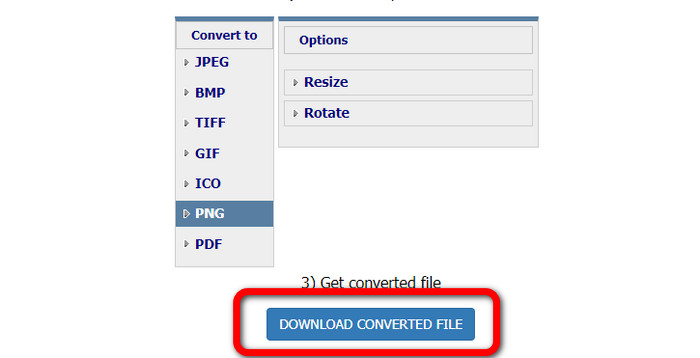
Pas 2: Selecciona el format PNG entre les opcions de format.
Pas 3: Fes clic al botó Download del fitxer convertit per desar la imatge a l’escriptori. També pots fer servir aquesta eina per convertir imatges a JPG.
Part 4. Preguntes freqüents sobre el fitxer PNG
1. Quina diferència hi ha entre PNG i JPG?
La principal diferència entre els formats de fitxer PNG i JPG és el seu algorisme de compressió. El format de fitxer PNG utilitza un algorisme sense pèrdues. Vol dir que pot guardar tota la informació de la imatge. El format JPG utilitza un algorisme de compressió amb pèrdues. Descarta part de la informació de la imatge per reduir la mida del fitxer.
2. Amb quina eficàcia el format PNG mostra el text escrit?
És efectiu. La compressió sense pèrdues d'aquest fitxer pot mostrar fotos amb molta text. Inclou dissenys de pàgina i captures de pantalla. S'inclouen escanejos de text imprès, com ara documents escrits a mà i pàgines de diaris.
3. Què és millor, JPG o PNG?
Depèn del teu propòsit. El fitxer JPG redueix la qualitat de la imatge. També funciona millor per reduir la mida del fitxer d'una imatge. PNG ha comprimit el fitxer tot conservant la qualitat de la imatge. És excel·lent per emmagatzemar elements, com ara text, gràfics icònics i dibuixos lineals.
Conclusió
Tota la informació anterior t’explica el format de fitxer PNG. Fins i tot et proporciona prou dades sobre per a què s’utilitza un fitxer PNG. A més, aquest article et mostra instruccions pràctiques per convertir imatges al format PNG fent servir FVC Free Image Converter. Per tant, si vols convertir fitxers d’imatge, fes servir aquest convertidor d’imatges en línia de confiança.
-
 8 convertidors d'imatges sorprenents [informació completa]
 Aquesta revisió us informarà sobre els millors convertidors de fitxers d'imatge que podeu utilitzar per convertir fitxers d'imatge. Llegiu aquesta publicació per conèixer el millor convertidor d'imatges per a vosaltres
-
 Detalls complets sobre les diferències entre JPEG i JPG i PNG
 Aquesta publicació us donarà prou informació sobre les diferències entre JPEG i JPG i PNG. A més, aprendràs a convertir imatges en aquests fitxers
-
 Què és JPEG/JPG: Converteix les teves imatges a JPG sense esforç
 Tens curiositat pel significat de JPEG? Tenim una resposta per a tu. A més, aprendràs a convertir diferents formats d'imatge en fitxers JPG. Llegiu la publicació ara.
