


 Video Converter Ultimate
 Gravadora de pantalla
 Reparació de vídeo
Com convertir AVI a WMV mitjançant convertidors gratuïts [Passos ràpids]
Els fitxers AVI, o Audio Video Interleave, desenvolupats inicialment per Microsoft Corporation, tenen un format de vídeo d’alta gamma. Aquest format de fitxer ofereix una resolució d’alta qualitat, però la mida del fitxer és massa gran. Una manera habitual de reproduir el teu vídeo o fer servir el fitxer a qualsevol plataforma és convertir el fitxer AVI a un fitxer WMV. Per tant, si vols saber més sobre com convertir AVI a WMV, continua llegint mentre t’expliquem diversos convertidors, amb els passos detallats.

Part 1. Converteix el teu AVI a WMV a Windows 10/11
El sistema operatiu Windows 10 admet diversos formats de fitxer que pots trobar en línia. Fitxers com AVI i WMV són compatibles amb Windows 10. Per tant, convertir el teu fitxer AVI a un fitxer WMV serà fàcil, sobretot si utilitzes aquest convertidor ultraràpid, FVC Video Converter Ultimate. Aquest convertidor és un dels més fiables i actualment està en tendència. A més, et permet editar, millorar i comprimir el teu fitxer. També és fàcil d’utilitzar i pot convertir ràpidament fitxers AVI a WMV a Windows 10.

FVC Video Converter Ultimate
Més de 5.689.200 descàrregues- Us permet convertir diversos formats de fitxer com ara AVI a WMV, MP4, MOV, VOB, etc.
- Té funcions que us permeten combinar diversos fitxers en un sol.
- Podeu editar, millorar i comprimir el vostre fitxer.
Descàrrega gratuïtaPer a Windows 7 o posteriorDescàrrega segura
Descàrrega gratuïtaPer a macOS 10.7 o posteriorDescàrrega segura
Aquests són els passos sobre com convertir el vostre fitxer AVI a format de fitxer WMV:
Pas 1. Per instal·lar FVC Video Converter Ultimate al teu Windows 10, fes clic al botó de descàrrega de més avall. Després segueix el procés d’instal·lació i executa l’aplicació.
Descàrrega gratuïtaPer a Windows 7 o posteriorDescàrrega segura
Descàrrega gratuïtaPer a macOS 10.7 o posteriorDescàrrega segura
Pas 2. Un cop hagis obert l’aplicació, fes clic al botó Add files situat a la part superior esquerra de la pantalla, o al botó +, per afegir els fitxers AVI a la interfície principal del programari. Es mostraran els fitxers de l’ordinador; després, selecciona el fitxer AVI que vols convertir a WMV. Fes clic al botó Open per pujar el fitxer.
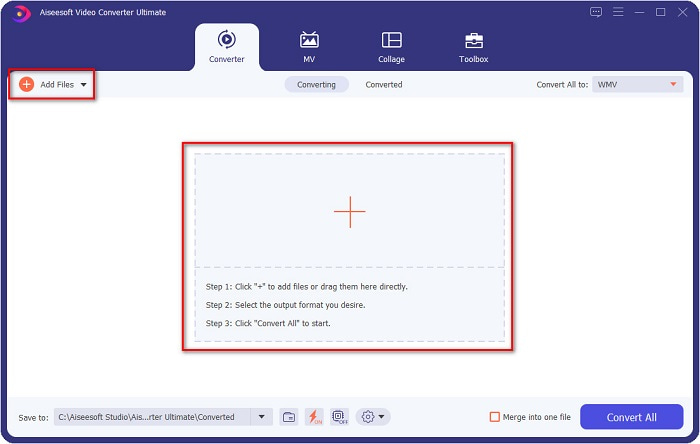
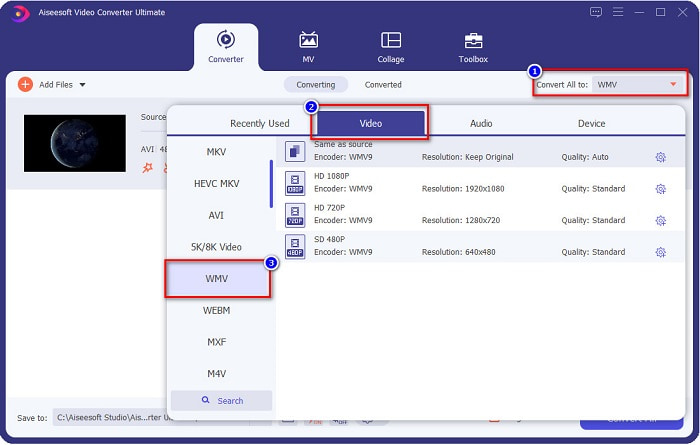
Pas 3. Per canviar el format del fitxer, fes clic al botó Convert All to a la cantonada superior dreta de la interfície del programari. Apareixerà una llista de formats de fitxer; després, selecciona WMV de la categoria Vídeo.
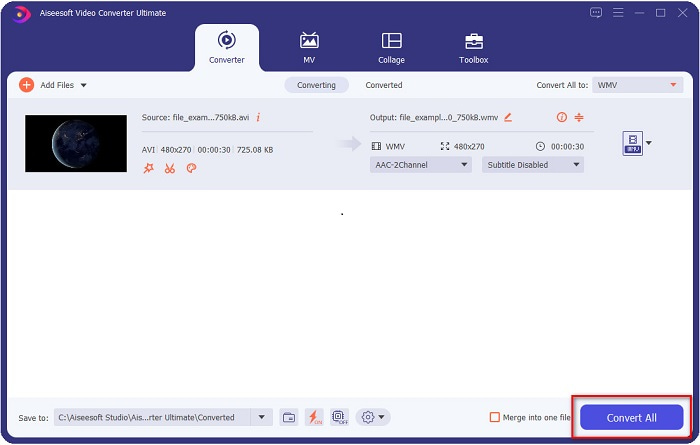
Pas 4. Després d’escollir el format de fitxer WMV, fes clic al botó Convert All per convertir el teu AVI a un fitxer WMV. Espera uns segons i ja està! Així de senzill, pots convertir fàcilment el teu fitxer AVI a WMV.
Part 2. Com convertir AVI a WMV de forma gratuïta
Quan converteixes fitxers AVI a WMV, també pots utilitzar eines convertidores gratuïtes descarregables. Un convertidor molt conegut és Freemake Video Converter. Aquest convertidor fora de línia et permet convertir més de 500 formats, com ara AVI a WMV, MP3, MP4, DVD i molts més. No obstant això, la interfície gràfica d’usuari (GUI) no és gaire bona i la seva interfície tampoc no és gaire intuïtiva. Tot i així, encara és utilitzada per molts usuaris per convertir fitxers.
Guia ràpida sobre com convertir el vostre fitxer AVI a fitxer WMV mitjançant Freemake Video Converter:
Pas 1. Descarrega l’aplicació cercant Freemake Video Converter al navegador. Després de descarregar-la, obre l’aplicació.
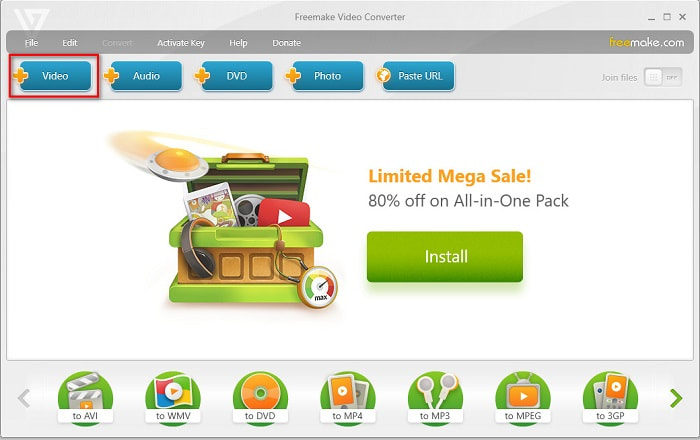
Pas 2. Després d’obrir l’aplicació, fes clic al botó Video; selecciona el teu fitxer AVI quan apareguin els fitxers de l’ordinador. Prem Open per afegir el teu fitxer AVI a la cua.
Pas 3. Després d’escollir el fitxer AVI, fes clic a l’opció Convert situada a la part superior de la interfície del programari. Apareixerà una llista de formats de fitxer; després, selecciona WMV.
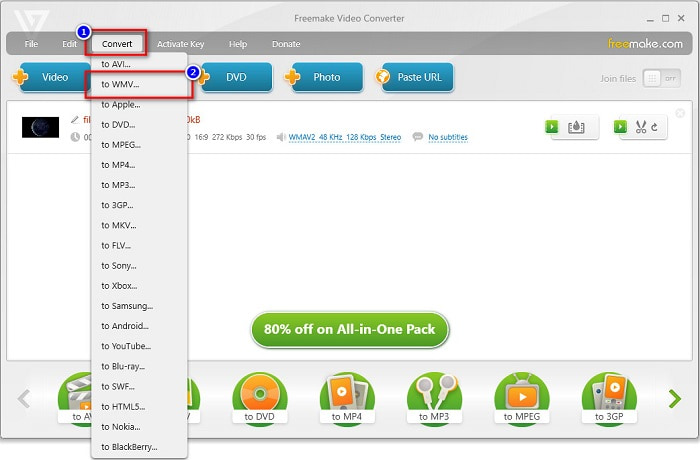
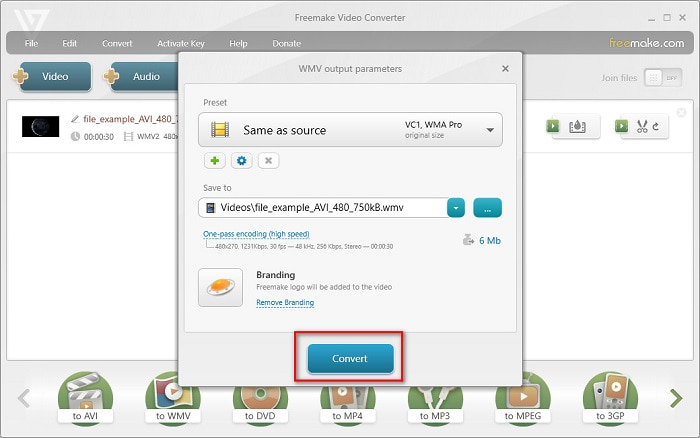
Pas 4. Apareixerà una nova interfície on ja podràs convertir el teu fitxer. Fes clic al botó Convert per començar a convertir el fitxer AVI a WMV.
Part 3. Conversió d'arxius AVI a WMV en línia
No es pot negar que és més còmode convertir fitxers en línia. Per tant, hem provat alguns convertidors en línia per convertir AVI a WMV en línia i hem escollit FVC Free Video Converter Online com el millor per recomanar. Aquest convertidor et permet convertir fitxers grans sense limitacions. Tot i això, pots experimentar una conversió lenta perquè aquest convertidor depèn d’internet. Això vol dir que la velocitat de conversió depèn de la connexió a internet. Malgrat això, FVC Free Video Converter Online ha estat utilitzat per molts usuaris i està considerat un dels millors convertidors en línia.
Passos per convertir el teu fitxer AVI a WMV amb FVC Free Video Converter
Pas 1. Al navegador, cerca FVC Free Video Converter Online.
Pas 2. Quan ja siguis a la pàgina web, fes clic al botó Add Files to Convert. Després, descarrega el llançador que apareixerà quan facis clic al botó Add Files to Convert. A continuació, selecciona el teu fitxer AVI.
Baixa la versió d’escriptori per convertir fitxers per lots.
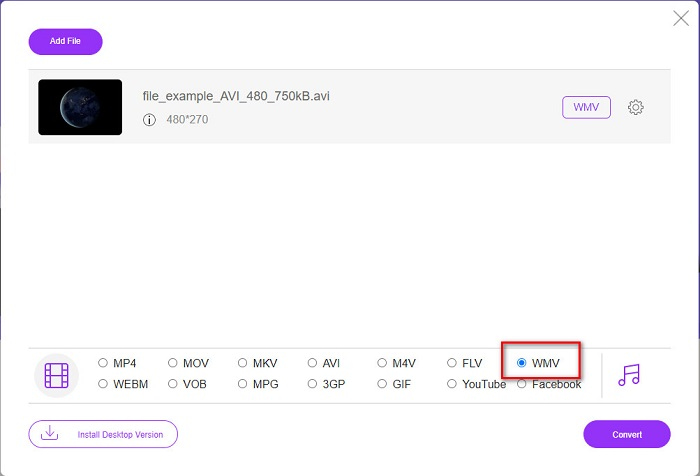
Pas 3. Després de seleccionar el fitxer, a la segona interfície del programari veuràs la llista de formats de fitxer; a continuació, fes clic a WMV.
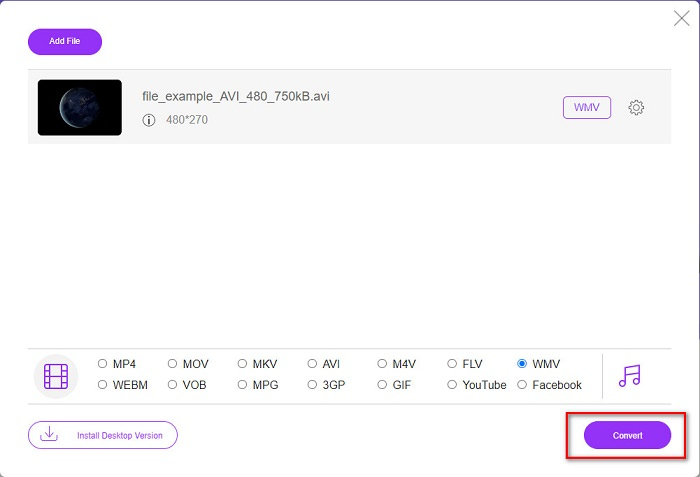
Pas 4. Finalment, fes clic al botó Convert a la part inferior dreta de la interfície del programari. Es mostraran els fitxers de l’ordinador, on podràs seleccionar la destinació del fitxer convertit. Després començarà la conversió del teu fitxer d’AVI a WMV.
Part 4. Més informació sobre AVI i WMV
Els fitxers AVI o Audio Video Interleave són formats de vídeo estàndard per a ordinadors amb Windows. Aquests fitxers contenen àudio i vídeo i utilitzen diversos còdecs, incloent-hi DivX i XviD. Tanmateix, aquest format està mínimament comprimit. Per tant, la seva mida de fitxer és força gran. D’altra banda, WMV o Windows Media Video és compatible amb molts dispositius de programari, i el Windows Media Player comprimeix aquest tipus de fitxers. A més, el sistema Windows sol reproduir aquest tipus de fitxer. Llegeix Best WMV Players si vols reproduir fitxers WMV amb facilitat.
AVI vs. WMV
Basat en el format de fitxer d'intercanvi de recursos (RIFF), el format AVI va ser introduït per Microsoft l'any 1992. Pot estalviar vídeo/àudio d'alta qualitat ja que utilitza menys compressió. Però això també provoca la gran mida del fitxer d'un fitxer AVI, que pot ser un problema quan hi ha espai limitat.
Produït per Microsoft, WMV era un dels formats de vídeo més comuns als anys 2000. Es pot veure a la xarxa i reproduir-lo per diversos reproductors multimèdia a Windows. I també és el format de fitxer de vídeo predeterminat de Windows Media Player. Però recentment ha estat assumit per altres formats.
Part 5. Preguntes freqüents sobre la conversió del format de fitxer AVI a WMV
Canviar AVI a WMV arruïna la qualitat del fitxer?
Quan convertiu AVI a WMV, la qualitat dels vostres fitxers no es veurà afectada. Tanmateix, alguns convertidors no admeten vídeos de píxels d'alta qualitat, la qual cosa fa que la qualitat baixi.
Podeu comprimir fitxers AVI?
Sí. Pots utilitzar compressors de vídeo disponibles en línia. També pots convertir el teu fitxer AVI a format WMV per reduir-ne la mida. A més, pots utilitzar FVC Video Converter Ultimate per comprimir els teus fitxers AVI.
La mida del meu fitxer AVI canviarà després de la conversió?
Hi ha alguns casos en la mida del fitxer AVI que poden ser diferents de l'original. Com que quan es converteixen els fitxers, els fitxers comprimits es descomprimiran, la qual cosa farà que la mida del fitxer canviï una mica.
Conclusió
Per resumir-ho tot, les eines en línia i fora de línia presentades anteriorment mostren funcions de conversió prometedores que poden satisfer les vostres necessitats quan es tracta de convertir fitxers AVI a WMV. Però si esteu buscant un convertidor que contingui moltes funcions que us ajudaran a satisfer les vostres necessitats, us recomanem que utilitzeu FVC Video Converter Ultimate; encara teniu dubtes al respecte? Prova-ho ara i treu el millor dels teus fitxers!
-
 Guia concreta per ajudar-vos a convertir AVI a FLV de forma gratuïta
 Per convertir AVI a FLV, necessiteu un potent convertidor de vídeo. Afortunadament, en podeu aprendre dos i la seva guia pas a pas d’aquest article únic.
-
 Com convertir vídeos AVI a fitxers GIF animats a Windows / Mac
 Voleu seleccionar els segments AVI interessants per crear memes GIF? Aquest article us explicarà els 2 millors mètodes per retallar els vídeos AVI i convertir AVI a fitxers GIF animats de forma gratuïta.
-
 Decidiu quin és el programari ideal per convertir AVI a MP3 [PC i Mac]
 Vols saber com convertir AVI a un format d'àudio MP3? A la llista següent trobareu diferents eines i passos que s'adaptaran a les vostres necessitats.

