


 Video Converter Ultimate
 Gravadora de pantalla
 Reparació de vídeo
Fenomenal Mini DV a AVI Converter Disponible a Windows i Mac OS
L’objectiu principal dels fitxers DV és contenir vídeo digital de càmeres de vídeo o videocàmeres dels fabricants Panasonic i Sony a partir de finals de 1995. Aquest còdec i format de cinta es va fer famós per la seva transició de la producció analògica a la digital. Però actualment no pots reproduir el fitxer DV amb el teu reproductor multimèdia predeterminat ni tan sols compartir-lo en línia. Així que, si vols reproduir aquest fitxer, has de plantejar-te convertir-lo a un format molt més compatible i reproduïble com l’AVI. A més, els detalls següents t’ajudaran a entendre què és DV, a convertir fitxers DV a AVI i a reproduir-los en un reproductor multimèdia si no els vols convertir.
Part 1. La batalla dels formats: DV VS AVI
El fitxer DV i AVI són gairebé similars, ja que aquests dos formats poden contenir vídeo i àudio. Tanmateix, el seu propòsit i com emmagatzemen el fitxer multimèdia està lluny l'un de l'altre. En aquest cas, determinem quines són les diferències entre DV i AVI comparant les seves 3 habilitats úniques.
Compatibilitat del format
L’AVI rep més suport i és un dels formats més compatibles per reproduir i editar vídeo. Aquest format pot contenir la reproducció de vídeo en un format sincronitzat. En canvi, el fitxer DV no és compatible amb nombrosos editors de vídeo ni reproductors multimèdia a PC i Mac. Per això, aquest és un dels motius pels quals necessites un convertidor de mini DV a AVI.
Compressió compatible
AVI és un format de fitxer sense pèrdues per a l'emmagatzematge robust i avançat de fitxers multimèdia. Tanmateix, aquest format consumirà molt de l'emmagatzematge del vostre disc dur perquè no està comprimit. Mentre que DV utilitza una compressió amb pèrdues per al seu vídeo, però el fitxer d'àudio no està comprimit. El motiu pel qual el format té pèrdua és perquè utilitza el DCT com a base per a fotograma per fotograma que s'utilitza per comprimir el vídeo.
Fidelitat d’àudio
El fitxer DV de fidelitat d'àudio admet entre la mitjana i la millor qualitat d'àudio perquè utilitza un àudio PCM de mostreig de fins a 48 kHz amb una longitud de paraula de 20 bits. AVI utilitza un PCM sense comprimir i la qualitat de l'àudio és excel·lent. Tot i així, pot ser millor si utilitzeu DV com a codificador per aconseguir DV-AVI que comprimeixi.
Ara que entenem quins són aquests formats, ara és el moment adequat per convertir DV a AVI al Mac o al vostre PC llegint el tutorial que es proporciona a continuació.
Part 2. Millor eina de conversió fenomenal per convertir DV a AVI a Mac i Windows
FVC Video Converter Ultimate
Tens problemes per triar un convertidor que produeixi un resultat extraordinari? Si és el cas, et recomanem que facis servir el FVC Video Converter Ultimate. Aquest programari s’ha convertit en una de les opcions més populars entre els usuaris que converteixen formats sovint. A més, el nom «ultimate» no és només un nom, també descriu el seu rendiment. En termes generals, aquest programa és ideal per a tothom qui necessiti un cop de mà amb els seus problemes de conversió. Abans de passar als passos, primer determinem els avantatges que obtindràs si et descarregues aquest programari.

Video Converter Ultimate
Més de 30000 descàrregues- Converteix el teu fitxer de vídeo DV en més de 200 formats disponibles.
- Admet tots els sistemes operatius com PC i Mac.
- La seva caixa d'eines inclou funcions avançades com ara crear GIF, editar vídeos, combinar i molt més.
- Interfície intuïtiva per a tothom.
- Admet una conversió 30 vegades més ràpida en comparació amb els altres convertidors en línia o fora de línia.
Descàrrega gratuïtaPer a Windows 7 o posteriorDescàrrega segura
Descàrrega gratuïtaPer a macOS 10.7 o posteriorDescàrrega segura
Per tant, sense més preàmbuls, continuem amb el tutorial següent i convertim DV a AVI sense perdre la qualitat del vídeo.
Passos per convertir DV a AVI amb FVC Video Converter Ultimate:
Pas 1. Prem el botó de Descàrrega que trobaràs a continuació i tria el sistema operatiu que estàs fent servir. Instal·la el programari al teu disc i fes clic a Inicia ara per passar al següent pas.
Descàrrega gratuïtaPer a Windows 7 o posteriorDescàrrega segura
Descàrrega gratuïtaPer a macOS 10.7 o posteriorDescàrrega segura
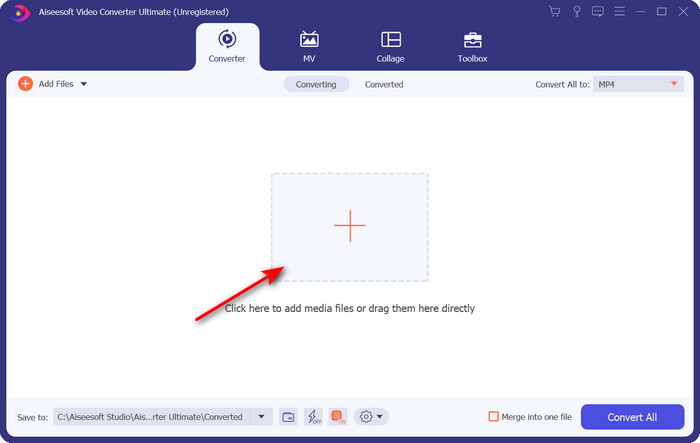
Pas 2. Obre el programari i fes clic al botó + situat al centre de la interfície de l’eina. S’obrirà una carpeta i, per pujar el fitxer .dv, fes clic a Obre.
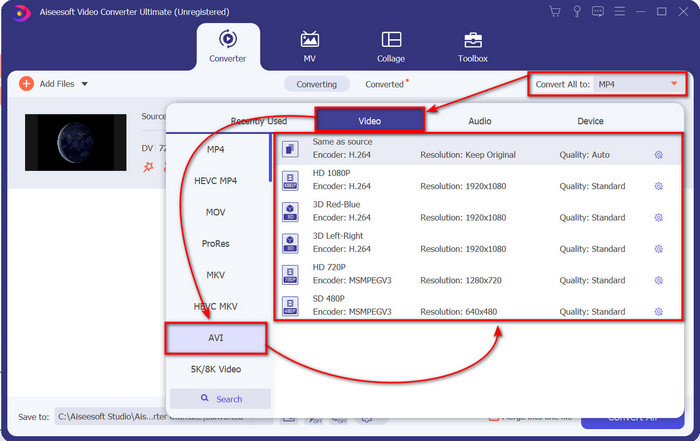
Pas 3. Per canviar el fitxer .dv a .avi, fes clic al botó desplegable i busca el format AVI.
Pas 4. Un cop hagis triat el format, és el moment adequat de convertir el teu DV a AVI fent clic a Converteix-ho tot.
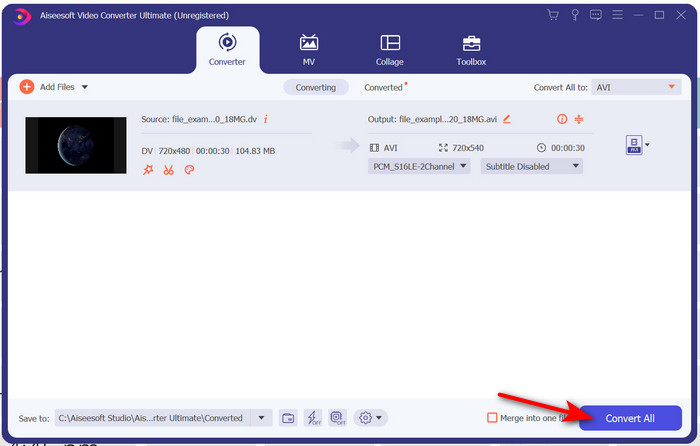
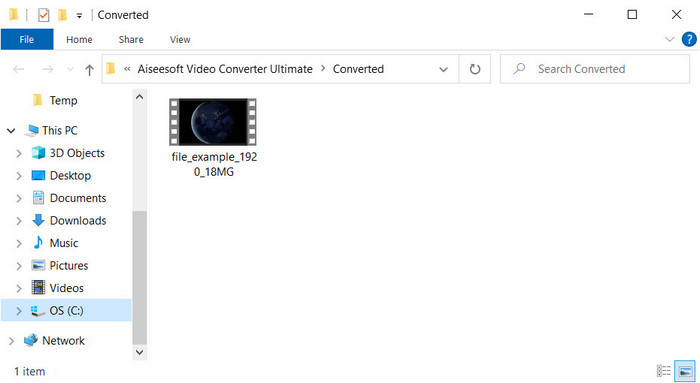
Pas 5. Convertir un fitxer et portarà menys d’un minut, així que gairebé no cal esperar. Es mostrarà una altra carpeta amb els fitxers convertits.
Part 3: reprodueix els teus fitxers DV amb el reproductor de vídeo DV disponible per a PC i Mac
Reproductor Blu-ray
No vols convertir mini DV a AVI? Aleshores prova aquest reproductor multimèdia que admet aquest tipus de format, el Blu-ray Player. Aquest reproductor multimèdia admet més de 300 formats i còdecs per reproduir el vídeo a l’escriptori sense cap complicació. A més, aquest reproductor disposa de les funcions més avançades que hauria d’oferir un reproductor multimèdia per millorar la teva experiència de visualització. També pots utilitzar un CD, DVD o disc Blu-ray per reproduir el vídeo a l’ordinador; en definitiva, és un reproductor multimèdia portàtil que tothom pot fer servir. Per tant, si no vols embolicar-te amb la conversió del fitxer .dv, segueix aquests passos per reproduir el vídeo.
Passos per reproduir el fitxer DV amb l’ajuda de Blu-ray Player:
Pas 1. Per descarregar aquest reproductor multimèdia, fes clic al botó que hi ha a continuació, després instal·la’l i engega’l.
Descàrrega gratuïtaPer a Windows 7 o posteriorDescàrrega segura
Descàrrega gratuïtaPer a macOS 10.7 o posteriorDescàrrega segura
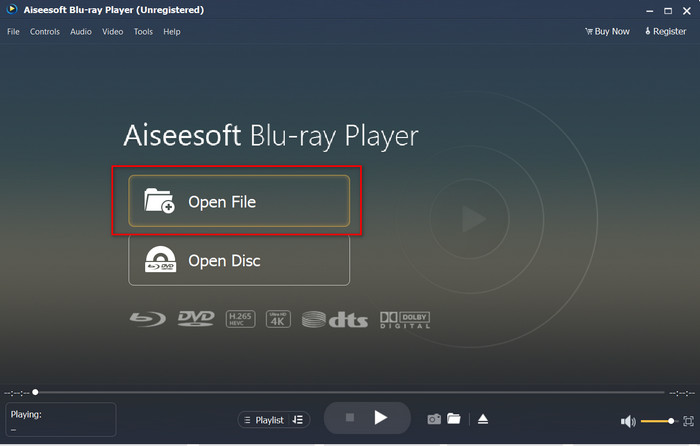
Pas 2. Fes clic a Obre fitxer, localitza el fitxer .dv a la teva carpeta i prem Obre.
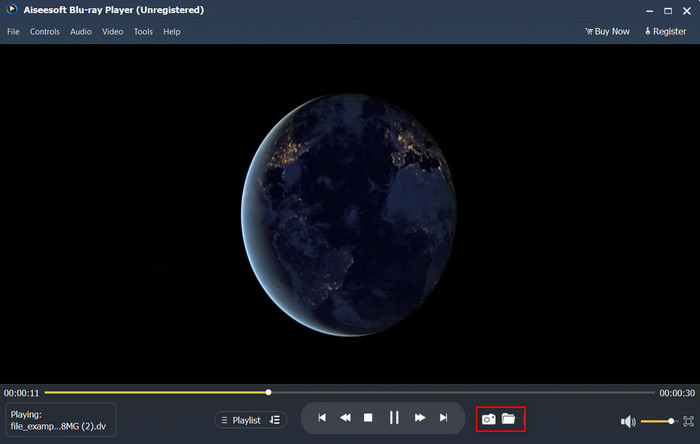
Pas 3. El fitxer DV es reproduirà automàticament al teu escriptori. A més, fes clic al botó de la càmera si vols fer una captura de pantalla del que estàs mirant. I si vols veure les captures que has fet, fes clic al botó de la carpeta.
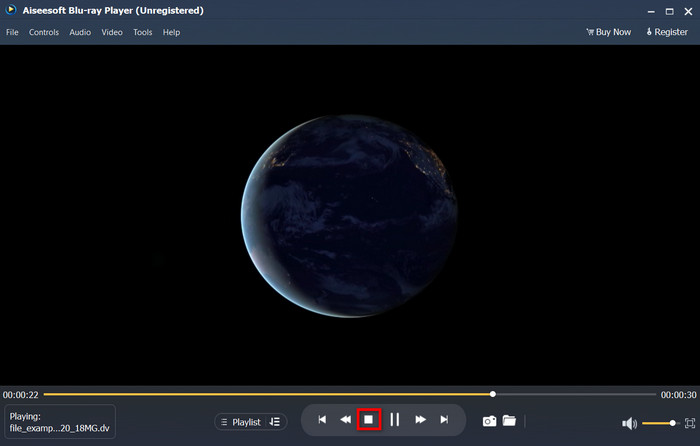
Pas 4. Si vols deixar de mirar el fitxer .dv, fes clic al botó del cub.
Pas 5. Per mirar un altre fitxer en un format diferent, segueix els passos 2 i 3, i gaudeix de la reproducció de vídeo en alta qualitat.
Relacionat:
Part 4. Preguntes freqüents sobre la conversió de DV a AVI
La conversió de fitxers DV perd la seva qualitat?
Convertir qualsevol format en una versió nova no hauria de disminuir la qualitat del format de vídeo original. Tanmateix, alguns convertidors no admeten la conversió de qualitat de vídeo 1080 o 4k perquè trigarà temps. Per tant, si no voleu perdre qualitat, feu servir FVC Video Converter Ultimate. No espereu menys perquè aquest programari no afectarà la vostra qualitat i us oferirà una opció per augmentar-lo o mantenir-lo.
Puc jugar .dv a VLC?
Pel que fa a l'actualitat, VLC no admet cap fitxer .dv per reproduir; tanmateix, si comprimiu AVI i utilitzeu el DV-AVI, podeu reproduir el vídeo al VLC.
Quin format és el millor substitut del DV?
Si voleu conèixer el millor substitut d'un fitxer DV, proveu d'utilitzar el fitxer MP4. Aquest format es coneix com el format multifuncional perquè és compatible amb tots els escriptoris i dispositius si volen reproduir el vídeo o editar-lo. Però la qualitat de MP4 i DV és molt diferent entre si si els comparem. No obstant això, la compatibilitat MP4 és el millor format multimèdia que podeu utilitzar com a substitut.
Conclusió
En resum, només hem presentat un convertidor de DV a AVI perquè és l’únic programari que ofereix un rendiment realment bo a l’hora de convertir aquest tipus de fitxer. A mesura que avançàvem en aquest article, hem descobert una altra manera de reproduir el fitxer .dv mitjançant aquest reproductor de DV. En definitiva, hem presentat dues eines perquè facin la seva feina, tant si vols reproduir el fitxer .dv com si el vols convertir. Així que, si tries el FVC Video Converter Ultimate, espera un resultat de qualitat extraordinària en molt poc temps. Però si decideixes només reproduir el fitxer DV, la teva millor opció ha de ser el Blu-ray Player.
-
 Les 5 millors opcions per convertir MPEG a format AVI [en línia i fora de línia]
 Et costa cercar un convertidor per a MPEG? A continuació, intenteu llegir aquest article mentre aprenem a canviar el format MPEG a AVI amb passos detallats.
-
 4 increïbles convertidors per convertir de manera gratuïta WMV a AVI en línia [2021]
 Esteu buscant un convertidor de WMV a AVI? I si és així, proveu de llegir aquest article ja que triem totes les eines que podem trobar al web per ajudar-vos en aquesta tasca.
-
 4 convertidors en línia i fora de línia més nous per convertir F4V a format AVI
 No tens idea de quin convertidor hauries d'utilitzar per convertir F4V a AVI o a qualsevol altre format de vídeo? A continuació, llegiu aquest article mentre aprenem a convertir amb l'eina disponible.
