


 Video Converter Ultimate
 Gravadora de pantalla
 Reparació de vídeo
Guia simplificada Com convertir DV a WMV a Windows i PC
Els fitxers DV són formats estàndard de vídeo brut de difusió que s’utilitzen habitualment en videocàmeres. Després que debutés com a format estàndard de videocàmera, Sony i Panasonic van presentar un format més professional i diferent del format DV. Encara que aquest fitxer DV és excel·lent per editar, per reproduir-lo a Windows cal utilitzar un programa de programari per veure el vídeo. Així doncs, a continuació presentem dos convertidors que podeu utilitzar per convertir DV a WMV i mirar-lo sense cap complicació.

Part 1. Utilitzeu el convertidor més increïble per convertir DV a WMV
FVC Video Converter Ultimate pot ajudar-vos a resoldre el problema de convertir el format a una versió nova. Aquesta eina admet diferents funcions a banda de la conversió. Per tant, si aconseguiu aquest convertidor, heu d’esperar que podreu fer molt més i no només quedar-vos en la conversió. A més, si necessiteu un procés de conversió immediat, aquesta és la millor opció de convertidor per convertir DV a WMV, AVI, MOV, MP4, MKV i més de 200 formats multimèdia. Voleu experimentar un convertidor amb noves funcionalitats que ofereixi resultats professionals sense cap complicació? Si és així, aquesta demostració us ajudarà a distingir com convertir el fitxer a un nou format WMV.
Passos per convertir DV a WMV amb FVC Video Converter Ultimate:
Pas 1. Descarregueu el FVC Video Converter Ultimate al disc dur del vostre ordinador, feu clic al botó de descàrrega, seguiu els passos d’instal·lació i, a continuació, executeu l’eina.
Descàrrega gratuïtaPer a Windows 7 o posteriorDescàrrega segura
Descàrrega gratuïtaPer a macOS 10.7 o posteriorDescàrrega segura
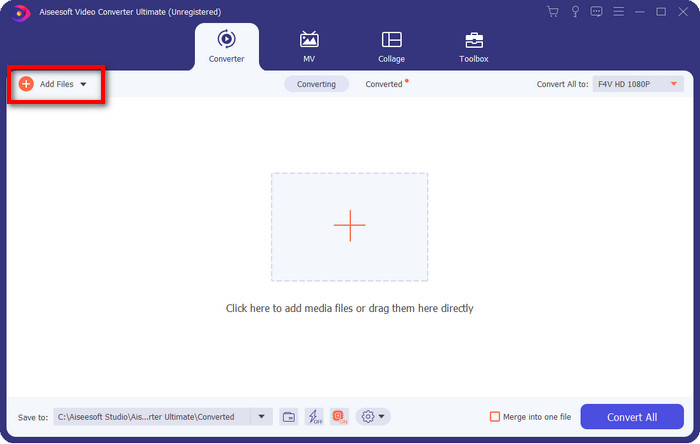
Pas 2. Un cop ho tingueu tot configurat, inseriu el fitxer al convertidor fent clic a Add Files, cerqueu el fitxer DV desat al vostre ordinador a la carpeta que es mostrarà i premeu Open.
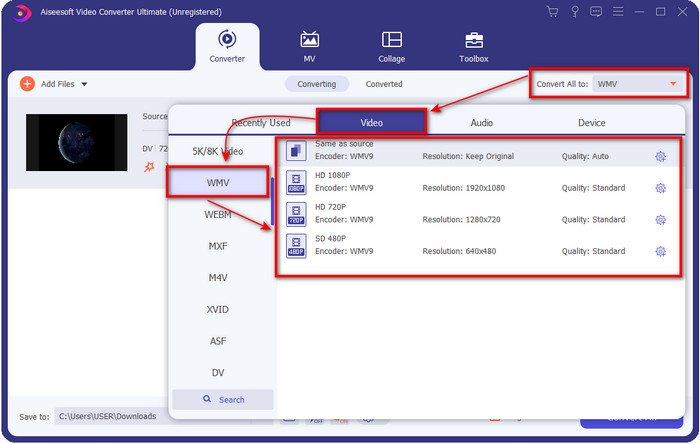
Pas 3. Canvieu el format fent clic al botó drop-down a la part superior dreta de la interfície d’usuari. Després, trieu el format WMV a la llista que apareixerà i, ara, ja podeu seleccionar la qualitat del vídeo de sortida.
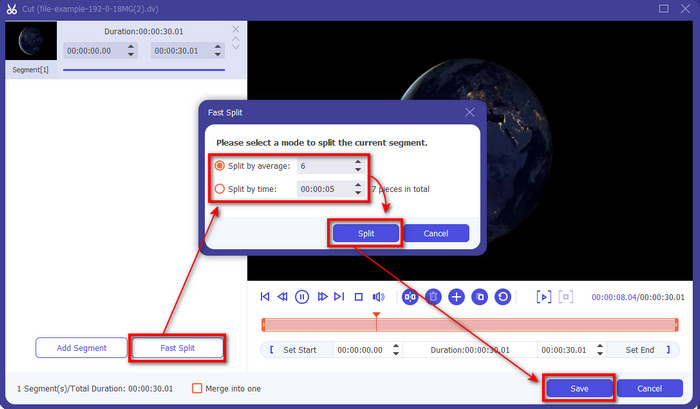
Voleu dividir els vostres vídeos en diferents segments? Si és així, premeu el botó de tisores, feu clic a Fast Split per definir el nombre de segments que voleu i la durada de cada segment, i premeu Split per continuar. Per desar el resultat del retall que heu fet, feu clic a Save.
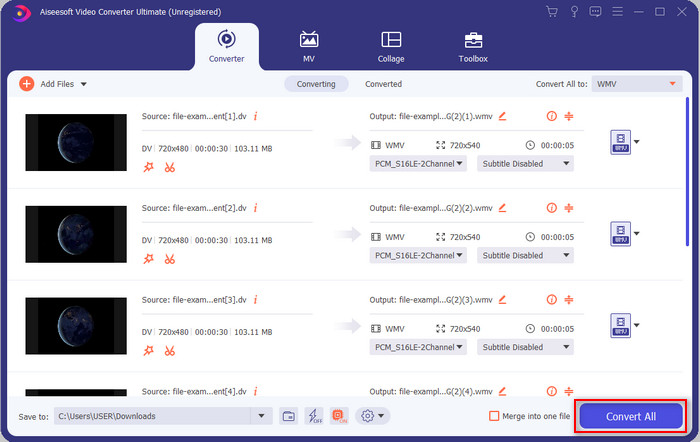
Pas 4. Feu clic a Convert All perquè comenci el procés de conversió del fitxer DV. Després del procediment, apareixerà una carpeta nova a la pantalla amb el nou fitxer WMV.
Part 2. Utilitzeu el convertidor en línia per convertir DV a WMV en línia
Busqueu una solució en línia per convertir DV a WMV i que no tingui complicacions? Doncs FVC us cobreix aquesta necessitat amb el FVC Free Video Converter Online. Aquest convertidor web us ajudarà a convertir, però haureu d’accedir-hi des del navegador en lloc de descarregar-lo. A més, és fàcil, gratuït i segur per millorar el vostre procés de conversió. Voleu saber com utilitzar aquesta eina web? Aleshores seguiu els passos següents per aprendre a fer la conversió en línia.
Pas 1. Podeu fer clic en aquest enllaç per obrir el convertidor web i s’obrirà una pestanya.
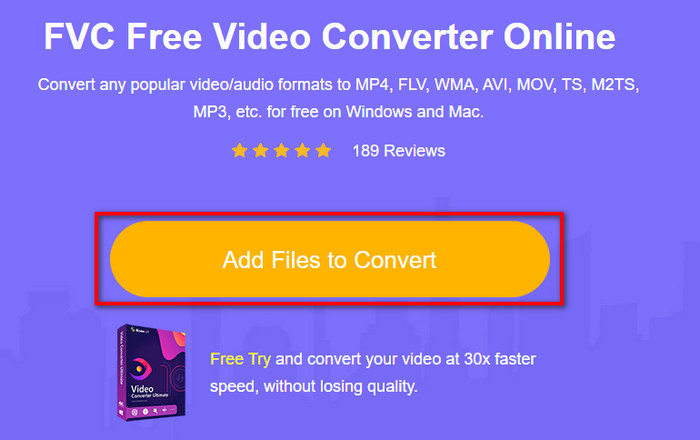
Pas 2. Feu clic a Add Files to Convert al lloc web; apareixerà directament una carpeta a la pantalla, seleccioneu el fitxer DV i premeu Open.
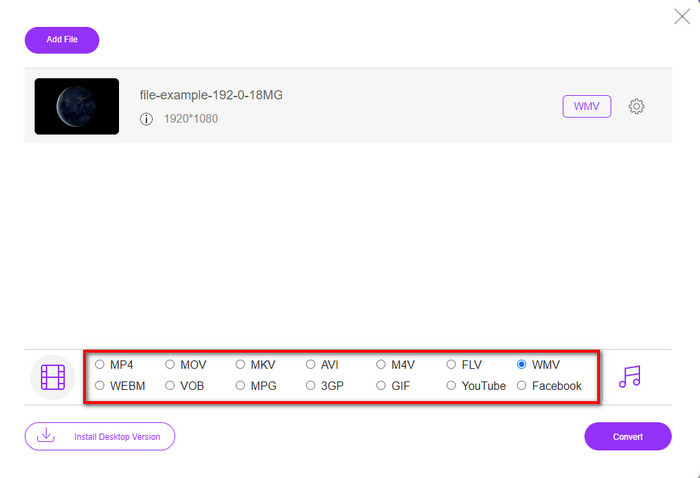
Pas 3. Un cop el fitxer estigui carregat, trieu el format al catàleg que es presenta a sota o feu clic a WMV per desar-lo en format WMV.
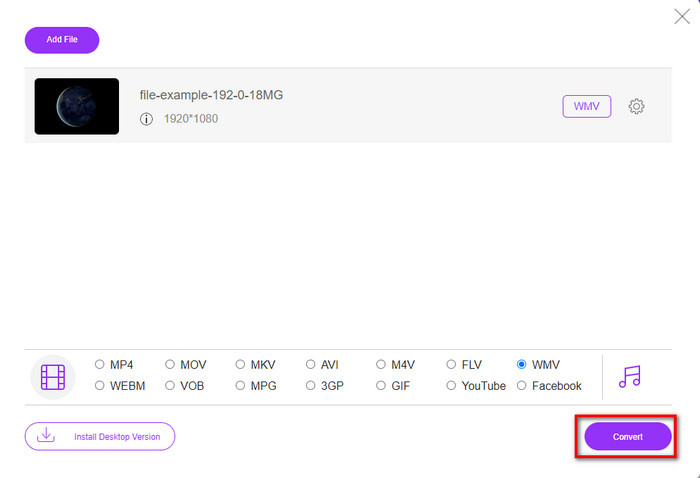
Pas 4. En fer clic a Convert, començarà el procés de conversió. Després del procés, el fitxer es descarregarà automàticament al disc dur del vostre ordinador.
Part 3. Quina diferència hi ha entre DV i WMV
La diferència entre DV i WMV és fàcil d'entendre de moltes maneres. Així que si voleu saber què són, heu de llegir la informació de la llista següent.
Enregistrar vídeo en una càmera de vídeo, DV és la millor opció perquè pot emmagatzemar aquest tipus de contingut. A més, aquest format pot contenir detalls essencials com ara metadades, subcodi, hora i codificació de data. A més, aquest format utilitza una compressió intraframe dins de cada fotograma i, per això, és ideal per a l'edició detallada. Tot i que el format és excel·lent i s'emmagatzema en cintes DV, la compatibilitat que té aquest format és pobra i la seva mida de fitxer és enorme en comparació amb WMV. D'altra banda, WMV és el millor format per utilitzar com a reproducció de vídeo a Windows. I ara adapta el format versió 9 per HD DVD i Blu-ray Disc, ara es coneix com VC-1.
Part 4. Preguntes freqüents sobre la conversió de DV a WMV
Per què no puc utilitzar el programari DV al Mac?
El format DV no és compatible amb Mac, especialment amb iMovie i QuickTime Player. Però podeu convertir el vostre fitxer DV a format MOV perquè funcioni al vostre macOS. Si no sabeu com convertir DV a MOV, hauríeu de dedicar 5 minuts o menys a llegir aquest article per aprendre com fer-ho.
Els fitxers DV segueixen sent el millor format per editar?
Els formats DV són coneguts per ser un dels contenidors de primer nivell en edició. Perquè DV emmagatzema vídeo d'alta qualitat i emmagatzema cada fotograma amb finalitats d'edició més accessibles. Però avui, la capacitat d'aquest format ja ha estat adoptada per la majoria de formats. Per tant, si us pregunteu si encara és l'ideal, la resposta és no a causa de la poca compatibilitat d'aquest format.
Com fer que els meus fitxers DV siguin més petits?
Com ja deveu saber, els fitxers DV són enormes perquè aquest format utilitza un compressor especial. Així que és totalment normal buscar un compressor per reduir la mida del fitxer i estalviar espai al disc. Teniu problemes a l’hora d’escollir i fer com comprimir fitxers DV? Si és així, feu clic en aquest enllaç.
Conclusió
Tots els convertidors presentats anteriorment us ajudaran en el vostre recorregut de conversió de DV a format WMV. Per tant, acabem ara el nostre recorregut perquè aquesta és l’última parada, ja que ja hem adquirit prou coneixements sobre com convertir els vostres fitxers DV. Ara haureu de triar quin convertidor s’adapta millor a vosaltres. La decisió és a les vostres mans; faci servir el convertidor que faci servir, aquestes eines FVC segur que us garantiran l’èxit. FVC Free Video Converter Online o FVC Video Converter Ultimate, tots dos convertidors faran que el vostre procés de conversió sigui sense complicacions.
-
 Millor estratègia sobre com convertir fitxers DV a format AVI amb passos detallats
 Voleu convertir el vostre fitxer DV a AVI? A continuació, llegiu aquest article per conèixer l'eina única que podeu utilitzar per convertir i un reproductor multimèdia per reproduir el vostre DV al vostre PC o Mac.
-
 Convertidors de DV a FLV útils per convertir DV a FLV [2022]
 Si esteu buscant les millors eines fàcils d'utilitzar per convertir DV a FLV, aquí teniu el millor article que podeu llegir. Teniu una visió excel·lent, explorant tota la informació d'aquest article.
-
 3 maneres principals de convertir FLV a WMV a Windows i Mac
 Busqueu la millor manera de convertir FLV a WMV sense perdre qualitat a PC o Mac? Teniu sort ja que aquí compartim tres mètodes per fer la feina fàcilment.
