


 Video Converter Ultimate
 Gravadora de pantalla
 Reparació de vídeo
 Baixada segura
Maneres increïbles de convertir GIF a DivX en pocs minuts
Avui dia, a internet s’utilitzen diferents formats de fitxer. Un dels formats de fitxer populars per a gràfics web que tenim actualment és el GIF, que sol ser entretingut de veure. Tanmateix, hi ha algunes situacions en què el format de fitxer GIF no és compatible amb altres dispositius. De vegades necessites un format de fitxer reconegut per molts dispositius, com DivX. En aquest cas, si vols aprofundir més en aquesta publicació, has de llegir aquest article per obtenir informació sobre com convertir GIF a DivX de manera instantània.

Part 1: Introducció a GIF i DivX
El Graphics Interchange Format, o GIF, és un format popular per a gràfics web. Pot ser animat i s’utilitza sovint principalment per mostrar animacions bàsiques als teus llocs web. Els GIF també inclouen píxels transparents, cosa que els permet combinar-se amb altres colors. A més, si observes algunes imatges que es mouen repetidament, és possible que la imatge sigui en format GIF. El fitxer DivX és un altre format de fitxer reconegut per altres dispositius electrònics de consum, programes de reproducció de vídeo i lectors de DVD. Aquest fitxer també és conegut com a fitxer de pel·lícula codificat amb DivX, que es classifica com a fitxer de vídeo. També és compatible amb altres dispositius. Per tant, llegeix els altres punts essencials a continuació si vols convertir GIF a DivX.
Part 2: Programa per convertir GIF i DivX sense perdre qualitat
Suposem que estàs cercant un convertidor bo i fantàstic que pugui convertir GIF a DivX sense perdre qualitat. En aquest cas, la millor aplicació que pots utilitzar és el Video Converter Ultimate. Aquesta aplicació fiable pot admetre diferents formats de fitxer, com ara MKV, MOC, GIF, MTS, M2TS, MPEG, FLV, XVID, MTS, DivX, AVI i més. A més, a banda de convertir, aquesta aplicació disposa de moltes funcions i eines diferents que pots utilitzar, com ara un controlador de velocitat de vídeo, eliminador de marques d’aigua de vídeo, millorador de vídeo, creador de GIF, creador de collages, reversor de vídeo, retallador de vídeo, compressor d’àudio, compressor de vídeo i més. A més, aquesta aplicació és gratuïta i accessible tant a Windows com a Mac. Finalment, Video Converter Ultimate és fàcil d’utilitzar i té una interfície senzilla, cosa que el fa adequat per a usuaris novells.
Funcions clau
L'aplicació no només és excel·lent per convertir fitxers, sinó que també té moltes funcions que podeu gaudir.
◆ Ofereix moltes opcions per millorar vídeos/àudio.
◆ Personalitza el teu vídeo.
◆ Et permet editar la taxa de bits del teu vídeo.
◆ Et permet editar la resolució i la velocitat de fotogrames del teu vídeo.
Pros
- Apte per a principiants.
- Té un procés d'estalvi ràpid.
- La conversió és estable i segura.
- No s'ha aplicat cap filigrana.
- Disponible tant a Windows com a Mac.
- Fàcil d'utilitzar.
Contres
- Compreu el programari per obtenir funcions més avançades.
Si voleu convertir el vostre fitxer GIF a DivX amb el vostre Mac o Windows, seguiu aquests senzills i senzills passos a continuació.
Pas 1: Descarrega el Video Converter Ultimate al teu Mac o Windows. Després del procés, executa l’aplicació.
Descàrrega gratuïtaPer a Windows 7 o posteriorDescàrrega segura
Descàrrega gratuïtaPer a macOS 10.7 o posteriorDescàrrega segura
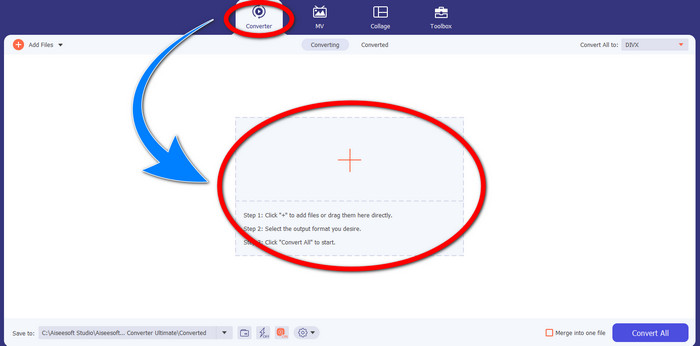
Pas 2: Després d’obrir Video Converter Ultimate, fes clic al botó Converter > Signe més per adjuntar el fitxer GIF que vols convertir.
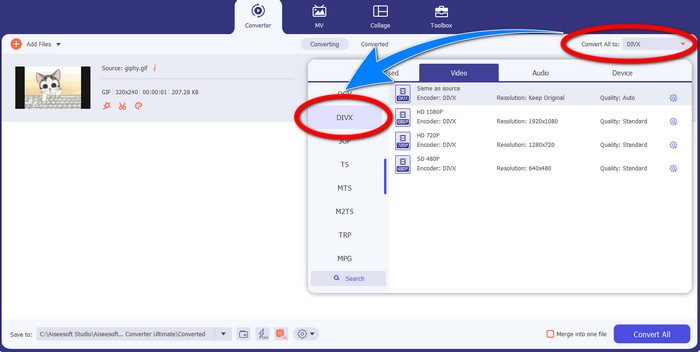
Pas 3: Quan ja hagis afegit el GIF, fes clic al botó Convert All to i tria el fitxer DivX amb la qualitat seleccionada, com ara 480p, 720p i 1080p.
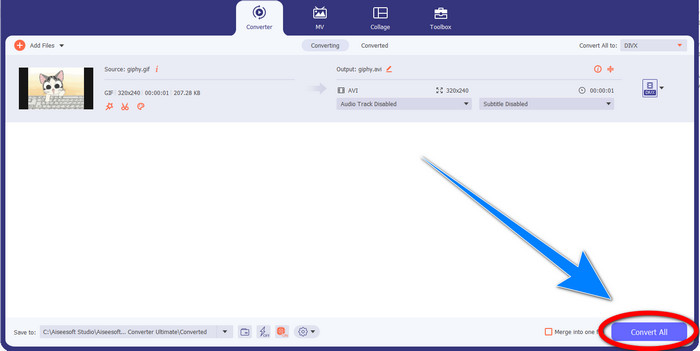
Pas 4: Després de canviar el format de fitxer de GIF a DivX, fes clic al botó Convert All per desar el resultat final.
Part 3: Convertidor en línia per canviar GIF a DivX
Convertio és una eina en línia que pots utilitzar per convertir GIF a format de fitxer DivX. Aquest programari és capaç de convertir un format de fitxer específic a diferents formats. A més, té moltes funcions, especialment de conversió, com un convertidor d’àudio, convertidor d’imatges, convertidor de tipografies, convertidor de llibres electrònics, convertidor de presentacions i més. A més, pots utilitzar aquest programari de manera gratuïta i també pots comprar una subscripció per obtenir més avantatges. Tampoc t’has de preocupar pels teus fitxers, perquè és segur i protegit. El fitxer que estàs convertint s’eliminarà automàticament després de 24 hores. Tanmateix, la versió gratuïta és limitada. Només disposes d’algunes funcions que pots utilitzar i d’una mida màxima de fitxer que pots desar. Si t’interessa saber com convertir GIF a DivX, segueix els passos que es donen a continuació.
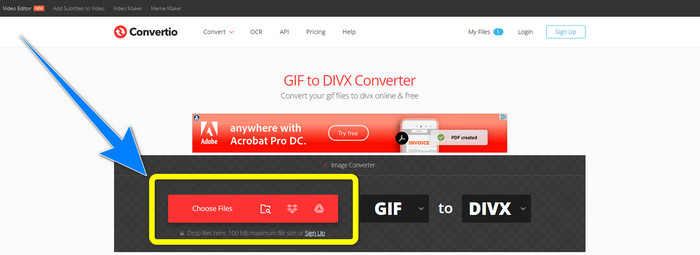
Pas 1: Ves al lloc web de Convertio. Després, fes clic al botó Choose Files per adjuntar el fitxer GIF que vols convertir.
Pas 2: Després d’adjuntar el teu fitxer GIF, pots canviar el format a DivX triant les opcions de format.
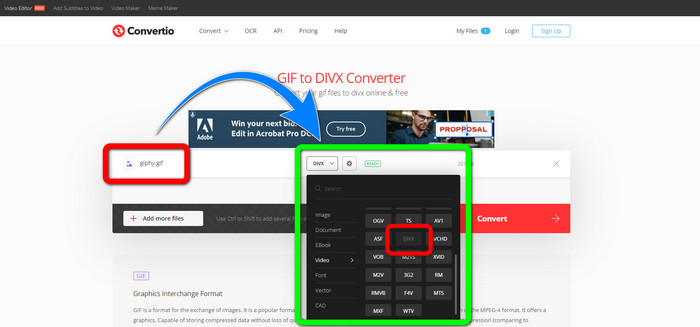
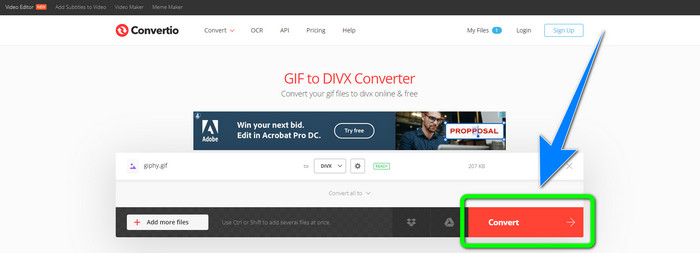
Pas 3: Quan hagis acabat de triar DivX a les opcions de format, fes clic al botó Convert per convertir el GIF a DivX. Després ja podràs desar el resultat final al teu dispositiu.
Relacionat amb:
[Offline/Online] Convertidors d’AVI a DivX més utilitzats que has de conèixer
Com convertir MKV a DivX en línia i fora de línia de manera gratuïta
Part 4: Preguntes freqüents sobre la conversió de GIF a DivX
Per què hauria de convertir un fitxer específic a altres formats de fitxer?
Un dels motius pels quals heu de convertir un fitxer específic a un altre format de fitxer és que hi ha fitxers que no són compatibles amb el dispositiu, que es convertiran en incompatibles i inadequats. D'aquesta manera, una aplicació amb convertidor és essencial per canviar el format del fitxer específic per adaptar-lo al dispositiu que utilitzeu.
Puc convertir el meu àudio amb l'aplicació Convertio?
Sí, per suposat. Convertio no només és fiable a l'hora de convertir formats de fitxers d'imatge i vídeo. Aquesta aplicació també es pot considerar un convertidor d'àudio.
Quin és el millor convertidor de vídeo i més fiable que puc utilitzar per al meu Mac?
Si estàs buscant una aplicació excel·lent i extraordinària amb un convertidor de fitxers, aleshores has d’utilitzar el Video Converter Ultimate. És adequat per editar i convertir el teu fitxer de vídeo amb el teu Mac.
Hi ha una aplicació fantàstica amb un convertidor de vídeo que puc utilitzar per al meu telèfon?
Si aquí està! El programari amb convertidor de vídeo no només és accessible per a ordinadors, sinó que també hi ha aplicacions que podeu trobar a Play Store o navegadors per convertir fitxers amb el vostre telèfon com Android.
Hi ha un convertidor de vídeo per al meu iOS?
Definitivament sí. Hi ha un convertidor de vídeo que podeu utilitzar per al vostre iOS. El millor que cal fer és mirar la botiga d'aplicacions. Busqueu el convertidor de vídeo, cerqueu les aplicacions que apareixen als resultats i proveu-les.
Conclusió
Tal com s’ha explicat en la informació anterior, es pot concloure que convertir un fitxer a un altre format és important. Alguns formats són incompatibles o inadequats per als teus dispositius, de manera que l’has de convertir a un altre format de fitxer. A més, aquest article ha proporcionat dues maneres excel·lents i efectives de convertir GIF a DivX a Windows, Mac i en línia. Si desitges convertir més fitxers, el millor programari que pots utilitzar és el Video Converter Ultimate. Pots utilitzar aquesta aplicació amb rapidesa i convertir fitxers més de pressa que amb altres aplicacions.
-
 Com convertir M4V a DivX gratuïtament a Mac [Millors eines]
 Esteu buscant maneres de convertir M4V a DivX de forma gratuïta? Hem enumerat els millors convertidors perquè pugueu convertir el vostre fitxer M4V a DivX a Mac.
-
 Convertidors de WMV a DivX gratuïts La millor elecció dels usuaris
 Aquests són els millors convertidors de WMV a DivX gratuïts que els usuaris utilitzen principalment. Aquest article us ofereix les millors maneres de convertir el vostre fitxer WMV a DivX.
-
 Els 5 millors convertidors gratuïts de MPEG a DivX per a Windows i Mac
 Convertiu fàcilment el vostre fitxer MPEG a un fitxer DivX utilitzant els millors convertidors de MPEG a DivX. Llegiu aquest article per conèixer més detalls sobre ells.
