


 Video Converter Ultimate
 Gravadora de pantalla
 Reparació de vídeo


2 maneres fàcils de convertir M4V a WMV sense esforç i sense pèrdues
Algunes empreses tenen formats de compressió de vídeo. Apple i Microsoft han desenvolupat fitxers de vídeo exclusius per als seus reproductors multimèdia. Per tant, quan algú va descarregar o comprar fitxers M4V d'Apple iTunes Store i els volia compartir amb amics o familiars amb ordinadors, convertir M4V a WMV podria ser el millor per fer-ho abans de fer-ho. Per tant, us oferim el convertidor únic que fa aquesta feina de manera ràpida, eficient i excepcionalment sense problemes.

Part 1. Com convertir M4V a WMV amb facilitat en Mac i Windows
Free Video Converter Ultimate és un convertidor de vídeo senzill però efectiu de FVC Studio. Et permet convertir fitxers de vídeo i àudio al teu ordinador Windows o Mac. A més, els formats de vídeo admesos per aquesta conversió de vídeos són diversos i inclouen els més utilitzats: admet els formats populars MP4, FLV, M4V, WMV, TS, M2TS i fitxers per a iPhone/Android. Aquest programari utilitza tecnologia HEVC, de manera que no t’has de preocupar per la qualitat en les conversions d’alta qualitat. Pel que fa a la qualitat, també és compatible amb 4K UHD. Per utilitzar-lo, només has de seguir aquests senzills passos:
Pas 1: Descarrega el fitxer .exe fent clic al botó Free Download de sota d’acord amb el teu sistema operatiu, per a Windows o Mac. Un cop hagis acabat la descàrrega, obre’l i comença la instal·lació del programari. Després, executa el programari.
Descàrrega gratuïtaPer a Windows 7 o posteriorDescàrrega segura
Descàrrega gratuïtaPer a macOS 10.7 o posteriorDescàrrega segura
Pas 2: S’obrirà una finestra amb una interfície que té un botó + al mig. Has de fer-hi clic per importar el fitxer de vídeo que vulguis convertir. També hi pots arrossegar i deixar anar el fitxer fàcilment.
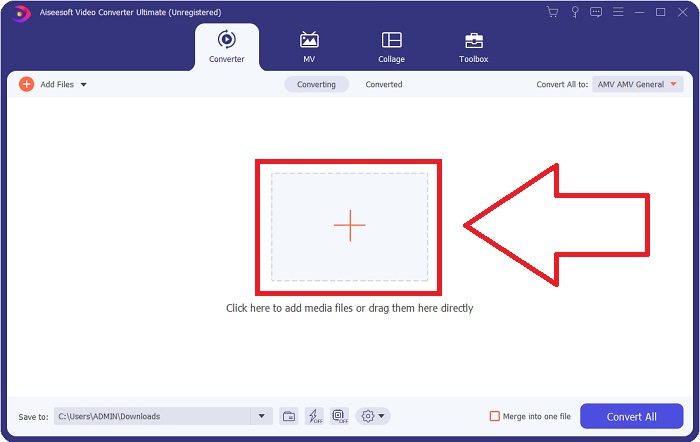
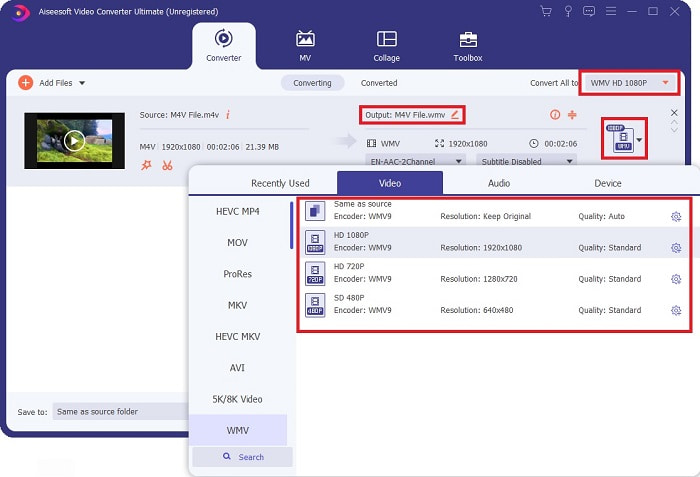
Pas 3: Veureu el fitxer que heu importat a la interfície. A la dreta, s’hi mostra quin és el format actual del vídeo. Fes-hi clic i apareixeran tots els formats disponibles entre els quals pots triar. En aquest cas, baixa amb el desplaçament i cerca WMV o simplement escriu-ho al quadre de cerca per anar més ràpid. A més, totes les qualitats de vídeo estan disponibles al costat dret de la pestanya. Pots seleccionar la que prefereixis.
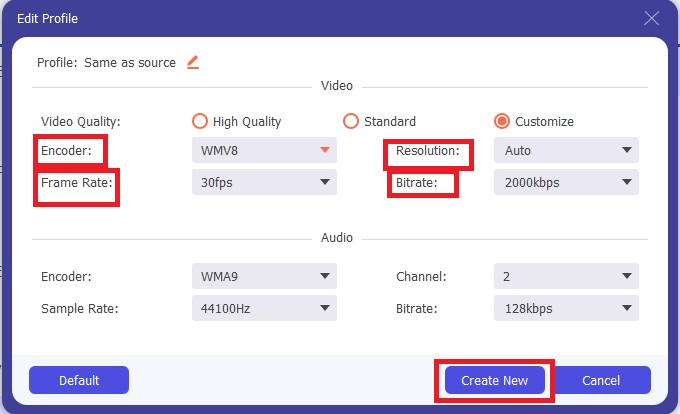
Pas 4: A més de l’esmentada selecció de qualitat, pots editar encara més el resultat del teu vídeo fent clic a la icona d’engranatge situada a la dreta de la qualitat de vídeo que hagis triat. Se t’hi mostraran tots els ajustos possibles, incloent-hi la velocitat de fotogrames, la resolució, el bitrate, la freqüència de mostreig, el còdec i molts altres. Només cal que facis clic al botó Create New per desar els canvis realitzats.
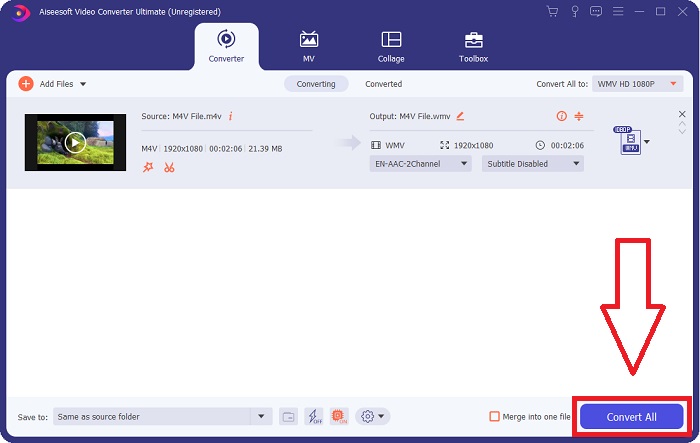
Pas 5: Per acabar el procés de conversió, fes clic al botó Convert All situat a l’angle inferior dret de la pestanya, espera que acabi i obtindràs el fitxer convertit.
Part 2. Com convertir M4V a WMV amb el fre de mà
Handbrake és un popular programa de conversió gratuït que s'executa a les plataformes Windows, Mac i Linux. Els usuaris poden penjar vídeos en qualsevol format des de fonts DVD i Blu-ray a aquest transcodificador de codi obert per convertir-los a WMV. El procediment de conversió és ràpid i fàcil, gràcies a una interfície fàcil d'utilitzar. Seguiu aquestes senzilles instruccions per convertir M4V a WMV amb un fre de mà.
Pas 1: Inicia l’aplicació Handbrake al teu ordinador. Fes clic al botó Open Source a la pantalla principal per cercar i afegir els fitxers WMV convertits. També pots arrossegar i deixar anar els vídeos a la interfície.
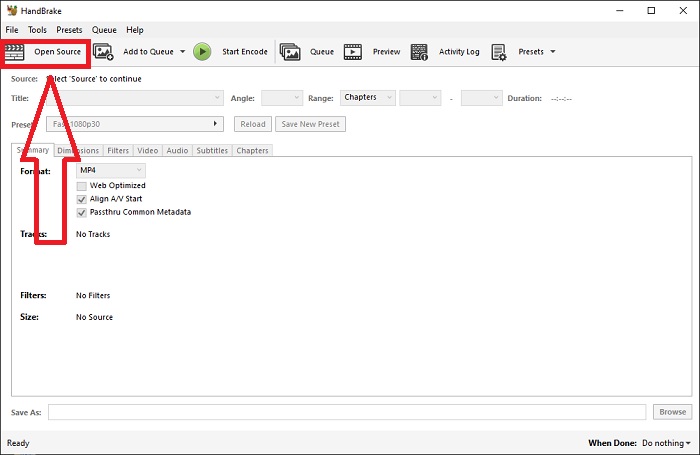
Pas 2: El fitxer acabat d’inserir es mostrarà a l’àrea Source. Després, tria WMV com a format de sortida desitjat a l’opció desplegable Format de la pestanya Summary. Si cal, es poden ajustar els filtres, còdecs de vídeo i altres propietats del fitxer.
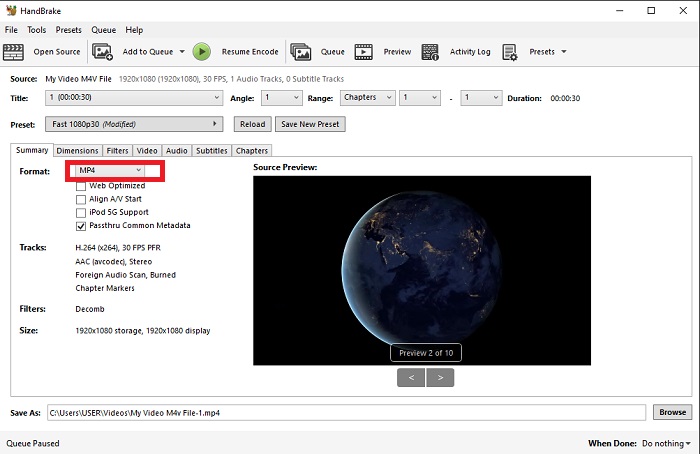
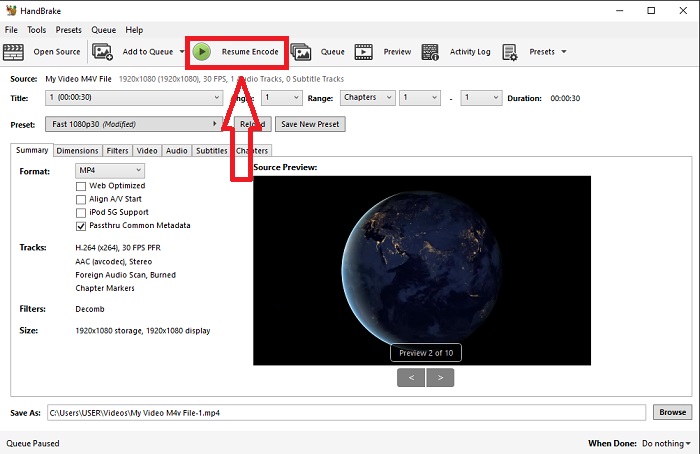
Pas 3: Tria el nom del fitxer de sortida i la ubicació al teu PC a l’apartat Destination. Finalment, fes clic al botó Start Encode per convertir el fitxer M4V a WMV.
Part 3. Una altra eina útil per convertir M4V a WMV en línia
Com a eina gratuïta d'Internet, FVC Free Video Converter és útil. MP4, MOV, MKV, AVI, M4V, FLV, WMV, WEBM, VOB, MPG, 3GP, GIF i formats de vídeo aprovats per YouTube i Facebook es troben entre els tipus que admet. A més, aquest convertidor de vídeo en línia gratuït també pot convertir fitxers d'àudio, la qual cosa us permet convertir el vostre vídeo o música a MP3, AAC, AC3, WMA, WAF, FLAC i altres formats. FVC Free Video Converter també us permet especificar fitxers abans de començar a convertir. Pots canviar la resolució, la velocitat de fotogrames i la taxa de bits del vídeo, així com el canal d'àudio, la freqüència de mostreig i la taxa de bits.
Pas 1: Fes clic en aquest enllaç per accedir a l’eina en línia. Primer, has de descarregar ràpidament un llançador. Pots fer-ho fent clic al botó Add Files to Convert que es troba al mig de la pàgina. Aquest pas et permetrà importar els teus fitxers.
Pas 2: Torna a fer clic en aquest botó per pujar finalment el vídeo. Sabràs que la pujada s’ha fet correctament quan tots els formats disponibles apareguin a la interfície. Des d’allà, selecciona WMV entre els altres.
Pas 3: A la dreta trobaràs una icona d’engranatge per a les opcions addicionals del programari. Fes-hi clic i et permetrà fer canvis a la configuració de vídeo i àudio quant a resolució, velocitat de fotogrames i altres paràmetres semblants. Un cop acabat, fes clic a OK i després al botó Convert per finalitzar el procés de conversió.
Relacionat:
Part 4. Coneixements ampliats sobre M4V i WMV
Per obtenir informació addicional sobre els dos formats, podeu llegir el que us oferim a continuació:
M4V és un format de fitxer creat per Apple. És molt similar al format de fitxer MP4, excepte que els fitxers M4V poden tenir la protecció DRM Fairplay d'Apple. El format M4V es pot trobar en material de vídeo adquirit a la botiga iTunes. Si el fitxer M4V té DRM habilitat, el compte d'iTunes utilitzat per comprar el fitxer ha d'estar autoritzat a la màquina que el reprodueix.
D'altra banda, els fitxers WMV són fitxers de vídeo creats per Microsoft que generalment inclouen àudio. Tant a les plataformes Mac com a PC, els usuaris poden reproduir aquests fitxers amb diversos reproductors de vídeo. La protecció de gestió de drets digitals (DRM) es pot incloure en determinats fitxers WMV, evitant que els usuaris facin còpies il·legals dels fitxers comprats a minoristes en línia.
| M4V | WMV | |
| Extensió de fitxer | .m4v | .wmv |
| Desenvolupador | Apple Inc. | Microsoft |
| Programes de suport | ◆ Reproductor multimèdia clàssic ◆ VLC Media Player ◆ KMPlayer ◆ Zoom Player | ◆ VLC Media Player ◆ MPlayer ◆ Reproductor multimèdia clàssic ◆ Reproductor de Windows Media |
Part 5. Preguntes freqüents sobre la conversió de M4V i WMV
M4V és de més qualitat que MP4?
Ara sabem que no hi ha cap diferència fonamental entre MP4 i M4V després de fer una comparació M4V MP4 al costat de l'altre. Després d'eliminar la protecció DRM del fitxer de vídeo M4V, els fitxers de vídeo MP4 i M4V són idèntics.
El fre de mà elimina el DRM?
És una biblioteca per visualitzar DVD xifrats amb el Content Scramble System (CSS), un mètode utilitzat àmpliament pel programari de reproductor gratuït per desxifrar discos protegits. És compatible amb Windows, macOS, Linux i diversos sistemes operatius. HandBrake és capaç d'eliminar eficaçment el DRM dels DVD i extraure'ls.
Quin és el millor ús de WMV?
Microsoft va crear el format de vídeo WMV que s'utilitza àmpliament als reproductors multimèdia de Windows. Els fitxers WMV són més petits i més comprimits que els fitxers MP4. És per això que és popular per transmetre vídeos a Internet.
Conclusió
Innegablement, hi ha moltes maneres de convertir M4V a WMV, però només unes poques poden fer-ho mentre fan ajustos en algunes especificacions més. És per això que us recomanem Video Converter Ultimate, ja que estarà al vostre costat sempre que necessiteu un convertidor. Si el temps no permet instal·lar el programari, el seu homòleg en línia sempre està disponible per utilitzar-lo. Per tant, ajudeu-nos a oferir la millor experiència d'edició de vídeo utilitzant FVC Video Converter Ultimate.
-
 Gratuït | 3 millors mètodes per convertir MP4 a WMV sense perdre qualitat
 Aquesta publicació explica com es converteix el vídeo MP4 a format WMV a Mac o Windows. També us oferirem diverses opcions, inclosos programes d'escriptori i convertidors en línia basats en web. A punt per conèixer les millors eines de conversió de MP4 a WMV?
-
 3 maneres principals de convertir FLV a WMV a Windows i Mac
 Busqueu la millor manera de convertir FLV a WMV sense perdre qualitat a PC o Mac? Teniu sort ja que aquí compartim tres mètodes per fer la feina fàcilment.
-
 Una guia senzilla sobre com convertir el vostre GIF a WMV a Windows / Mac
 Vols saber com convertir GIF a format WMV? A continuació, seguiu aquest article, ja que mostra diferents solucions que podeu triar.

