


 Video Converter Ultimate
 Gravadora de pantalla
 Reparació de vídeo
Converteix MPEG a AVI amb el 5 MPEG a AVI Video Converter accessible
MPEG és un dels millors formats que probablement ja has fet servir, ja que emmagatzema fitxers de vídeo i d’àudio. A més, no és només un contenidor, sinó que també utilitza la compressió MPEG‑1 i MPEG‑2. Tanmateix, MPEG‑1 i MPEG‑2 són formats antics que solien utilitzar-se en Blu-rays. Així que ara explicarem com millorar-lo convertint el format a AVI. A la llista següent, presentem diferents eines que pots utilitzar per a convertir MPEG a AVI i detallarem més a fons què són MPEG i AVI.
Part 1. Breu explicació sobre els formats de fitxers MPEG i AVI
MPEG i AVI són un dels formats de primer nivell que podeu utilitzar per emmagatzemar un fitxer multimèdia. Tot i que són excel·lents, encara hi ha algunes raons per les quals cal utilitzar el convertidor de vídeo MPEG a AVI. Però de moment, explicarem molts detalls sobre els dos formats i tindrem una idea sobre MPEG i AVI.
Com s'ha dit anteriorment, MPEG no només és un contenidor, sinó que també té un compressor integrat. Bàsicament, és un format de fitxer de doble propòsit. A més, aquest format està sent el format més utilitzat en Blu-ray per la qualitat i la compressió que proporciona. A més, el format MPEG es classifica en 6, però parlarem dels dos que s'utilitzen habitualment i que és el MPEG-1 i el MPEG-2. A més, MPEG-1 és la primera generació de MPEG. Aquest format emmagatzema la resolució estàndard, però en comparació amb la resolució de l'altre format, el MPEG-1 és molt menor. Tot i que MPEG-2 ofereix una qualitat molt millor que l'MPEG-1, però funciona millor en Blu-ray i DVD. A més, aquest format és el més utilitzat per l'estació de televisió per transferir i reproduir un vídeo.
Però AVI és molt diferent dels MPEG, perquè no està comprimit. A més, la qualitat que proporciona aquest format és alta perquè no comprimeix el fitxer que conté. Encara que el format és molt gran en mida, rep molt de suport en totes les plataformes en comparació amb els fitxers MPEG.
Part 2. 2 del millor convertidor utilitzat per convertir MPEG a format AVI fora de línia
1. FVC Video Converter Ultimate
Si estàs buscant un convertidor i descarregador MPEG a AVI polivalent, aleshores FVC Video Converter Ultimate ha de ser l’eina adequada. Aquesta eina ja ocupa una posició destacada en aquest article per les funcions i la simplicitat que ofereix. Tot i que és fàcil d’utilitzar, pots obtenir el resultat fenomenal que sempre has volgut. A més, a diferència d’altres convertidors, aquest programa estableix un estàndard molt alt. Així que, si vols assolir un èxit total abans, durant i després de la conversió, és imprescindible fer servir aquesta eina. I ara, continuem amb el tutorial pas a pas sobre com utilitzar el FVC Video Converter Ultimate.
Pas 1. Per descarregar l’eina a l’escriptori, fes clic al botó que es mostra a continuació. Instal·la-la quan acabi la descàrrega, fes una configuració ràpida i clica Start Now.
Descàrrega gratuïtaPer a Windows 7 o posteriorDescàrrega segura
Descàrrega gratuïtaPer a macOS 10.7 o posteriorDescàrrega segura
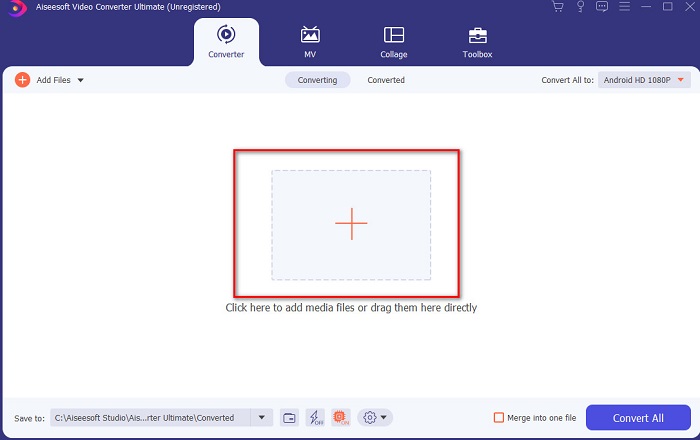
Pas 2. La interfície de l’eina hauria de semblar-se a aquesta; aleshores fes clic al signe + al centre. A continuació apareixerà una carpeta a la pantalla: selecciona el fitxer de vídeo MPEG que vols convertir i fes clic a Open.
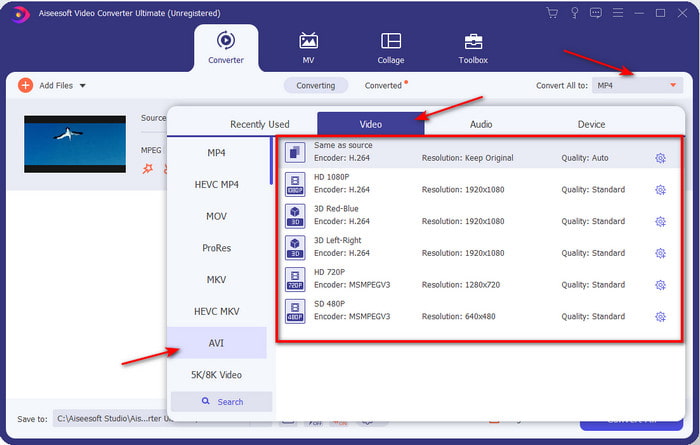
Pas 3. Quan el fitxer ja sigui a la interfície, clica Convert All to: i cerca el format AVI.
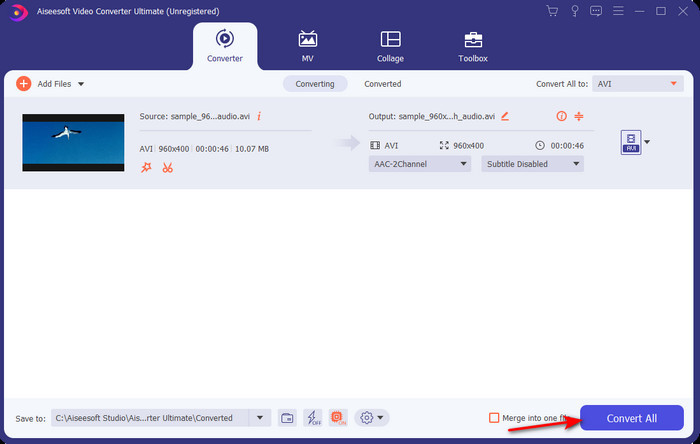
Pas 4. Ara, per començar la conversió de les pel·lícules MPEG‑4 a format AVI, prem Convert All.
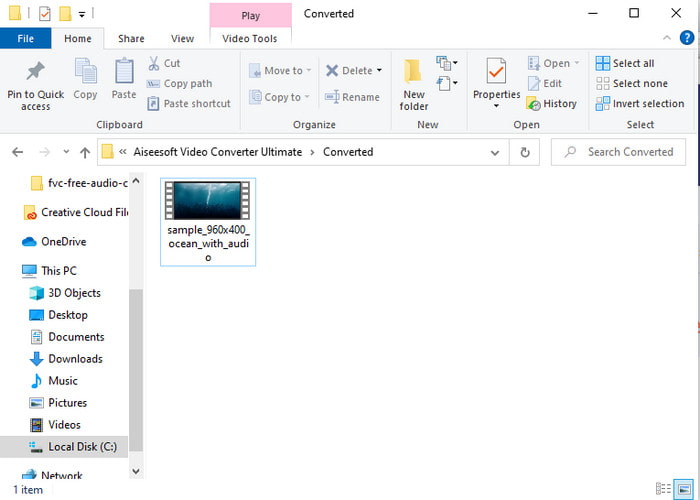
Pas 5. La descàrrega del fitxer només trigarà uns minuts i, quan hagi acabat, apareixerà una carpeta amb el format convertit. Llavors, fes clic al fitxer per veure el nou format convertit del teu MPEG.
2. FFmpeg
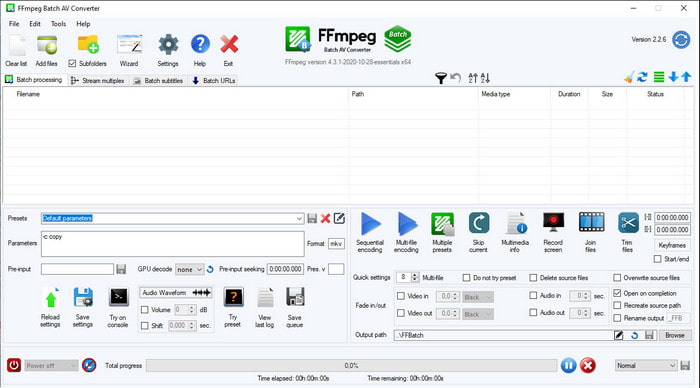
Un altre programari disponible en aquesta llista és FFmpeg. Si busques programari de codi obert, aquesta és una de les opcions que pots trobar al web. Ara bé, la interfície d’aquesta eina és difícil d’entendre, tant per a principiants com per a usuaris avançats. El procés de conversió és generalment excel·lent i produeix un resultat d’alta qualitat com qualsevol altre convertidor. Per tant, si vols convertir amb FFmpeg de MPEG a AVI, segueix aquests passos tal com els simplifiquem perquè siguin fàcils d’entendre.
Pas 1. Descarrega FFmpeg a l’escriptori i crea una carpeta nova; dins d’aquesta, descomprimeix el fitxer.
Pas 2. Busca CDM al teu Window i obre’l.
Pas 3. Localitza el fitxer mitjançant la línia d’ordres i insereix aquest codi ffmpeg -i input.mpeg -vn -ar 44100 -ac 2 -b:a 192k output.avi, després prem Enter al teclat per començar el procés.
Part 3. 3 del millor convertidor utilitzat per convertir MPEG a format AVI en línia
3. Convertidor de vídeo gratuït FVC
Si busques el millor convertidor gratuït de MPEG a AVI en línia, el FVC Free Video Converter és el convertidor en línia que s’ajustarà al que necessites, gràcies a la simplicitat de la seva interfície web. A més, una gran avantatge d’aquesta eina en línia és que hi pots accedir fàcilment des del teu navegador preferit. A més a més, convertir amb aquesta eina no té cap limitació, és a dir, pots convertir qualsevol format en qualsevol moment. Tanmateix, aquí no pots fer conversions per lots, a diferència de FVC Video Converter Ultimate. Ara, si vols provar i fer servir aquesta eina en línia, segueix els passos indicats a continuació.
Pas 1. Per anar a la pàgina principal del convertidor FVC, primer has de fer clic en aquest enllaç.
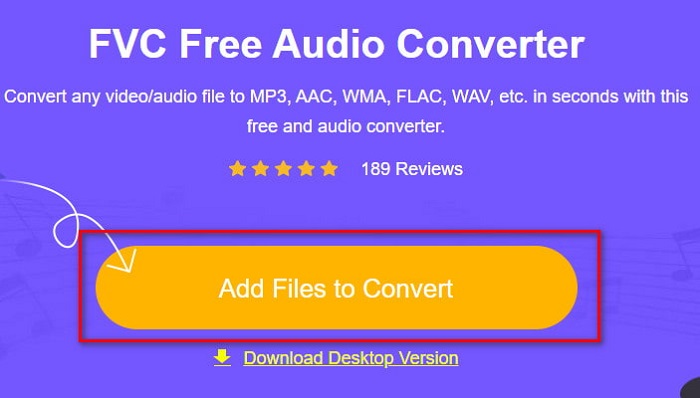
Pas 2. Fes clic a Add Files to Convert i, tot seguit, s’obrirà l’eina web i apareixerà una carpeta. Localitza el fitxer i fes clic a Open.
Pas 3. Un cop l’eina web estigui oberta, tria el format entre els que es mostren en aquesta secció.
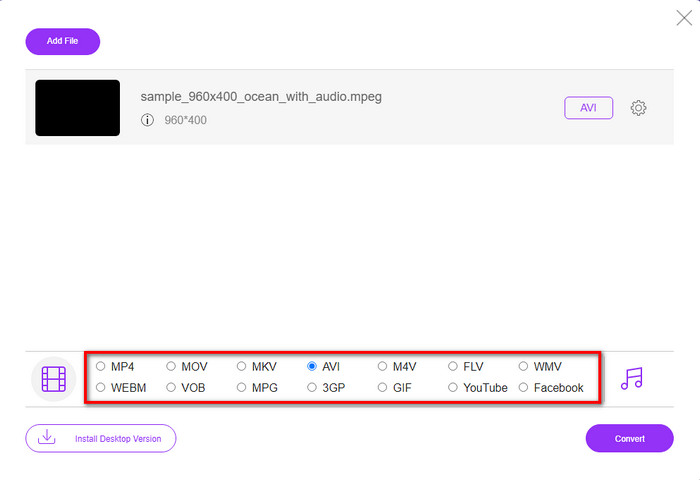
Pas 4. Quan ja hagis seleccionat el format, és el moment de convertir-lo fent clic al botó Convert.
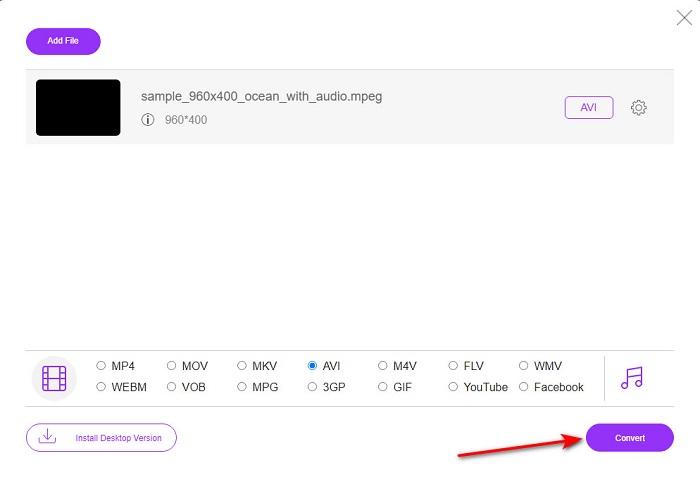
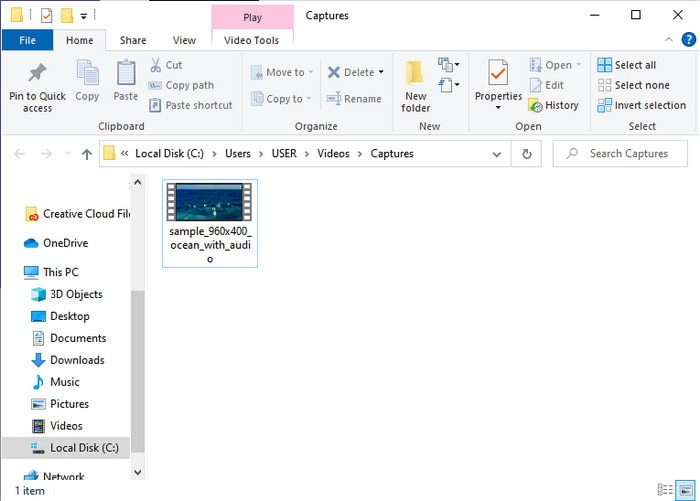
Pas 5. Espera un breu moment perquè el procés comenci. Quan hagi finalitzat, apareixerà una carpeta amb el fitxer convertit que has creat abans.
4. Freeconvert.com
Igual que l’eina en línia esmentada anteriorment, aquesta és una altra eina en línia que pots utilitzar, Freeconvert.com. Aquesta eina web ja ha guanyat popularitat entre els usuaris a Internet. Molts usuaris també la valoren positivament per la seva facilitat d’ús i per altres funcionalitats. No obstant això, si tries aquesta eina web, té un inconvenient important: el nombre de formats que admet és limitat. A més, el procés de conversió aquí és una mica més lent del que es podria esperar. Ara, si vols saber com utilitzar aquest convertidor en línia, segueix els passos.
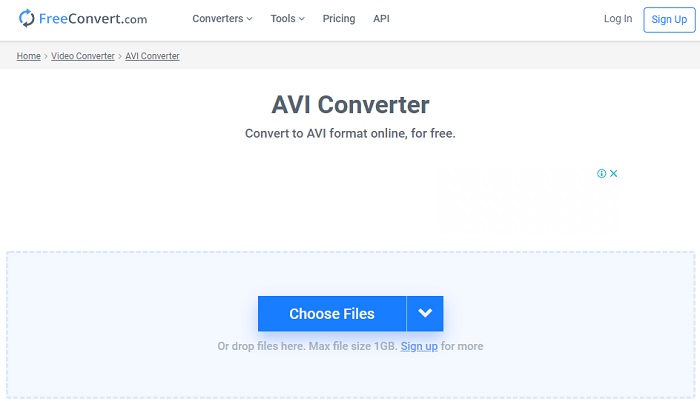
Pas 1. Cerca el lloc web freeconvert.com al navegador. Després fes clic a AVI dins de Video Converters.
Pas 2. Prem Choose File i localitza el fitxer MPEG a la carpeta que apareixerà a continuació. Un cop seleccionat el fitxer, fes clic a Convert To AVI.
Pas 3. Espera que finalitzi el procés de càrrega i després fes clic a Download AVI per desar el fitxer.
Part 4. Preguntes freqüents sobre la conversió de MPEG a AVI
La conversió de MPEG perd la qualitat?
Bé, depèn del format en què el convertiràs. Per tant, si canvieu el vostre MPEG a GIF, espereu un canvi dràstic perquè admet una combinació de colors menys que l'altre format. Tanmateix, si utilitzeu un altre format que el GIF, no espereu cap pèrdua.
Són MPEG amb pèrdues o sense pèrdues?
MPEG admet compressió amb pèrdues, de manera que si utilitzeu aquest format, espereu una mida de fitxer més petita fins i tot si teniu un vídeo i un àudio llargs.
MPEG és un bon format?
Abans era un dels millors formats que podeu utilitzar per emmagatzemar dades als vostres DVD. Tanmateix, en aquesta època, MPEG no és la millor opció per emmagatzemar dades. Però si voleu emmagatzemar-lo en DVD, CD o Blu-ray i transferir-los molt més ràpidament, aquesta ha de ser una opció.
Conclusió
En resum, tot el programari en línia i fora de línia que es presenta aquí és fantàstic per utilitzar-lo per convertir el format. Tanmateix, hi ha una eina que demostra que podeu aconseguir una conversió fenomenal fàcilment amb FVC Video Converter Ultimate. De fet, ho podem explicar en 3 paraules i això també és fàcil d'utilitzar, eficaç i segur. Per tant, si voleu assolir la grandesa, descarregueu aquesta eina ara mateix i proveu-la.
-
 Com convertir fitxers MPEG a MP4 de forma gratuïta a Windows, Mac i en línia
 Llegiu i obteniu 3 maneres gratuïtes de convertir fitxers MPEG a MP4 al vostre ordinador. Podeu utilitzar convertidors de vídeo en línia i d’escriptori per convertir fàcilment el format MPEG a MP4.
-
 [2021] Les millors eines i maneres fàcils de convertir MPEG a MP3
 Aquest article parla principalment de com podeu convertir els vostres vídeos MPEG en MP3 amb l'ús de les eines més fiables de la llista.
-
 Tutorial per convertir fitxers MP4 a AVI amb 7 convertidors de vídeo gratuïts
 Voleu obtenir totes les maneres gratuïtes de convertir vídeos AVI a MP4? No us hauríeu de perdre aquest article. Aquí teniu 7 maneres de convertir fitxers AVI a MP4 de forma gratuïta a Windows, Mac, iPhone, Android i en línia.
