


 Video Converter Ultimate
 Gravadora de pantalla
 Reparació de vídeo
 Baixada segura
Les maneres més excel·lents de convertir MPG a M4V ràpidament
Esteu buscant el millor procediment per convertir MPG a M4V ràpidament en Mac i Windows? No us preocupeu més, perquè us presentarem la millor solució per convertir fitxers. A més, us mostrarem la millor manera de convertir MPG a M4V en línia. D’aquesta manera, tindreu una idea de com convertir els vostres fitxers tant en línia com fora de línia. Només heu de relaxar-vos mentre llegiu fins al final aquest article il·lustratiu.

Part 1: manera eficaç de convertir MPG a M4V amb Mac
Avui dia, alguns usuaris de Mac tenen dificultats per convertir els seus MPG a M4V perquè no saben quina aplicació poden utilitzar. Si també pertanys a aquests usuaris, el millor convertidor que pots utilitzar és Video Converter Ultimate. Podeu utilitzar aquesta meravellosa eina al vostre Mac fàcilment perquè té una interfície fàcil d'utilitzar. A més, a part dels formats de fitxer MPG i M4V, podeu convertir més fitxers de vídeo, inclosos MP4, MOV, AVI, FLV, MKV, WMV, DIVX i molt més. A més, si voleu convertir diversos fitxers MPG en un M4V, també és possible. Aquest convertidor ofereix un procés de conversió per lots on podeu convertir diversos fitxers MPG simultàniament. A més, aquest convertidor no només és accessible per als usuaris de Mac. Els usuaris de Windows també poden utilitzar aquest convertidor, cosa que el fa més convenient per a tots els usuaris.
A part de convertir vídeos, també podeu convertir diversos fitxers d'imatge. Aquesta eina admet diversos formats d'imatge, com ara BMP, JPG, PNG, WEBP i més. A més, tot i que és una aplicació convertidora, hi ha més coses que pot fer. Si el vostre vídeo MPG és massa lent i voleu accelerar-lo, podeu fer-ho amb aquesta eina. Us permet ajustar la velocitat del vostre vídeo des de 0,125x, 0,25x, 0,5x, 0,75x, 1x, 1,25x, 1,5, 2x, 4x fins a 8x més ràpid que la velocitat mitjana del vostre vídeo. D'aquesta manera, podeu ajustar fàcilment la velocitat del vostre vídeo. Una altra característica que podeu gaudir amb aquesta eina és l'eina Video Enhancer. Aquesta eina us permet augmentar la resolució del vostre vídeo, també podeu optimitzar la brillantor i el contrast del vostre vídeo, també podeu reduir el tremolor del vídeo. Finalment, podeu eliminar fàcilment el soroll del vostre vídeo. Amb la guia d'aquest programari, podeu reproduir el vostre vídeo millor i més satisfactori de veure. Vegeu més funcions a continuació.
Funcions
◆ Converteix més de 100 fitxers de vídeo, inclosos M4V, MPG, MP4, AVI, MOV, FLV, MKV, WMV, OGV, VOB, 3GP, SWF, etc.
◆ Converteix diversos fitxers alhora.
◆ Pot convertir fitxers 30 vegades més ràpid que la velocitat mitjana de conversió.
◆ Ofereix creador de collages.
◆ Pot crear un vídeo musical.
◆ Converteix fitxers d'imatge, com ara JPG, PNG, TIF, BMP i molt més.
◆ Proporciona eines d'edició, com ara controlador de velocitat de vídeo, potenciador de vídeo, compressor, retallador, retallador i molt més.
Utilitzeu les guies senzilles següents per convertir MPG a M4V al Mac amb FVC Video Converter Ultimate.
Pas 1: Feu clic al botó de descàrrega per a Mac que trobareu a continuació per descarregar Video Converter Ultimate al vostre Mac. Després, continueu amb el procés d’instal·lació i inicieu l’aplicació.
Descàrrega gratuïtaPer a Windows 7 o posteriorDescàrrega segura
Descàrrega gratuïtaPer a macOS 10.7 o posteriorDescàrrega segura
Pas 2: Seleccioneu el panell Converter quan la interfície principal ja aparegui a la pantalla. A continuació, hi ha tres opcions per inserir el fitxer de vídeo MPG. Feu clic al botó Add File, a la icona amb el signe més o bé arrossegueu el fitxer directament dins del quadre.
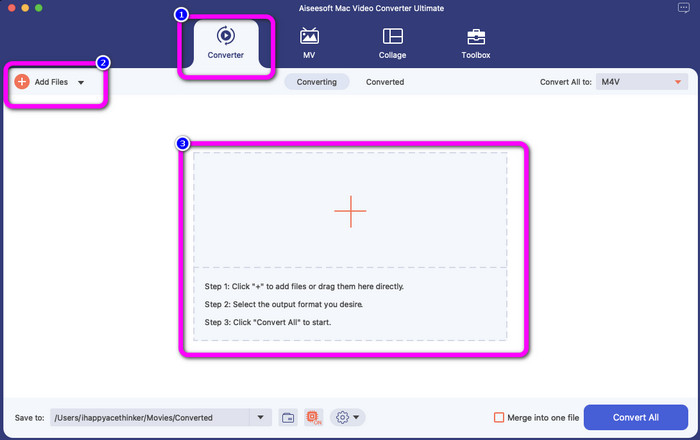
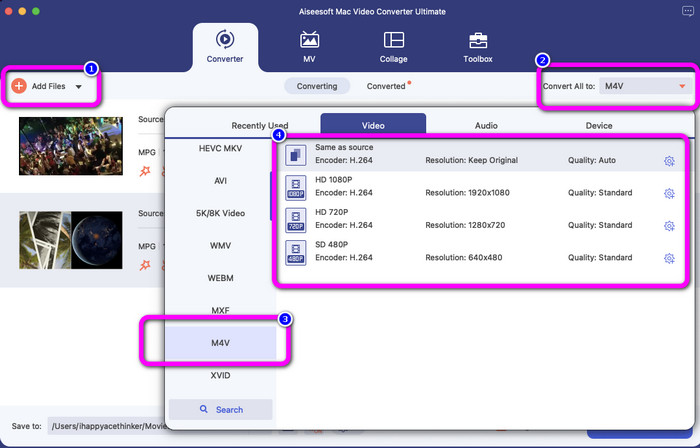
Pas 3: Feu clic al botó Add Files per convertir més fitxers MPG. Després, per convertir-los en un fitxer M4V, seleccioneu el botó Convert All to. Consulteu les opcions de format, seleccioneu el format M4V i trieu la resolució de vídeo que vulgueu, de 480p a 1080p.
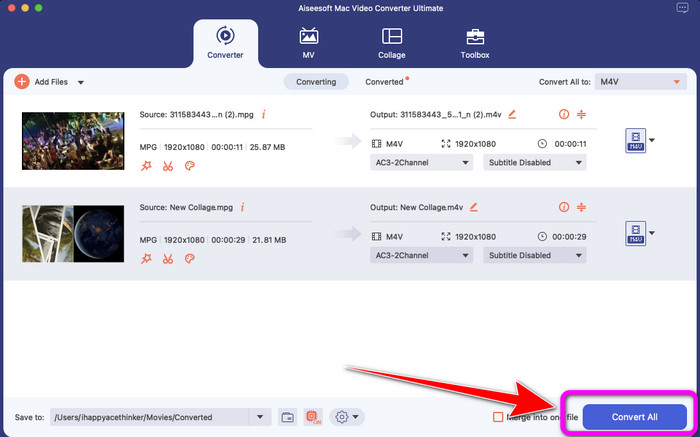
Pas 4: Després de convertir tots els fitxers al format M4V, feu clic al botó Convert All. D’aquesta manera s’iniciarà el procés de conversió. Després, deseu el vostre vídeo. Si voleu convertir MXF a M4V, podeu utilitzar aquest programari.
Part 2: manera gratuïta de convertir MPG a M4V en línia
Si voleu convertir MPG a M4V gratuïtament en línia, utilitzeu FVC Free Video Converter. Podeu trobar aquesta eina gratuïta a tots els navegadors, com ara Mozilla Firefox, Google Chrome, Safari, Microsoft Edge i més. Podeu convertir fàcilment el vostre fitxer MPG al format M4V en només uns quants clics, perquè té una interfície senzilla, comprensible per a tothom. Aquesta eina en línia admet molts formats, com WMA, MP4, FLV, AVI, MOV, TS i més. Aquest convertidor també us permet convertir nombrosos fitxers amb un sol clic.
A més, durant el procés de conversió, podeu editar i canviar la velocitat de bits, la velocitat de fotogrames i la resolució del vostre vídeo anant a la configuració del vídeo. També podeu canviar la taxa de bits i la freqüència de mostreig de l'àudio. Amb aquestes grans funcions, podeu assegurar-vos que el vostre vídeo millori. A més, no s'afegirà cap filigrana als vostres vídeos després de convertir els vostres vídeos, la qual cosa és genial, sobretot si no voleu veure elements pertorbadors de la vostra foto.
Funcions
◆ Converteix fitxers de vídeo, com ara MPG, M4V, MP4, MOV, AVI, FLV, MKV i molt més.
◆ Ofereix procés de conversió per lots.
◆ Editeu la velocitat de bits, la velocitat de fotogrames i la resolució del vídeo.
◆ Converteix formats d'àudio, com ara MP3, AAC, AC3, WAV, FLAC, etc.
◆ Canvieu la taxa de bits i la freqüència de mostreig de l'àudio.
Seguiu les guies senzilles següents per convertir MPG a M4V amb FVC Free Video Converter Ultimate.
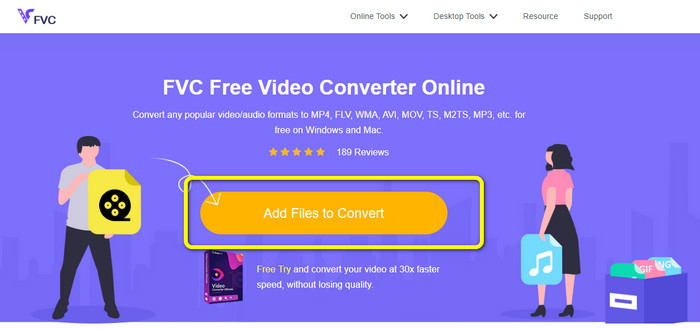
Pas 1: Pugeu el fitxer MPG que voleu convertir fent clic al botó Add Files to Convert.
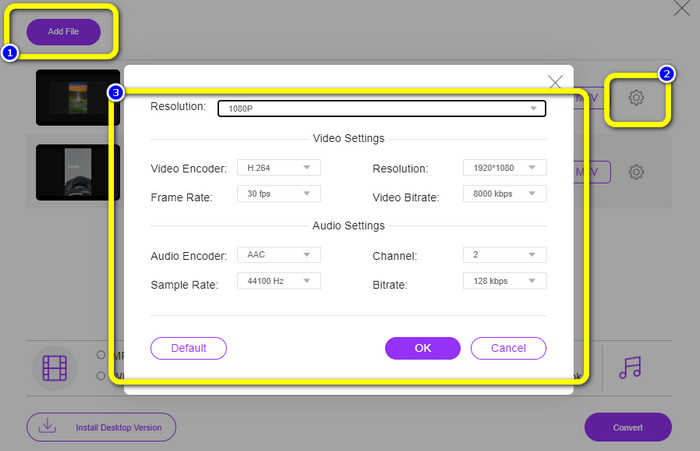
Pas 2: Seleccioneu el botó Add File per afegir més fitxers que vulgueu convertir. A continuació, feu clic a la icona Setting, canvieu la configuració segons les vostres preferències i feu clic a OK.
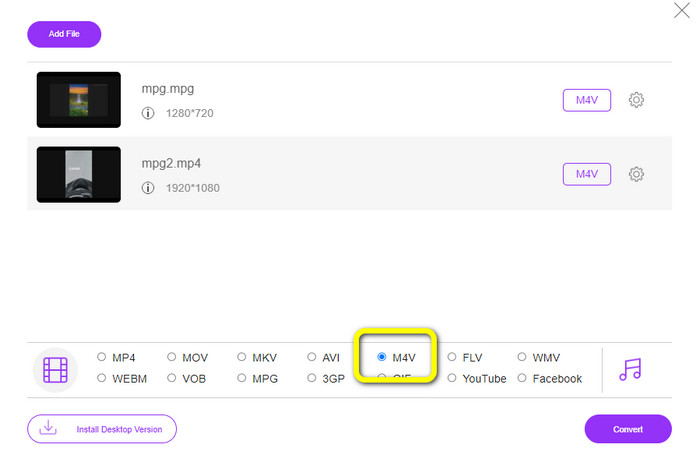
Pas 3: Després d’això, consulteu les opcions de format a la part inferior de la vostra interfície i seleccioneu el format de fitxer M4V.
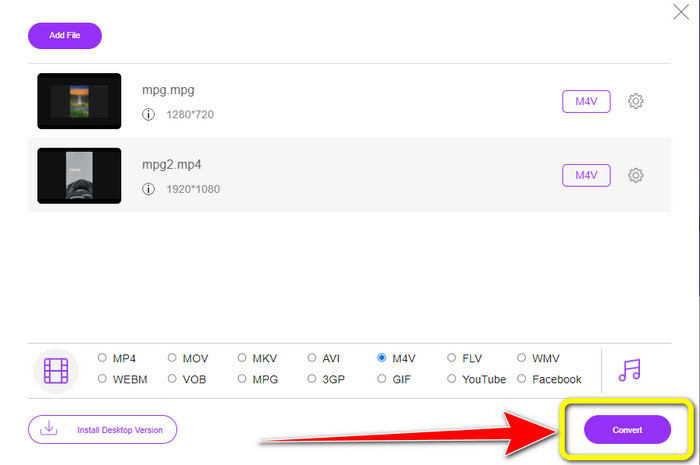
Pas 4: Quan hàgiu acabat d’escollir M4V com a format de fitxer desitjat, feu clic al botó Convert. Trieu la ubicació de fitxer que vulgueu i espereu el procés de conversió. També podeu utilitzar aquest convertidor per canviar OGV a M4V.
Part 3: Quin és el millor?
Els dos convertidors esmentats més amunt són els millors que podeu utilitzar fora de línia i en línia. Si voleu convertir el vostre fitxer MPG a M4V mitjançant una eina en línia, podeu utilitzar FVC Free Video Converter. Aquesta eina ofereix un procés de conversió per lots que us ajuda a convertir diversos fitxers alhora. D’altra banda, si preferiu convertir els vostres fitxers amb un convertidor descarregable, podeu utilitzar Video Converter Ultimate. Aquesta eina fora de línia és accessible tant en Mac com en Windows, fet que la fa disponible per a tots els usuaris.
Part 4: MPG vs. M4V
| MPG | M4V | |
| Extensió de fitxer | .mpg | .m4v |
| Descripció | El format de fitxer MPG és un fitxer del grup d'experts en imatges en moviment. És una distribució en línia habitual perquè es pot descarregar i reproduir més ràpidament que altres formats de vídeo. | Apple va crear el format de fitxer M4V. Aquest contenidor de vídeo és gairebé similar al format de fitxer MP4. L'única diferència principal entre els dos és que el format M4V estava protegit per la protecció de còpia DRM. |
| Desenvolupador | ISO, IEC | Apple Inc. |
| Programes associats | Reproductor multimèdia VLC LAN de vídeo Reproductor de Windows Media | Apple QuickTime Player Reproductor multimèdia VLC Apple iTunes |
Part 5: Preguntes freqüents sobre la conversió de MPG a M4V
1. Quin format és millor, MPG o MP4?
Pel que fa a la qualitat, el format de fitxer MP4 pot oferir una millor qualitat que el format MPG. És perquè MP4 admet més còdecs de vídeo com H.265.
2. Per què els fitxers MPG són tan grans?
És gran perquè MPG està associat amb MPEG2. És un format de compressió antic que requereix una petita potència de processament per codificar i encara crea fitxers grans.
3. Quin reproductor és el millor per a fitxers MPG?
VLC Media Player
Apple QuickTime Player
Media Player Lite
PotPlayer
FX Player
Video LAN
Conclusió
Convertir MPG a M4V és difícil, però gràcies a aquests mètodes efectius que utilitzen grans convertidors, la conversió de fitxers s’ha tornat senzilla. Si voleu convertir els vostres fitxers amb facilitat, utilitzeu els dos convertidors esmentats més amunt.
-
 4 maneres de convertir MPG a MKV mitjançant convertidors en línia/fora de línia
 Esteu buscant un convertidor fàcil d'utilitzar que pugui convertir fitxers MPG a MKV? Aquest article enumera les millors i més senzilles maneres de convertir ràpidament fitxers MPG a MKV.
-
 3 maneres de convertir MPG a 3GP a Windows i Mac [Gratis]
 Si esteu buscant maneres de convertir MPG a 3GP, llegiu aquest article per conèixer les millors maneres de convertir MPG a 3GP a Windows i Mac
-
 Com convertir MPG a DivX sense tenir pèrdua de qualitat
 Esteu buscant una aplicació sense problemes que pugueu utilitzar per convertir MPG a DivX? Aquest article us proporcionarà diferents mètodes efectius que heu de provar
