


 Video Converter Ultimate
 Gravadora de pantalla
 Reparació de vídeo
 Baixada segura
2 millors mètodes destacats per convertir OGV a M4V a Mac i Windows
No tens ni idea de com convertir OGV a M4V? Aleshores ves a aquesta guia i descobriràs altra informació essencial que necessites. Aquest article ofereix procediments senzills per convertir OGV a M4V en Mac i Windows. Estàs impacient per aprendre aquests mètodes? Llavors llegeix tot aquest article!

Part 1: Introducció a OGV i M4V
| Nom | OGV | M4V |
| Nom de l'arxiu | Fitxer de vídeo OGG Vorbis | Vídeo PEG-4 |
| Extensió de fitxer | .ogv | .m4v |
| Desenvolupat per | Xiph.org | Apple Inc. |
| Descripció | Microsoft Media Player és el principal responsable dels fitxers OGV. Els fitxers de vídeo OGG tenen l'extensió de nom de fitxer "OGV". Durant la reproducció multimèdia, un fitxer OGV pot contenir diversos fluxos de vídeo, àudio, text, dades de text de presentació i metadades. Theora s'utilitza sovint per codificar vídeos que es guarden com a fitxers OGV. Els vídeos d'alta qualitat es poden emmagatzemar a velocitats de bits baixes gràcies al còdec Theora. És un mètode de compressió de vídeo de codi obert i amb pèrdues. En un fitxer OGV, també podeu integrar els còdecs de vídeo Daala, Tarkin i Dirac. Els fluxos d'àudio d'OGV es poden codificar amb FLAC, Opus, Vorbis o Speex. Els fitxers OGV es poden veure i reproduir en reproductors de vídeo com VLC i altres. | Apple va desenvolupar el format de vídeo M4V. És un mètode per guardar vídeos i és similar al format MP4. Tanmateix, aquesta vegada la protecció contra còpies DRM pot ser per als fitxers M4V, cosa que marca la diferència. Apple utilitza l'estàndard de codificació M4V a la seva iTunes Store. La protecció de còpia FairPlay d'Apple ajuda a prevenir la còpia no desitjada de fitxers M4V. QuickTime fa referència als vídeos M4V amb FairPlay DRM com "AVC0 Media". |
| Detalls tècnics | Un superconjunt compatible amb enrere fa que el format de compressió de vídeo Theora sigui fonamentalment compatible amb el format de compressió de vídeo VP3. VP3 i Theora es poden combinar sense recompressió perquè Theora és un superconjunt de VP3. | Els fitxers M4V es poden protegir mitjançant la protecció de còpia FairPlay d'Apple per evitar la rèplica no autoritzada. Només els ordinadors aprovats (a través d'iTunes) amb el compte utilitzat per comprar el vídeo poden reproduir un fitxer M4V protegit per FairPlay. |
| Programes associats | FFmpeg MPlayer Reproductor multimèdia VLC | Apple iTunes Apple QuickTime Player Reproductor multimèdia VLC Zoom Player Media Player Classic K-Reproductor Multimèdia Jugador real |
| Tipus MIME | vídeo/ogg | vídeo/x-m4v |
Part 2: Com convertir OGV a M4V mitjançant l'eina en línia
Per convertir fàcilment el format de fitxer OGV a M4V, només necessites un convertidor fiable. Així doncs, en aquesta part et mostrarem com convertir OGV a M4V mitjançant FVC Free Video Converter Online. Amb aquesta eina pots convertir diferents fitxers, com MP4, MOV, VOB, MOV, AVI, FLV i més. També admet la conversió per lots, de manera que pots convertir diversos fitxers sense pèrdua de qualitat. A més, amb uns quants clics ja pots convertir els teus fitxers, perquè té una interfície intuïtiva. Amb tots aquests procediments bàsics, és evident que aquest convertidor de vídeo és adequat per a principiants. També pots ajustar la resolució fins a 1920x1080. Pots canviar també la taxa de bits fins a 20000 kbps. Finalment, pot canviar la velocitat de fotogrames fins a 60 fps. A més, també pots editar l’àudio anant a la configuració d’àudio. Pots ajustar la taxa de bits i la freqüència de mostreig de l’àudio. També admet formats d’àudio com FLAC, MP3, AC3, AAC i més.
Funcions
◆ Converteix diversos formats de vídeo, com ara OGV, M4V, MP4, AVI, FLV, MKV i molt més.
◆ Ofereix conversió per lots.
◆ Editeu la velocitat de bits, la velocitat de fotogrames i la resolució del vídeo.
◆ Admet formats d'àudio com MP3, AC3, AAC, FLAC, WAV, etc.
◆ Editeu la taxa de bits i la freqüència de mostreig de l'àudio.
Convertiu el vostre fitxer OGV al format M4V mitjançant FVC Free Video Converter Online. Seguiu el procediment senzill a continuació.
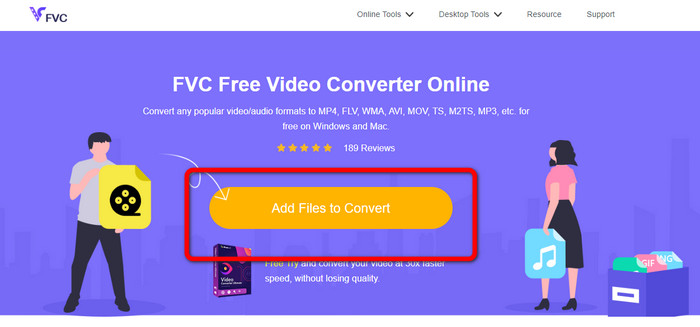
Pas 1: Ves al lloc web de FVC Free Video Converter Online. Després, per pujar el fitxer de vídeo OGV, prem el botó Add Files to Convert. La teva carpeta apareixerà a la pantalla i tria el vídeo que vols convertir.
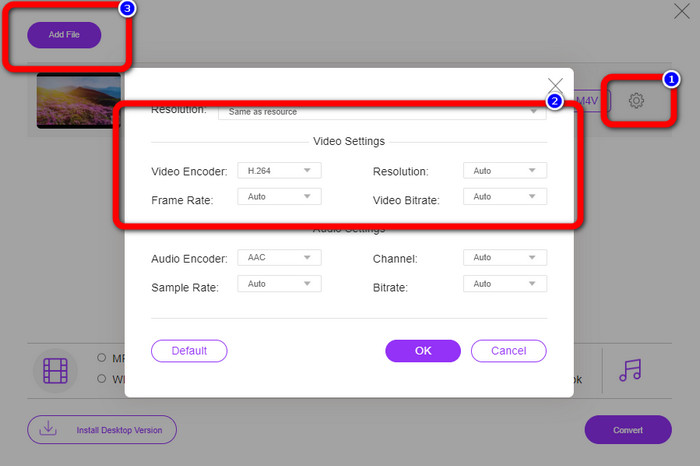
Pas 2: Després de pujar el fitxer de vídeo OGV, pots canviar la taxa de bits, la velocitat de fotogrames i la resolució fent clic a la icona Setting. Després, clica OK. A més, si vols afegir més fitxers, pots prémer el botó Add File a la part superior esquerra de la interfície.
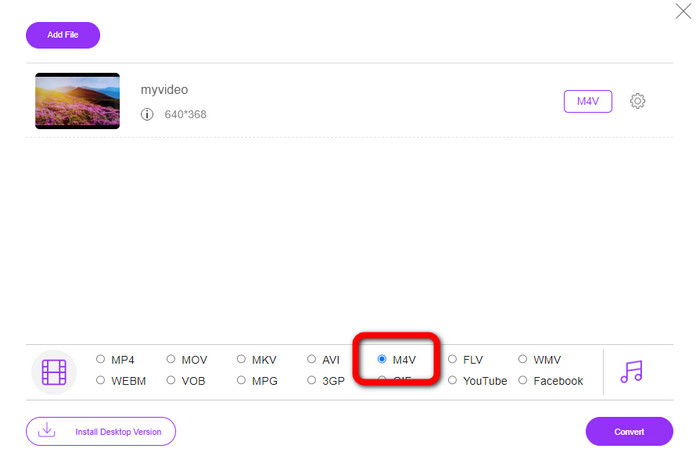
Pas 3: Després de fer alguns canvis al teu fitxer de vídeo OGV, tria el format de fitxer M4V entre les opcions de format a la part inferior de la interfície. Després, desa el vídeo a la ubicació de fitxer que desitgis.
Part 3: Guia fàcil per convertir OGV a M4V fora de línia
Pel que fa a l'aplicació fora de línia, podeu utilitzar Video Converter Ultimate per convertir OGV a M4V a Mac i Windows. Aquesta eina és un convertidor descarregable de primer nivell. Pot convertir diversos fitxers fàcilment perquè permet als usuaris fer conversions per lots. A més, té un procés de conversió ultra ràpid, que és 30 vegades més ràpid que altres convertidors. D'aquesta manera, podeu convertir molts vídeos amb una sola mà. A més, fins i tot si esteu convertint els vostres vídeos, podeu personalitzar-los o editar-los mitjançant eines d'edició de vídeos. Pots afegir filtres, retallar vídeos, millorar vídeos i molt més.
A més, Video Converter Ultimate té més funcions que pots experimentar. Pots sincronitzar l’àudio amb el vídeo perquè disposa de la funció Audio Sync. També és possible incrementar el volum del teu vídeo si ho tens previst. El pots augmentar fins a 200% perquè aquesta eina ofereix un potenciador de volum (Volume Booster). Has de descobrir més funcions fent servir aquest convertidor de vídeo.
Funcions
◆ Converteix fitxers de vídeo, com ara M4V, OGV, SWF, MP4, AVI, FLV, MOV, VOB, MKV, WMV i molt més.
◆ Pot crear un collage atractiu.
◆ Ofereix eines d'edició de vídeo per millorar el vídeo, com ara potenciador de vídeo, correcció de color, retallador, eliminador de filigrana i molt més.
◆ La creació d'un vídeo musical està disponible.
◆ Ajustar la velocitat del vídeo.
◆ Ofereix compressor de vídeo i àudio
◆ Personalitza el vídeo en 3D des de 2D
Pas 1: Si vols descarregar Video Converter Ultimate, clica el botó Download de més avall. Després, executa l’aplicació després del procés d’instal·lació.
Descàrrega gratuïtaPer a Windows 7 o posteriorDescàrrega segura
Descàrrega gratuïtaPer a macOS 10.7 o posteriorDescàrrega segura
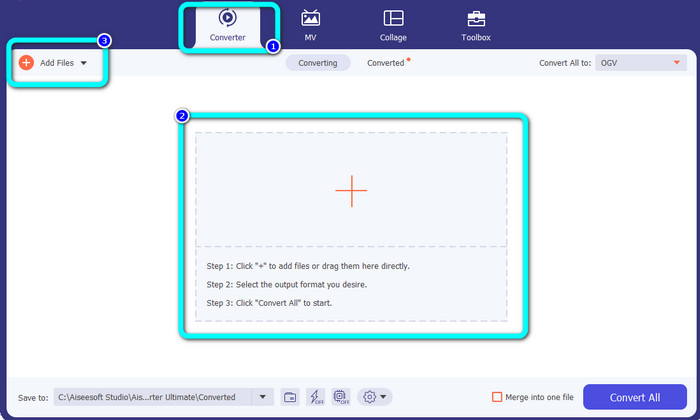
Pas 2: Tria el panell Converter i fes clic al botó amb el signe Plus per afegir el fitxer de vídeo OGV. També pots fer clic al botó Add Files o deixar anar directament el fitxer dins del quadre.
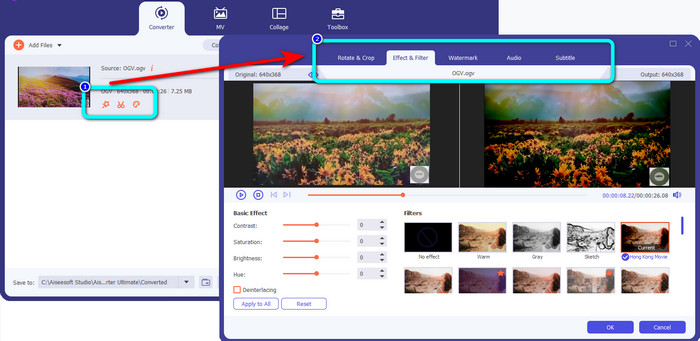
Pas 3: Si vols editar el teu vídeo OGV, fes clic a les icones del primer quadre. D’aquesta manera podràs retallar i girar el vídeo i afegir-hi filtres, marques d’aigua i més. Després d’editar el vídeo, selecciona OK.
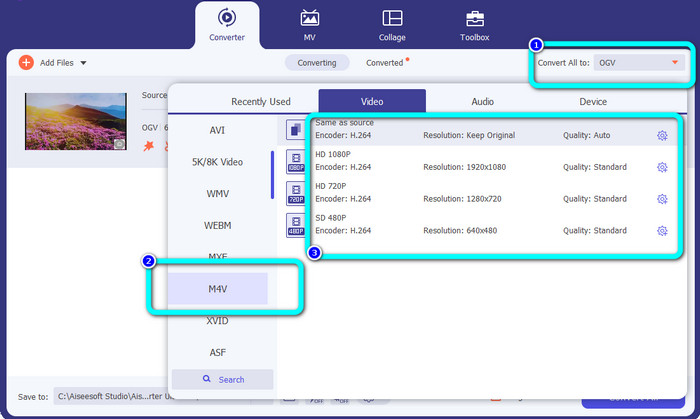
Pas 4: Després d’això, per convertir el teu OGV a M4V, ves al botó Convert All to per mostrar les opcions de format. Selecciona el format de fitxer M4V i tria la resolució que desitgis.
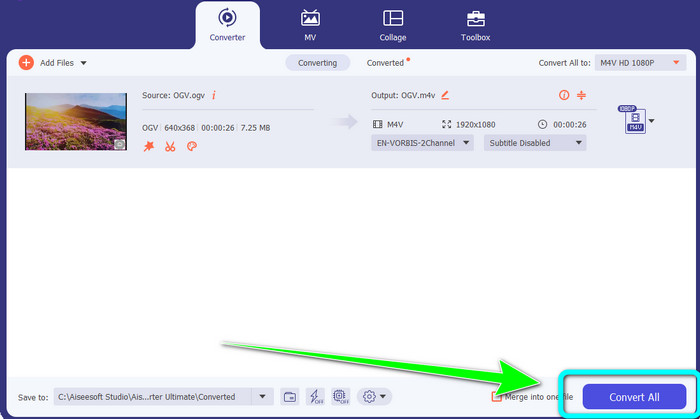
Pas 5: Per a l’últim pas, fes clic al botó Convert All per convertir el fitxer OGV al format M4V i desar el vídeo al teu dispositiu.
Lectures relacionades:
Les 2 millors maneres d’excepció per convertir M2TS a M4V
Aprèn i descobreix les millors maneres de convertir MXF a M4V
Part 4: Preguntes freqüents sobre la conversió d'OGV a M4V
OGV té pèrdues?
Sí. El format OGV combinat amb un estàndard de compressió de vídeo de codi obert conegut com a extensió de fitxer .ogv va ser creat principalment per Xiph.org; està estretament relacionat amb OGG Vorbis i es pot utilitzar per a l'emmagatzematge amb pèrdues o la transmissió en línia.
Quant de temps triga a convertir OGV a MP4?
Depèn del convertidor que utilitzis. Si vols un convertidor amb un procés de conversió ràpid, fes servir Video Converter Ultimate. Ofereix una velocitat de conversió 30 vegades més ràpida.
Puc obrir el meu fitxer M4V a tots els dispositius?
Lamentablement no. Només podeu accedir als fitxers M4V mitjançant ordinadors autoritzats per Apple. Si voleu reproduir el vostre vídeo en tots els dispositius, podeu convertir el vostre vídeo en un fitxer MP4.
Conclusió
És fàcil convertir OGV a M4V en Mac i Windows sempre que coneguis les aplicacions pràctiques que pots usar. Aquest article t’ha presentat dues grans aplicacions per convertir OGV a M4V de manera fàcil i ràpida. Pel que fa a un convertidor en línia, pots fer servir FVC Free Video Converter Online. D’altra banda, pots utilitzar Video Converter Ultimate per convertir fitxers fora de línia.
-
 Excel·lent convertidor OGV a FLV que no us hauríeu de perdre [Provat]
 Si us 'està preguntant com convertir ràpidament fitxers OGV a FLV, aquest article us mostrarà l'únic convertidor que mai necessitareu.
-
 5 convertidors OGV a WMV beneficiosos per convertir els vostres fitxers OGV
 Hi ha 5 convertidors OGV a WMV diferents que podeu utilitzar per convertir els fitxers OGV. Aquest article proporciona un fet fort sobre els 5 convertidors ogv disponibles.
-
 Maneres sorprenents de convertir OGV a MKV de manera eficient i senzilla
 Aquesta guia us oferirà un procediment sense problemes per convertir OGV a MKV sense pèrdues. Proveu aquests convertidors més fiables i experimenteu la seva gran funció.
