


 Video Converter Ultimate
 Gravadora de pantalla
 Reparació de vídeo
[Manera ràpida i fàcil] Converteix fitxers RMVB a WMV amb els 2 principals convertidors RMVB
Avui dia, els asiàtics produeixen més episodis de televisió, pel·lícules d’animació i films i després els distribueixen arreu del món, de manera similar als nord-americans. La majoria d’aquestes pel·lícules estan codificades en fitxers .rmvb perquè l’RMVB és més petit i té una taxa de bits més baixa, però la seva qualitat és excel·lent. Tanmateix, quan descarregues el fitxer a Windows, el teu reproductor multimèdia nadiu no pot reproduir aquest format perquè no és compatible. És complicat, oi? Però avui podem convertir el teu fitxer RMVB en un WMV reproduïble. Per aquest motiu, comencem el recorregut per saber com convertir RMVB a WMV amb les dues eines que pots utilitzar.

Part 1. Altres raons per les quals necessiteu convertir el vostre fitxer RMVB a WMV
Abans de començar la nostra expedició de conversió, primer entenem el possible motiu per convertir el fitxer RMVB. La llista següent és les possibles raons per les quals necessiteu un convertidor de RMVB a WMV en línia o fora de línia.
Com s’ha dit abans, el fitxer RMVB no és compatible amb gairebé tots els reproductors multimèdia, especialment amb el Windows Media Player. Aquest problema no és nou per a nosaltres, perquè hi ha molts formats que el Windows Media Player no admet; malauradament, l’RMVB és un d’ells. Encara que puguis convertir l’RMVB a un nou format compatible, hi ha una altra solució: descarregar un reproductor multimèdia de tercers com el Blu-ray Player. Aquest reproductor admet un ventall de formats molt més ampli per reproduir el teu vídeo en comparació amb el Windows Media Player. Per tant, si vols descarregar aquest reproductor, pots fer clic al botó de descàrrega següent. Però si vols llegir informació més detallada sobre els reproductors RMVB, fes clic en aquest enllaç.
Descàrrega gratuïtaPer a Windows 7 o posteriorDescàrrega segura
Descàrrega gratuïtaPer a macOS 10.7 o posteriorDescàrrega segura
Els fitxers RMVB són un contenidor de fitxers de codi obert, que aquest format no utilitza un còdec específic. Tot i que és un gran avantatge manipular el còdec, no totes les aplicacions admeten obertament tot tipus de còdecs. Per tant, si voleu utilitzar el fitxer RMVB amb finalitats d'edició o reproducció, no us hauria de sorprendre si no funcionarà amb el còdec no compatible.
Així que ara, per esbrinar com convertir RMVB a WMV, continuem amb els detalls següents i llegim amb atenció. Només passareu cinc minuts llegint aquest article i obtenint prou coneixements sobre com convertir els vostres fitxers RMVB amb els convertidors disponibles.
Part 2. El convertidor més excepcional per convertir RMVB a WMV amb Video Converter Ultimate
FVC Video Converter Ultimate està especialitzat a convertir el teu RMVB a WMV, AVI, MKV, MOV, MP4 i molts més en menys d’un minut. Disposa d’un sistema de conversió ultraràpid i acceleració per maquinari per acabar la conversió més de pressa que un llamp. De fet, aquest convertidor admet funcions d’edició múltiples i molt avançades que t’encantaran. Així doncs, vols acabar la tasca de convertir el teu fitxer RMVB perquè tens pressa? Aleshores, a què esperem? Anem directament al procés tot seguint els passos següents.
Passos per convertir fitxers RMVB a format WMV amb FVC Video Converter Ultimate:
Pas 1. Descarrega FVC Video Converter Ultimate al teu Windows fent clic al botó de descàrrega següent. Però si ets usuari de Mac, has de fer clic a l’altre botó per descarregar la versió per a Mac de l’eina. Segueix el procés d’instal·lació i obre el convertidor.
Descàrrega gratuïtaPer a Windows 7 o posteriorDescàrrega segura
Descàrrega gratuïtaPer a macOS 10.7 o posteriorDescàrrega segura
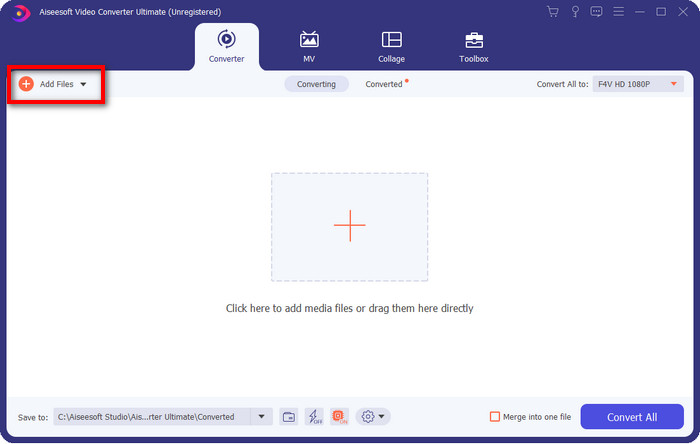
Pas 2. Insereix els fitxers RMVB al convertidor prement Add Files, localitza el fitxer a la carpeta que apareixerà a la pantalla i prem Open.
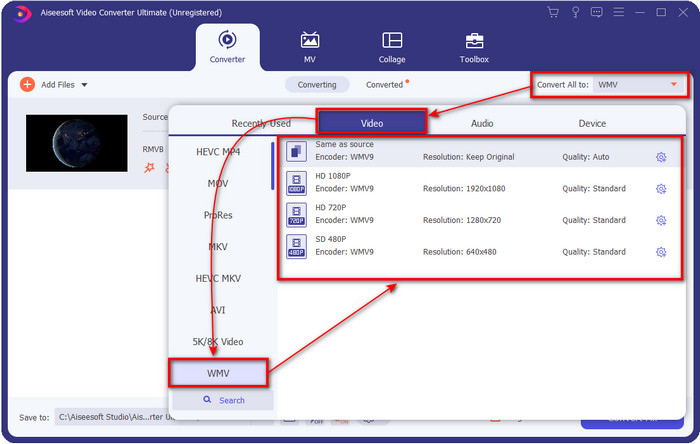
Pas 3. Prem el botó Convert All to i apareixerà una llista de formats; tria el format que vulguis o WMV fent-hi clic.
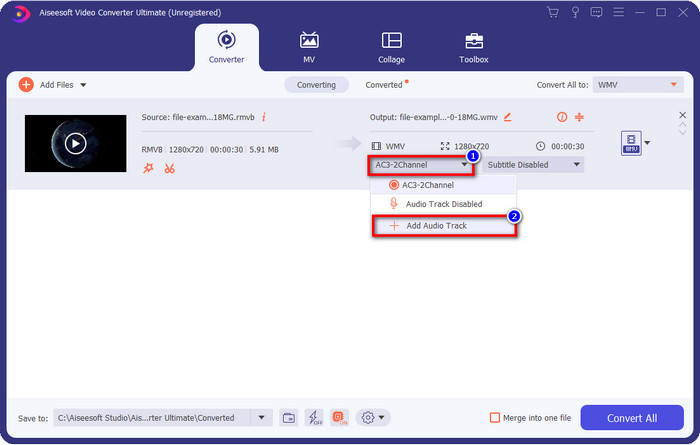
Opcional: Vols afegir àudio al teu vídeo abans de convertir el fitxer? Si és així, fes clic al botó drop-down, fes clic a Add Audio Track, cerca la pista d’àudio desada a l’escriptori i prem Open.
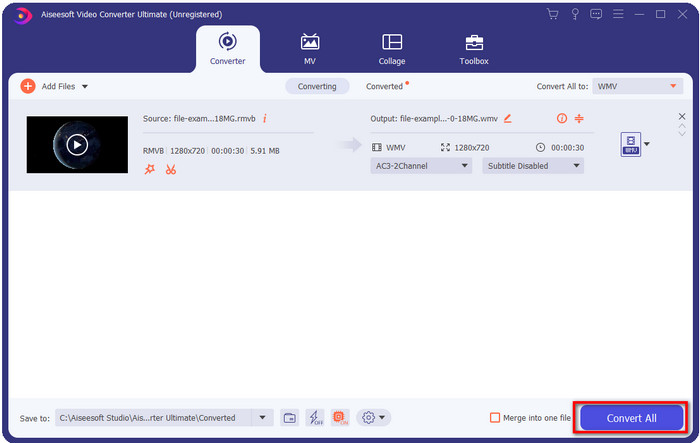
Pas 4. En fer clic al botó Convert All, la conversió del fitxer començarà. Un cop acabat el procés, apareixerà a la pantalla una carpeta amb el fitxer convertit.
Part 3. Millor convertidor web per convertir RMVB a WMV en línia
Si busques un potent convertidor de RMVB a WMV en línia, has de fer servir el FVC Free Video Converter Online. Aquest convertidor web és la millor solució al teu problema de conversió, sens cap dubte. Tot i això, admet un nombre limitat de formats que pots pujar i triar; és un problema, oi? Però el fitxer RMVB sí que és compatible aquí si el que busques és una solució en línia. A més, a la llista següent t’expliquem com utilitzar aquesta eina web.
Passos per convertir fitxers RMVB a format WMV amb FVC Free Video Converter Online:
Pas 1. Fes clic en aquest enllaç i s’obrirà una pestanya nova al navegador.
Baixa la versió d’escriptori per convertir fitxers per lots.
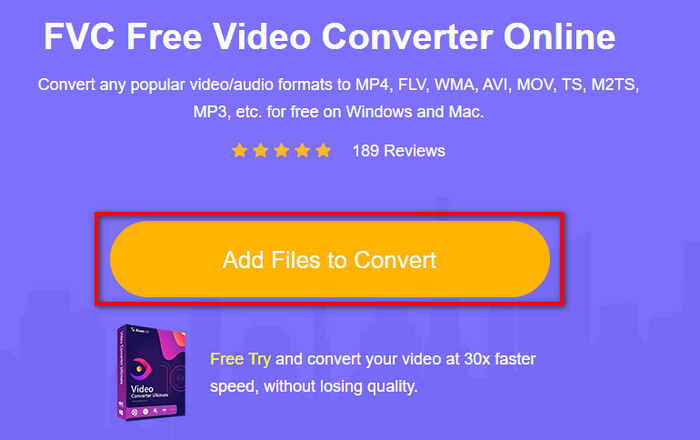
Pas 2. Fes clic a Add Files to Convert al lloc web i apareixerà una carpeta de l’escriptori a la pantalla. Selecciona el fitxer RMVB que vols convertir i prem Open.
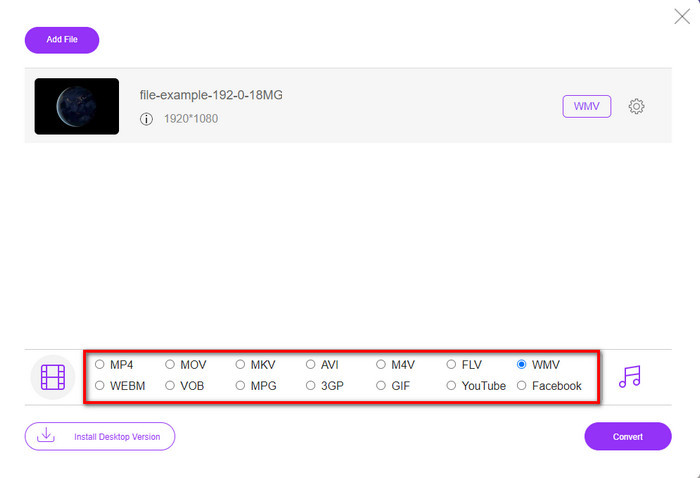
Pas 3. Un cop pujat, tria el format WMV a sota o qualsevol altre format que vulguis de la llista.
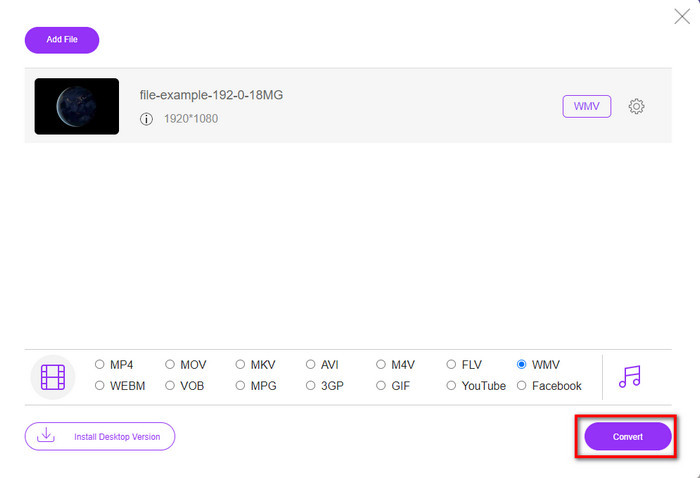
Pas 4. Fes clic a Convert per iniciar el procés de conversió.
RMVB vs. WMV
RMVB, una variació més recent del format estàndard Real Media (.RM), és un format de fitxer de vídeo Real Media comprimit mitjançant una taxa de bits variable. És un format popular per a pel·lícules i animes asiàtics. Els fitxers RMVB són de mida més petita i tenen velocitats de bits més baixes però de millor qualitat.
Produït per Microsoft, WMV era un dels formats de vídeo més comuns als anys 2000. Es pot veure a la xarxa i reproduir-lo per diversos reproductors multimèdia a Windows. I també és el format de fitxer de vídeo predeterminat de Windows Media Player. Però recentment ha estat assumit per altres formats.
Part 4. Preguntes freqüents sobre la conversió de RMVB a WMV
RMVB i RM són el mateix?
No hi ha cap diferència significativa entre els dos contenidors. Els canvis de nom són perquè el CBR eren còdecs reals més antics només amb finalitats de transmissió. El nom es canvia, però el propòsit del format no ho és.
Què he de fer per reproduir fitxers RMVB al Mac?
Pots descarregar un reproductor RMVB de tercers al teu Mac per reproduir el vídeo. Però si no vols descarregar un reproductor de tercers, planteja’t convertir l’RMVB a MOV. Vols saber com fer-ho? Llavors fes clic en aquest enllaç per aprendre com convertir RMVB a MOV.
La conversió del fitxer RMVB perd la qualitat?
Convertir el vostre RMVB no hauria de disminuir la qualitat del vídeo en si. Però la majoria del convertidor canvia la qualitat perquè no s'admeten píxels de qualitat 1080 o fins i tot superiors. Així que ara, si voleu convertir els vostres fitxers sense perdre la qualitat, heu d'utilitzar FVC Video Converter Ultimate. Aquesta eina admet la conversió del fitxer 1080 i fins i tot superior sense degradar la qualitat.
Conclusió
Tant si vols descarregar un convertidor a l’escriptori i conservar-lo com si prefereixes utilitzar una eina en línia, FVC et dona suport. Aquests dos convertidors esmentats són excel·lents en molts aspectes si els comparem amb altres convertidors en línia o fora de línia. En lloc de comparar aquestes dues eines amb les altres, comparem-les entre elles. FVC Free Video Converter Online t’ajudarà amb el teu problema de conversió. A més, el gran avantatge d’aquesta eina és que està llesta per utilitzar sempre que tinguis connexió a Internet. Per contra, FVC Video Converter Ultimate ofereix un resultat fenomenal que et deixarà a tu i als altres bocabadats. Per tant, si vols fer que el procés de conversió sigui encara més interessant, utilitza aquest convertidor «ultimate» i fes-hi més coses.
-
 Les 4 millors aplicacions gratuïtes per a convertidors de RMVB a FLV a l’escriptori o en línia
 Aquest article us explicarà el millor programari de conversió de RMVB a FLV i les aplicacions web que poden convertir fitxers RMVB (velocitat de bits variable RealMedia) a vídeo FLV.
-
 2 de la millor elecció del convertidor de fitxers RMVB a AVI [en línia i fora de línia]
 No saps com convertir RMVB a AVI? Aquest article se centra en els convertidors que podeu utilitzar per convertir RMVB a AVI, ja sigui en línia o fora de línia.
-
 Guia sobre com convertir RMVB a MP4 a Windows / Mac (3 formes gratuïtes)
 Voleu convertir RMVB a MP4 per reproduir-lo fàcilment a l'ordinador o al telèfon mòbil? Trobareu maneres senzilles de convertir els vostres fitxers RMVB a MP4 en aquesta guia.

