


 Video Converter Ultimate
 Gravadora de pantalla
 Reparació de vídeo
Procés de conversió en línia i fora de línia: SWF a WMV
SWF is a legacy file format created by Adobe for the Shockwave Flash player. Flash is no longer supported by many browsers, was never supported by iOS devices, and the SWF file format is seldom used these days due to performance and security problems. On the other hand, WMV is a set of video compression codecs created for early internet video streaming and physical media such as HD-DVD and Blu-Ray. Video in this file format is natively viewable on Windows devices, so you may wish to convert SWF files to WMV because Flash players are becoming more unsupported, and you can no longer play SWF files. Hence, we provide you with two options to convert your SWF to WMV.

Part 1. Com convertir SWF a WMV a Windows i Mac amb facilitat
Video Converter Ultimate is a multimedia converter that converts practically all major video and audio files to your desired output format. It can convert video files in batches, making it more potent than it seems. It does not stop at converting; it also enables users to modify their videos with the help of helpful editing tools. Furthermore, this video converter supports various formats, including the most widely used nowadays. More significantly, it converts at a faster rate than comparable software. To use this particular software, follow these simple steps:
Step 1: Click the Free Download button to download the .exe file you will need to install the software. Wait for it to finish, open it, and follow the installation process promptly. Click Start Now and launch the software.
Descàrrega gratuïtaPer a Windows 7 o posteriorDescàrrega segura
Descàrrega gratuïtaPer a macOS 10.7 o posteriorDescàrrega segura
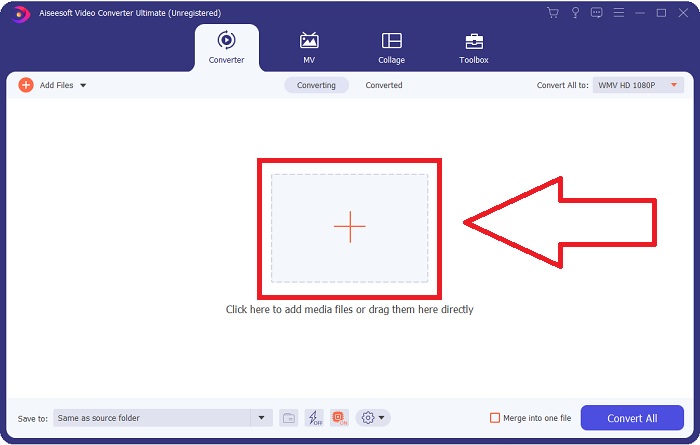
Step 2: Upload the video file you wish to convert by clicking the + button in the middle of the interface. Alternatively, drag the file from your desktop and drop it on the interface, and it will automatically import.
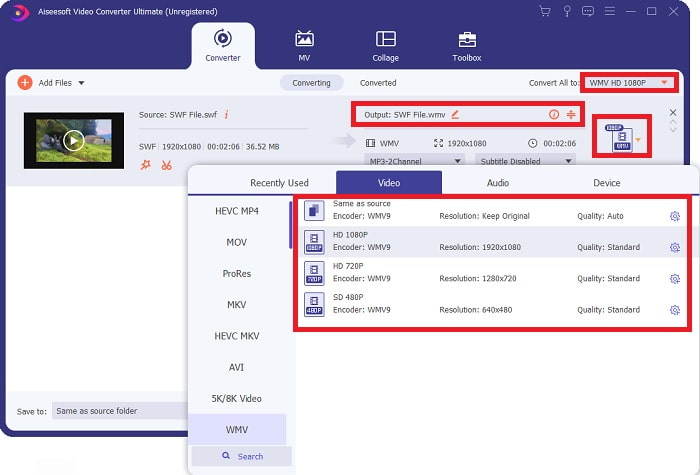
Step 3: Click the drop-down arrow on the right in which you will see the current format your video is in, and it will show you all the available formats to choose. In this case, scroll down and select WMV or just type it in the search bar. All video qualities are also available to choose from on the right panel.
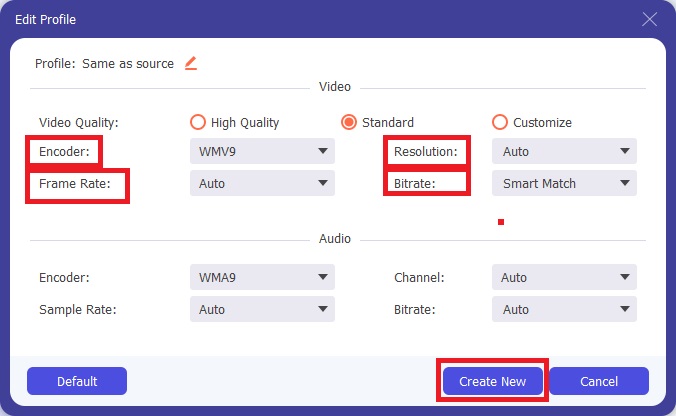
Step 4: To further edit your video, click on the gear icon on the right to show all the handy editing tools. From there, you can make all the necessary adjustments that best suit your needs. Just click the Create New button once you are finished.
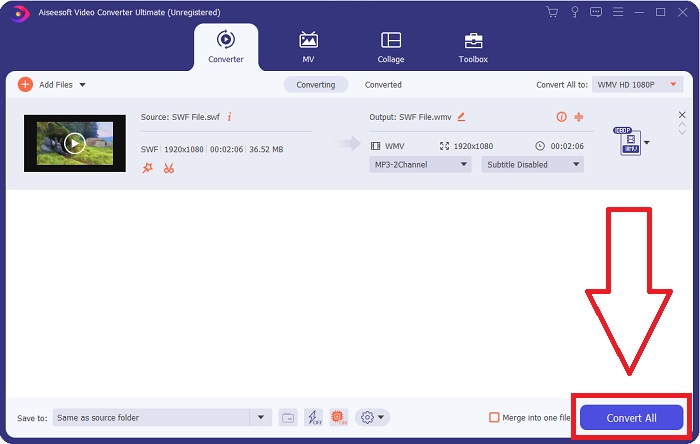
Step 5: Finish the conversion process by finally clicking the Convert All button on the window's bottom right corner and waiting for it to finish.
Part 2. Un altre consell per convertir SWF a WMV en línia
FVC Free Video Converter sempre és gratuït i no requereix cap registre. Alguns convertidors de vídeo en línia gratuïts restringeixen els períodes de conversió o la mida dels fitxers. Si heu utilitzat tots els vostres temps de conversió gratuïts o el vostre fitxer és massa enorme, haureu de comprar un pla, fins i tot si convertiu vídeos poques vegades. Però FVC Free Video Converter no té aquestes restriccions i pot convertir vídeos en qualsevol moment.
A més, aquest servei no necessita registre per convertir fitxers més grans, a diferència de la majoria de convertidors de vídeo en línia requereixen registre per convertir vídeos de més d'1 GB. Aquests són els passos que heu de seguir per a aquesta fantàstica eina:
Step 1: To go to the website, click this link. Then, download the launcher quickly by clicking the Add Files to Convert button and waiting for it to finish.
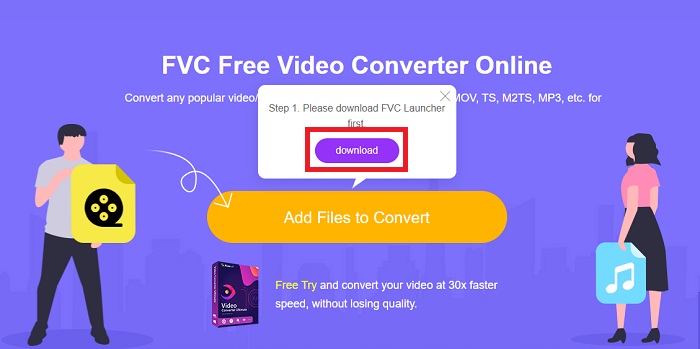
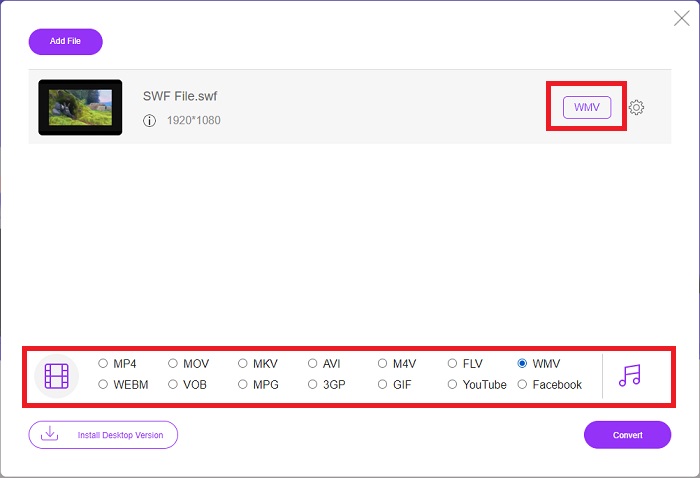
Step 2: Click the said button again, and this time, it will allow you to upload the video file you wish to convert. After that, select WMV among all the available formats.
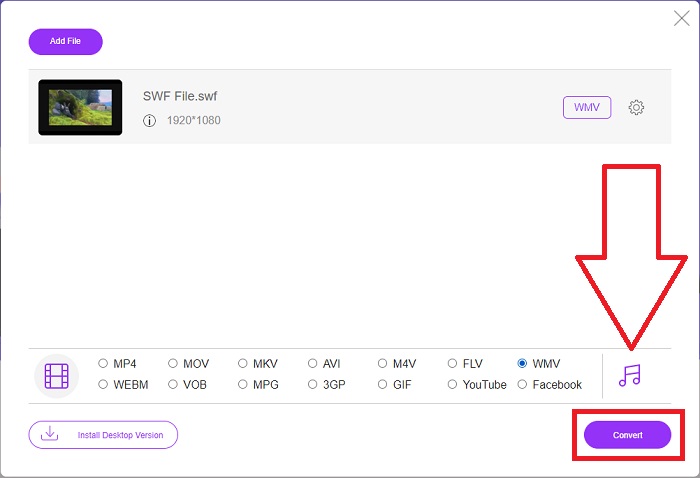
Step 3: You can still use handy editing tools like the software itself. Just click the gear icon, and it will show you all the adjustments you can make. To save the changes made, click OK and once you finish adjusting, click Convert to start the process.
Relacionat:
Part 3. Amplis coneixements sobre els formats SWF i WMV
Si voleu saber més sobre els dos formats, continua llegint aquest article. Oferim tota la informació necessària i essencial que pugui necessitar com a antecedents.
Adobe utilitza el format de fitxer SWF per emmagatzemar pel·lícules i animacions basades en vectors. Small Web Format és l'abreviatura; tanmateix, també es coneix com a format ShockWave. Normalment s'utilitza per transmetre vídeos a través d'Internet, especialment jocs basats en navegador. Malauradament, Adobe va declarar que deixaria de donar suport al format Flash a finals de 2020 a causa de problemes de rendiment i seguretat.
D'altra banda, un fitxer WMV és un fitxer de vídeo de Windows Media que es pot comprimir mitjançant un o més formats de compressió de vídeo de Microsoft. És un format d'emmagatzematge de vídeo popular a Windows, per això l'utilitzen determinades aplicacions de tercers per a coses com ara animacions curtes. Està dissenyat per funcionar amb reproductors multimèdia de Microsoft com Windows Media Player i Movies & TV. Per utilitzar-los amb sistemes de gestió de drets digitals (DRM), els fitxers WMV poden estar xifrats.
| Format web petit | Vídeo de Windows Media | |
| Extensió de fitxer | .swf | .wmv |
| Desenvolupador | Adobe Systems Incorporated | Microsoft |
| Programes de suport | ◆ Adobe Flash Player ◆ Adobe Flash ◆ CC professional ◆ Reproductor GOM ◆ Adobe Dreamweaver 2020 | ◆ VLC Media Player ◆ MPlayer ◆ Reproductor multimèdia clàssic ◆ Reproductor de Windows Media |
Part 4. Preguntes freqüents sobre la conversió de SWF i WMV
Per a què serveixen els fitxers WMV?
Els fitxers de vídeo WMV són el millor format per vendre materials de vídeo en línia o mitjançant discos HD DVD i Blu-ray.
Per a què serveix el fitxer SWF?
Els fitxers Flash, o fitxers SWF, s'utilitzen sovint per a la distribució eficient d'informació multimèdia a Internet.
Es poden editar els fitxers SWF?
Adobe Flash és un format de fitxer utilitzat per Adobe. A diferència d'altres fitxers multimèdia, i el fitxer SWF requereix el connector Flash Player per veure un navegador web. A més, els usuaris no poden editar directament fitxers SWF.
Conclusió
FVC Video Converter Ultimate és l'opció perfecta per a vostè si sou un principiant o simplement un aficionat quan es tracta de conversió de vídeo. No convertiu formats de vídeo amb molta freqüència. Els seus avantatges, com ara la conversió constant de formats de vídeo, la conversió ràpida de fitxers de vídeo en comparació amb programes comparables, el funcionament senzill, el suport per a diversos formats, etc., l'ajuden a convertir-se en el millor convertidor de vídeo que hi ha. Quan es tracta de conversió de vídeo, Video Converter Ultimate i el seu equivalent en línia són les opcions més acceptables.
-
 [2 solucions] Com convertir fitxers SWF a GIF fàcilment de forma gratuïta
 Si no exporteu el format GIF a través del programari Flash, podeu provar de desar els fitxers en format SWF al principi. A continuació, podeu aprendre dues maneres senzilles de convertir fitxers SWF a GIF d’aquest article.
-
 Top of the Line 5 millors convertidors gratuïts de SWF a AVI [basats a la web i a l'escriptori]
 Voleu saber com convertir el vostre fitxer SWF a AVI? Així que si no, llegiu aquest article ja que us oferim una solució al vostre problema de conversió del SWF.
-
 [Fàcil i gratuït] Eines excepcionals per utilitzar per convertir SWF a MOV
 Has provat de convertir SWF a MOV perquè no pots editar vídeos? Qui té la culpa de la incompatibilitat de l'editor de vídeo? Continueu llegint per trobar la vostra solució.
