


 Video Converter Ultimate
 Gravadora de pantalla
 Reparació de vídeo
 Baixada segura
3 mètodes sense esforç per convertir TRP a MKV
Tens problemes amb el teu fitxer TRP perquè no el pots reproduir al reproductor multimèdia o en altres programes? Si ets un dels usuaris que es troben amb aquest tipus de problema, és molt recomanable que llegeixis aquest article. Pots convertir el teu fitxer TRP a MKV perquè la majoria de programes admeten el format MKV. Aquest article et mostrarà mètodes senzills per convertir TRP a MKV al teu Windows, Mac i en línia. Què estàs esperant? No perdis el temps i comença a llegir aquest article!

Part 1: Definició de TRP i MKV
Què és TRP?
TRP és un fitxer multimèdia d’alta definició codificat en el format de transport MPEG-2 part 1. S’utilitza sovint en la difusió de vídeo digital. A més, s’utilitza per a fluxos d’àudio, sincronitzar la sortida i la multiplexació digital de vídeo, i inclou excel·lents funcions de correcció d’errors. TRP també conté dades d’àudio AC3 i vídeo H.264. Es pot reproduir amb diversos programes de reproducció de vídeo.
Què és MKV?
MKV, o Matroska, és un contenidor multimèdia que gestiona nombrosos fitxers d’àudio, subtítols i vídeo en un sol format de fitxer. MKV també és diferent d’altres estàndards multimèdia com MP4 i AVI perquè és de codi obert i pot ser personalitzat per persones que utilitzen programari de codi obert. Finalment, el format de fitxer MKV s’utilitza més habitualment per a vídeos en HD i transmissió de vídeo en línia.
Part 2: maneres més fàcils de convertir TRP a MKV fora de línia
Utilitzant Video Converter Ultimate
Heu de descarregar i utilitzar Video Converter Ultimate per convertir TRP a MKV sense pèrdues. Amb aquesta aplicació, podeu convertir qualsevol format de fitxer de vídeo que vulgueu, inclosos TRP i MKV. Podeu convertir diversos fitxers de vídeo en un sol procés perquè aquesta eina té una funció de conversió per lots. A més, té un procés de conversió 30 vegades més ràpid, de manera que no haureu de consumir més temps per convertir diferents fitxers. Aquesta aplicació admet diversos formats diferents de TRP i MKV, com ara vídeo 5K/8K, ProRes, DV, ASF, M4V, MXF, MP4, MOV i molt més. La millor part és que podeu utilitzar aquesta aplicació amb el vostre Windows i Mac, la qual cosa és una bona notícia per a tots els usuaris. A més, si voleu canviar la velocitat dels vostres vídeos, podeu utilitzar la funció Video Speed Controller. Pots alentir el teu vídeo des de 0,125x i accelerar-lo fins a 8 vegades més ràpid que la velocitat original. A més, si voleu retallar el vostre vídeo, podeu fer-ho. Aquesta eina també ofereix una funció de retall de vídeo,
Per saber més sobre aquest gran programari, l'has de descarregar i provar-lo tu mateix.
Funcions:
◆ Converteix nombrosos formats de fitxer.
◆ Pot fer un collage creatiu.
◆ Ofereix Music Video Creator.
◆ Proporciona Toolbox per millorar els vídeos.
Pros
- 30 vegades més ràpid que altres convertidors de programari.
- Té una interfície d'usuari amigable, que és adequada per a usuaris no professionals.
- Té funcions diferents a part de la conversió.
- Disponible tant a Windows com a Mac.
- Converteix diversos formats de fitxer, com ara FLV, MP4, MOV, WBM, GIF, AMV, etc.
- Pot canviar els detalls de la data individualment o per lots.
Contres
- Compra la subscripció per utilitzar funcions més avançades.
Si voleu convertir TRP a MKV, seguiu aquests senzills passos a continuació.
Pas 1: Al teu Windows o Mac, descarrega el Video Converter Ultimate fent clic al botó Baixa de més avall. Obre l’aplicació després de descarregar-la i instal·lar-la.
Descàrrega gratuïtaPer a Windows 7 o posteriorDescàrrega segura
Descàrrega gratuïtaPer a macOS 10.7 o posteriorDescàrrega segura
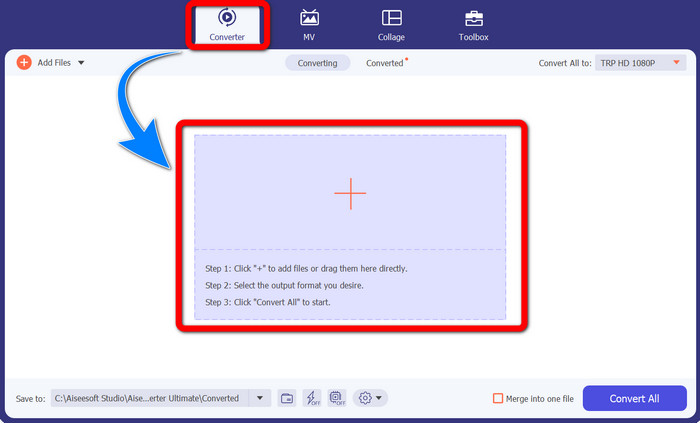
Pas 2: Quan ja hagis obert el Video Converter Ultimate, selecciona el panell Converter. A continuació, fes clic al signe + per importar el teu vídeo en format TRP.
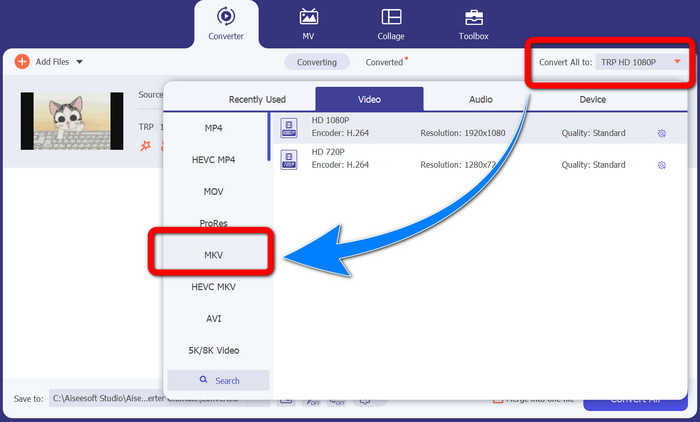
Pas 3: Després d’importar el teu vídeo, fes clic a la icona Convertir-ho tot a. Cerca el format MKV a les opcions de format i fes-hi clic.
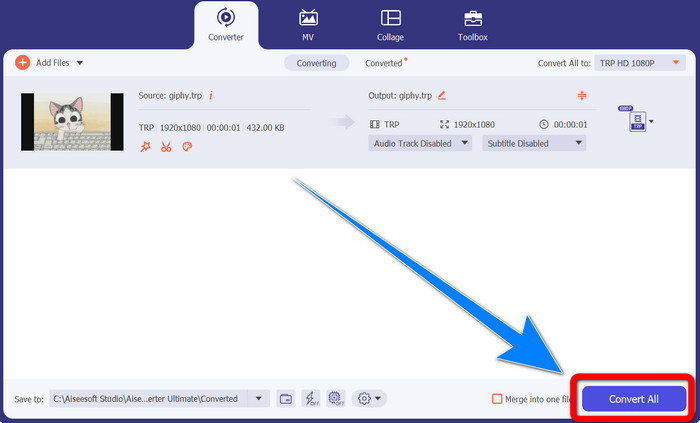
Pas 4: Després, fes clic al botó Convertir-ho tot per convertir el teu TRP a format MKV.
Utilitzant Prism Video Converter
Prism és una altra aplicació que pots descarregar al teu Windows i Mac. Aquesta aplicació et pot ajudar a convertir TRP a MKV fàcilment. A més, admet diferents formats de fitxer, com AMV, MP4, DVD, VOB, MOV, DIVX, AVI, 3GP i més. Tanmateix, aquesta aplicació és molt lenta quan s’instal·la a Windows o Mac. A més, el procés de conversió triga una estona. I té una interfície complicada, que confondrà els principiants, de manera que hauràs de buscar alguns tutorials o demanar ajuda a usuaris avançats. Si vols descarregar i utilitzar aquesta aplicació, segueix els passos senzills següents.
Pas 1: Descarrega el Prism Video Converter al teu Mac o Windows.
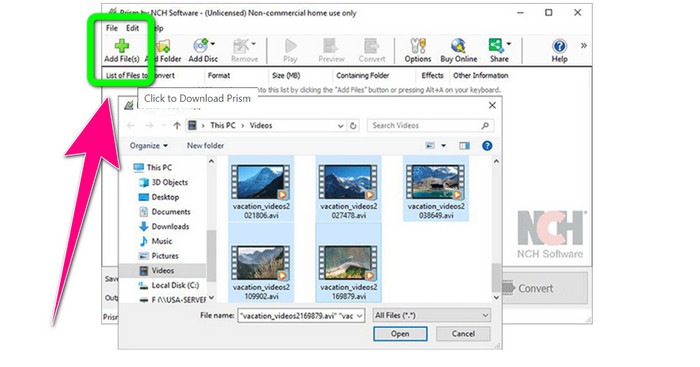
Pas 2: Fes clic al botó verd Afegeix fitxers i insereix el teu fitxer TRP.
Pas 3: Defineix el format de sortida. Fes clic al fitxer MKV entre les opcions de format.
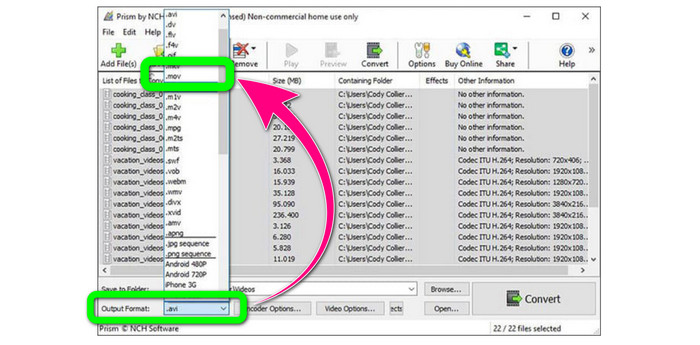
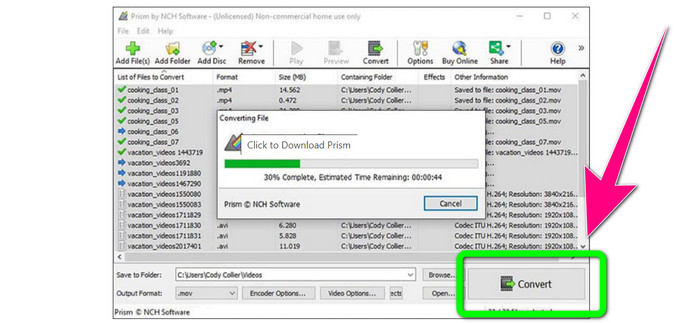
Pas 4: Finalment, selecciona el botó Convertir per convertir el teu fitxer TRP a format MKV.
Part 3: Aplicacions en línia per convertir TRP a MKV
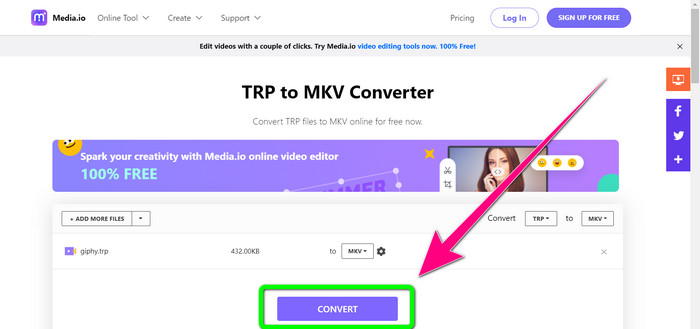
T’interessa convertir TRP a MKV en línia? Aleshores pots utilitzar Media.io. Amb l’ajuda d’aquesta aplicació, pots convertir TRP a MKV. A més, té molts més formats admesos, com MP4, AVI, WMV, MOV, FLV, DIVX, XVID, 3GP, etc. També és un convertidor d’àudio i d’imatges.
A més, també és capaç d'editar vídeos. Pots retallar, retallar, combinar, reproduir vídeos i molt més. Tanmateix, quan es tracta del procés de conversió és lent. Cal esperar una mica més per completar el procés. També té anuncis inquietants que apareixen a la pantalla. A més, necessita una connexió ràpida a Internet per funcionar bé. Si voleu convertir TRP a MKV mitjançant Media.io, seguiu els passos següents.
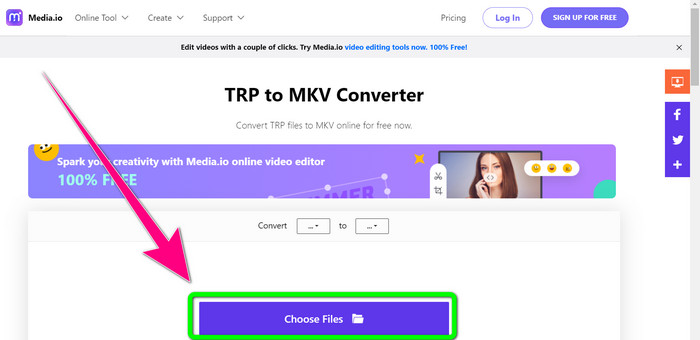
Pas 1: Ves al lloc web de Media.io. Després, fes clic al botó Tria fitxers per afegir el teu vídeo en format de fitxer TRP.
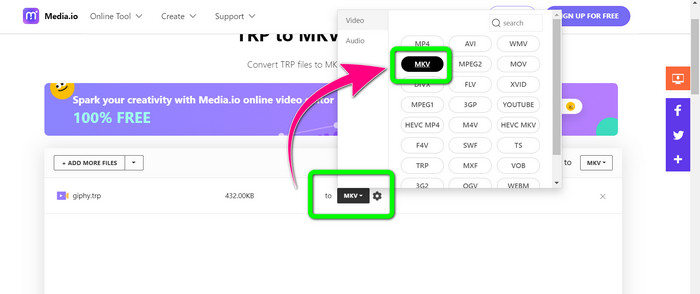
Pas 2: Després d’afegir el teu vídeo, ves a les opcions de format, busca el fitxer MKV i selecciona’l.
Pas 3: Per a l’últim pas, fes clic al botó Convertir. Espera que finalitzi el procés de conversió i desa el teu vídeo en format de fitxer MKV.
Lectura addicional
Millors procediments sobre com convertir AMV a MKV de franc
Converteix fàcilment MTV a MKV amb aquests convertidors definitius
Part 4: Preguntes freqüents sobre la conversió de TRP a MKV
Per què el fitxer MKV no és compatible amb el meu televisor?
Un fitxer MKV és només un contenidor de vídeo que es pot codificar amb molts còdecs, com ara HEVC, MPEG-4, VP9, etc. El televisor té poca compatibilitat amb aquests còdecs, per això no podeu reproduir MKV al vostre televisor.
El fitxer MKV és de bona qualitat?
El format de fitxer MKV és popular en vídeos d'alta qualitat. També té una mida de fitxer més gran. Significa que MKV és un contenidor i no té cap efecte sobre la qualitat.
Hi ha un convertidor ràpid que puc utilitzar al meu ordinador?
Definitivament sí! Si busqueu un convertidor de programari ràpid, Video Converter Ultimate és la millor aplicació. Podeu convertir els vostres fitxers moltes vegades més ràpid i més fàcil.
Conclusió
Amb totes les aplicacions i formes de convertir TRP a MKV esmentades més amunt, et recomanem especialment utilitzar el Video Converter Ultimate. Pot convertir nombrosos fitxers al moment amb una velocitat de conversió ultraràpida. Així doncs, què esperes? Prova-ho tu mateix per descobrir-ne més.
-
 2 del programari més impressionant disponible per convertir TRP a MOV
 No s'han pogut convertir els fitxers TRP a MOV? A continuació, seguiu la guia proporcionada en aquest article. A mesura que escollim les millors eines que podeu utilitzar per convertir els vostres fitxers TRP.
- 2 del programari més impressionant disponible per convertir TRP a MOV
No s'han pogut convertir els fitxers TRP a MOV? A continuació, seguiu la guia proporcionada en aquest article. A mesura que escollim les millors eines que podeu utilitzar per convertir els vostres fitxers TRP
-
 2 Convertidors professionals per convertir TRP a format WMV [Guia]
 Ets un dels usuaris que està passant un moment complicat amb el fitxer TRP? Si és així, continuem llegint aquest article per saber com convertir TRP a WMV i saber-ne més
