


 Video Converter Ultimate
 Gravadora de pantalla
 Reparació de vídeo
Maneres excepcionals de convertir VOB a 3GP fàcilment [Millors convertidors]
Vols reproduir el teu fitxer VOB en el teu dispositiu de tercera generació però no ho aconsegueixes? Aleshores, la millor solució per a tu és convertir el fitxer VOB a un fitxer 3GP. Els fitxers 3GP són els fitxers que admeten els dispositius 3G. Per tant, si estàs buscant la millor manera de descodificar el teu fitxer VOB a 3GP, aquest article pot ser la resposta. T’hem preparat les maneres més senzilles i efectives de convertir VOB a 3GP.

Part 1. Com convertir amb FVC Video Converter Ultimate
FVC Video Converter Ultimate és un dels convertidors amb millor rendiment disponibles a la web. Aquest convertidor gratuït fora de línia converteix nombrosos formats de fitxer, incloent-hi VOB, 3GP, MP4, MKV, MOV, AVI, FLV i més de 1000 formats. Aquest convertidor també et permet retallar la durada del teu vídeo i fins i tot afegir-hi efectes per millorar el fitxer de vídeo. A més, si vols unir múltiples fitxers, aquest convertidor ofereix conversió per lots. Així doncs, si vols convertir el teu VOB a 3GP sense esforç, llegeix més detalls a continuació i descarrega’l gratuïtament.

FVC Video Converter Ultimate
Més de 5.689.200 descàrregues- Pot convertir més de 1000 formats de fitxer disponibles al web.
- Pot convertir per lots diversos formats de fitxer.
- Té un procés de conversió ultra ràpid i una acceleració de maquinari.
- Té funcions d'edició avançades per tallar, afegir subtítols i afegir filigranes al fitxer.
- Disponible a totes les plataformes multimèdia com Windows i Mac.
Descàrrega gratuïtaPer a Windows 7 o posteriorDescàrrega segura
Descàrrega gratuïtaPer a macOS 10.7 o posteriorDescàrrega segura
Aquests són els passos sobre com convertir VOB a 3GP mitjançant FVC Video Converter Ultimate:
Pas 1. Primer, descarrega l’aplicació fent clic al botó Baixar per a Windows o Mac. Després segueix el procés d’instal·lació i obre l’aplicació.
Descàrrega gratuïtaPer a Windows 7 o posteriorDescàrrega segura
Descàrrega gratuïtaPer a macOS 10.7 o posteriorDescàrrega segura
Pas 2. Fes clic al botó Afegir fitxers o al botó amb el signe +. Apareixeran els fitxers del teu ordinador; selecciona el fitxer VOB per pujar-lo a la cua.
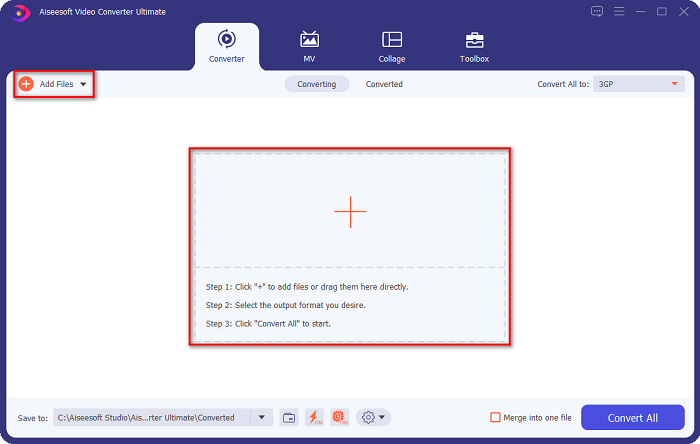
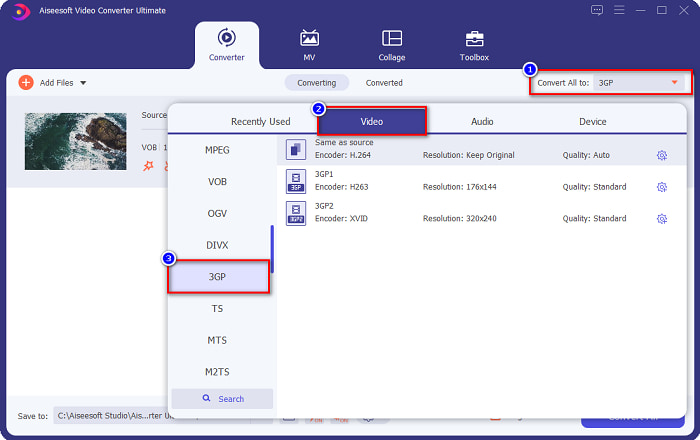
Pas 3. Per al tercer pas, fes clic al botó Convertir-ho tot a per seleccionar el format de sortida que vulguis. Fes clic a 3GP i continua amb el pas següent.
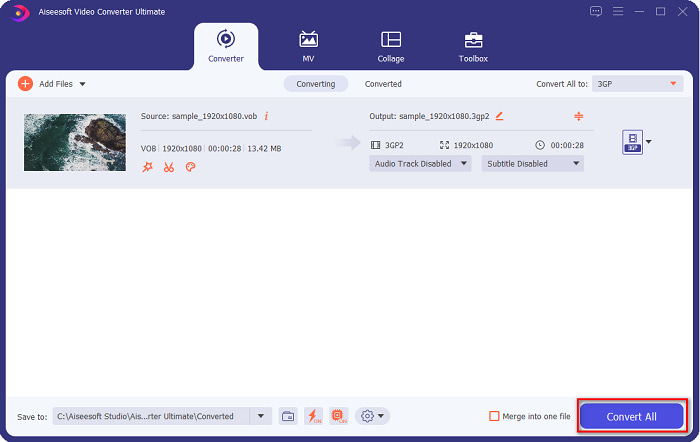
Pas 4. Després de seleccionar el format de sortida desitjat, fes clic al botó Convertir-ho tot per començar la conversió. Només cal esperar uns segons i llest! Amb aquests passos tan simples, pots convertir fàcilment el teu fitxer VOB a 3GP.
Part 2. Com convertir VOB a 3GP gratuïtament en línia
Si voleu convertir el vostre fitxer VOB a un fitxer 3GP sense descarregar-lo, podeu utilitzar els convertidors en línia disponibles al web. La comoditat i l'eficiència d'utilitzar un convertidor en línia són sens dubte bones. Per tant, oferim dues maneres de convertir el vostre fitxer VOB a un format de fitxer 3GP.
FileProInfo
FileProInfo és un convertidor en línia amb una interfície gràfica fàcil d’utilitzar, fet que el converteix en una eina adequada per a principiants. Admet gairebé tots els formats de fitxer estàndard disponibles a internet. Tanmateix, aquests convertidors en línia contenen molts anuncis molestos. Tot i això, molta gent continua fent servir aquest convertidor.
Pas 1. Al navegador, cerca FileProInfo per anar a la seva pàgina web. A la interfície principal del programari, fes clic al botó Selecciona el fitxer VOB i tria el teu fitxer VOB per pujar-lo.

Pas 2. A continuació, selecciona el format de sortida desitjat al quadre que hi ha al costat de la paraula a.

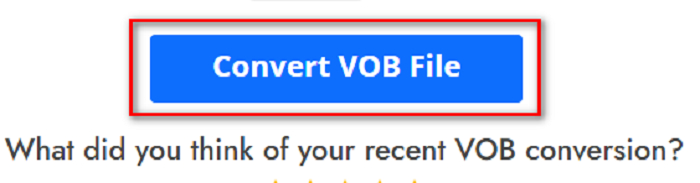
Pas 3. Finalment, fes clic a Converteix el fitxer VOB a la part inferior de la interfície del programari. Després espera que acabi la conversió.
I això és tot! Sense suar, podeu convertir el vostre fitxer VOB a 3GP.
Converteix 365
Convert365 és un convertidor en línia de VOB a 3GP que et permet convertir la majoria de formats estàndard, com ara VOB, 3GP, AVI, MOV, MP4, MPEG i més. I si estàs buscant un convertidor en línia que pugui normalitzar el volum de l’àudio, aquesta eina disposa d’aquesta funció. Tanmateix, com que és una eina en línia, pots experimentar una conversió lenta perquè depèn de la connexió a internet. A continuació, segueix els passos per convertir un fitxer VOB a 3GP amb Convert365.
Pas 1. Cerca Convert365 al teu navegador, fes clic al botó Afegir fitxers i selecciona el teu fitxer VOB quan apareguin els fitxers de l’ordinador.

Pas 2. Després, al botó desplegable que hi ha al costat de Convertir a, tria el format de sortida. Fes clic al format de fitxer 3GP.
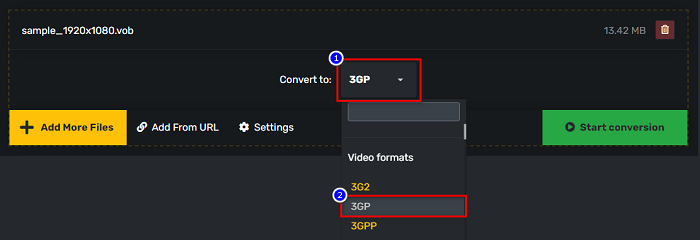
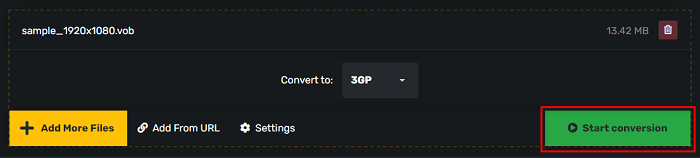
Pas 3. I finalment, fes clic a Inicia la conversió botó per convertir el vostre VOB a un fitxer 3GP.
Part 3. Quin convertidor de VOB a 3GP he d'utilitzar
Quan escolliu el millor convertidor per convertir VOB a 3GP, sempre heu de tenir en compte la velocitat, els fitxers que admet i la singularitat de les característiques del convertidor. Us recomanem que utilitzeu l'eina fora de línia FVC Video Converter Ultimate entre els millors convertidors en línia i fora de línia que es mostren a dalt. Aquest convertidor ofereix moltes funcions diferents que altres convertidors no tenen, com ara el creador de GIF 3D, l'eliminador de marques d'aigua i molts més.
A més, tot i que pot donar sortides professionals, també té una interfície fàcil d'utilitzar perquè no us costarà utilitzar-la.
Part 4. Més informació sobre VOB i 3GP
VOB o Video Object és un format de contenidor de fitxers que utilitzen els DVD. Conté continguts de vídeo, àudio, subtítols i menú. Aquest tipus de fitxer té limitacions i restriccions de còpia per protegir-los de ser copiats directament. En canvi, els fitxers 3GP són formats de fitxer que només es poden reproduir en dispositius mòbils de tercera generació. Aquests formats de fitxer són desenvolupats pel Third Generation Partnership Project (3GPP). A més, aquest tipus de fitxer només conté una mida petita, en comparació amb els fitxers VOB, perquè estan fets per compartir-los amb dispositius 3G. 3GP pot emmagatzemar fitxers de vídeo i àudio que s'utilitzen habitualment als telèfons 3G.
Part 5. Preguntes freqüents sobre la conversió de VOB a 3GP
Es pot jugar a 3GP a macOS?
Els fitxers 3GP no es poden reproduir a macOS, especialment a la versió més nova de QuickTime. Tanmateix, pots convertir el teu fitxer 3GP a un fitxer que macOS admeti, com és MOV. Per saber-ne més sobre com convertir fitxers 3GP a MOV, fes clic en aquest enllaç.
La conversió de VOB a 3GP afectarà la qualitat del vostre fitxer?
Absolutament sí. La mida del fitxer es veurà afectada quan convertiu VOB a 3GP. Com que 3GP només conté fitxers de vídeo i àudio i té una mida de fitxer més petita, la mida del fitxer del vostre fitxer VOB serà més petita.
El format de fitxer 3GP és un fitxer comú?
Malauradament, avui dia, els formats de fitxer 3GP no són tan habituals perquè hi ha menys telèfons 3G en aquests dies. El fitxer més comú per als usuaris de mòbils avui en dia és el format de fitxer MP4.
Conclusió
Com que presentem els millors i més fàcils d'utilitzar convertidors per convertir VOB a MOV a Windows i Mac, arribem a la conclusió que FVC Video Converter Ultimate és la millor entre les eines de conversió en línia i fora de línia escollides. No només té funcions úniques per provar, sinó que també ofereix una conversió d'alta velocitat. Encara tens dubtes sobre aquest convertidor, descarrega'l ara i prova el millor convertidor de VOB a 3GP.
-
 Les millors maneres de convertir VOB a FLV [Gratis i en línia inclòs]
 Voleu convertir un fitxer VOB a un fitxer FLV? Podeu completar la tasca fàcilment amb convertidors d'escriptori o en línia. Llegiu aquesta guia i apreneu a transformar VOB a FLV fàcilment i ràpidament.
-
 3 pràctics convertidors disponibles per canviar el fitxer VOB al format AVI [2021]
 Teniu un problema perquè els fitxers VOB no es poden reproduir? Aleshores, intentem convertir-lo amb les 3 maneres que es presenten a continuació amb els passos detallats de cada convertidor.
-
 Excel·lents mètodes per utilitzar per convertir VOB a MOV
 Les descàrregues de vídeos en línia són convenients, però què passa si el vídeo està en format VOB i el vostre reproductor no l'admet? Aquesta publicació us ensenyarà com convertir VOB a MOV.
