


 Video Converter Ultimate
 Gravadora de pantalla
 Reparació de vídeo
 Baixada segura
Guies destacades per convertir VOB a DIVX completament
Els fitxers que es troben més freqüentment en els DVDs s’anomenen fitxers VOB, i poden contenir pràcticament totes les dades, incloent-hi navegació, menús, subtítols, vídeo i àudio. Però ocupen massa espai en un dispositiu. Per tant, si vols que la mida del teu fitxer sigui més petita, has de convertir el teu fitxer VOB a altres formats de fitxer com el format DIVX. Afortunadament, aquest article ofereix els millors mètodes que pots provar per convertir diferents fitxers. Per convertir VOB a DIVX, has de llegir aquest article i conèixer les eines que pots utilitzar tant en línia com fora de línia.

Part 1: excel·lent convertidor de VOB a DIVX sense perdre qualitat
Vols convertir un fitxer VOB a DIVX sense perdre qualitat? Aleshores aquest article és la millor resposta per a tu. El convertidor més excel·lent i útil que pots fer servir és el Video Converter Ultimate. Et pot ajudar a convertir nombrosos fitxers, com VOB, MT2S, DV, ASF, OGV, DIVX, MTV, MP4, M4V, AVI, AMV, GIF i molts més. També permet la conversió per lots per convertir diversos fitxers amb un sol clic. A més, aquesta eina d’escriptori pot convertir fitxers a una velocitat elevada, 30 vegades més ràpida que altres convertidors. A més a més, la pots descarregar tant en Mac com en Windows, de manera que qualsevol usuari pot utilitzar aquesta eina.
A més, Video Converter Ultimate té moltes funcions, com ara el creador de vídeos musicals, el creador de collages i molt més. Amb l'ajuda d'aquesta eina fora de línia, podeu fer el que vulgueu al vostre vídeo. Llegiu més detalls sobre aquest convertidor fora de línia a continuació.
Funcions
◆ Converteix nombrosos formats de vídeo, com ara VOB, DIVX, MP4, AVI, MTS i molt més.
◆ Ofereix procés de conversió per lots.
◆ Crea un collage fantàstic i bonic.
◆ Ofereix diverses eines d'edició, com ara un compressor de vídeo, un potenciador, un controlador de velocitat de vídeo, un retallador, etc.
Pros
- Pot utilitzar de manera eficient Mac i Windows.
- Accessible per a usuaris principiants i avançats.
- Pot convertir fins a 30 vegades més ràpid.
Contres
- Les funcions avançades es poden utilitzar mitjançant la versió de pagament.
Ofereix diverses eines d'edició, com ara un compressor de vídeo, potenciador, controlador de velocitat de vídeo, retallador, etc.
Pas 1: Descarrega el Video Converter Ultimate al teu Mac o Windows fent clic al botó Download de sota. Instal·la’l i executa l’aplicació.
Descàrrega gratuïtaPer a Windows 7 o posteriorDescàrrega segura
Descàrrega gratuïtaPer a macOS 10.7 o posteriorDescàrrega segura
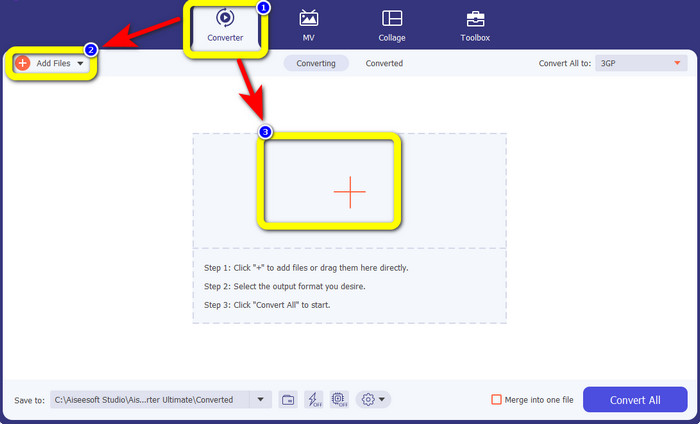
Pas 2: Selecciona el panell Converter. Després, fes clic al botó Add Files per pujar el teu fitxer VOB. També pots fer clic al botó amb el signe Plus per pujar el fitxer.
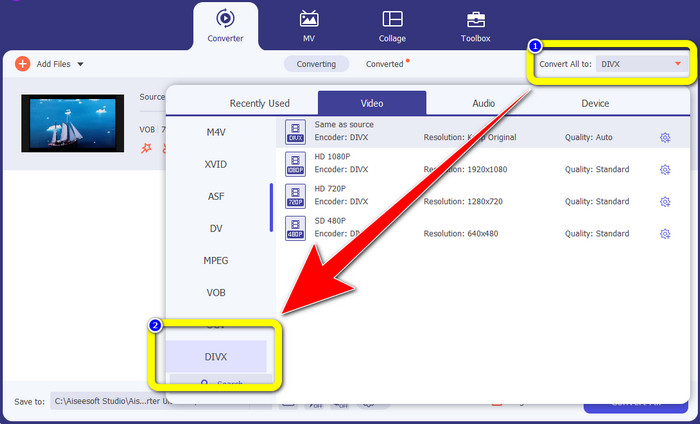
Pas 3: Després de pujar el fitxer, ves al botó Convert All to. Apareixeran les opcions de format; aleshores selecciona el format de fitxer DIVX.
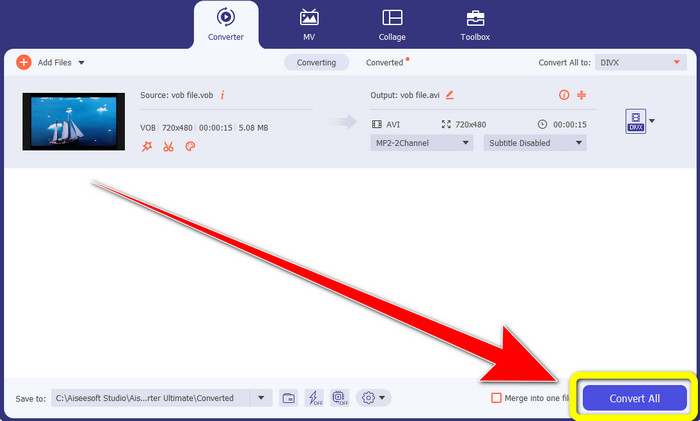
Pas 4: Fes clic a Convert All per convertir i desar el resultat final.
Part 2: Eines en línia gratuïtes per convertir VOB a DIVX
Media.io
Si et preguntes quin convertidor pots utilitzar sense instal·lar-lo al teu Windows o Mac, pots fer servir Media.io. Aquesta eina gratuïta en línia és capaç de convertir VOB a DIVX. És molt senzilla d’utilitzar, ja que només calen tres passos fàcils per convertir diversos fitxers. A més, aquest convertidor en línia admet diferents formats de vídeo i àudio, com MOV, AVI, XVID, DIVX, FLV, MP4, M4V, MP3, WAV, WMA i molts més. A més a més, aquesta eina en línia no és només un convertidor. Pots fer moltes coses amb aquesta eina, com editar els teus vídeos amb diverses eines, com ara un editor de vídeo, unidor, retallador, tallador, etc. Tanmateix, Media.io és una aplicació basada en web, de manera que sempre depens de l’accés a Internet. Sense connexió a Internet, no pots utilitzar aquest convertidor. A més, només disposa d’un procés de conversió normal, de manera que convertir més fitxers triga una mica de temps. Per convertir el fitxer VOB al format DIVX, segueix els passos senzills següents.
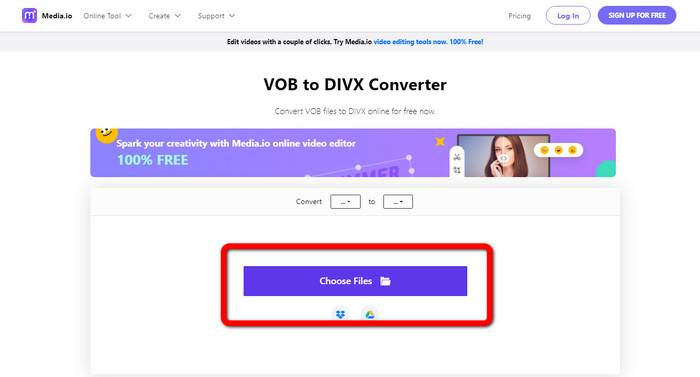
Pas 1: Ves al lloc web de Media.io. Fes clic al botó Choose Files. Els teus fitxers apareixeran a la pantalla. Selecciona el fitxer VOB que vols convertir.
Pas 2: Quan acabis de pujar el fitxer VOB, selecciona el format de fitxer DIVX entre les opcions de format.
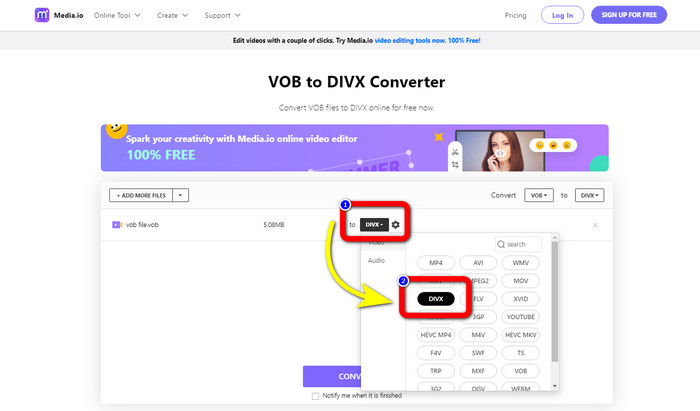
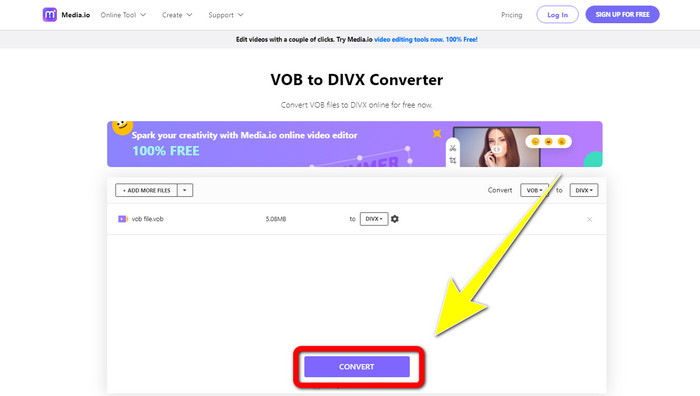
Pas 3: Per a l’últim pas, fes clic al botó Convert. Després desa’l a l’escriptori.
Convertio
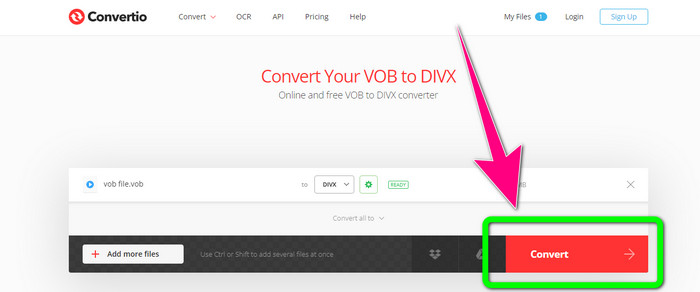
Un altre programari en línia que podeu utilitzar per convertir VOB a DIVX és Convertio. Aquesta eina en línia admet diferents formats de fitxer, com ara FLV, MP4, DIVX, VOB, MOV, MTS, WMV i molt més. A més, aquest programari és fàcil d'utilitzar i perfecte per a tots els usuaris. A més d'això, també podeu convertir diversos formats d'àudio, imatges, presentacions, documents, llibres electrònics, etc. Malauradament, utilitzar aquest convertidor en línia té un desavantatge. Només podeu deixar anar fitxers amb un màxim de 100 Mb amb la versió gratuïta. L'única manera d'augmentar la mida màxima del fitxer és comprar una subscripció. D'aquesta manera, podeu gaudir de la conversió de nombrosos fitxers sense preocupar-vos pel límit de mida del fitxer. Seguiu els passos següents per convertir un fitxer VOB a DIVX mitjançant Convertio.
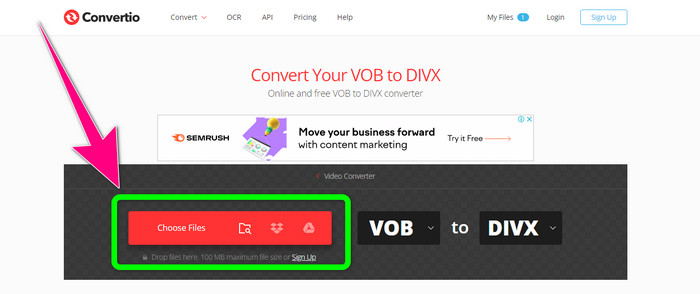
Pas 1: Visita el lloc web de Convertio. Fes clic al botó Choose Files i deixa-hi anar el fitxer VOB.
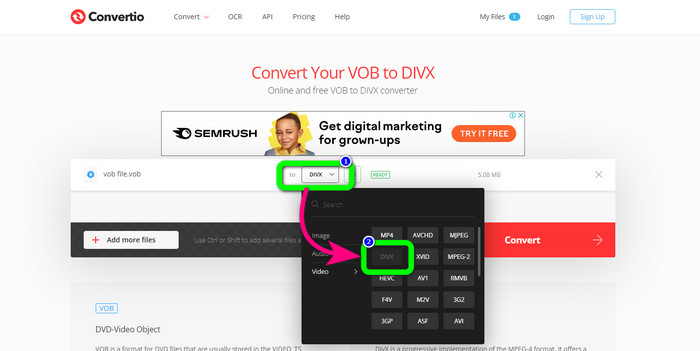
Pas 2: Per al segon pas, tria el format DIVX entre les opcions de format.
Pas 3: En l’últim pas, fes clic al botó Convert. Espera el procés de conversió i desa el teu fitxer DIVX. Si necessites convertir VOB a 3GP, també pots utilitzar aquesta eina.
Part 3: VOB vs. DIVX
| VOB | DIVX | |
| Extensió de fitxer | El format de contenidor de vídeo digital VOB (Video Object) es veu normalment en material de vídeo DVD. VOB multiplexa informació de vídeo, àudio, menú i text de DVD com ara subtítols. Sovint s'utilitzen còdecs d'àudio AAC i de vídeo MPEG-1 o MPEG-2 Part 2. Tot i ser gratuït, les versions específiques d'aquest format poden estar xifrades. | El còdec de vídeo DivX, creat per DivX, LLC, és principalment compatible amb el programari de Windows, però també es pot integrar amb consoles de jocs, despertadors, equips estèreo de vehicles i altres dispositius. Actualment, hi ha tres còdecs DivX principals: còdec de vídeo d'alta definició H.264/MPEG-4 AVC DivX Plus, HEVC Ultra HD i MPEG-4 Part 2 (DivX Plus). |
| Programes associats | Reproductor KM Reproductor multimèdia VLC Reproductor multimèdia Reproductor GOM clàssic | Reproductors de DVD/Blu-ray Cotxe estèreo XBox 360 Despertadors |
| Desenvolupat per | Fòrum de DVD | DIVX Networks Inc. |
| Tipus MIME | Vídeo/MPEG, VÍDEO/DVD | DIVX/VÍDEO |
Part 4: Preguntes freqüents sobre la conversió de VOB a DIVX
1. Per a què serveix DIVX?
L'empresa DivX produeix productes amb la marca DivX. La paraula de vegades s'utilitza per referir-se al conegut còdec DivX, que comprimeix vídeos llargs per reduir la mida dels fitxers mantenint un nivell raonable de qualitat de vídeo.
2. Com puc convertir MP4 a format DIVX?
Podeu convertir MP4 a format DIVX amb Video Converter Ultimate. D'aquesta manera, podeu canviar fàcilment el format del vostre vídeo.
3. És el mateix DIVX que AVI?
Tot i que el format de fitxer DivX també pot incloure funcions com els subtítols i els capítols XSUB, també es basa en el contenidor AVI. Tots els dispositius amb certificació DivX, inclosos els televisors i els aparells per al cotxe, admetran vídeos AVI i DIVX per a la reproducció.
Conclusió
Aquests són els millors mètodes per convertir VOB a DIVX sense perdre qualitat utilitzant eines en línia i fora de línia. Però, com pots veure, les eines en línia tenen desavantatges. Per tant, la millor solució és descarregar un convertidor excel·lent al teu Windows o Mac, com ara el Video Converter Ultimate.
-
 Com convertir VOB a WMV a Windows i Mac [ràpidament]
 Sou una de les persones que volen convertir el vostre fitxer VOB a format de fitxer WMV? Hem provat els convertidors fora de línia i en línia i hem escollit els millors convertidors de VOB a WMV.
-
 3 maneres de convertir VOB a MKV a Windows, Mac i en línia
 Voleu convertir DVD VOB a MKV? Aquest article us ofereix les tres millors maneres de convertir el vostre fitxer VOB a MKV sense tenir dificultats per convertir fitxers.
-
 Com convertir DIVX a 3GP a Windows, Mac i en línia
 Com convertir DIVX a 3GP? Si busqueu una resposta, llegiu aquest article. Us mostrarem grans procediments amb l'ajuda de diferents convertidors.
