


 Video Converter Ultimate
 Gravadora de pantalla
 Reparació de vídeo
 Baixada segura
Grans maneres d'utilitzar les eines últimes per convertir XviD a 3GP
No pots reproduir el teu fitxer .xvid al telèfon mòbil? Aleshores, potser el teu dispositiu no l’admet. Per reproduir el vídeo al telèfon, has de convertir el teu fitxer XviD a 3GP. Quan es tracta de telèfons mòbils, el format més popular que pots fer servir per veure vídeos és el format 3GP. Aquesta publicació t’oferirà informació sobre les millors maneres de convertir XviD a 3GP de manera ràpida i senzilla utilitzant les eines definitives que pots fer servir a Windows, Mac i en línia. Llegim i aprenem tot el que puguem.

Part 1: la millor manera de convertir XviD a 3GP
La millor manera de convertir XviD a 3GP és utilitzant Video Converter Ultimate. És un dels grans convertidors que pots descarregar als teus ordinadors Windows i Mac. Si disposes d’aquesta aplicació, ja no t’has de preocupar per convertir molts fitxers, perquè Video Converter Ultimate pot convertir més de 1000 formats, incloent-hi FLV, MKV, DIVX, XviD, 3GP, M4V, MTS, SWF, MP4 i molts més. A més, té una velocitat de conversió 30 vegades més ràpida que altres convertidors, cosa que és molt útil per als usuaris. També pots convertir diversos fitxers d’una sola vegada, ja que ofereix un procés de conversió per lots, de manera que no cal convertir cada fitxer manualment. A més a més, si vols girar el teu vídeo XviD, pots fer servir aquesta eina perquè disposa de la funció Video Rotator. Amb l’ajuda d’aquest rotador, pots girar el teu vídeo amb facilitat. A més, també pots retallar el vídeo a la llargada perfecta amb l’eina Video Trimmer. Amb aquestes funcions, es pot dir que Video Converter Ultimate és l’eina definitiva per convertir i editar els teus vídeos.
Funcions
◆ Converteix formats de vídeo com XviD, 3GP, MP4, M4V, DIVX, FLV, AVI, SWF i més de 100 més.
◆ Té la capacitat de crear un vídeo musical.
◆ Pot ajudar a crear un collage.
◆ Té excel·lents eines d'edició com ara potenciadors de vídeo, correcció de color, retallador i molt més.
◆ Ajusteu el controlador de velocitat de vídeo.
◆ Pot canviar la mida del fitxer mitjançant el compressor.
Pros
- Pot convertir fitxers de vídeo 30 vegades més ràpid que altres convertidors.
- Apte per a usuaris no professionals i té una interfície senzilla.
- Pot convertir el format d'imatge entre JPG, PNG, WEBP, BMP i TIFF.
- Pot convertir diversos fitxers d'una vegada.
Contres
- Aconsegueix la versió de pagament per gaudir de les grans funcions.
Convertim el vostre fitxer XviD a 3GP mitjançant els mètodes útils següents.
Pas 1: Has de descarregar el Video Converter Ultimate al teu Windows o Mac fent clic al botó Download de sota. Instal·la l’aplicació i obre-la.
Descàrrega gratuïtaPer a Windows 7 o posteriorDescàrrega segura
Descàrrega gratuïtaPer a macOS 10.7 o posteriorDescàrrega segura
Pas 2: A la part superior de la interfície hi ha quatre opcions: Converter, MV, Collage i Toolbox. Selecciona el panell Converter i fes clic a la icona Plus per afegir el fitxer XviD que vols convertir.
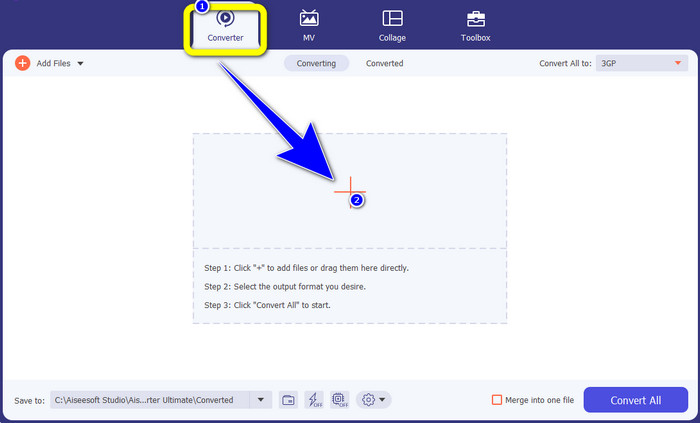
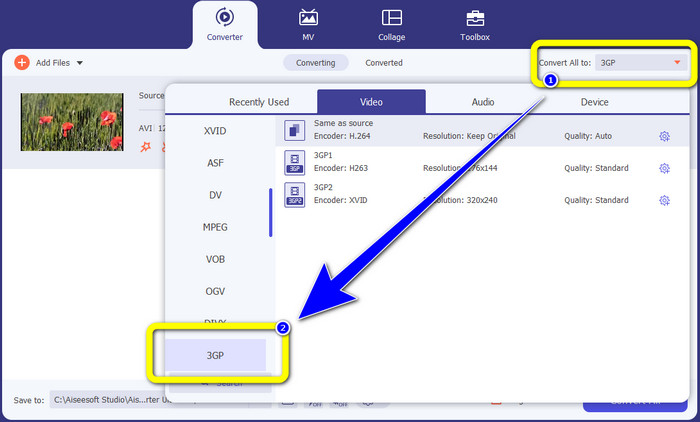
Pas 3: Després d’afegir el teu fitxer XviD, mira al costat dret de la interfície i fes clic al botó Convert all to. Apareixeran les opcions de format i selecciona el format de fitxer 3GP.
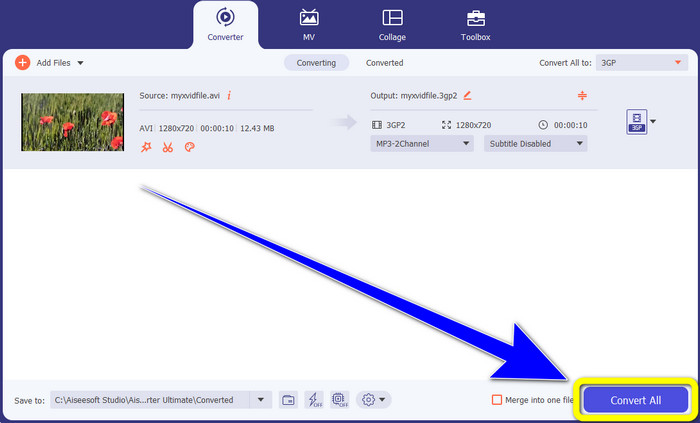
Pas 4: Per al quart i últim pas, fes clic al botó Convert All per convertir el teu fitxer XviD a 3GP. Espera que acabi el procés de conversió i desa el teu vídeo.
Part 2: Converteix XviD a 3GP en línia
Utilitzant FVC Free Video Converter en línia
A part del millor convertidor que has descobert a la primera part, també hi ha convertidors en línia que pots fer servir gratuïtament. La millor eina en línia és FVC Free Video Converter Online. Aquest pràctic programari et permet convertir XviD a 3GP fàcilment. Admet formats de fitxer d’àudio i vídeo, com MP4, M4V, WMV, AVI, MOV, VOB, WEBM, MP3, AAC, AC3, WMA, FLAC, etc. A més, aquest convertidor és fàcil d’utilitzar perquè només té tres passos senzills per convertir diversos fitxers. D’aquesta manera, cap usuari no tindrà dificultats per utilitzar aquest convertidor en línia. Si desitges saber com convertir XviD a 3GP fàcilment amb FVC Free Video Converter Online, fem servir aquests tres passos senzills que tens a continuació.
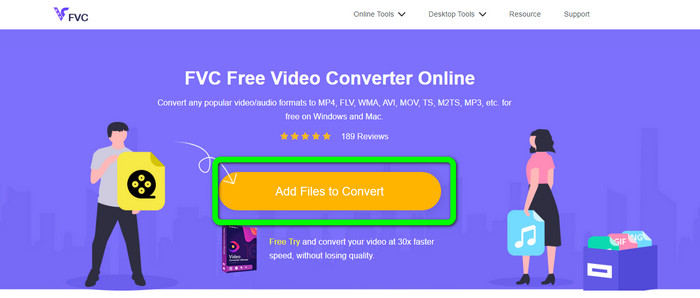
Pas 1: Visita el lloc web de FVC Free Video Converter Online. Fes clic al botó Add Files to Convert i puja el fitxer XviD que vols convertir a format 3GP.
Pas 2: Quan hagis pujat el fitxer, veuràs les opcions de format a la part inferior de la interfície. Tria el format de fitxer 3GP.
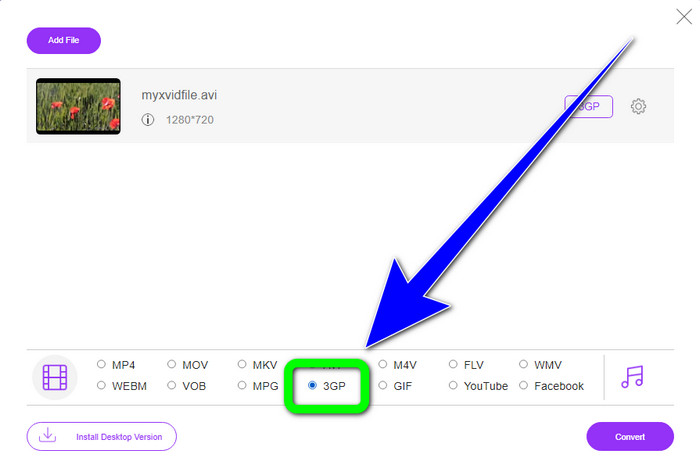
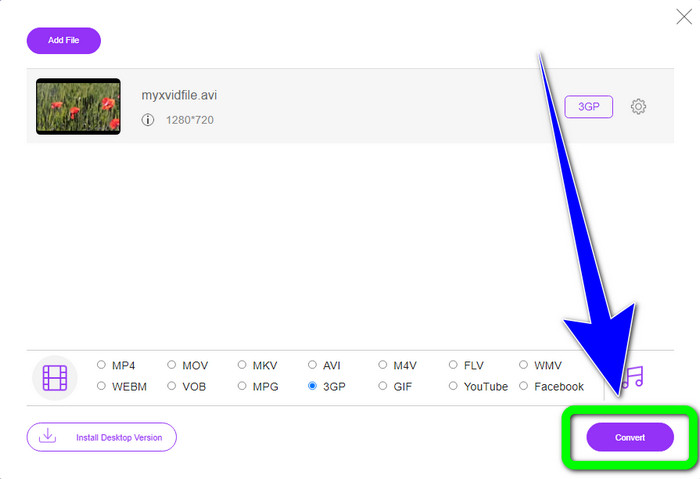
Pas 3: Has de fer clic al botó Convert per convertir el fitxer XviD a 3GP. Espera que acabi el procés de conversió del fitxer i desa el fitxer final al teu Windows o Mac.
Utilitzant OnlineConvertFree.com
Onlineconvertfree.com és una altra eina en línia que pots fer servir per convertir XviD a 3GP. Aquesta aplicació també és bona per convertir fitxers d’àudio, imatges, documents i vídeo, cosa que la fa convenient per a tothom. A més, admet diversos formats, com AVCHD, MT2S, MPEG, MKV, M4V, MP4, FLV, DIVX, XviD, 3GP i molts més. Tampoc no t’has de preocupar pel teu fitxer, perquè en aquest programari està protegit. El teu fitxer de vídeo s’eliminarà automàticament al cap de 24 hores. També pots utilitzar aquesta eina per convertir XviD a FLV.
Tanmateix, heu de tenir en compte que Onlineconverterfree.com és una eina basada en web, en la qual heu de tenir una connexió ràpida a Internet per operar-la. A més, el límit d'emmagatzematge d'aquest programari és de només 100 Mb, per la qual cosa heu de comprar una subscripció per augmentar el límit d'emmagatzematge. Seguiu els passos següents per convertir XviD a 3GP mitjançant Onlineconverter.com.
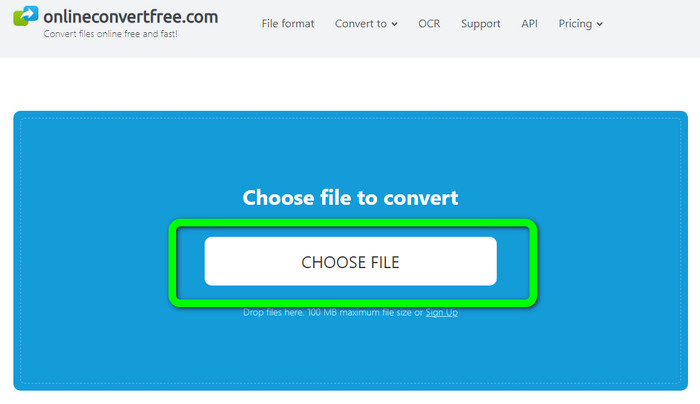
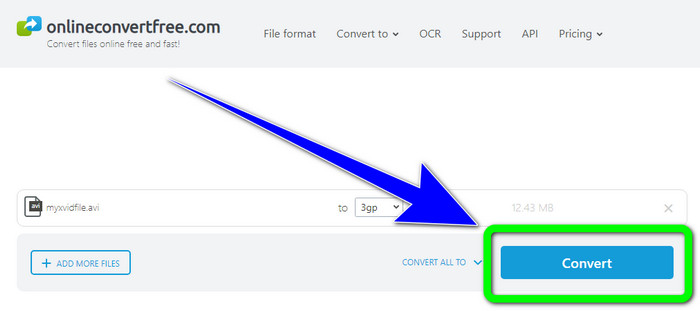
Pas 1: Ves al lloc web Onlinecovnerter.com. Fes clic al botó Choose File per inserir el fitxer XviD.
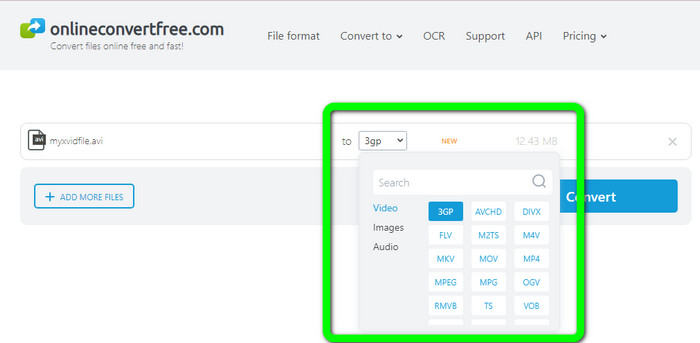
Pas 2: Fes clic al fitxer 3GP entre les opcions de format.
Pas 3: Per a l’últim pas, fes clic al botó Convert. Espera el procés de conversió i desa el resultat final al teu dispositiu. Fes clic aquí per aprendre a convertir M4V a 3GP.
Part 3: Coneixement ampliat sobre XviD
Què és XviD?
Aquest còdec, XviD, es basa en l'estàndard MPEG-4. Tot i que deforma els colors, té una gran definició en escenes dinàmiques. Com que és un còdec de codi obert, les parts interessades poden contribuir al seu desenvolupament, fomentant les actualitzacions contínues. Una pel·lícula en DVD es pot comprimir prou per encaixar en un CD tot mantenint la qualitat del DVD gràcies a la compressió habilitada a Xvid. El programa Xvid comprimeix i descomprimeix les dades de vídeo a MPEG-4 ASP. L'extensió .xvid s'utilitza per mantenir el vídeo comprimit. Quan es tracta d'arxius de vídeo, Xvid és comparable a ZIP. Xvid comprimeix el vídeo en una proporció de 200:1 o superior. Això permet una transmissió de xarxa més ràpida i un emmagatzematge en disc més efectiu.
Part 4: Preguntes freqüents sobre la conversió de XviD a 3GP
1. Quant de temps he d'esperar per convertir XviD a 3GP?
El procés de conversió dependrà del convertidor que utilitzeu i de la mida del fitxer de vídeo. Baixeu Video Converter Ultimate al vostre Windows o Mac si voleu un convertidor més ràpid. Aquesta aplicació té una velocitat de conversió 30 vegades més ràpida que altres convertidors.
2. Hi ha un convertidor gratuït que puc utilitzar amb emmagatzematge de fitxers il·limitat?
Sens dubte, sí! El millor convertidor gratuït que pots fer servir és FVC Free Video Converter Online. Aquesta eina en línia et permet convertir fitxers il·limitats, de manera que no t’has de preocupar pel límit de mida.
3. Què és millor, Xvid o 3GP?
Tots dos són millors. Si voleu reproduir un vídeo en un dispositiu 3G, és més adequat reproduir un vídeo amb un fitxer de vídeo 3GP. I si voleu reproduir els vostres vídeos en reproductors de vídeo, un vídeo amb un fitxer XviD és perfecte.
Conclusió
Aquest article t’ha proporcionat les millors tècniques per convertir XviD a 3GP. Per convertir més fitxers amb el teu Windows i Mac, pots descarregar Video Converter Ultimate. A més, si vols un convertidor en línia gratuït, pots fer servir FVC Free Video Converter Online.
-
 Trobeu els millors i senzills mètodes per convertir TS a 3GP
 Aquest article us oferirà una increïble descàrrega gratuïta del convertidor de TS a 3GP que podeu provar al vostre dispositiu. Llegiu aquest article per descobrir més detalls essencials que necessiteu
-
 Converteix MTS a 3GP utilitzant aquests convertidors definitius
 Voleu un procés senzill per convertir MTS a 3GP? No et preocupis més! Aquest article oferirà convertidors MTS a 3GP que podeu utilitzar en línia i fora de línia
-
 WebM a 3GP: maneres més efectives d'utilitzar aquestes eines
 Esteu buscant un excel·lent convertidor de WebM a 3GP? Aquest article us assegurarà que obtingueu els millors mètodes efectius per convertir el vostre WebM a 3GP
