


 Video Converter Ultimate
 Gravadora de pantalla
 Reparació de vídeo
 Baixada segura
4 millors aplicacions per utilitzar per convertir Xvid a DivX
En aquesta era moderna, els vídeos són presents arreu. A la gent li encanta mirar pel·lícules, clips, etc. Tanmateix, hi ha moments inesperats en què el vídeo és incompatible amb una plataforma concreta. Un dels principals motius és que, potser, el format de fitxer del vídeo no és compatible amb la plataforma. En aquest cas, la millor solució és canviar el vídeo a un altre format de fitxer. Per canviar el format de fitxer, has de buscar un programari excel·lent que puguis utilitzar per convertir un format de fitxer en un altre. Si vols aprendre a convertir Xvid a DivX, continua llegint.

Part 1: Millor aplicació per convertir a l'ordinador
Video Converter Ultimate és una aplicació de programari excel·lent i sorprenent que pots utilitzar per convertir Xvid a DivX al teu ordinador. Aquesta aplicació és accessible tant a Windows com a Mac. A més, és compatible amb diversos formats de fitxer, com GIF, FLV, AVI, MOC, MKV i molts més. Aquesta aplicació convertidora pot convertir fitxers incompatibles amb altres programes o dispositius. També pots convertir el teu fitxer sense perdre qualitat. A més, Video Converter Ultimate és senzill i fàcil d’utilitzar, cosa que el fa perfecte per als principiants que volen convertir fitxers amb facilitat. A més, aquesta aplicació no només és fantàstica per convertir diferents fitxers. També disposa de diverses eines d’edició que pots gaudir amb aquest programari, com ara creador de collages, controlador de velocitat de vídeo, compressor de vídeo, compressor d’àudio, afegir i eliminar marca d’aigua, retallador de vídeo, creador de collages, afegir marca d’aigua, correcció de color i molt més. Si vols convertir Xvid a DivX, segueix els passos senzills i fàcils que tens a continuació.
Pas 1: Descarrega el Video Converter Ultimate al teu ordinador. Obre l’aplicació després del procés d’instal·lació.
Descàrrega gratuïtaPer a Windows 7 o posteriorDescàrrega segura
Descàrrega gratuïtaPer a macOS 10.7 o posteriorDescàrrega segura
Pas 2: Després d’obrir el Video Converter Ultimate, ves a Converter. A continuació, fes clic al botó amb el signe Plus per adjuntar el teu vídeo de fitxer Xvid que vols convertir a DivX.
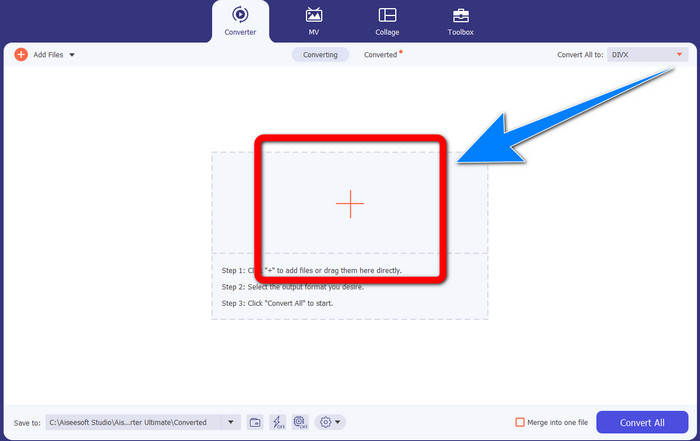
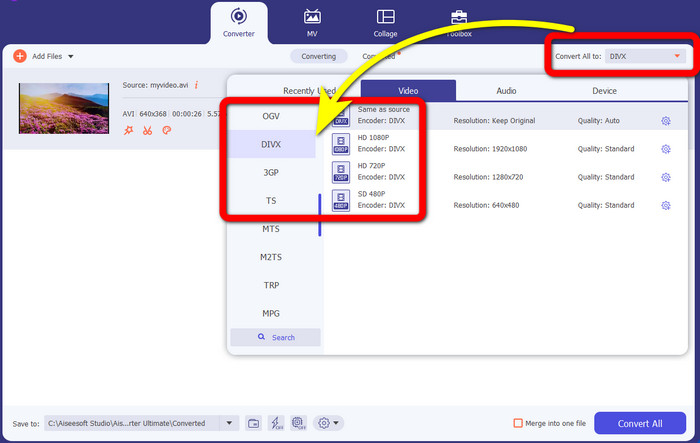
Pas 3: Quan ja hagis adjuntat el teu vídeo en fitxer Xvid, fes clic al botó Convert All. Després, selecciona el fitxer DivX i tria la qualitat desitjada, com 480p, 720p o 1080p.
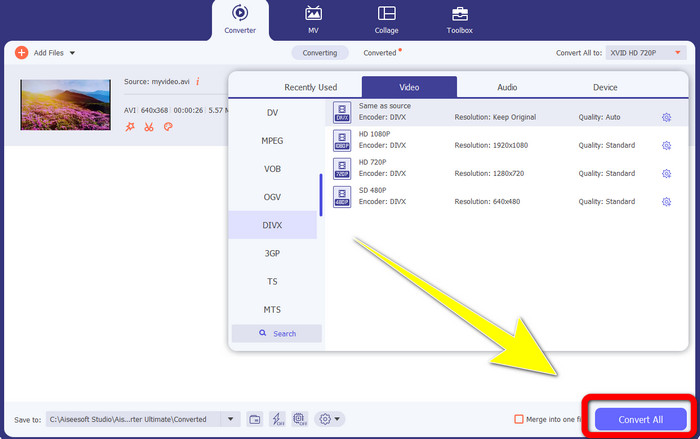
Pas 4: Després de canviar el teu vídeo d’un fitxer Xvid a un fitxer DivX, fes clic al botó Convert All per convertir i desar el resultat final. Després podràs provar el fitxer convertit al teu dispositiu per comprovar si ja és compatible.
Part 2: Programari lliure per convertir Xvid a DivX
Un altre convertidor de vídeo que pots utilitzar gratuïtament és el HitPaw Video Converter. Pots descarregar aquesta aplicació a Windows i Mac. Aquesta aplicació et permet convertir Xvid a DivX. A més, també pot convertir més de 1000 formats de fitxer, com MP4, M4V, MOV, MKV, WMV, MPEG, AVI, FLV i molts més. A més, HitPaw Video Converter és una aplicació senzilla adequada per a qualsevol usuari. Amb aquesta aplicació, pots convertir molts fitxers amb més facilitat. Tanmateix, la instal·lació triga una mica i les funcions avançades només estan disponibles a les versions de pagament. Si vols convertir Xvid a DivX, segueix aquests passos.
Pas 1: Descarrega el HitPaw Video Converter al teu Windows i Mac. Després del procés d’instal·lació, obre l’aplicació.
Pas 2: Fes clic al botó Add File per afegir el teu fitxer Xvid.
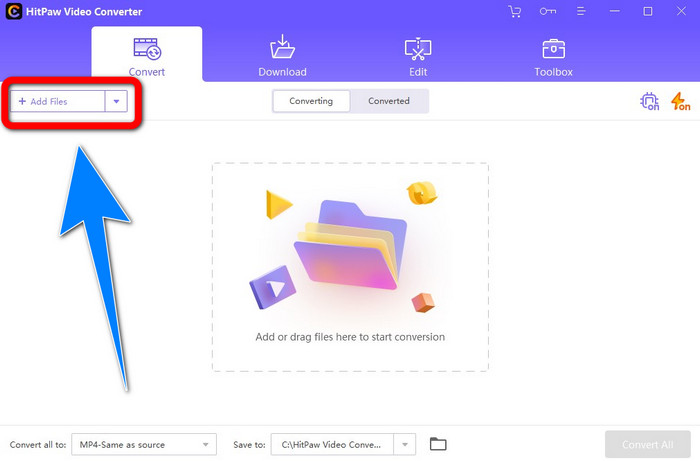
Pas 3: Ves a les opcions de format i fes clic al fitxer DivX.
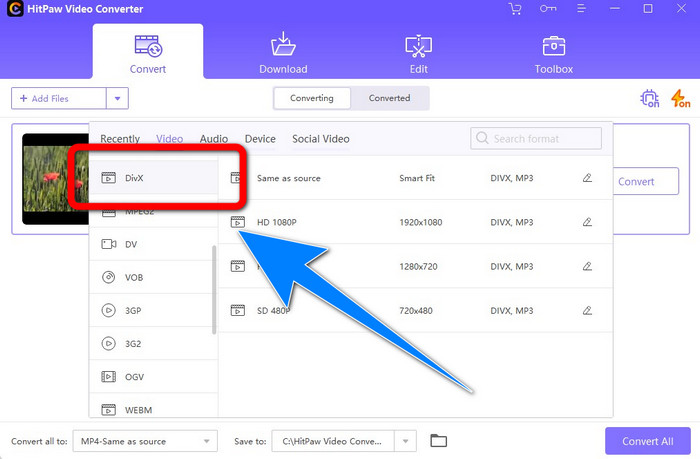
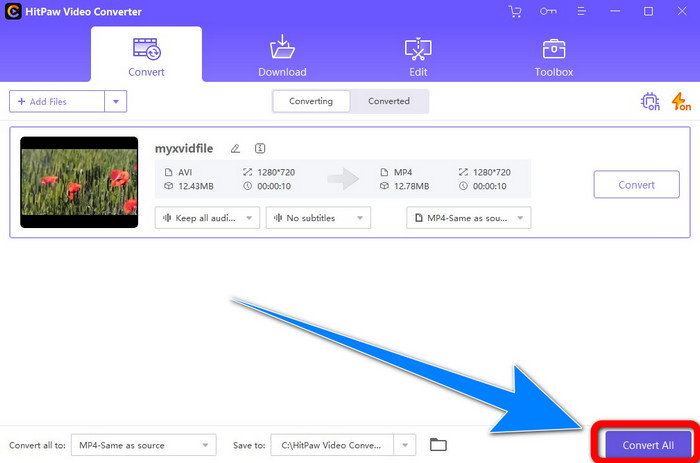
Pas 4: Després de triar el format de fitxer DivX, fes clic al botó Convert All per convertir i desar el resultat final.
Part 3: Convertir Xvid a DivX mitjançant l'eina en línia
1. Ús d'Evano
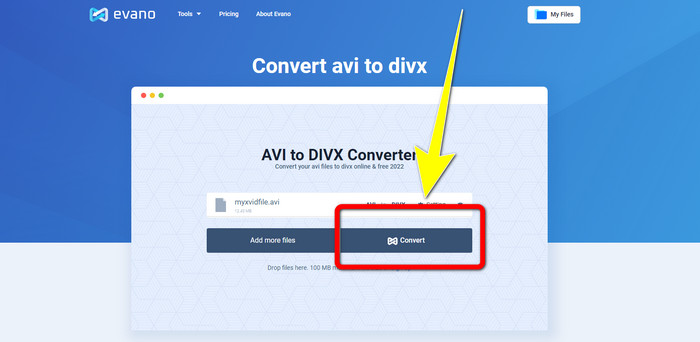
Evano és un dels programes més fiables i millors que pots utilitzar per convertir el teu fitxer Xvid a un fitxer DivX. A més, aquest programari és gratuït i té mètodes senzills de conversió, cosa que és bona per als usuaris nous. A més, és compatible amb diversos formats d’àudio i vídeo. En àudio, admet MP3, WAV, FLAC, M4R, DTS, AAC, MP2 i molts més formats d’àudio. En formats de vídeo, és compatible amb DivX, Xvid, AVI, MPEG, MKV, MOV, MJPEG, WEBM i molts més. No obstant això, aquest programari té limitacions. Només pots convertir com a màxim deu fitxers al dia, cosa que no és bona, sobretot per a les persones que han de convertir molts fitxers. A més, té un procés de conversió lent que triga uns quants minuts. Si vols convertir Xvid a DivX usant Evano, segueix els passos següents.
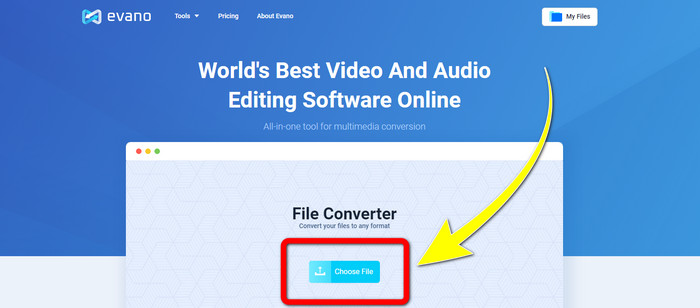
Pas 1: Ves al lloc web d’Evano. Després, fes clic a Choose file i afegeix el teu vídeo en fitxer Xvid.
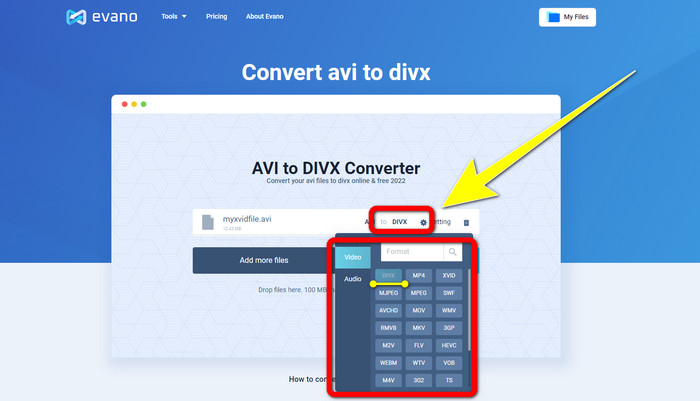
Pas 2: Quan ja hagis adjuntat el teu fitxer de vídeo, ves a les Format options i després tria el format de fitxer DivX.
Pas 3: Després de fer clic al fitxer DivX, selecciona el botó Convert. Espera el procés de conversió i Download el teu fitxer convertit.
2. Utilitzant AnyConv
Si busques una altra aplicació en línia útil i valuosa per convertir Xvid a DivX, AnyConv és el programari que pots utilitzar. A més, no cal que compris cap subscripció perquè aquesta aplicació és gratuïta. A més, és compatible amb molts formats d’àudio, vídeo i imatge, com 3GP, DIVX, MOV, FLAC, FLV, H264, JPEG, JPG, MP3, MP3, MP4, MPEG i molts més. També pots utilitzar aquest programari amb facilitat perquè només té tres passos senzills per convertir el teu fitxer Xvid a DivX. Tanmateix, el procés de conversió d’AnyConv és lent i, de vegades, el programari no funciona bé. Però si vols convertir diferents fitxers amb aquesta aplicació en línia, segueix els passos següents.
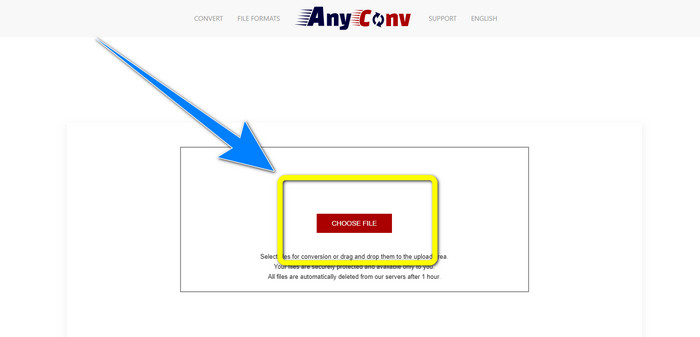
Pas 1: Visita el lloc web d’AnyConv. Fes clic al botó Choose File i insereix el vídeo que vols convertir.
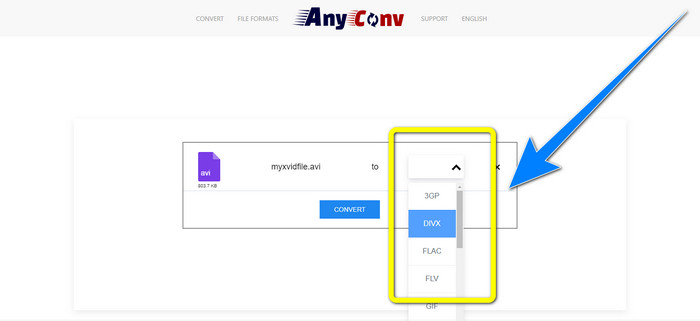
Pas 2: Després d’afegir el teu fitxer, ves a les format options i tria el format DivX.
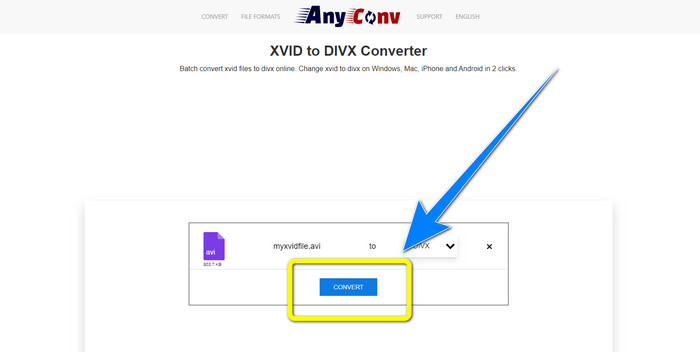
Pas 3: A continuació, fes clic al botó Convert. Després del procés de conversió, descarrega el fitxer que has convertit i desa’l al teu dispositiu.
Relacionat amb:
Com convertir XviD a FLV sense pèrdua de qualitat [Solucionat]
2 maneres útils de transcodificar XviD a format WMV sense pèrdues
Part 4: Introducció de Xvid i DivX
Xvid és un programari publicat sota la Llicència Pública General GNU basat en el format MPEG-4. També proporciona prou compressió perquè una pel·lícula completa en DVD càpiga en un sol CD. A més, va néixer a partir de DivX. A més, Xvid és un competidor directe de DivX. A més, és el més recent i ofereix una tecnologia millor que altres formats de fitxer. D’altra banda, DivX és un dels còdecs de vídeo més antics que pots trobar al mercat. També pertany a la família MPEG-4. Tanmateix, la mida del fitxer DivX és més petita que la d’altres formats de fitxer. La millor part és que el fitxer DivX és compatible amb diferents sistemes operatius i dispositius.
Part 5: Preguntes freqüents sobre la conversió de Xvid a DivX
Quant de temps triga a convertir el meu Xvid a un fitxer DivX?
La velocitat del procés de conversió de vídeo dependrà de l'aplicació que utilitzeu. Algunes aplicacions només triguen uns segons a convertir-se i d'altres triguen una estona. A més, encara depèn de la mida del fitxer del vídeo.
Puc convertir Xvid en un fitxer DivX amb el meu Mac?
Sí, és clar! Pots convertir Xvid a un fitxer DivX fent servir el teu Mac. L’aplicació adequada per al teu dispositiu és el Video Converter Ultimate. És accessible tant a Windows com a Mac. A més, pot ajudar-te a convertir més ràpidament que altres aplicacions.
També puc convertir el meu fitxer MP4 a un altre amb Video Converter Ultimate?
Si, tu pots! Video Converter Ultimate admet molts formats de fitxer de vídeo, com ara MP4, WEBM, MXF, FLV, GIF, XVID, DIVX, AVI, 5K/8K Video i molt més. D'aquesta manera, podeu convertir diferents formats de fitxer mitjançant aquesta aplicació.
Per què necessito convertir els meus fitxers a un altre format?
De vegades, heu de convertir els vostres fitxers a altres formats per fer-los més compatibles amb els vostres dispositius.
Conclusió
Com pots veure, convertir Xvid a DivX és molt important. No és només canviar el format de fitxer. Es tracta de com pots reproduir vídeos en un dispositiu concret sense experimentar cap problema. Convertir és la millor solució, sobretot si el teu vídeo no és adequat o és incompatible amb els teus dispositius. A més, si vols convertir més fitxers i canviar-los a altres formats de fitxer, el millor i més fiable convertidor que pots utilitzar és el Video Converter Ultimate.
-
 Els 2 millors convertidors suggerits per convertir XviD a MOV [en línia i fora de línia]
 Descobriu quins són els 2 convertidors suggerits que podeu utilitzar per convertir fitxers XviD a format MOV Llegiu atentament aquest article per tenir una idea de com convertir el fitxer Xvid.
-
 Com convertir XviD a AVI sense perdre la qualitat del vídeo [2021]
 Voleu convertir el vostre fitxer XviD a AVI? Si és així, llegiu aquest article mentre parlem més sobre XviD i com convertir el vostre fitxer XviD a format AVI.
-
 Com convertir MKV a DivX en línia i fora de línia de forma gratuïta
 Esteu buscant les millors maneres de convertir MKV a format DivX de forma gratuïta. Segueix llegint per conèixer els millors convertidors de MKV a DivX en línia i fora de línia.
