


 Video Converter Ultimate
 Gravadora de pantalla
 Reparació de vídeo
 Baixada segura
Apreneu a afegir etiquetes a un fitxer amb les millors maneres en un minut
If you post a media file online, it is ideal to use a tag to protect users who want to take ownership of your post. However, some users know how to remove metadata on the media file. Even though it is removable, adding tags to the file is still good for safety precautions. So, before you post anything on the web, you are lucky because you are in this article. But before we move, we must learn the basics of how to add tags to a file in less than a minute.

Part 1. Editor d'etiquetes fenomenal per afegir etiquetes a un fitxer sense esforç [programari final]
Ens agradaria que conegueu el FVC Video Converter Ultimate; Per què? El primer motiu és que és una eina capaç d'afegir etiquetes a qualsevol fitxer multimèdia, ja sigui una imatge o un vídeo. En segon lloc, en comptes d'aprendre a utilitzar altres eines, aquesta eina d'aprenentatge és molt més fluida del que penses mentre tens un toc expert. En tercer lloc, el programari està disponible a totes les plataformes, com Windows i Mac, de manera que tots dos usuaris d'aquest sistema puguin experimentar el màxim rendiment d'un editor de metadades.
En vols més? Milions d'usuaris ja aproven que aquesta és la seva primera opció per editar les etiquetes per fer l'altra tasca relacionada amb l'àudio i el vídeo, i estan contents amb els resultats. De fet, el programari és perfecte tal com és, començant des de la GUI fins a les seves característiques i funcions.
Features of FVC Video Converter Ultimate:
Admet un format ampli en què podeu pujar i canviar les metadades, com ara MP4, AVI, WMV, TS, RMVB i més de 1000 més.
Té un procés ultra ràpid i una acceleració de maquinari per ajudar-vos a acabar una tasca en poc temps.
Una de les GUI més boniques que un editor de metadades i un editor fiable en un escriptori.
Té una caixa d'eines polivalent per fer l'edició avançada i més bàsica que necessitareu al vostre vídeo i àudio.
Està disponible tant a Windows com a Mac; tenen les mateixes característiques i funcions.
Amazingly, we add a tutorial you can learn how to add tags to a file within a blink of an eye.
Step 1. You can instantly download the software on your Windows and Mac by clicking the download button. Click the downloaded file, set it up according to your wants, and install it.
Descàrrega gratuïtaPer a Windows 7 o posteriorDescàrrega segura
Descàrrega gratuïtaPer a macOS 10.7 o posteriorDescàrrega segura
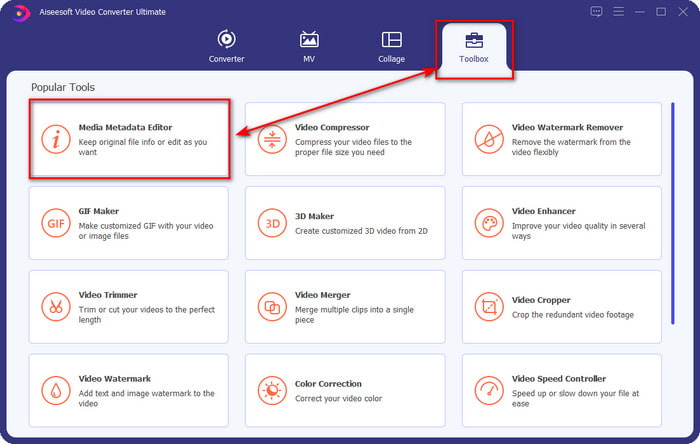
Step 2. Launch the software by clicking the Start Now. Once you've opened the ultimate software, you must open the Toolbox by clicking it and finding it under the Media Metadata Editor.
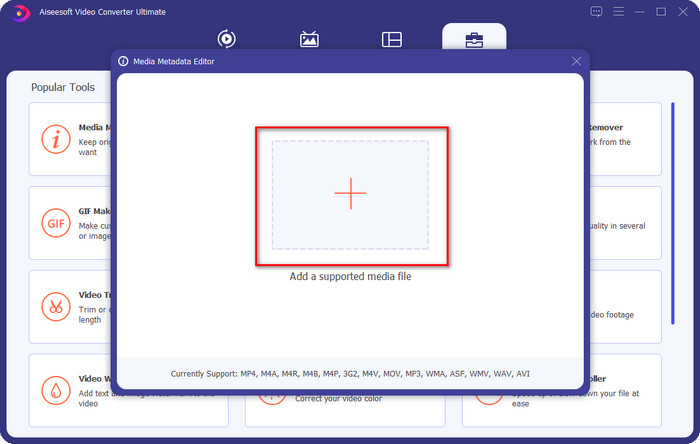
Step 3. Hit the + icon, find the media file on the file manager, and click Open next.
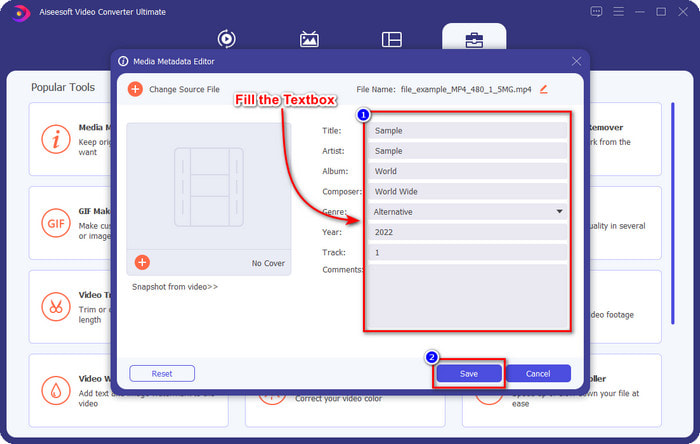
Step 4. Input all of the information you will need as your metadata on the text box. If filling it all up is done, you can now click the Save button.
Relacionat:
How to Edit Properties of WAV Files
How to Change File Details in Windows
Part 2. Com afegir etiquetes a un fitxer sense programari de tercers [Editor d'etiquetes integrat a Windows]
Aquests mètodes successius per afegir una etiqueta als fitxers només estan disponibles a Windows. El pas pot variar en la versió actualitzada de Windows en breu; si sou un Windows 10 o 11, hauríeu de conèixer aquest mètode. Sense més preàmbuls, analitzem les funcions integrades que podeu utilitzar per canviar o editar les etiquetes a l'ordinador Windows.
Propietats a Windows
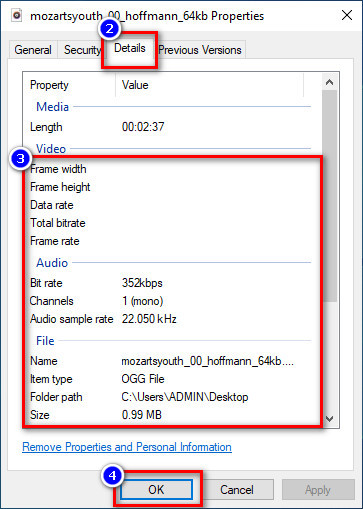
This method is not new to us because this is more known to handle changing the tags of the media files on every Windows. Properties on Windows is a simple tool that does a simple job easily. Moreover, learning how to add tags to a file is simpler with the help of this tool. To know more, keep on reading the details below.
Step 1. Find the media file on your Windows drive.
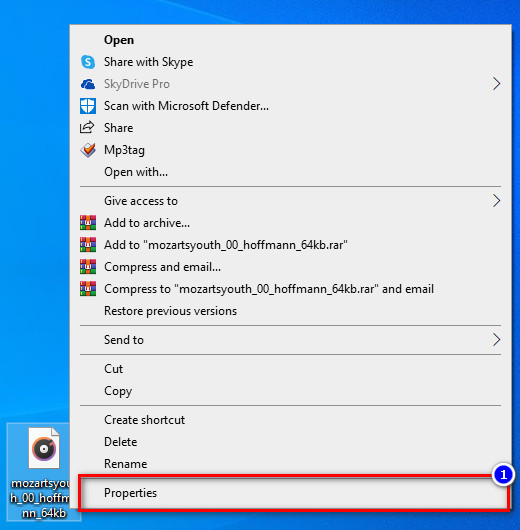
Step 2. Press the right-click and go to the Properties.
Step 3. Under Properties, you will see the Details, add the information or tags you need, and press OK.
Panell de detalls
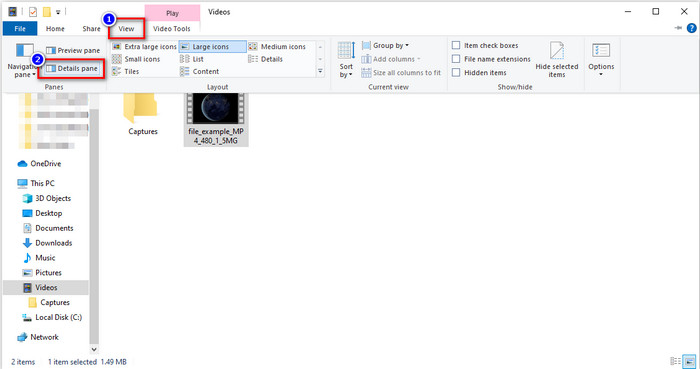
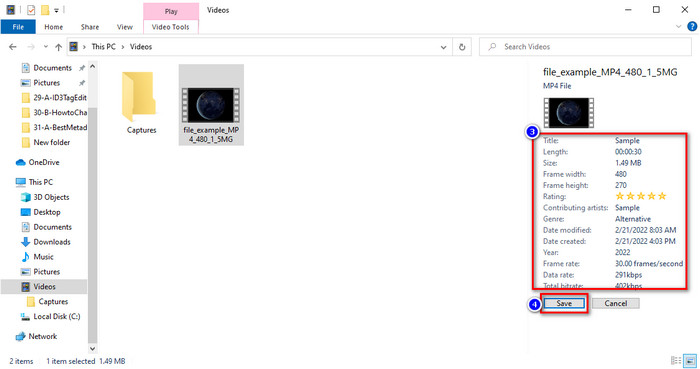
Not all Windows users know that we can use the Details Pane to adjust the media file's metadata. However, you can't add more information than the first method. But if you want to try using this method, you must now follow how to add tags to a file without opening it with detailed steps.
Step 1. Open the File Explorer and locate the file.
Step 2. Click the file, and go to the View. If you've to click the view on its panel, click the Details Pane.
Step 3. You can now adjust the tags and click Save if you've finished it.
Part 3. Preguntes freqüents sobre com afegir etiquetes a un fitxer
Què és millor: editor d'etiquetes integrat o de tercers?
Les dues tècniques per afegir o eliminar metadades funcionen bé amb les paraules. Tanmateix, si necessitem programari professional, us suggerim que instal·leu una eina que ofereixi més opcions de les que la integrada no pot oferir. Igual que el FVC Video Converter Ultimate, és l'eina de tercers perfecta per editar l'etiqueta d'un fitxer multimèdia diferent. Llegiu la informació anterior per saber-ne més.
Quin és l'avantatge d'utilitzar un editor de metadades integrat?
En lloc de descarregar-ho, instal·lar i configurar-ho tot, podeu seguir immediatament els passos per canviar les metadades, a diferència de les eines de tercers. A més, un dels millors avantatges d'utilitzar un integrat és que, sens dubte, és segur d'utilitzar perquè ja està a la vostra unitat. Però recordeu que l'editor d'etiquetes integrat no ofereix una opció àmplia per etiquetar el fitxer multimèdia; Per tant, és imprescindible descarregar un tercer adequat, però assegureu-vos que el programari que baixareu sigui segur i tingui més opcions pel que fa a les metadades. No obstant això, l'editor de metadades integrat és fiable i senzill d'utilitzar.
Puc editar metadades en línia?
Sí, podeu editar les metadades en línia. Editar metadades en línia és molt millor que utilitzar aplicacions integrades, però no totes les eines web són segures d'utilitzar. Per tant, si utilitzeu una eina en línia, assegureu-vos que la web estigui segura per evitar que us pirategin o hi hagi virus. I si no esteu segur del lloc web, podeu llegir alguns articles fiables sobre la revisió de l'eina web i saber si hi ha accés segur.
Conclusió
Whether you choose to add metadata by built-in or third-party, the success rate of making it is 100% sure. Although the tool we mentioned works best on its own, it is still better if you rely on the best software, such as the ultimate tool on the job. Why? Because it is more capable of doing more than the built-in tag editor on your Windows. If you didn't believe our review about the FVC Video Converter Ultimate, you would need to install it and try it out if it works the same as we say.
-
 Revisió completa de les metadades de FFmpeg sobre l'ús i la funcionalitat
 Voleu saber com utilitzar l'editor de metadades FFmpeg? Segurament, el programari no és fàcil d'utilitzar, però amb aquest article, podeu fer-ho amb facilitat.
-
 Com veure fàcilment metadades de fotos i vídeos a iOS
 Vols saber com veure les metadades a l'iPhone i l'iPad? Aleshores, llegir aquest article us pot ajudar a resoldre aquest problema sense esforç.
-
 Les millors tècniques sobre com editar etiquetes iD3 a iTunes [Consells efectius]
 Necessites saber com editar etiquetes a iTunes? Aleshores ets al lloc correcte. Com hem comentat els mètodes, podeu seguir per editar les etiquetes amb iTunes.
