


 Video Converter Ultimate
 Gravadora de pantalla
 Reparació de vídeo
 Baixada segura
Eliminador de filigrana Apowersoft: una revisió en profunditat que mai haureu de conèixer
Molts usuaris prefereixen utilitzar Apowersoft Watermark Remover com a opció per eliminar la marca d’aigua o el logotip dels vídeos i imatges. Pel que sabem, aquest programari disposa d’una potent funció d’eliminació de marques d’aigua i aplica un tractament suau al vídeo per mantenir-ne la qualitat. T’has plantejat descarregar aquest programari? O vols comprar un pla d’Apowersoft? Abans de prendre una decisió precipitada, llegeix la ressenya completa que hem fet sobre aquest eliminador de marques d’aigua per veure si s’ajusta a les teves necessitats!

Part 1. Revisió completa sobre Apowersoft Watermark Remover: has de saber-ho
Apowersoft Watermark Remover és un eliminador de marques d’aigua per a Windows que pots descarregar per eliminar de manera “màgica” la marca d’aigua dels teus vídeos o imatges. Sí, ho has sentit bé! Aquest programari pot processar tant imatges com vídeos, però no al mateix temps. A més, té una versió en línia, Apowersoft Online Watermark Remover, que pots utilitzar gratuïtament i accedir-hi des del teu navegador web preferit. Tot i així, la majoria de funcions que pots fer servir a la versió fora de línia no estan disponibles en línia.
Què passa si voleu afegir una marca d'aigua personalitzada al vídeo o a la imatge? És possible amb això? Sí, ho és! Podeu afegir text o un logotip a la fotografia. Heu de fer-ho únic per protegir el vídeo d'un possible robatori. Vols tenir una comprensió més profunda del millor eliminador de marques d'aigua d'Apowersoft? Si és així, aneu a la informació que incloem a continuació mentre afegim funcions, avantatges i contres, preus/plans i com utilitzar-lo.
Funcions clau d’Apowersoft Watermark Remover:
◆ Carregueu vídeo amb durada il·limitada.
◆ Un clic de distància per eliminar la marca d'aigua amb l'eliminació de la marca d'aigua d'Apowersoft.
◆ La funció d'arrossegar i deixar anar és compatible.
◆ Admet diversos formats de vídeos i imatges per importar.
◆ Afegir i eliminar marques d'aigua es poden fer aquí.
◆ Podeu descarregar aquest programari a Windows 11/ 10/ 8/ 7/ i Vista.
Pros
- Té una garantia de devolució de 30 dies i 7 dies per a aquells que aconsegueixen subscripcions mensuals.
- Té actualitzacions il·limitades del programari i del suport tècnic.
- Té una versió en línia i fora de línia que podeu utilitzar lliurement.
Contres
- No ofereix molt més que eliminar i afegir una marca d'aigua.
- Heu de comprar el programari després de la prova gratuïta per continuar utilitzant-lo.
- No és compatible amb la versió per a Mac.
Preus/Plans d’Apowersoft Watermark Remover:
La garantia de devolució de diners és compatible amb tots els plans que utilitzeu. Per tant, si decidiu comprar aquest programari, aquí teniu els plans que podeu adquirir per tenir una experiència completa amb l'eliminador de filigrana Apowersoft per a vídeos i imatges.
| Pla | Quota |
| Pla mensual | $ 19 |
| Pla anual | $ 29 |
| Pla perpetu | $ 39 |
Com utilitzar Apowersoft Watermark Remover:
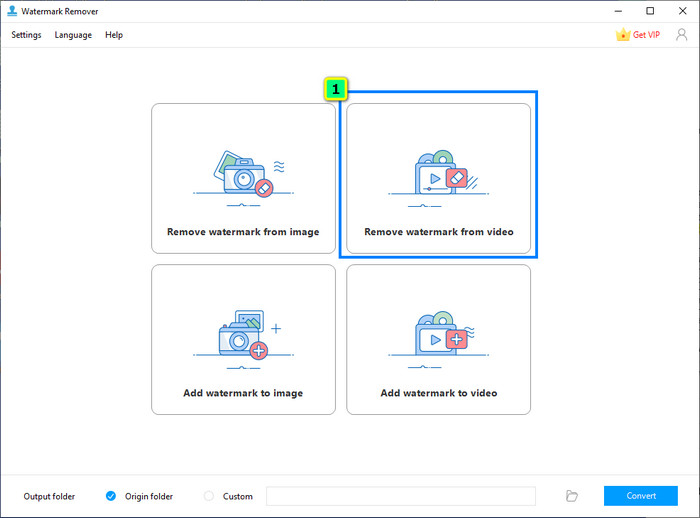
Pas 1. Descarrega l’eliminador de marques d’aigua al teu Windows, obre’l i fes clic a Video Watermark Remover.
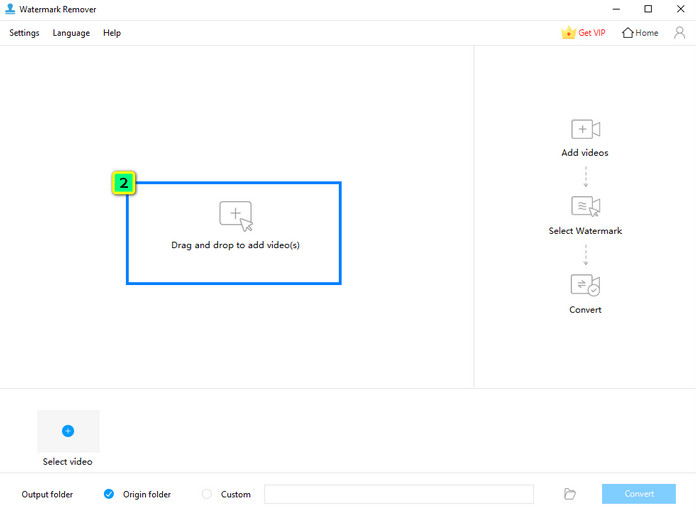
Pas 2. Fes clic a Add Files per pujar el vídeo desat al teu disc local.
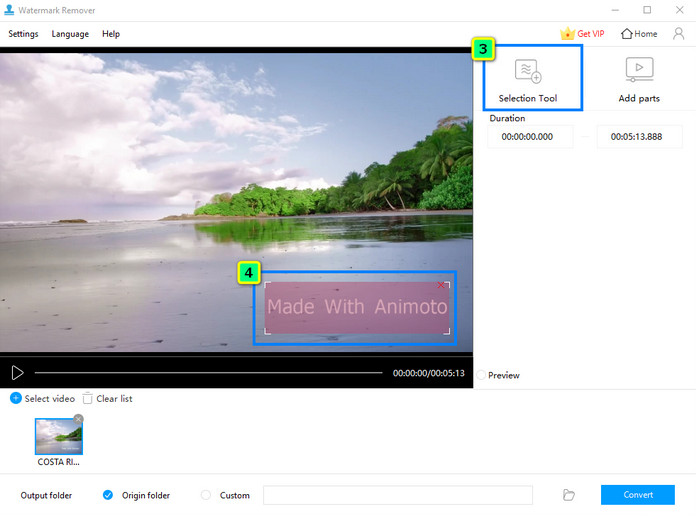
Pas 3. Prem Selection Tool, després arrossega i col·loca el quadre de selecció sobre la marca d’aigua.
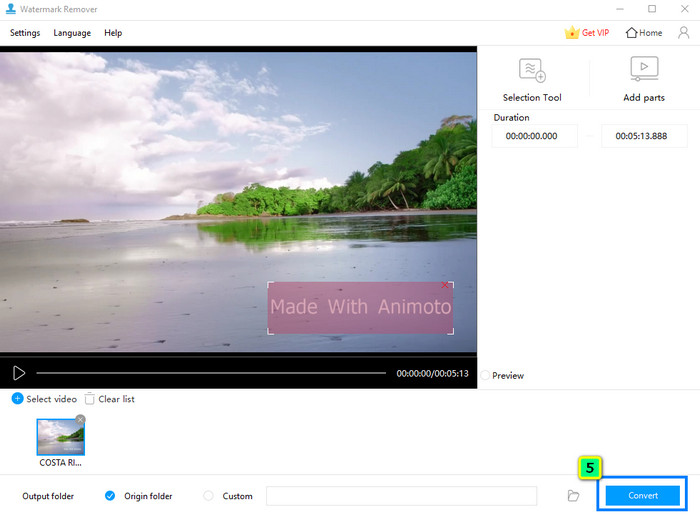
Pas 4. Després d’això, fes clic a Convert per desar el vídeo al teu disc local.
Part 2. Millor alternativa a Apowersoft Watermark Remover amb característiques i funcions multifuncionals
Apowersoft Watermark Remover per a Mac no és compatible, així que, què hauries d’utilitzar per eliminar la marca d’aigua? FVC Video Converter Ultimate és la millor alternativa que pots descarregar per eliminar ràpidament la marca d’aigua del teu vídeo, i també té una versió per a Windows. Igual que el producte d’Apowersoft, aquest programari pot eliminar i afegir marques d’aigua als vídeos.
A més, aquest programari té característiques i funcions multifuncionals que l'eliminador de filigranes que hem revisat no té, com ara retallar, retallar, crear GIF, afegir i suprimir metadades i molt més. Tot i tenir totes aquestes característiques, aquest programari es va convertir en una opció professional, però pot ser una opció per a principiants pel fàcil que és d'utilitzar. Vols saber més sobre aquest programari? Podeu llegir funcions addicionals, pros i contres, preus i com utilitzar-lo a continuació.
Funcions principals de FVC Video Converter Ultimate:
◆ Té un mètode nou i avançat per eliminar i afegir filigranes a cada vídeo.
◆ Les últimes funcions i funcions d'edició que necessitareu per al vostre vídeo es troben a Toolbox.
◆ No compromet la qualitat general del vídeo; té un potenciador de vídeo que podeu utilitzar.
◆ GUI senzilla que produeix resultats d'alta qualitat.
◆ Admet processos ultraràpids i acceleració de maquinari per ajudar-vos a processar qualsevol cosa de manera ràpida.
◆ Operatiu en una versió diferent dels sistemes operatius Windows i Mac.
Pros
- La millor opció per a múltiples edició de vídeo per les seves característiques i funció.
- Totes les edicions que heu fet aquí estan assegurades.
- Admet les actualitzacions il·limitades de l'editor i el suport tècnic les 24 hores del dia.
- S'admet la garantia de devolució de 30 dies.
Contres
- El seu preu és lleugerament superior al de l'eliminador de filigrana Apowersoft.
Com utilitzar l’eliminador de marques d’aigua de FVC Video Converter Ultimate:
Pas 1. Descarrega la versió adequada de FVC Video Converter Ultimate al teu ordinador de sobretaula o portàtil fent clic al botó de descàrrega que tens a continuació. Instal·la el programari, fes clic a Start Now per obrir-lo i elimina la marca d’aigua del teu vídeo.
Descàrrega gratuïtaPer a Windows 7 o posteriorDescàrrega segura
Descàrrega gratuïtaPer a macOS 10.7 o posteriorDescàrrega segura
Pas 2. Després d’executar l’aplicació al teu sistema, ves a la Toolbox i obre Video Watermark Remover.
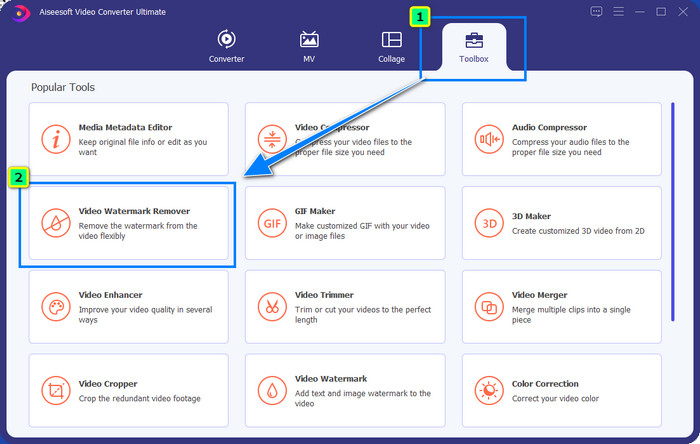
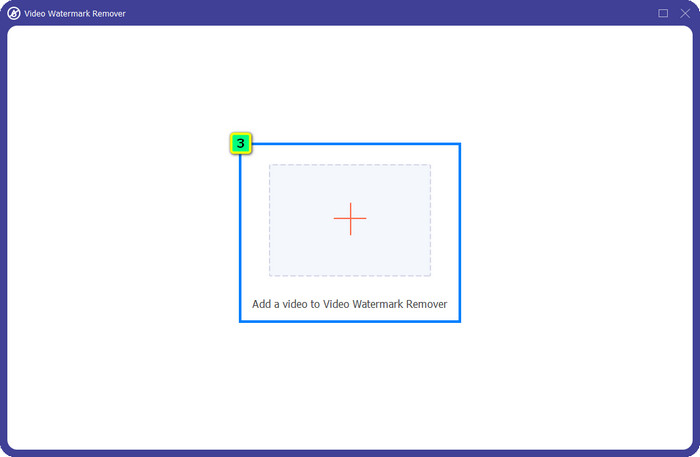
Pas 3. Prem la icona + per importar el vídeo que vols editar aquí.
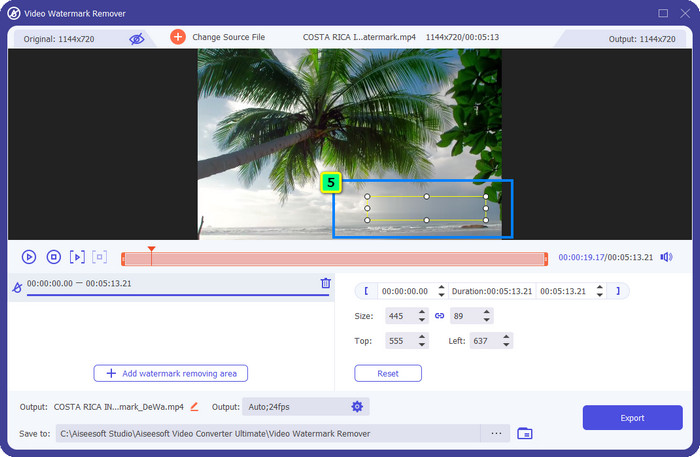
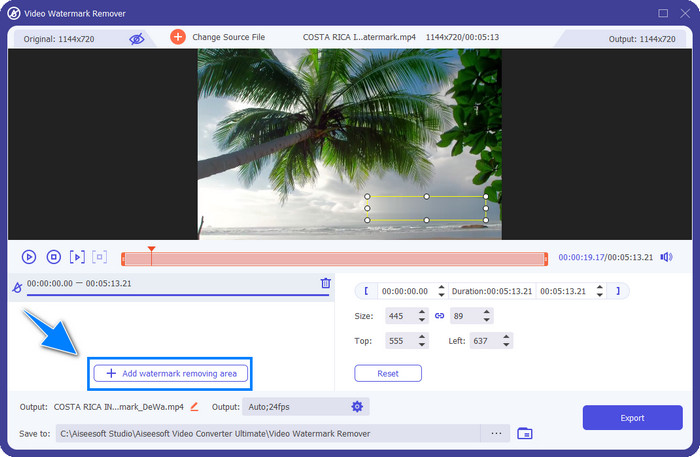
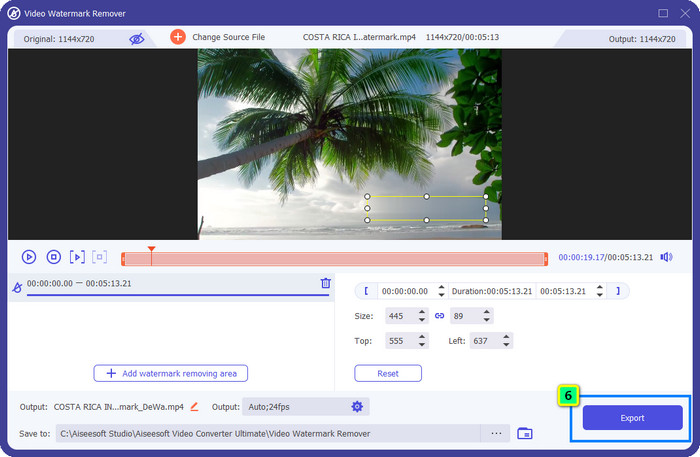
Pas 4. Selecciona Add Watermark Removing Area per utilitzar la funció d’eliminació de marques d’aigua d’aquest programari.

Pas 5. Després de fer-hi clic, apareixerà un quadre de selecció a la pantalla; canvia’n la mida i col·loca’l sobre la marca d’aigua. Assegura’t que cobreixi totes les marques d’aigua que hi hagi al teu vídeo.
Opcional: I si hi ha dues o més marques d’aigua? Com les puc eliminar? Amb aquest programari, fes clic a Add Watermark Removing Area i utilitza-ho tantes vegades com vulguis per esborrar les marques d’aigua del teu vídeo.
Pas 6. Ara desa el resultat final fent clic al botó Export; el fitxer es desarà directament al teu disc local.
Tanmateix, aquí les imatges no es poden editar. Per sort, disposa d’un FVC Free Watermark Remover que pots utilitzar per eliminar la marca d’aigua de les imatges de manera més eficient.
Lectures relacionades:
Ressenya imparcial sobre Apowersoft Free HEIC Converter que has de conèixer [ 2022 ]
Excel·lent Photobucket Watermark Remover en línia i fora de línia
Part 3. Preguntes freqüents sobre Apowersoft Watermark Remover
La prova gratuïta Apowersoft Video Watermark deixa marca d'aigua?
La prova gratuïta Apowersoft Video Watermark deixa marca d'aigua? Podeu afegir una marca d'aigua al vídeo o a la imatge amb l'ajuda d'Apowersoft Video Watermark. Tot i que utilitzeu la prova gratuïta, Apowersoft no adjunta una marca d'aigua a la sortida final després d'editar-la aquí.
On puc descarregar la versió de crack d'Apowersoft Watermark Remover?
El millor és descarregar la versió oficial d'aquest programari al seu lloc web oficial. Millor no utilitzar altres llocs web de tercers per descarregar aquest programari. En lloc de descarregar un crack, podeu gastar una mica i pagar per la seva versió oficial.
Val la pena comprar Apowersoft Watermark Remover?
Val la pena comprar l'Apowersoft Watermark Remover, però si voleu un programari multifuncional, és millor que trieu el FVC Video Converter Ultimate com a alternativa.
Conclusió
Apowersoft Watermark Remover ofereix una funció completa per afegir i eliminar marques d’aigua que pots utilitzar fàcilment en vídeos i imatges. Tot i així, les seves funcions no ofereixen gaire més, així que, si en vols més, hauràs d’anar a per totes descarregant FVC Video Converter Ultimate.
-
 3 maneres fàcils d'eliminar la marca d'aigua de Fiverr a Windows i Mac
 Esteu a la pàgina correcta si busqueu una aplicació que pugui eliminar la marca d'aigua de Fiverr. Llegiu aquesta publicació per saber com podeu eliminar fàcilment la marca d'aigua de Fiverr.
-
 Eliminadors de filigrana 123rf: revisió exhaustiva de les eines definitives
 Si voleu saber quins són els eliminadors de filigrana 123rf més destacats, llegiu aquest article detingudament. Aquest article ofereix una revisió en profunditat de les eines.
-
 Eliminadors de filigrana Arnold Maya excepcionals que no us podeu perdre
 Molts eliminadors de filigranes poden eliminar la filigrana Arnold Maya. Però si voleu saber quins són els millors eliminadors de filigranes d'Arnold Maya, llegiu aquesta pàgina.
