


 Video Converter Ultimate
 Gravadora de pantalla
 Reparació de vídeo
Com canviar el vídeo a càmera lenta a la velocitat normal com un professional
La tecnologia ha evolucionat enormement al llarg dels anys. S’han desenvolupat diversos programes i s’han inventat equips avançats per aportar singularitat i creativitat fins i tot en un simple vídeo. Un d’aquests és el vídeo a càmera lenta. Tanmateix, la majoria de persones només estan familiaritzades amb com fer aquest tipus de vídeo i no el tornen a la velocitat normal. Un exemple és quan s’utilitzen vídeos aleatoris o específics en línia per a un projecte escolar o per a qualsevol activitat de producció de vídeo, i aquests poden tenir una velocitat de reproducció que no sigui la preferida. Així doncs, aquest article pretén resoldre aquest problema que pot aparèixer de tant en tant, proporcionant les millors maneres de canviar un vídeo a càmera lenta a velocitat de reproducció normal en els sistemes operatius Mac, Windows, iOS i Android.

Part 1. Com canviar el vídeo a càmera lenta a la velocitat normal a Mac i Windows
És possible resoldre el problema de canviar la velocitat d’un vídeo a càmera lenta a normal descarregant i utilitzant convertidors fora de línia. D’altra banda, el Video Converter Ultimate és un dels millors programes d’edició disponibles, gràcies a les nombroses funcions que ofereix. A causa de la seva accessibilitat i facilitat d’ús per al públic en general, el recomanem especialment a qualsevol persona que vulgui convertir un vídeo a càmera lenta a velocitat normal en un ordinador Mac o Windows. A continuació es mostren els passos suggerits per utilitzar correctament el programari: gestioneu-lo bé.
Pas 1: Feu clic al botó Baixada gratuïta per desar el programa al disc dur de l’ordinador. A continuació, podeu instal·lar el programari i personalitzar-lo.
Descàrrega gratuïtaPer a Windows 7 o posteriorDescàrrega segura
Descàrrega gratuïtaPer a macOS 10.7 o posteriorDescàrrega segura
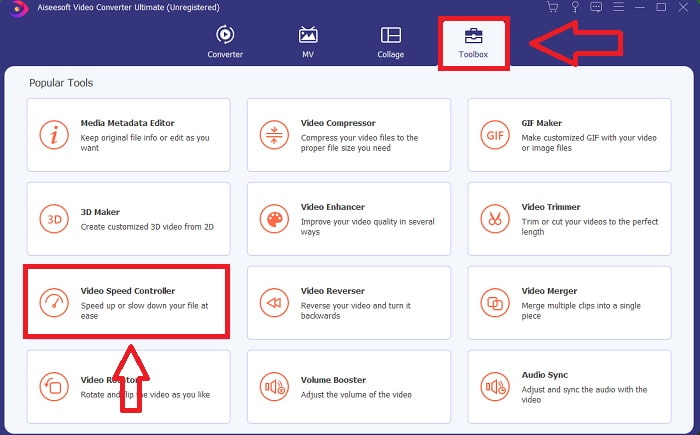
Pas 2: Activeu el programari fent clic a la icona Caixa d’eines a la barra de menú i seleccionant Controlador de velocitat de vídeo de la llista.
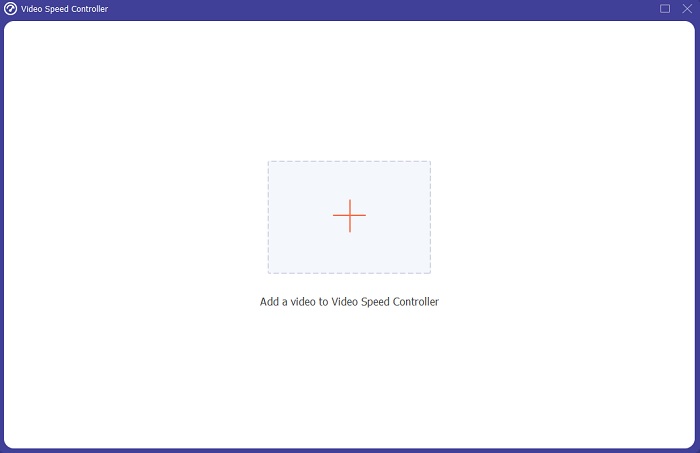
Pas 3: Per afegir el vídeo a càmera lenta, feu clic al botó + a la barra de preferències i continueu editant el vídeo.
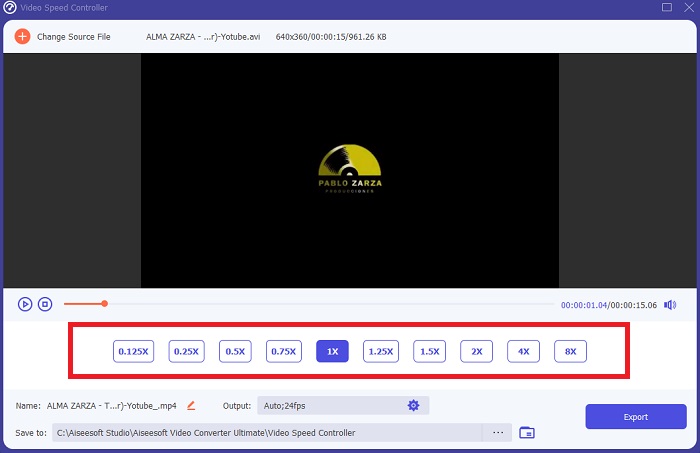
Pas 4: Augmenteu o disminuïu la velocitat del vídeo per ajustar la velocitat de reproducció.
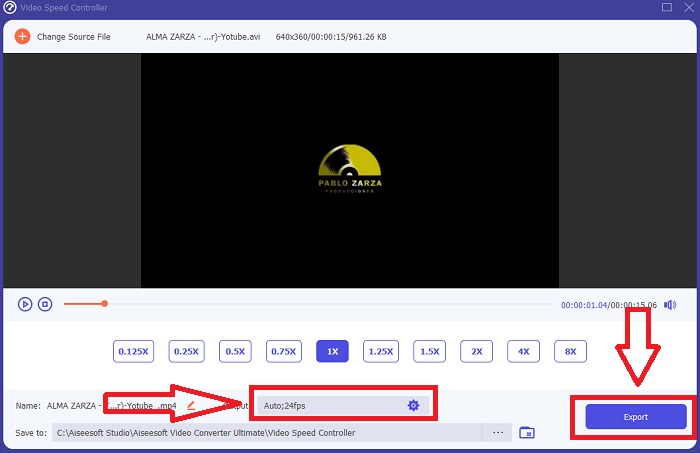
Pas 5: El format de sortida, la resolució, la qualitat, etc., es poden editar un cop hàgiu ajustat la velocitat de reproducció del vostre clip de vídeo. Quan estigueu a punt per desar la feina, feu clic a Exporta i trieu una ubicació.
Part 2. Com canviar el vídeo a càmera lenta a la velocitat normal a l'iPhone/iPad amb fotos
Els vídeos a càmera lenta són una de les millors opcions que tenen a l’abast qualsevol creador de contingut o videògraf per afegir un efecte dramàtic als clips utilitzant només el telèfon mòbil, com l’iPhone. Com que l’iPhone és un dels telèfons mòbils amb una càmera d’alta gamma que pot gravar vídeos a una taxa alta de fotogrames per segon, us pot oferir un clip molt satisfactori de veure. Tanmateix, els vídeos amb una velocitat de reproducció més baixa no sempre són la millor opció per a tots els vídeos que feu: hi ha tipus de vídeos en què la càmera lenta no és suficient o resulta irrellevant. Per tant, canviar el vídeo a càmera lenta a velocitat normal a l’iPhone es converteix en la vostra única opció. Per fer-ho, aquí teniu els passos fàcils de seguir:
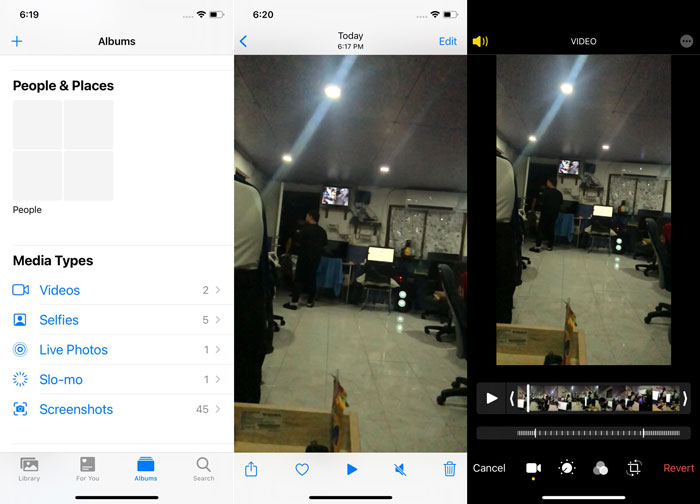
Pas 1: Obriu l’app Fotos al vostre iPhone o iPad i aneu a la pestanya Àlbums. Aneu fins a la part inferior i toqueu Càmera lenta a la secció Tipus de mèdia. Per veure un vídeo a pantalla completa, toqueu-lo.
Pas 2: Seleccioneu Edita a l’angle superior dret.
Pas 3: Apareixerà un petit control lliscant amb línies verticals blanques. L’efecte de càmera lenta està representat per les línies més separades, mentre que les línies molt juntes representen l’efecte a velocitat normal. Totes dues parts estan dividides per dos controls lliscants. Arrossegueu un control lliscant d’un extrem de la pantalla a l’altre. Totes les línies molt espaiades quedaran perfectament alineades. Això indica que el vídeo ara es reproduirà a velocitat normal. Per comprovar si funciona, premeu el botó de reproducció en forma de triangle. El vídeo que abans era a càmera lenta ara té una velocitat de reproducció normal. Tot i això, podeu desfer aquesta acció seleccionant Edita, Reverteix, Reverteix a l’original. També podeu utilitzar els controls lliscants per triar quines parts de la gravació es reproduiran a una velocitat més lenta o més ràpida segons el vostre gust.
Relacionat:
Com solucionar el problema de vídeos que no es reprodueixen a l’iPhone
Millor reproductor de vídeo per a iPhone
Part 3. Com canviar el vídeo a càmera lenta a la velocitat normal a Android amb Google Fotos
Els usuaris d’Android poden ajustar la velocitat d’un vídeo a càmera lenta perquè torni a ser normal de manera gratuïta, igual que els usuaris d’iPhone. En aquest cas, haureu d’utilitzar l’aplicació Google Fotos que ve preinstal·lada al telèfon, tot i que també podeu fer servir una app de tercers. Per accessibilitat i comoditat, utilitzarem Google Fotos per canviar el vídeo a càmera lenta a velocitat normal a Android, i així és com es fa:
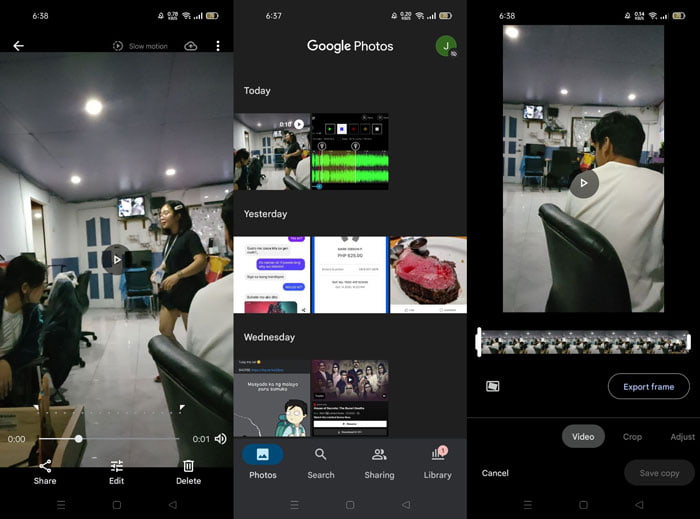
Pas 1: Obriu l’app Google Fotos al vostre telèfon Android i feu clic al vídeo que vulgueu accelerar. Seleccioneu Edita a la part inferior de la pantalla i apareixerà un controlador de velocitat de reproducció.
Pas 2: Arrossegueu el control lliscant per augmentar la velocitat de reproducció a 1,5x o 2x, en funció de la velocitat del vostre vídeo a càmera lenta.
Pas 3: Feu clic al botó de reproducció en forma de triangle per comprovar si el vídeo ara té la velocitat que voleu. Un cop satisfets, seleccioneu Fet per desar-lo.
Part 4. Preguntes freqüents sobre com canviar el vídeo a càmera lenta a la velocitat normal
Com puc invertir un vídeo a càmera lenta?
Per canviar d'opinió i convertir aquest vídeo en un clip de càmera lenta una vegada més, només cal que obriu el vídeo i toqueu el botó Edita a la part inferior de la pantalla. A continuació, feu clic a Revertir i seleccioneu Torna a l'original per confirmar la vostra decisió.
Podeu convertir vídeos de baix fps a càmera lenta amb l'aplicació Fotos?
L'aplicació Fotos no us permet convertir vídeos normals d'iPhone gravats a 30 fps o 24 fps a càmera lenta. Tanmateix, podeu fer-ho mitjançant aplicacions de tercers com iMovie o altres aplicacions d'edició d'Apple.
Google Fotos és la millor aplicació per convertir vídeos a càmera lenta a velocitat normal?
Com es pot imaginar, hi ha alguns inconvenients en utilitzar aquesta aplicació gratuïta. En primer lloc, la velocitat de processament de vídeo és relativament lenta, sobretot quan s'edita un videoclip llarg. A més, si divideixes el vídeo abans de canviar la velocitat de reproducció, l'àudio de fons o la narració de veu es silenciarà. Independentment, és una gran aplicació gratuïta per a Android. Encara podeu utilitzar aplicacions de tercers, però la majoria de les convenients d'utilitzar no són gratuïtes.
Conclusió
La versatilitat dels vídeos pot satisfer necessitats diferents, i simplement canviant la velocitat de reproducció es poden cobrir gèneres diversos, tant d’entreteniment com educatius. El fet que això es pugui fer avui dia amb aplicacions i programes de fàcil accés potencia la nostra creativitat i ens resulta molt pràctic segons les nostres preferències. Encara que canviar un vídeo a càmera lenta a velocitat normal en línia també és convenient, descarregar un programari redueix les molèsties relacionades amb els problemes de connexió. Aquest article pot ser de gran ajuda per a aquells que encara no estan familiaritzats amb aquests mètodes i ofereix respostes als seus dubtes.
-
 Reproductor de vídeo VR: revisió dels 5 millors reproductors de vídeo VR el 2021
 El VLC pot reproduir VR? Quin és el millor reproductor de vídeo VR? Com es pot reproduir vídeo en auriculars de realitat virtual? Aquí podeu respondre a totes les vostres preguntes sobre el reproductor de vídeo VR.
-
 Com reproduir DVD al Windows Media Player el 2021
 Per què el meu DVD no es reprodueix al Windows Media Player? Com es reprodueix el DVD al reproductor multimèdia de Windows 7? Aquesta publicació comparteix 3 maneres de reproduir DVD amb o sense WMP.
-
 Obriu el fitxer MKV al Windows Media Player
 Podeu reproduir fitxers MKV al Windows Media Player? Com convertir MKV a Windows Media Player? Trobeu tres maneres d'obrir el fitxer MKV al Windows Media Player aquí.
