


 Video Converter Ultimate
 Gravadora de pantalla
 Reparació de vídeo
 Baixada segura
Canvieu ràpidament les metadades del vídeo a l'iPhone com un professional en menys d'un minut
Avui dia, ordenar els nostres fitxers s’ha tornat essencial per a molts, especialment per als usuaris d’iPhone. Podem determinar la ubicació del fitxer i organitzar el fitxer multimèdia a la nostra biblioteca o carpeta amb una etiqueta adequada. En alguns casos, els usuaris d’iOS troben incòmode cercar un fitxer a l’iPhone quan té metadades incorrectes, perquè no són fàcils de localitzar. Vols saber com ho podem solucionar? La solució adequada per arreglar les metadades a l’iPhone és canviar-les segons les teves especificacions per fer-les visibles i ben organitzades. Informa’t i aprèn a canviar les metadades de vídeo a l’iPhone llegint aquest article.

Part 1. 2 de les millors aplicacions per canviar les metadades de vídeo a l'iPhone
Metapho - Editor d'etiquetes de vídeo i fotos a l'iPhone
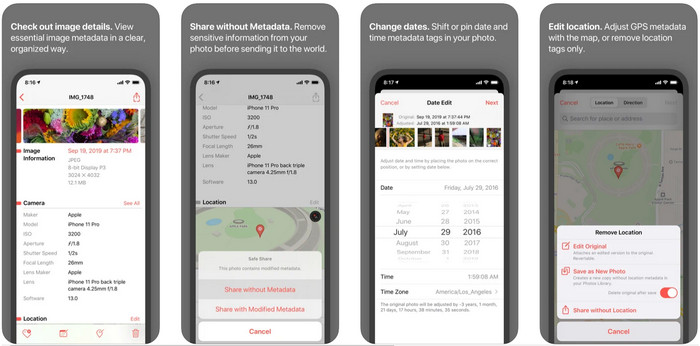
Metapho és un dels millors editors d’etiquetes que pots descarregar i utilitzar per canviar les metadades de vídeo en un iPhone. L’app és un editor senzill que et permet canviar la data, el nom del fitxer, la mida, el model del dispositiu, la velocitat d’obturació i la ubicació. Amb aquesta aplicació també pots veure les metadades de cada Live Photo que fas i editar-les correctament si ho desitges. Tot i que l’app és prometedora, cal comprar-la per poder editar les metadades; si no ho fas, només podràs visualitzar les metadades gratuïtament i res més. Però no t’amoïnis, perquè només és una compra única, de manera que podràs gaudir de l’app un cop l’hagis adquirida.
Pas 1. Obre l’App Store i descarrega Metapho al teu iPhone.
Pas 2. Obre l’app, tria un dels fitxers que vols obrir a Fotos i toca’l per continuar. A continuació, veuràs una llista d’edicions que pots fer a la teva etiqueta; edita-les segons les teves necessitats.
Pas 3. Fes clic al botó Save quan hagis acabat d’editar les etiquetes.
Metadades Exif: Editor d'etiquetes de fotos i fotos en directe a l'iPhone
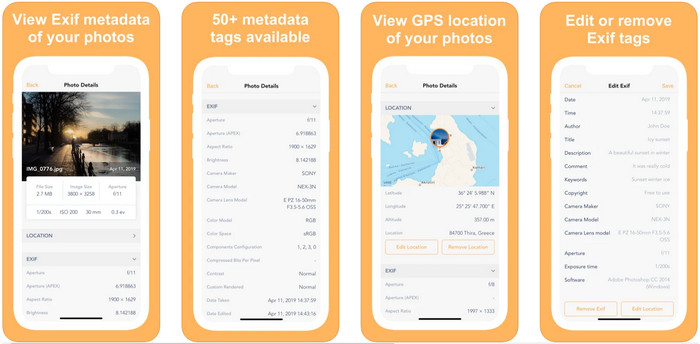
EXIF Metadata fa el que ha de fer un editor de metadades per ajudar els usuaris d’iPhone a editar les seves etiquetes. Aquesta eina té una interfície gràfica singular i és més atractiva que Metapho. Amb aquesta app pots veure informació molt més detallada sobre la teva imatge de manera gratuïta. Encara que l’app ofereix una versió Pro, les funcions d’edició que necessitaràs ja hi són a la versió gratuïta, però pots adquirir la versió Pro per afegir més informació a les teves metadades. Un dels inconvenients d’aquesta app és que només admet fitxers d’imatge, de manera que canviar les metadades d’un vídeo és impossible. Per tant, si vols canviar les metadades d’una imatge en un iPhone, segueix els passos següents.
Pas 1. Descarrega i instal·la l’app al teu iPhone.
Pas 2. Obre l’eina, toca el botó + i tria de quina imatge vols canviar l’etiqueta.
Pas 3. Fes clic a Edit, afegeix la informació que necessitis i després fes clic a Save.
Part 2. Millor editor de metadades multimèdia per a Windows i Mac: FVC Video Converter Ultimate
No tota la informació que necessites canviar a les teves metadades és compatible amb les apps esmentades anteriorment. Si vols tenir informació més detallada a la teva etiqueta, et recomanem triar el millor editor d’etiquetes per a Windows i Mac, el FVC Video Converter Ultimate. Aquest programari et pot ajudar a afegir més informació d’etiquetes al teu fitxer multimèdia amb només uns quants clics. Siguis professional o no, afegir metadades al teu fitxer deixa de ser un problema gràcies a aquest programari definitiu.
Potser us preocupa si el vostre fitxer és compatible aquí. Aquesta eina admet més de 1000 formats i, de fet, el que teniu és compatible. Per donar-vos una idea de com canviar les metadades de vídeo del vostre iPhone, llegiu la informació detallada que oferim a continuació per seguir-les en conseqüència perquè l'èxit està en camí.
Pas 1. Fent clic al botó de descàrrega següent, pots obtenir aquesta eina definitiva tant per als teus sistemes Windows com Mac. Fes clic al fitxer que has descarregat per instal·lar l’eina al teu disc i després obre-la.
Descàrrega gratuïtaPer a Windows 7 o posteriorDescàrrega segura
Descàrrega gratuïtaPer a macOS 10.7 o posteriorDescàrrega segura
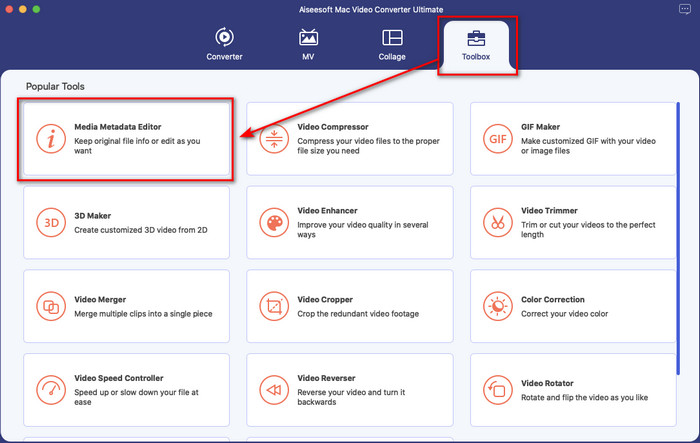
Pas 2. Ves a la secció Toolbox i, dins el conjunt de funcions, fes clic a Media Metadata Editor.
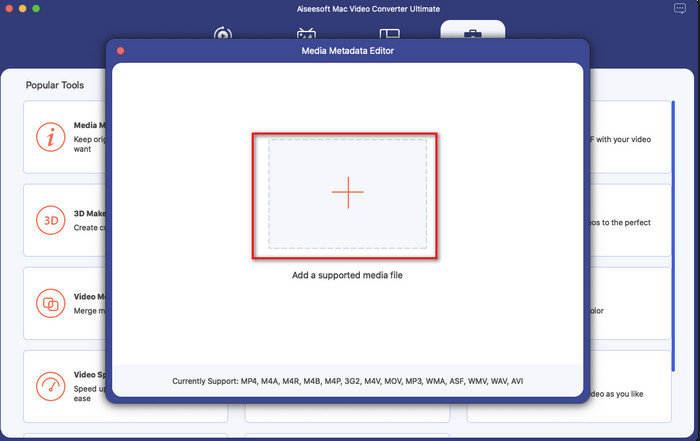
Pas 3. Prem el botó + i apareixerà una carpeta de fitxers a la pantalla; busca el fitxer al qual vols afegir metadades, fes clic a Open per pujar-lo.
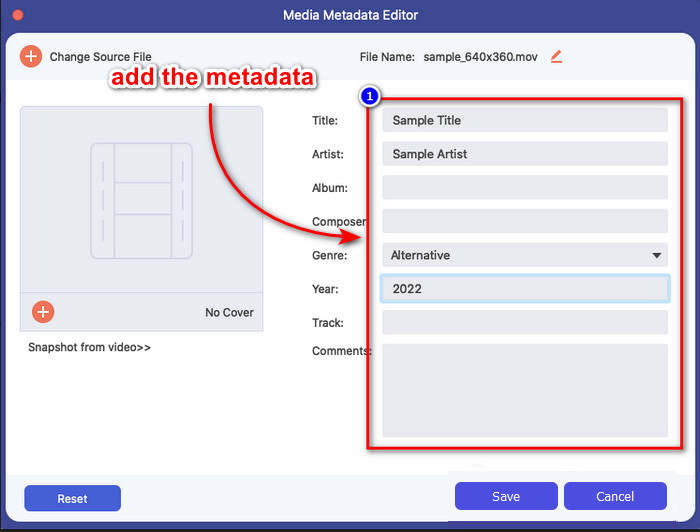
Pas 4. A la nova finestra, ara ja pots editar o suprimir les metadades del teu fitxer; fes clic a cada quadre de text i escriu la informació que vulguis afegir com a metadades. A més, també pots afegir una caràtula d’àlbum al teu fitxer multimèdia, si ho desitges, prement el botó +, després busca la imatge de l’àlbum al fitxer i fes clic a Open per inserir-la.
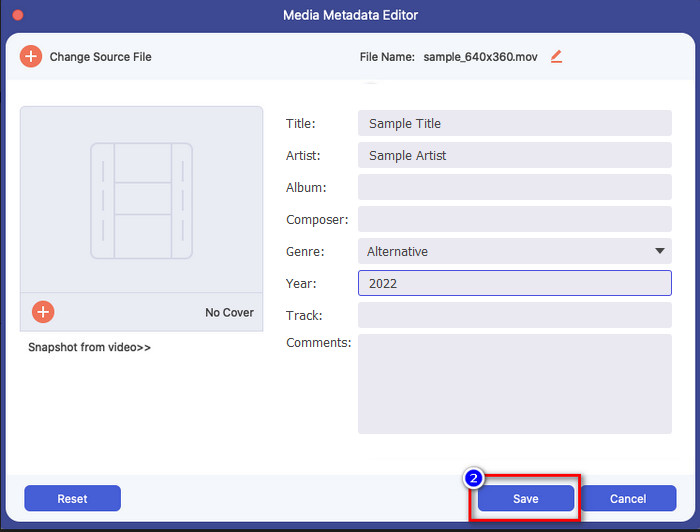
Pas 5. Quan hagis acabat totes les edicions i canvis al teu fitxer multimèdia, ja pots fer clic a Save. En un instant, hauràs canviat les metadades del teu fitxer multimèdia; amb uns quants clics senzills i l’ajuda de l’eina, tot s’ha fet possible.
Part 3. Preguntes freqüents sobre l'editor de metadades de l'iPhone
Puc editar metadades a l'iPhone?
Sí, podeu editar metadades al vostre iPhone, però només podeu editar la ubicació i veure les etiquetes bàsiques del fitxer, però no editar-les. Si voleu canviar les metadades del fitxer amb detall, us suggerim que utilitzeu una aplicació de tercers que sigui suficient per a les vostres necessitats per al vostre problema de metadades.
Per què he d'eliminar les metadades?
Eliminem metadades per motius de privacitat. Algunes persones podrien obtenir informació molt detallada sobre nosaltres mitjançant les metadades; potser no ho sabies, però les metadades poden emmagatzemar la teva ubicació exacta, data, hora, coordenades i fins i tot números de telèfon mòbil. Si no vols exposar informació sobre tu mateix, et recomanem eliminar les metadades del teu fitxer. Vols saber com? Si és així, aquest article t’ajudarà a eliminar les metadades del teu fitxer en menys d’un minut.
Canviar les metadades a l'iPhone és fàcil?
Absolutament, sí, canviar metadades a l'iPhone és fàcil amb l'ajuda de l'editor de metadades adequat. Tot i que la tasca sembla una mica difícil, encara és manejable per a tots els usuaris. Si voleu conèixer la millor eina per dur a terme aquesta tasca, heu de llegir la informació sobre les dues eines que hem proporcionat anteriorment. Per ajudar-vos a acabar de canviar l'etiqueta a l'iPhone com un professional.
Conclusió
Ara que has arribat al final, hem après que canviar les metadades de vídeo a l’iPhone és una tasca fàcil. Amb l’ajuda d’aquest article i la teva dedicació, s’ha fet possible. Així doncs, ara has de triar la manera que creguis que s’adapta millor a tu. Encara que el FVC Video Converter Ultimate no estigui disponible a l’iPhone, continua sent un dels millors programes que pots tenir al teu Mac o Windows per editar les etiquetes. Aquesta eina permet afegir informació molt detallada sobre el fitxer multimèdia que tens, per ajudar-te a organitzar-lo i fer-lo visible. Vols saber quines altres funcions i característiques té el programari? Fes clic al botó de descàrrega de més amunt per donar-hi una ullada.
-
 Els 3 principals editors de metadades FLAC a Mac i Windows [Actualitzat el 2022]
 Voleu canviar les metadades de FLAC? En aquest cas, heu de llegir aquest article, ja que proporcionem coneixements suficients sobre l'últim editor de metadades FLAC que podeu utilitzar.
-
 Les millors maneres d'editar metadades MKV com un professional [Fàcil]
 No tens ni idea de com editar les metadades MKV? Alguns usuaris tenen dificultats per editar les etiquetes a MKV, si sou un d'ells, llegiu aquest article.
-
 Millor tècnica sobre com editar les metadades de WebM ràpidament
 Llegiu tots els detalls que oferim a continuació mentre inserim un tutorial sobre com editar les metadades de WebM. Feu clic a aquest enllaç per saber-ne més.
