


 Video Converter Ultimate
 Gravadora de pantalla
 Reparació de vídeo
 Baixada segura
Comprimir 3GP: aquí teniu la guia definitiva per reduir fitxers 3GP en procés per lots
3GP és famós per la seva petita mida de fitxer i la seva gran mobilitat. Quan necessiteu alliberar més espai del vostre telèfon Blackberry, la còpia de seguretat i reduir els fitxers 3GP són la manera més eficient. Per descomptat, podeu simplement comprimir vídeos 3GP gratuïtament en línia per reduir la mida del vídeo. Quan necessiteu reduir el 3GP, o fins i tot gestionar els vídeos, podeu triar els compressors 3GP professionals de l'article.

Part 1: Com alliberar vídeos 3GP de compressió per lots en línia
Quina hauria de ser la millor manera de comprimir diversos vídeos 3GP en línia? La majoria de compressors de vídeo en línia només et permeten reduir la mida d’un sol vídeo. Free Video Compressor és el compressor de vídeos 3GP ideal que redueix un gran nombre de vídeos amb uns quants clics. Et permet ajustar els paràmetres de vídeo, com ara la resolució, la taxa de bits, etc.
- 1. Comprimiu diversos vídeos 3GP en línia amb passos senzills.
- 2. Ajusta la resolució del vídeo, la taxa de bits, la mida del vídeo i molt més.
- 3. Fàcil d'utilitzar sense filigranes afegits als vostres fitxers de vídeo.
- 4. Comprimir per lots 3GP a una velocitat 30 vegades més ràpida que altres eines.
Pas 1: Un cop hagis transferit els vídeos 3GP des del teu telèfon intel·ligent, pots anar al compressor 3GP en línia gratuït i fer clic al botó Add Files to Compress per importar el fitxer 3GP que vulguis reduir.

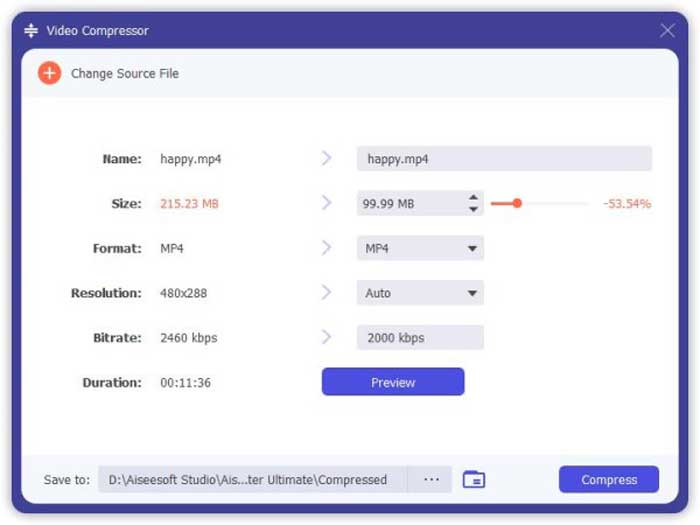
Pas 2: Després d’això, pots ajustar la resolució, la taxa de bits i molts altres paràmetres. Previsualitza la mida del vídeo 3GP i fes clic al botó Compress per comprimir el vídeo 3GP en línia.

Pas 3: Quan hagis descarregat el fitxer 3GP, només cal que facis clic al botó Change Source File per canviar-lo per un altre fitxer 3GP. No hi ha cap limitació quant al nombre de fitxers de vídeo 3GP. Troba més reproductors 3GP aquí.
Part 2: La forma professional de comprimir fitxers 3GP per lots
Si necessites comprimir els teus vídeos 3GP simultàniament, o fins i tot dividir els vídeos en fitxers més petits, Video Converter Ultimate és un compressor 3GP amb diverses funcions que no només redueix la mida dels vídeos 3GP, sinó que també els divideix i retalla. A més, també pots convertir els vídeos 3GP a MP4 i a altres formats de vídeo.
- 1. Comprimiu diversos vídeos 3GP simultàniament amb un sol clic.
- 2. Seleccioneu el punt inicial i el punt final per retallar el fitxer 3GP desitjat.
- 3. Redueix els vídeos 3GP amb velocitat de bits, format de vídeo, resolució, etc.
- 4. Converteix 3GP a MP4 i més altres formats de vídeo a una mida més petita.
Descàrrega gratuïtaPer a Windows 7 o posteriorDescàrrega segura
Descàrrega gratuïtaPer a macOS 10.7 o posteriorDescàrrega segura
Un cop hàgiu instal·lat Video Converter Ultimate, podeu iniciar el programa al vostre ordinador. Proporciona 3 maneres diferents de comprimir els vídeos 3GP. Només cal que consulteu el procés detallat a continuació.
1: Comprimiu fitxers 3GP des de Toolbox
Ves al menú Toolbox de la interfície d’usuari i tria l’opció Video Compressor per reduir la mida dels fitxers 3GP. Pots ajustar el còdec de vídeo, la taxa de bits, la resolució i moltes altres opcions de configuració. Després d’això, pots previsualitzar la mida del vídeo per comprimir els fitxers 3GP.
2: Comprimiu 3GP en procés per lots
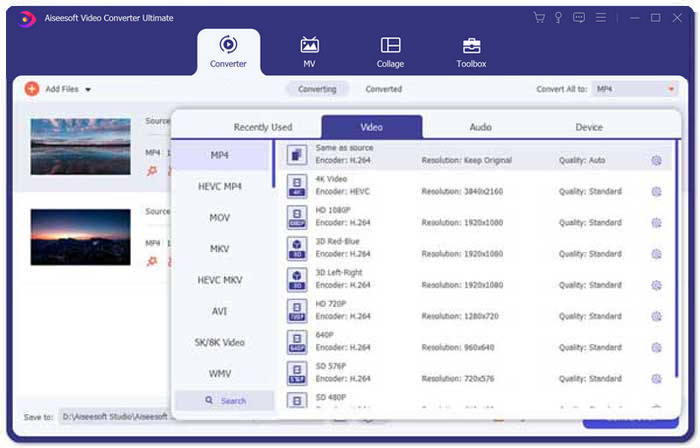
Ves al menú Converter i tria Add Files per importar els vídeos 3GP al programa. Llavors pots seleccionar MP4 com a format de sortida al costat de la columna Convert All to:. A més, també pots ajustar la taxa de bits de vídeo, el còdec de vídeo i altres paràmetres per reduir els fitxers 3GP.
3. Retalla la part de vídeo 3GP desitjada
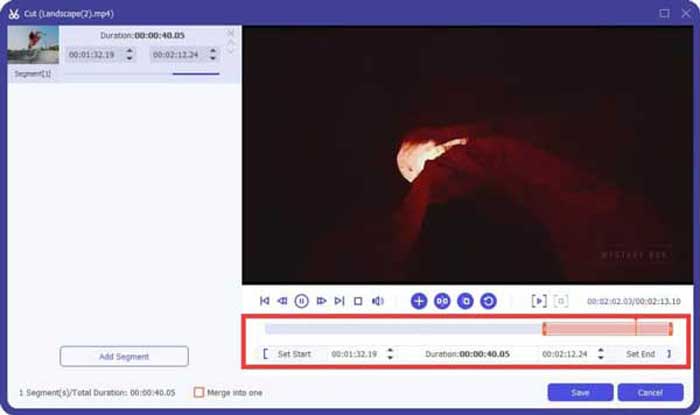
Quan només necessitis retallar la part desitjada, pots fer clic a la icona de les Scissor per dividir el vídeo 3GP. Només has de seleccionar el punt d’inici i el punt final per reduir la mida del 3GP. Després d’això, pots fer clic al botó Convert All per extreure la part de vídeo 3GP que vulguis.
Part 3: Preguntes freqüents sobre com comprimir vídeos 3GP
1. Què és el format de vídeo 3GP?
3GP també es coneix com el grup de projectes d'associació de tercera generació. Com a contenidor de fitxers multimèdia, 3GP pretén estalviar espai, ús de dades i amplada de banda. Si heu fet vídeos amb freqüència amb un telèfon intel·ligent, heu de comprimir fitxers 3GP.
2. He de comprimir 3GP a MP4?
En comparació amb 3GP, MP4 és un format de fitxer molt més popular i flexible. Podeu triar comprimir el vostre 3GP a MP4 si no podeu obrir o reproduir 3GP al vostre dispositiu. Només cal afegir els vídeos 3GP a qualsevol convertidor de vídeo. Podeu convertir el format 3GP a MP4 amb uns quants clics.
3. Hi ha compressors de vídeo 3GP per a BlackBerry?
Sí. Només podeu cercar editors de vídeo 3GP o compressors de vídeo 3GP per a BlackBerry. Per descomptat, també podeu utilitzar Google Drive i alguns compressors de vídeo 3GP en línia per reduir i reduir el vídeo 3GP segons els vostres requisits.
Conclusió
Aquest article comparteix dues maneres efectives de comprimir un vídeo 3GP. Si voleu comprimir el vostre 3GP en línia gratuïtament, FVC Online Video Compressor hauria de ser l'opció correcta. Quan necessiteu reduir els fitxers 3GP dins d'un procés per lots, Video Converter Ultimate sempre hauria de ser la vostra primera opció.
-
 3 maneres de comprimir i convertir fitxers de vídeo grans per a WhatsApp
 En aquest article, podeu obtenir 3 maneres senzilles de comprimir vídeos en línia per a WhatsApp. Per què no podeu enviar vídeos a WhatsApp? Què podeu fer per corregir el límit de mida de vídeo de WhatsApp? Només cal llegir i comprovar.
-
 Tutorial per comprimir GIF i reduir la mida del fitxer amb alta qualitat
 Aquí teniu dues maneres senzilles de comprimir GIF a l'ordinador o al telèfon mòbil. Podeu utilitzar el compressor de vídeo en línia FVC Free i Photoshop per reduir la mida del fitxer GIF en diferents aspectes.
-
 3 mètodes per convertir MP4 a 3GP sense problemes
 Voleu convertir MP4 a 3GP d’una manera fàcil i ràpida? Aquí compartirem 3 convertidors MP4 a 3GP per canviar MP4 a 3GP per reproduir-los en diversos telèfons mòbils.
