


 Video Converter Ultimate
 Gravadora de pantalla
 Reparació de vídeo
 Baixada segura
2 maneres ràpides de reduir fitxers OGV grans [gratuït i en línia]
Els fitxers OGV s’utilitzen sovint per reproduir contingut de vídeo en pàgines web mitjançant l’etiqueta HTML5

Part 1. Manera en línia de comprimir fitxers OGV amb un compressor OGV
Free Video Compressor és una eina en línia gratuïta, popular i útil per comprimir fitxers OGV disponible per als usuaris. A diferència de moltes altres eines en línia gratuïdes habituals, Free Video Compressor no imposa restriccions ni en el nombre ni en la mida dels fitxers pujats. Encara més important, no hi haurà cap marca d’aigua als fitxers de vídeo exportats. A més, et permet comprimir MP4, AVI, WMV, MOV i molts altres formats de vídeo habituals sense perdre qualitat.
Com comprimir fitxers OGV mitjançant compressor de vídeo gratuït
Pas 1. Ves al lloc web del compressor de vídeos OGV en línia escrivint https://www.free-videoconverter.net/free-video-compressor/.
Pas 2. Localitza i fes clic al botó Add Files to Compress i després descarrega el llançador per activar el servei. A la finestra que apareixerà, busca els teus fitxers OGV i prem Open per confirmar.

Pas 3. A continuació, has de definir els paràmetres de compressió per fer el fitxer més petit. Pots establir la mida del vídeo, canviar-ne la resolució, seleccionar el bitrate i molt més.

Pas 4. Prem el botó Compress per iniciar el procés. Un cop finalitzat, el fitxer es descarregarà automàticament a l’ordinador.

A més, aquest compressor de vídeo gratuït us pot ajudar a resoldre altres problemes de compressió de vídeo. Només cal que consulteu els articles següents:
Com comprimir un vídeo per enviar per correu electrònic
Com comprimir fitxers de vídeo AVCHD de franc a Windows i Mac
Part 2. Com comprimir i optimitzar un fitxer OGV amb Clideo
Clideo és un conjunt d’eines de vídeo tot-en-un gratuït. Funciona amb tots els formats populars i es comprimeix ràpidament i no requereix cap descàrrega. Us permet comprimir gratis un fitxer OGV de fins a 500 MB, però no té cap límit de quantitat. Ara podeu seguir els passos següents per reduir la mida del fitxer OGV.
Pas 1. Visita https://clideo.com/compress-video i després fes clic al botó Choose file.
Pas 2. Puja un fitxer OGV que vulguis comprimir des de l’ordinador. També pots seleccionar el fitxer des de Dropbox o Google Drive fent clic a la fletxa blava cap avall.
Pas 3. Quan el fitxer s’hagi pujat, l’eina començarà a processar el vídeo. El temps de processament depèn de la mida del vídeo.
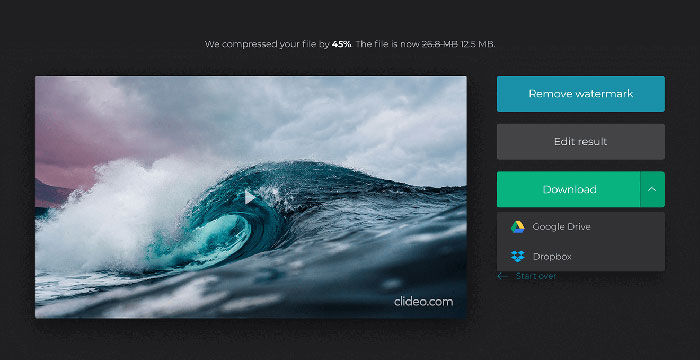
Pas 4. Quan la compressió hagi acabat, podràs veure la mida inicial del fitxer i la del fitxer comprimit. Ara pots previsualitzar el resultat per assegurar-te que es veu bé. Si n’estàs satisfet, pots fer clic al botó Download per desar-lo al dispositiu o a l’emmagatzematge al núvol.
Part 3. Preguntes més freqüents sobre la compressió de fitxers OGV
Què és un fitxer OGV?
Un fitxer OGV és un fitxer de vídeo desat en format de contenidor Ogg de codi obert Xiph.Org. Conté reproduccions de vídeo que poden utilitzar un o més còdecs diferents, com ara Theora, Dirac o Daala. Els fitxers OGV es poden reproduir amb diversos reproductors multimèdia.
Com funciona la compressió OGV?
Quan es tracta de la compressió de fitxers OGV, és la compressió entre fotogrames que condueix a reduir la mida del fitxer eliminant les similituds que es produeixen entre els fotogrames de vídeo.
Com puc comprimir el format MP4 a OGV?
Podeu utilitzar l’eina esmentada - Compressor de vídeo gratuït per comprimir els fitxers MP4 a OGV. O podeu triar una aplicació de convertidor de vídeo per ajudar-vos a crear-la.
Conclusió
Els mètodes en línia anteriors us poden ajudar a comprimir de manera eficient un vídeo OGV. Quin preferíeu utilitzar? Podeu compartir les vostres recomanacions als comentaris següents.
-
 De 50 MB a 5 MB: Com comprimir fitxers MP4 en segons
 El vídeo MP4 és massa gran per penjar-lo? Voleu reduir la mida del vídeo? Aquí hi ha 3 maneres eficients de comprimir un fitxer MP4 a una mida més petita sense límit.
-
 Tutorial: 7 maneres de comprimir vídeos de forma gratuïta sense perdre la qualitat
 Llegiu i obteniu 7 maneres de comprimir vídeos de forma gratuïta a l'ordinador o al telèfon. Podeu reduir els vídeos de grans dimensions en fitxers petits per a correu electrònic, Twitter, Instagram, YouTube, WhatsApp i molt més fàcilment.
-
 Com comprimir fitxers MOV a Windows, Mac, iPhone i Android
 En aquest article es mostra com comprimir els vídeos QuickTime MOV al telèfon o a l'ordinador amb detalls. Si el vostre vídeo MOV és massa gran per enviar-lo, compartir-lo o desar-lo, podeu obtenir 4 solucions viables aquí.
