


 Video Converter Ultimate
 Gravadora de pantalla
 Reparació de vídeo
2 mètodes per comprimir vídeos per a Instagram en línia i a l'escriptori
Com comprimir vídeos per a Instagram? Estàveu desesperats en assabentar-vos que el vídeo que vau treballar durant hores no es podia penjar a Instagram per la seva gran mida? No us espanteu. Acabes d’arribar al lloc correcte. Aquest article us proporcionarà les dues maneres més senzilles de comprimir vídeos per penjar Instagram.

Primera part: per què he de comprimir vídeos per a Instagram
T Tal com s'ha esmentat anteriorment, no es poden penjar fitxers de vídeo grans a Instagram. Cal comprimir els vídeos d’Instagram en fitxers MP4 de menys de 20 MB. La velocitat de fotogrames de vídeo ha de ser de 30 fotogrames per segon, amb 3500 KB de velocitat de bits. La mida del vídeo sol tenir una amplada de 1080 píxels. Es recomana una resolució de 4: 5. A més, els vostres vídeos han de ser superiors a 3 segons i inferiors a 60 segons.
Part 2: Com comprimir fitxers de vídeo per a Instagram en línia
FVC Free Video Compressor és una eina intel·ligent en línia per comprimir vídeos de diversos formats. No cal que descarreguis cap programa. Tot el procés de compressió es completa en una pàgina web. Amb aquesta eina, pots reduir els teus vídeos fins a la mida que vulguis.
Funcions principals:
- 1. Comprimiu diversos vídeos grans com MKV, FLV, WMV, AVI, TS, MOV, etc.
- 2. Interfície fàcil d'utilitzar perquè els principiants puguin personalitzar la configuració
- 3. Treballeu a una velocitat 30 vegades més ràpida i no deixeu cap filigrana a les sortides
- 4. Maneja vídeos 4K Ultra HD sense cap pèrdua de qualitat
Aquests són els passos per comprimir fitxers de vídeo d'Instagram en línia amb aquesta eina:
Pas 1: Carrega FVC Free Video Compressor al navegador.
Fes clic al botó Add Files to Compress al centre. Si és el primer cop que utilitzes aquesta eina, has de descarregar un fitxer anomenat fvc-launcher i executar-lo abans de continuar. Després, torna a fer clic al botó Add Files to Compress. A continuació podràs triar els fitxers de vídeo que vols comprimir per a Instagram.

Pas 2: Personalitza els paràmetres del vídeo que vols comprimir per a Instagram
Mida: Pots ajustar la barra de percentatge arrossegant-la. Per comprimir un vídeo per a Instagram, assegura’t que la mida de sortida és inferior a 20 MB. Els canvis en la mida de sortida afectaran alhora el bitrate de sortida.
Format: Actualment, pots convertir el vídeo a 12 formats, incloent-hi MP4, MKV, AVI, FLV, etc. Per comprimir un vídeo per a Instagram, només cal que triïs el format MP4.
Resolució: Pots reduir la resolució a valors inferiors com ara 320*240, 480*360 i més. O bé pots mantenir la resolució original i comprimir el vídeo per a Instagram simplement reduint el bitrate.

Pas 3: Comença a comprimir i espera que l’eina acabi la tasca.
Fes clic al botó morat Compress i tria la carpeta on vols desar el vídeo de sortida. No tanquis el navegador ni la pàgina web mentre el vídeo s’estigui processant. En cas contrari, hauràs de tornar a començar a comprimir el vídeo per a Instagram des del principi. La velocitat del procés depèn en gran mesura del teu maquinari.
Part 3: Com comprimir fitxers de vídeo per a Instagram a l'escriptori
A més de la mida, la durada del teu vídeo ha de ser de 3 a 60 segons. Tanmateix, les funcions de l’eina en línia són força simples perquè funciona en una pàgina web. No tens l’opció de retallar el vídeo amb l’eina en línia. Quina eina pots utilitzar si vols no només comprimir sinó també editar el vídeo? Aiseesoft Video Converter Ultimate probablement és la teva millor opció.
Funcions principals:
- 1. Compatible amb més de 1.000 formats, inclosos WMA, MP4, AVI, MOV, WMV, MP3, FLAC, etc.
- 2. La tecnologia avançada d’acceleració de maquinari garanteix una velocitat sense precedents
- 3. Retalleu i combineu videoclips amb un arc de Sant Martí de filtres i efectes bàsics.
- 4. L'eina 3D Maker us permet gaudir de vídeos 3D increïbles amb les vostres ulleres 3D
- 5. Creeu vídeos de pantalla dividida gairebé professionals
- 6. Inclou quatre maneres principals de millorar el teu vídeo
Descàrrega gratuïtaPer a Windows 7 o posteriorDescàrrega segura
Descàrrega gratuïtaPer a macOS 10.7 o posteriorDescàrrega segura
Passos per comprimir vídeos per a Instagram amb Video Converter Ultimate:
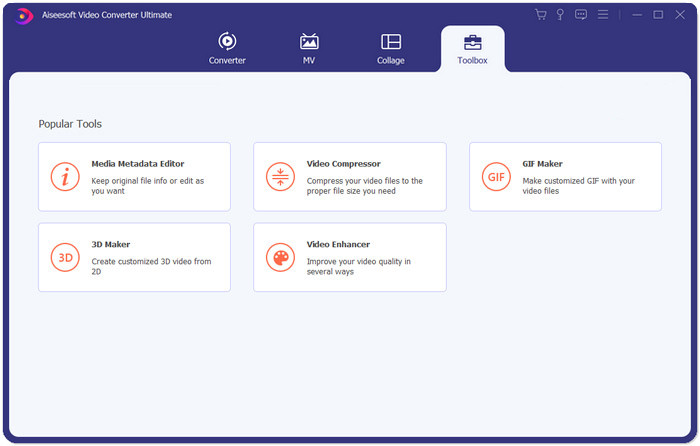
Pas 1: Descarrega, instal·la i inicia Aiseesoft Video Converter Ultimate. Ves a la pestanya Toolbox i fes clic al botó “+” per afegir el vídeo que vols comprimir per a Instagram.
Pas 2: Després d’afegir el vídeo, accediràs a la interfície de Video Compressor. Arrossega la barra de mida per ajustar la mida del fitxer de sortida i tria la resolució i el format de sortida que desitgis.
Nota: Només pots canviar el bitrate de manera indirecta provant diferents combinacions de resolució i mida de sortida.
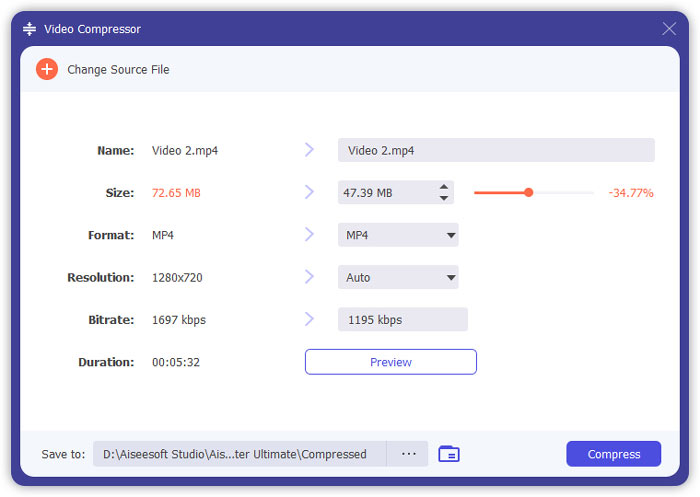
Pas 3: Fes clic al botó Compress a la part inferior dreta per començar a comprimir el vídeo per a Instagram.
Lectura ampliada:
Com comprimir vídeos en línia per a WhatsApp (100 MB/500 MB/1 GB…)
Com comprimir un vídeo per correu electrònic i fer-lo més petit de 25 MB
Part 4: Preguntes més freqüents sobre la càrrega de vídeos a Instagram
Quins són els requisits de la pujada de vídeos d'Instagram?
Format: MP4
Còdec: H.264
Bitrate: inferior a 3500 kbps
Velocitat de fotogrames: menys de 30 fotogrames per segon.
Quina és la millor relació d'aspecte per als vídeos d'Instagram?
La millor relació d'aspecte és de 9:16, que també és la proporció estàndard de la majoria de telèfons intel·ligents.
Quin format d'àudio hauria d'utilitzar el meu vídeo per penjar Instagram?
Àudio AAC.
Conclusió
En aquest article teniu dues eines útils per comprimir el vostre vídeo per a Instagram. Són compressors de vídeo gratuïts FVC i Video Converter Ultimate. Quan comprimeu el vídeo per a Instagram, no oblideu assegurar-vos que el vídeo tingui entre 3 i 60 segons i menys de 20 MB.
-
 La millor manera de reduir la mida de vídeo Vimeo per penjar-lo
 En aquest post, us mostrarem com comprimir el fitxer de vídeo per penjar-lo a Vimeo, juntament amb les directrius que necessiteu per a la compressió de vídeo i àudio.
-
 Com es pot reduir la mida del fitxer de vídeo per a YouTube de dues maneres
 Els vídeos de YouTube són grans i són lents per penjar? Només cal que comprimeu la mida del fitxer de vídeo en un format més petit per a YouTube de dues maneres en línia i a l'ordinador.
-
 Com es pot comprimir el vídeo per a Facebook gratuïtament i en línia
 Si teniu prohibit penjar un vídeo gran a Facebook, no us preocupeu. Només cal comprimir la mida de vídeo gran des de GB a MB amb el compressor de vídeo gratuït.
