


 Video Converter Ultimate
 Gravadora de pantalla
 Reparació de vídeo
 Baixada segura
Com comprimir fitxers WebM en línia amb dos compressors de vídeo gratuïts
WebM és un format de fitxer multimèdia audiovisual que s’utilitza habitualment per a continguts multimèdia en pàgines web. És compatible amb tots els navegadors web populars com Chrome, IE, Safari, Firefox i altres. Quan vols que el teu vídeo es reprodueixi en streaming més ràpid, l’has de comprimir. La pregunta és: saps com comprimir WebM sense pèrdues importants de qualitat?

Vols comprimir un fitxer WebM i reduir-ne la mida? En aquesta publicació, volem compartir 2 maneres gratuïtes per ajudar-te a comprimir WebM en línia.
Part 1. Com comprimir gratuïtament el fitxer WebM en línia
Per comprimir WebM i reduir-ne la mida mantenint la qualitat original de la imatge i del so, pots confiar en el popular Free Video Compressor. Està dissenyat especialment per comprimir vídeos en qualsevol dels formats de vídeo més utilitzats, inclosos WebM, AVI, MP4, FLV, MKV, MOV i més.
Aquest compressor de fitxers WebM fàcil d'utilitzar té la capacitat de reduir la mida del fitxer de vídeo sense pèrdues de qualitat. Us permet comprimir 4K UHD i 1080p, 720p HD i vídeos SD comuns. Podeu anar a la pàgina Free Video Compressor per comprimir directament WebM amb facilitat.
Pas 1. Obre el navegador a l’ordinador i ves al lloc oficial d’aquest compressor de fitxers WebM en línia i gratuït.

Pas 2. Un cop hi siguis, pots fer clic al botó Add Files to Compress per instal·lar un petit llançador per a la compressió de WebM. A continuació, pots seleccionar i afegir el fitxer WebM que vols comprimir a la finestra emergent.

Pas 3. Pots comprimir lliurement el teu fitxer WebM segons les teves necessitats. A més, se’t permet personalitzar la resolució de vídeo, la velocitat de fotogrames i la taxa de bits, el nom del vídeo i el format de sortida. Després de totes aquestes operacions, només has de fer clic al botó Compress per començar a comprimir WebM en línia.

A diferència de moltes altres eines de compressió de vídeo en línia de WebM, aquest compressor de vídeo gratuït no afegirà cap filigrana al fitxer WebM comprimit.
Part 2. Com comprimir WebM amb el compressor WebM
Per comprimir fitxers WebM en línia, també pots confiar en el VEED WebM Compressor. Tant si els teus fitxers superen els límits de mida de fitxer dels adjunts de correu electrònic, de Facebook Messenger o d’altres límits de pujada, pots utilitzar aquest compressor WebM per reduir la mida del fitxer del teu vídeo WebM.
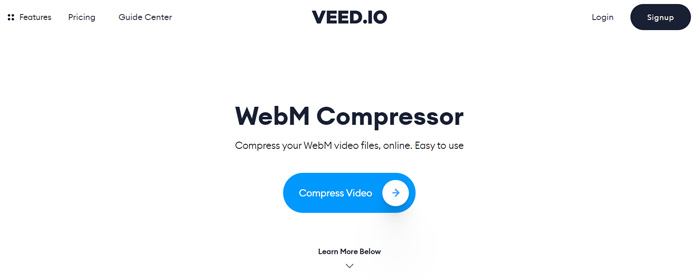
Pas 1. Obre el navegadors i ves al lloc de VEED WebM Compressor. Fes clic al botó Compress Video per passar al següent pas de càrrega.
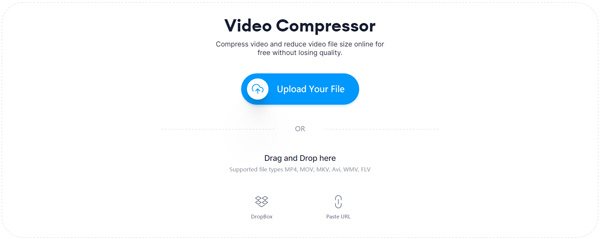
Pas 2. Pots fer clic al botó Upload Your File per pujar el teu vídeo WebM. Aquí també pots arrossegar i deixar anar el fitxer per carregar el WebM. Aquest compressor gratuït de vídeo WebM també et permet pujar vídeos des de DropBox i mitjançant URL.
Pas 3. Pots ajustar lliurement la compressió de vídeo segons les teves necessitats. A més, pots personalitzar la resolució de vídeo. També pots retallar el teu fitxer WebM fent clic a Edit Video. Està dissenyat amb un reproductor multimèdia perquè puguis visualitzar el vídeo carregat.
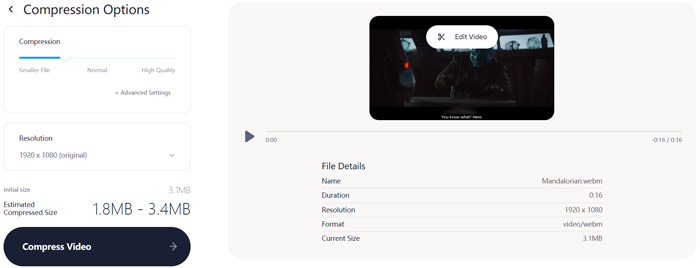
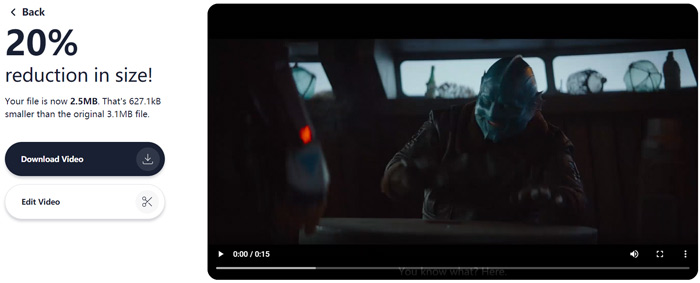
Pas 4. Fes clic al botó Compress Video a la cantonada inferior esquerra per iniciar la compressió del fitxer WebM. Després, pots fer clic al botó Download Video per desar el vídeo WebM comprimit a l’ordinador.
Part 3. Preguntes més freqüents sobre la compressió de fitxers WebM
Pregunta 1. Què és el format WebM?
WebM és un format de codi obert que conté vídeo comprimit amb còdecs VP8 o VP9 i àudio comprimit amb còdecs Vorbis o Opus. WebM està pensat originalment per oferir una alternativa lliure de drets d’ús al vídeo HTML5 i als elements d’àudio HTML5. El fitxer WebM s'utilitza principalment per al contingut multimèdia de les pàgines web.
Pregunta 2. Com convertir gratuïtament WebM a MP4 en línia?
Per convertir gratuïtament un fitxer WebM a MP4, pots confiar en el popular convertidor de vídeo, Free Online Video Converter. És capaç de fer la conversió de WebM a MP4 i altres conversions de vídeo/àudio amb facilitat.
Pregunta 3. Quin és el format de vídeo més petit amb alta qualitat?
MP4. Normalment ofereix la millor qualitat de vídeo amb la mida de fitxer més petita.
Conclusió
Quan decideixis compartir un vídeo WebM a Facebook, Instagram, Twitter o una altra xarxa social, és millor que el compris primer. En aquesta publicació, pots aprendre 2 mètodes senzills per comprimir WebM en línia gratuïtament. Pots utilitzar el compressor de vídeo que prefereixis per reduir la mida dels teus fitxers WebM.
-
 Tutorial per comprimir un vídeo per correu electrònic a iPhone / Android / en línia
 No podeu enviar un vídeo massa gran per correu electrònic? Si teniu aquest problema, podeu obtenir formes pràctiques de comprimir un vídeo per correu electrònic aquí. Aquest article us mostrarà com reduir els fitxers de vídeo grans de forma gratuïta en detalls.
-
 Convertidor de MP4 a WebM: 4 millors mètodes per convertir MP4 a WebM
 Quan vulgueu convertir MP4 a WebM de forma gratuïta, podeu obtenir més informació sobre els 4 mètodes més freqüents per obtenir els vídeos desitjats de forma gratuïta a l'article.
-
 3 maneres de comprimir i convertir fitxers de vídeo grans per a WhatsApp
 En aquest article, podeu obtenir 3 maneres senzilles de comprimir vídeos en línia per a WhatsApp. Per què no podeu enviar vídeos a WhatsApp? Què podeu fer per corregir el límit de mida de vídeo de WhatsApp? Només cal llegir i comprovar.
