


 Video Converter Ultimate
 Gravadora de pantalla
 Reparació de vídeo
 Baixada segura
Apreneu a retallar vídeos a Snapchat per obtenir un aspecte més polit
Vols fer que el teu contingut destaqui entre la multitud i impressioni els teus seguidors? Prova l’eina d’escapçar vídeos de Snapchat. Dominar aquesta tècnica tan senzilla com potent et permetrà crear snaps polits, d’aspecte professional, que captin l’atenció de l’audiència. Continua llegint i t’ensenyarem com escapçar vídeos a Snapchat com un autèntic professional. Els mètodes que presentarem portaran la teva manera d’explicar històries a un altre nivell. No desaprofitis l’oportunitat de transformar les teves històries o vídeos de Snapchat per deixar empremta en aquesta dinàmica plataforma de xarxes socials.

Part 1. Com retallar un vídeo a Snapchat
Snapchat és una plataforma de xarxes socials que ha agafat el món per asalto amb les seves característiques úniques i la seva interfície fàcil d'utilitzar. Una de les característiques més importants de les eines d'edició de vídeo de Snapchat és la possibilitat de retallar vídeos. En retallar els vostres vídeos, podeu centrar-vos en un tema concret, crear una composició més atractiva i fer una transició perfecta entre diversos clips. D'altra banda, aquí teniu una guia d'instruccions simplificada sobre com retallar un vídeo a Snapchat.
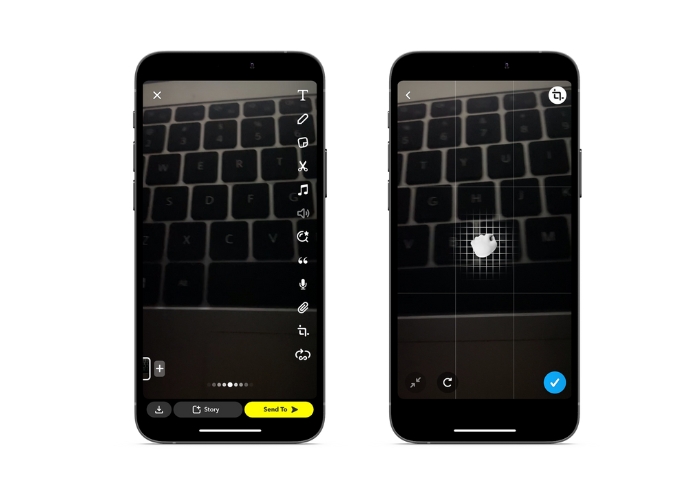
Pas 1. Obre Snapchat. Enregistra un vídeo mantenint premut el botó circular de captura.
Pas 2. Un cop hagis enregistat el vídeo, toca la icona de retallar per accedir a l’eina d’escapçat des del menú de la dreta.
Pas 3. Fes un gest de pessic i arrossega el vídeo amb els dits per escapçar-lo a la mida i forma que vulguis. Quan estiguis satisfet amb l’escapçat, toca la icona de marca de verificació per desar els canvis.
Pas 4. Afegeix qualsevol filtre addicional, textos o efectes al teu vídeo i després envia’l als teus seguidors o afegeix-lo a la teva història.
Part 2. Com retallar un vídeo per a Snapchat
1. FVC Video Converter Ultimate
FVC Video Converter Ultimate et permet convertir i optimitzar els teus vídeos amb només uns quants clics. Una de les característiques més interessants de FVC Video Converter Ultimate és la seva potent caixa d’eines, que inclou diverses funcions per editar i millorar els vídeos. Des d’afegir subtítols i marques d’aigua fins a ajustar la brillantor, el contrast i la saturació, aquesta caixa d’eines té tot el que necessites per crear vídeos d’aspecte professional que destaquin. Però potser una de les eines més útils és la funció d’escapçar vídeos. Pots escapçar els vídeos per eliminar seccions no desitjades, ajustar la relació d’aspecte o crear una composició més atractiva. Segueix la guia següent per aprendre a escapçar vídeos per a Snapchat abans de publicar-los.
Pas 1. Aconsegueix el programa
Per començar a escapçar els teus vídeos amb FVC Video Converter Ultimate, has de descarregar i instal·lar el programa a l’ordinador. Només cal que facis clic al botó Baixada gratuïta que correspongui al teu sistema operatiu i segueixis les instruccions d’instal·lació.
Baixada gratuïtaPer a Windows 7 o posteriorBaixada segura
Descarrega gratisPer a MacOS 10.7 o posteriorBaixada segura
Pas 2. Importa un vídeo per escapçar-lo
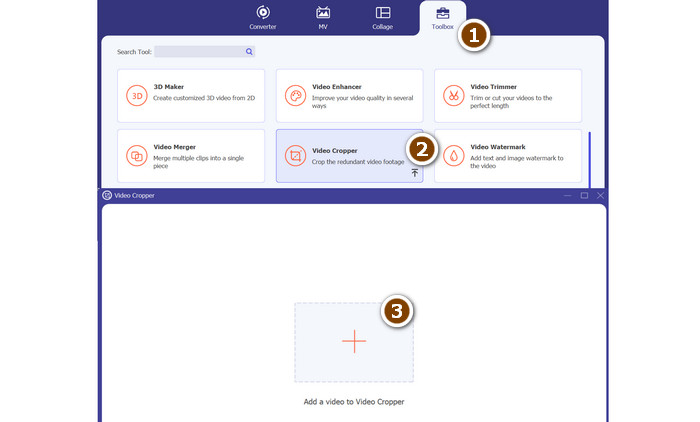
Quan hagis instal·lat el programa, obre’l i accedeix a la caixa d’eines fent clic a la pestanya Toolbox. Des d’aquí, selecciona l’opció Video Cropper per obrir l’eina d’escapçat. Per importar un vídeo a escapçar, fes clic al botó amb el signe més a la zona de càrrega de l’opció Video Cropper.
Pas 3. Retalla el vídeo
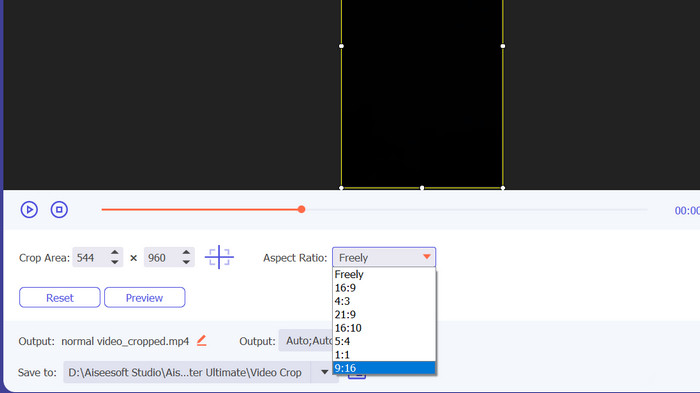
A continuació, seleccioneu la relació d'aspecte que voleu utilitzar per al vostre vídeo. Per a Snapchat, la relació d'aspecte ideal és de 9:16 (vertical). Podeu seleccionar la relació d'aspecte que vulgueu al menú desplegable que hi ha a sota de la vista prèvia del vídeo. Per retallar el vídeo, simplement arrossegueu les cantonades del quadre de retall per ajustar la mida i la forma del vostre vídeo.
Pas 4. Exporta el vídeo retallat
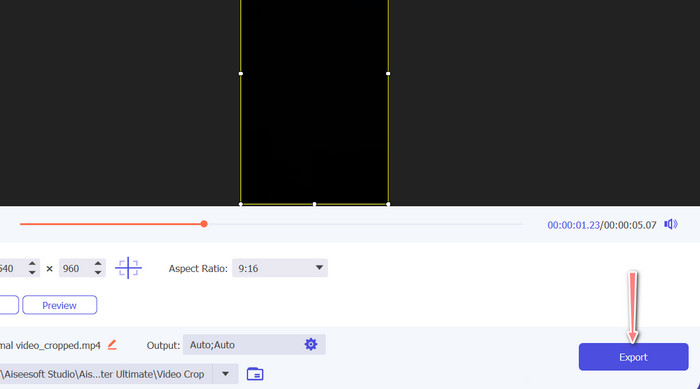
Quan estiguis satisfet amb l’escapçat, fes clic al botó Exportar a l’extrem inferior dret de la interfície per desar el fitxer de vídeo escapçat. Després el podràs compartir amb els teus seguidors o publicar-lo al teu compte de Snapchat per impressionar els amics amb les teves habilitats d’edició de vídeo!
2. Vid.Fun
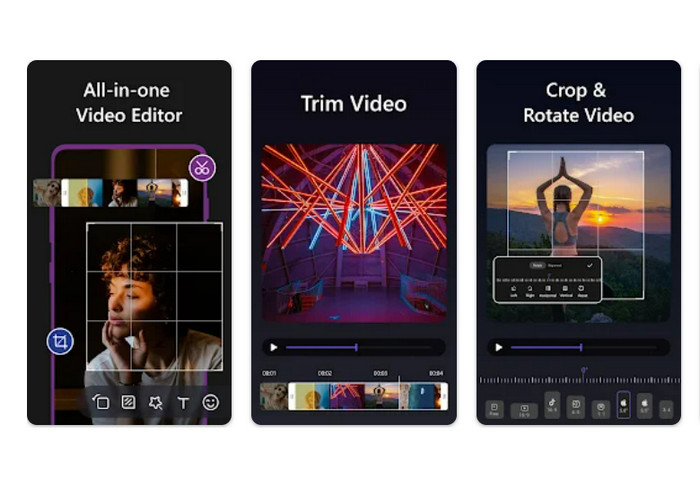
Si utilitzes un telèfon intel·ligent o una tauleta, Vid.fun et pot ajudar a escapçar els vídeos a les dimensions ideals per a Snapchat. Entre les moltes eines útils de l’aplicació hi ha un escapçador de vídeo potent que et permet ajustar fàcilment la relació d’aspecte dels teus vídeos amb uns quants tocs senzills. A més, ofereix diverses opcions de relació d’aspecte, per garantir que els teus vídeos de Snapchat sempre tinguin el millor aspecte possible. A continuació tens un tutorial sobre com escapçar vídeos per a Snapchat.
Pas 1. Comença descarregant Vid.fun des de Google Play Store. Després, obre’l immediatament. El botó Crop és accessible des del menú principal.
Pas 2. En segon lloc, has d’afegir un fitxer multimèdia triant-ne un de la galeria del dispositiu. Tria la relació d’aspecte desitjada al menú desplegable corresponent. També pots utilitzar les nanses d’escapçat i posició a la previsualització del vídeo per obtenir el resultat que busques.
Pas 3. Revisa el resultat del teu vídeo escapçat per assegurar-te que és tal com l’havies imaginat. A la part superior dreta trobaràs un botó Exportar; prem-lo quan hagis acabat d’escapçar.
Lectura addicional
Com alentir un vídeo a Snapchat fàcilment en qualsevol dispositiu
Les maneres més fàcils d’eliminar el text de Snapchat d’una captura de pantalla
Part 3. Preguntes freqüents sobre retallar vídeos a Snapchat
Com canviar la relació d'aspecte a Snapchat?
Snapchat admet diverses relacions d'aspecte per als vídeos, com ara 9:16 (vertical), 16:9 (paisatge), 16:9 (paisatge) i 4:5 (vertical).
Quina relació d'aspecte he d'utilitzar per als vídeos de Snapchat?
La relació d'aspecte ideal per als vídeos de Snapchat és de 9:16 (vertical). Això garanteix que els vostres vídeos ocupin la pantalla completa als dispositius mòbils i estiguin optimitzats per visualitzar-los a la plataforma.
Quins són alguns consells per retallar vídeos per a Snapchat?
Quan es retalla vídeos per a Snapchat, és important triar una relació d'aspecte adequada a les directrius de la plataforma i que sembli bé als dispositius mòbils.
Conclusió
Escapçar vídeos per a Snapchat és un procés senzill però important per garantir que el teu contingut es vegi el millor possible a la plataforma. Seguint els passos descrits més amunt sobre com escapçar un vídeo a Snapchat o per a Snapchat, podràs escapçar fàcilment els teus vídeos a la relació d’aspecte adequada i compartir-los amb els teus seguidors.
-
 Com retallar fitxers MP4 sense perdre cap qualitat del vídeo [2023]
 Apreneu a retallar MP4 amb passos senzills només per a vosaltres. Per tant, seguiu el ritme perquè us presentem la millor de les millors eines de retall que podeu utilitzar.
-
 [Gratis] 4 maneres fàcils de retallar GIF animats en línia i fora de línia
 Voleu retallar GIF fàcilment? Bé, podeu fer-ho amb l'ajuda d'aquests talladors GIF disponibles en aquest article, llegir-lo bé i aprendre a fer-ho.
-
 6 filtres de Snapchat animats de Snapchat preferits a Snapchat
 Vols conèixer les millors maneres d'afegir filtres als vídeos de Snapchat? Bé, podeu fer clic aquí i conèixer els diferents filtres que podeu utilitzar per aplicar als vídeos de Snapchat.
