


 Video Converter Ultimate
 Gravadora de pantalla
 Reparació de vídeo
 Baixada segura
Controlador de velocitat de vídeo potent - Editor de velocitat DaVinci Resolve
Si vols utilitzar un potent editor de velocitat de vídeo, probablement voldràs fer servir aquesta eina. DaVinci Resolve Speed Editor és una eina per canviar la velocitat del vídeo que utilitza un teclat USB. Aquest speed editor proporciona un control de maquinari personalitzat que et permet editar fàcilment la velocitat del teu vídeo. Per tant, si et preguntes què pot fer més aquesta eina, llegeix aquest article per saber-ne més sobre el DaVinci Resolve Speed Editor.

Part 1. Informació bàsica, característiques, funcions i preu de DaVinci Resolve Speed Editor
Molts editors professionals utilitzen el DaVinci Resolve Speed Editor per canviar la velocitat del seu vídeo. I si ets nou fent servir DaVinci Resolve Speed Editor, probablement voldràs conèixer la informació, les funcions i el preu d’aquesta eina. En aquesta part, sabràs la informació bàsica, les funcions i el preu d’aquest speed editor.
Informació bàsica
DaVinci Resolve és un teclat tipus USB que us permet editar el vostre fitxer. Si voleu una eina que pugui canviar la velocitat del vostre vídeo, aquesta eina és la millor per a vosaltres. DaVinci Resolve ofereix una manera més ràpida i senzilla d'editar vídeos. És més que un teclat perquè té moltes funcions d'edició que podeu utilitzar, com ara un editor de velocitat de vídeo, control de marcatge de cerca, afegir/eliminar efectes, selecció de múltiples càmeres de safata de sincronització i molt més. A més d'això, aquesta eina d'editor de velocitat també té una versió sense fil.
Quan compreu un teclat DaVinci Resolve, veureu un cable USB i un indicador d'alimentació de la bateria. Un cop traieu el cable USB de la part posterior del dispositiu, el Bluetooth intentarà vincular-se automàticament al vostre dispositiu.
A més, si demaneu l'editor de velocitat d'aquesta eina, podeu utilitzar els controls del jog wheel, els controls de reproducció i els controls d'edició i retallada del vostre teclat.
Característiques i Funcions
Si us pregunteu quines són les característiques i funcions de DaVinci Resolve, a continuació us presentem les característiques i funcions més comunes d'aquesta eina.
Speed Editor
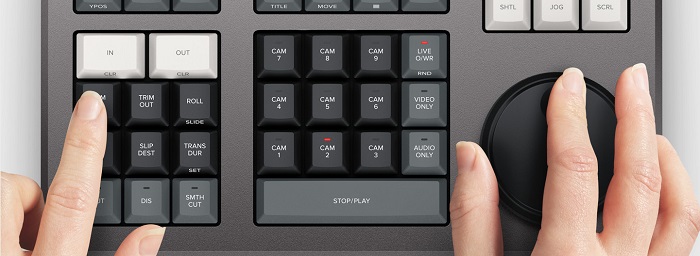
DaVinci Resolve Speed Editor està creat per a editors professionals que volen millors efectes de transició en el seu vídeo. Fent servir aquest controlador de velocitat de vídeo, pots alentir o accelerar els fps del teu vídeo, destacant la millor escena del teu vídeo. Hi ha moltes maneres d’utilitzar DaVinci Resolve per accelerar un clip.
◆ Fes servir els punts In and Out simplement desplaçant-te amb el dial de cerca i col·locant els punts d’entrada i sortida a la línia de temps del teu vídeo, i després ves a les funcions d’edició per editar el teu vídeo.
◆ Fes servir els botons Trim in and Trim out simplement mantenint premuts els botons de retall i girant el dial de cerca. L’indicador intel·ligent de la línia de temps et permet veure quina part estàs retallant.
Afegir i eliminar efectes
Amb el DaVinci Resolve Speed Editor també pots afegir i eliminar efectes al teu vídeo. L’indicador intel·ligent de la línia de temps determina en quin punt d’edició estàs treballant. Prem la tecla CUT per eliminar un efecte al punt d’edició. I si vols dissoldre el punt d’edició a la línia de temps, prem la tecla DIS (dissolve). A més, si vols una transició de tall suau al punt d’edició, prem la tecla SMTH CUT (smooth cut).



Color
Aquesta funció us permet canviar el contrast, la temperatura, el to mitjà, la saturació i altres. La pàgina en color és una de les funcions que més agrada de DaVinci Resolve i pot ser utilitzada fàcilment pels principiants.
Sync Bin
La funció sync bin és un espai on pots trobar vídeos o preses sincronitzades a la línia de temps d’edició. Després, pots utilitzar les tecles de càmera per seleccionar una presa alternativa i editar-la a la teva línia de temps.
Nivell d’àudio i marca
DaVinci Resolve també pot ajustar l’àudio del teu vídeo. Per establir els nivells d’àudio del teu clip, mantén premuda la tecla i ajusta el nivell d’àudio amb el dial de cerca. Si prems dues vegades la tecla de nivell d’àudio, afegirà un marcador. I si prems dues vegades la tecla i la mantens premuda, et permet establir el color dels marcadors.
Visor a pantalla completa i revisió
Aquesta clau us permet convertir el vostre visor a pantalla completa. Té un color vermell perquè el puguis trobar fàcilment. Si premeu dues vegades aquesta tecla, s'orarà des de la vostra edició més recent.
Afegir transicions
Si fas servir la tecla Transition, afegiràs una transició personalitzada al teu vídeo. És gairebé similar als botons de tall i tall suau.
Snapper i visor
En prémer la tecla Snap s’activa l’ajust (snapping) a la teva línia de temps. I si prems i mantens premuda la tecla Snap, s’ajustarà la mida del visor.
Eliminació amb arrastre (Ripple Delete)
La supressió d'ondes us permet eliminar el clip al punt de reproducció; ondula la línia de temps per eliminar el buit entre els dos clips. La supressió de ondulació és una bona manera de reduir la durada de la línia de temps del vostre vídeo.
Preu
Podeu comprar DaVinci Resolve Speed Editor per a $395. I si esteu buscant una versió de programari d'aquesta eina, podeu descarregar-la gratuïtament a Windows, Mac i Linux. Tanmateix, la versió del programari d'aquesta eina és complicada d'utilitzar.
Alternativa per a DaVinci Resolve Video Speed Editor
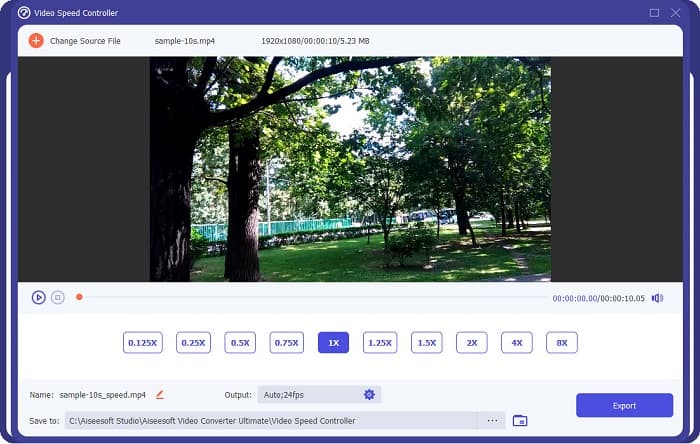
Si vols una manera més fàcil d’editar la velocitat del teu vídeo, fes servir FVC Video Converter Ultimate. Aquesta aplicació de programari et permet accelerar o alentir el teu vídeo fàcilment. Amb el seu procés d’operació ràpid, no consumiràs gaire temps editant la velocitat del teu vídeo. A més, hi ha molts ajustos de velocitat predeterminats entre els quals pots triar per al teu vídeo. I si et preguntes què més pot fer, aquesta eina disposa de moltes funcions d’edició, incloent-hi un compressor d’àudio, compressor de vídeo, editor de metadades de vídeo i més. També admet nombrosos formats de fitxer, com MP4, MKV, MOV, AVI, FLV, WMV i més de 1000 formats. Per saber-ne més sobre aquesta aplicació de programari, llegeix les descripcions següents.
Avantatges d’utilitzar FVC Video Converter Ultimate:
1. Té una interfície d'usuari intuïtiva.
2. Et permet canviar la velocitat del vídeo de 0,125x, 0,50x, 0,75x, 1,25x, 1,5x, 2x, 4x i 8x.
3. Té moltes funcions d'edició avançades per utilitzar, com ara un retallador de vídeo, una fusió de vídeos, un creador de 3D i molt més.
4. Disponible a totes les plataformes multimèdia, inclosos Windows, Mac i Linux.
Part 2. Preguntes freqüents sobre DaVinci Resolve Video Speed Editor
Val la pena DaVinci Resolve Video Speed Editor?
Amb el seu preu, val la pena utilitzar aquesta eina d'editor de velocitat de vídeo perquè pot produir sortides de gran qualitat i tenir moltes funcions d'edició per utilitzar.
DaVinci Video Speed Editor és compatible amb qualsevol format?
No admet tots els formats de fitxer. Tanmateix, pot suportar nombrosos formats de fitxer, com ara MOV, MXF, DNG, DCP, ARI, MTS, etc.
DaVinci Resolve Video Speed Editor té una versió gratuïta?
DaVinci Resolve Video Speed Editor té una versió de prova gratuïta només per un temps limitat. Per utilitzar-lo durant tota la vida, compra l'eina per a $395.
Conclusió
Tots els teus dubtes sobre el DaVinci Resolve Video Speed Editor ja estan resolts. Amb l’eina destinada a editar la velocitat de vídeo, pots alentir o accelerar fàcilment el teu vídeo i crear-hi boniques transicions. Però, si busques una eina més convenient i més fàcil d’utilitzar, prova FVC Video Converter Ultimate de franc!
-
 Com avançar ràpidament un vídeo a l'iPhone: ajusteu la velocitat del vídeo
 Com puc avançar ràpidament un vídeo al meu iPhone? Com avançar ràpidament un vídeo a l'iPhone amb iMovie? Aprèn 3 maneres d'accelerar un vídeo en dispositius iPhone i iPad.
-
 Com accelerar el vídeo a Premiere Pro i amb les seves alternatives
 Vols saber com utilitzar l'estrena professional per accelerar un vídeo? Aleshores esteu a l'article correcte, ja que us oferim passos i altres alternatives assequibles.
-
 2 maneres sense esforç de com accelerar un vídeo a TikTok
 Vols saber el secret de com accelerar el vídeo a TikTok? A continuació, llegiu aquest article per tenir una idea de com fer-ho i saber quines són les altres 2 eines que us ajudaran.
