


 Video Converter Ultimate
 Gravadora de pantalla
 Reparació de vídeo
Apreneu a editar les metadades OGG fàcilment amb passos detallats
Amb les etiquetes als fitxers OGG, el dispositiu que utilitzeu actualment pot entendre què hi ha al fitxer. Un cop s'adjunten les metadades, us pot ajudar a organitzar-les correctament determinant les etiquetes per trobar-les ràpidament. Per tant, si els vostres fitxers OGG no tenen metadades, cal afegir-ne una. Tot i que cercar un editor d'etiquetes per a OGG és fàcil, no estem segurs de si són perfectament segurs d'utilitzar. En lloc de provar-los i fallar, farem la resolució de problemes per eina per a vostè. Per tant, segueix llegint aquesta publicació per saber com editar les metadades OGG manualment amb una garantia d'èxit 100%.

Part 1. Edita les metadades OGG sense descarregar un programa extern a Windows
A Windows, podeu editar fàcilment les metadades OGG sense haver de descarregar cap eina fent servir Propietats. Tot i això, no és tan eficaç com l’eina especialitzada que es mostra més avall, però us pot servir per fer la tasca. Per tant, si voleu saber com utilitzar aquest editor de metadades, podeu seguir els passos següents.
Avantatges d'utilitzar propietats a Windows:
◆ Descarregar-lo no és essencial per utilitzar-lo en qualsevol moment, i fins i tot no teniu accés a Internet.
◆ Fàcil d'utilitzar i pot ser utilitzat per qualsevol usuari que vulgui editar metadades.
◆ Admet una àmplia gamma de formats OGG, MP3, WAV, WMA i molts més.
Com editar les etiquetes OGG fàcilment amb propietats a Windows:
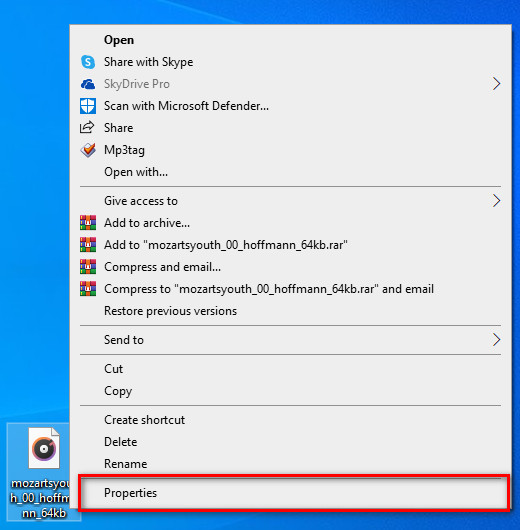
Pas 1. Cerqueu el fitxer OGG a l’escriptori i feu-hi clic amb el botó dret; després, seleccioneu Propietats.
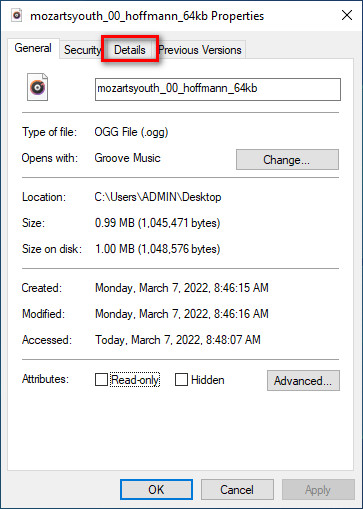
Pas 2. Després de fer clic a Propietats, apareixerà un panell a la pantalla. Aneu a Detalls, seleccioneu cada etiqueta i ompliu-la.
Pas 3. Premeu D’acord per desar els canvis que heu fet amb Propietats.
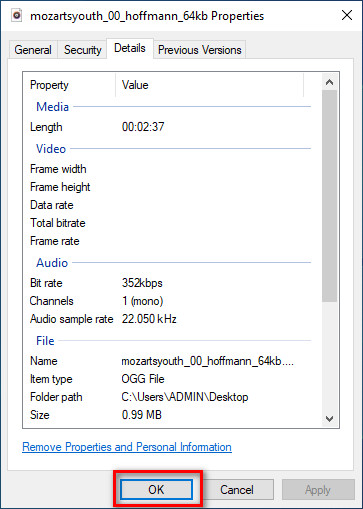
Consell: aquesta funció de vegades no desa les metadades que heu afegit al fitxer OGG. Per tant, si això passa, haureu de tornar a fer-ho i començar des del principi.
Part 2. Editor d'etiquetes OGG més recomanat per editar metadades OGG a Windows i Mac [professionalment]
La millor manera d’editar OGG és utilitzar un editor d’etiquetes potent però senzill a Windows i Mac, el FVC Video Converter Ultimate. Amb aquesta eina, podeu sobreescriure manualment les metadades dels fitxers OGG en uns quants clics. A diferència de Propietats, no tindreu cap problema a l’hora d’editar o corregir les etiquetes del vostre fitxer multimèdia. Tanmateix, haureu de descarregar i comprar l’eina per accedir completament a les seves excel·lents funcions que cap altra eina us pot oferir.
A més de la seva capacitat d'edició de metadades, aquesta eina us permet convertir el vostre fitxer OGG en un nou format d'àudio tot conservant l'àudio d'alta qualitat emmagatzemat al vostre fitxer OGG. També podeu realitzar edició bàsica del vostre vídeo i àudio si voleu, com ara tallar, retallar, fusionar, retallar i molts més, però també pot realitzar edició avançada; podeu comprovar l'edició avançada a la Caixa d'eines. Potser penseu què és el millor d'aquesta eina; Bé, està a l'altura de les expectatives de tothom, i el nom definitiu no és només un nom, sinó que també són les habilitats de l'eina. Per tant, si voleu utilitzar l'eina per editar metadades OGG, podeu copiar els passos següents per tenir èxit amb la punta del dit.
Avantatge d'utilitzar FVC Video Converter Ultimate [recomanat]:
◆ És un editor d'etiquetes professional que pot manipular fàcilment les metadades del vostre fitxer d'àudio fins i tot si no sou un professional.
◆ Admet una àmplia gamma de formats per carregar com OGG, MP3, WAV, WMA, AIFF i més de 1000, inclosos els formats de vídeo.
◆ És la millor opció per començar en l'edició de metadades, resolució, qualitat, tall, etc.
◆ Si és possible, podeu descarregar el programari tant en sistemes Windows com en Mac.
◆ A Toolbox hi ha disponibles funcions i funcions addicionals per ajudar-vos amb diferents tasques relacionades amb el vídeo i l'àudio.
Com editar etiquetes OGG com un professional amb FVC Video Converter Ultimate:
Pas 1. Premeu el botó de descàrrega que hi ha a continuació i trieu el sistema operatiu correcte que feu servir. Quan s’hagi acabat la descàrrega, feu clic al fitxer del programari que heu descarregat per instal·lar-lo al vostre disc. Configureu-lo segons les vostres preferències i, finalment, feu clic a Inicia ara per obrir l’eina.
Descàrrega gratuïtaPer a Windows 7 o posteriorDescàrrega segura
Descàrrega gratuïtaPer a macOS 10.7 o posteriorDescàrrega segura
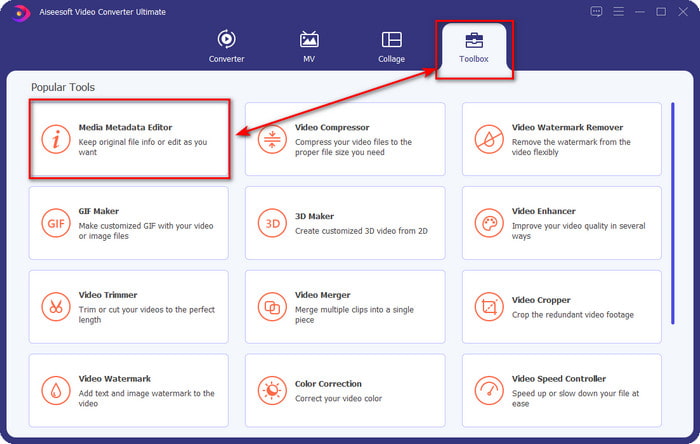
Pas 2. Després d’obrir el programari a l’escriptori, aneu a la secció Caixa d’eines i cerqueu Editor de metadades multimèdia; feu clic a aquesta funció per continuar.
Pas 3. Feu clic a la icona + per localitzar el fitxer OGG desat al disc de l’escriptori. Seleccioneu el fitxer amb extensió .ogg i feu clic a Obre per pujar el fitxer a l’eina.
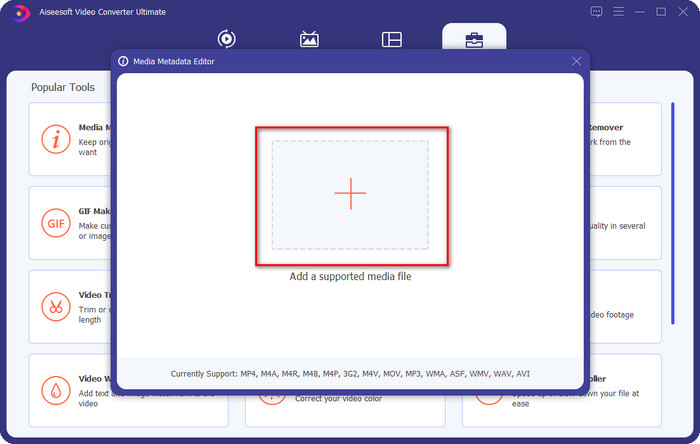
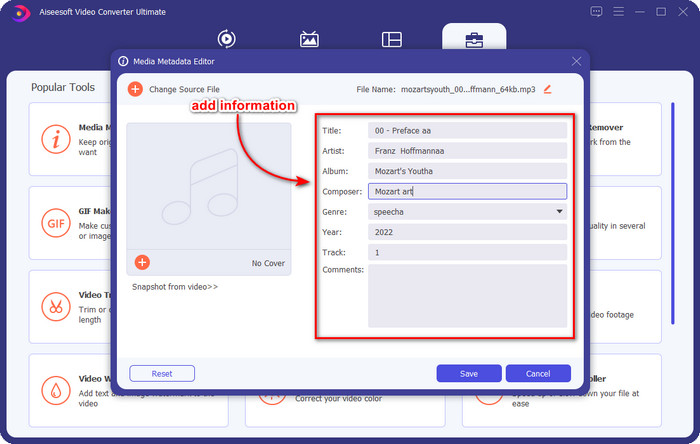
Pas 4. Editeu o suprimiu les metadades a la finestra petita que apareixerà a la pantalla; feu clic a cada quadre de text i afegiu-hi la informació que voleu aplicar a l’OGG. També podeu afegir una imatge al fitxer d’àudio OGG si ho voleu, però assegureu-vos que la imatge estigui desada a l’escriptori.
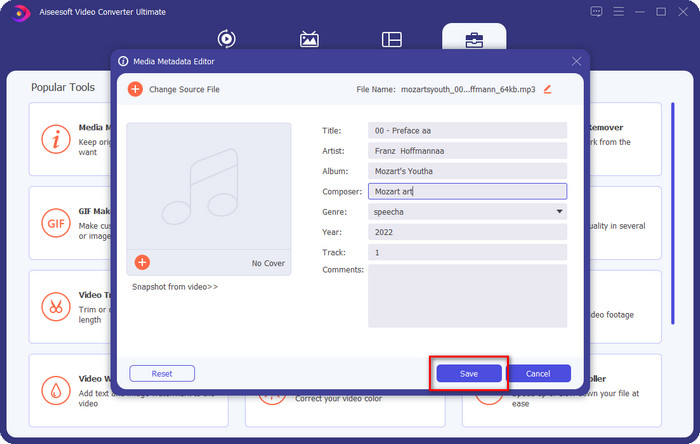
Pas 5. Quan hàgiu acabat d’afegir la informació necessària al vostre fitxer OGG, podeu fer clic a Desa per desar el fitxer amb les metadades aplicades. D’aquesta manera, haureu afegit les metadades OGG editades al vostre escriptori amb l’ajuda del millor editor de metadades OGG que podeu utilitzar de manera segura i ràpida en tots dos sistemes operatius.
Part 3. Preguntes freqüents sobre l'edició de metadades OGG
Puc utilitzar el fitxer OGG al Mac?
Els fitxers OGG no són compatibles amb els dispositius d’Apple, però podeu utilitzar una aplicació de tercers per reproduir els fitxers OGG que no es poden reproduir al Mac. Voleu saber com fer-ho? Si és així, feu clic en aquest enllaç, on hem recopilat informació sobre OGG i com reproduir fàcilment els fitxers OGG al Mac.
És OGG més popular que MP3?
Pel que fa a la popularitat, MP3 és molt més compatible que OGG perquè és molt més flexible si els comparem. Tots dos són bons contenidors d'àudio i tenen diferents fortaleses d'àudio. Però pel que fa a la qualitat, OGG és molt millor que MP3, però és menys compatible.
Puc gravar OGG d'alta qualitat?
I tant que sí, podeu gravar en OGG. Però quina eina admet el format OGG? Si n’hi ha alguna, és el millor gravador OGG que puc utilitzar? Totes aquestes preguntes tenen resposta si feu clic en aquest enllaç i en llegiu el contingut.
Conclusió
Sorprenent, oi? Ho és, amb tot el que podeu fer per editar les metadades OGG amb les solucions esmentades més amunt. Si en necessiteu una, aquestes són les solucions conegudes per resoldre les etiquetes del vostre fitxer OGG. Si no us creieu la informació que hem escrit aquí, hauríeu de provar totes dues opcions, i us podem assegurar que tindreu èxit a l’hora d’editar les etiquetes dels vostres OGG. Però si voleu una eina professional per editar les etiquetes dels vostres OGG, heu d’utilitzar l’eina definitiva per acabar la tasca. FVC Video Converter Ultimate és, sens dubte, la millor elecció per editar qualsevol etiqueta de qualsevol tipus de contingut multimèdia que tingueu. Si penseu que aquesta és l’eina adequada per a vosaltres, us recomanem que llegiu els passos que hem proporcionat més amunt per editar les etiquetes amb facilitat.
-
 7 editors d'etiquetes de música populars a Windows, Mac i dispositius mòbils
 Les etiquetes de música són populars per a l'ordenació de la música a la biblioteca segons les dades que hi ha a l'interior. Què passa si el vols canviar? Llegiu els detalls a continuació per saber-ne més.
-
 4 editors de metadades de llibres d'àudio suggerits el 2022
 Si no teniu cap idea sobre l'editor d'etiquetes d'Audiobook, aquest article us ajudarà. Coneix-ho millor llegint cada detall a continuació i les eines a utilitzar.
-
 Els 5 millors editors d'etiquetes MP3 gratuïts disponibles en línia i fora de línia
 Vols saber com editar etiquetes MP3? En aquest cas, continueu llegint. Per avui, us oferim 5 dels millors editors d'etiquetes MP3 que podeu utilitzar.
