


 Video Converter Ultimate
 Gravadora de pantalla
 Reparació de vídeo
Com reduir la resolució d'un vídeo a Windows, Mac i telèfons mòbils
Els vídeos en HD 1080 i 720 tenen la millor resolució que t’agradarà utilitzar, especialment per mirar-los. Tot i que aquestes resolucions són les millors, tard o d’hora necessitaràs convertir la resolució del vídeo a una de més baixa per estalviar espai al disc. Però la pregunta és: com es pot convertir la resolució del vídeo per reduir-la? Aquest article identificarà els principals convertidors de resolució de vídeo per reduir la resolució del vídeo a Windows, Mac, en línia, Android i iPhone.

Part 1. Per què cal reduir la resolució de vídeo
Com a preparació abans de reduir la resolució del vídeo, primer determinem la causa per la qual hem de canviar per reduir la resolució d'un vídeo. La informació que oferim a continuació és la instància més habitual que necessitareu per reduir la resolució.
Motiu 1. No és compatible amb dispositius mòbils
Alguns dispositius mòbils no admeten una resolució de vídeo més alta perquè el vostre mòbil no el reconeix. De vegades, pensàvem que el vídeo no s'obria a causa de la compatibilitat del format, però aquest és un altre motiu. Si voleu reproduir el vídeo, heu de tenir en compte la resolució del vídeo que heu desat al telèfon.
Motiu 2. Preneu-vos el temps per carregar el fitxer en un reproductor multimèdia
Tots els reproductors multimèdia poden reproduir el vostre vídeo amb la resolució més alta possible, però no tots poden carregar el vídeo amb alta qualitat immediatament. Encara que veure un vídeo amb alta resolució és més agradable que veure'n un de més baix. Aprendre a reduir la resolució d'un vídeo és imprescindible si voleu veure el vídeo a l'instant amb poca o menys càrrega al reproductor multimèdia.
Raó 3. El vídeo d'alta qualitat menja molt espai
Aquest motiu no és nou per a nosaltres; és més probable que el vídeo amb alta qualitat tingui una mida de fitxer enorme. A causa de la sortida d'alta qualitat, cal esperar que la mida del fitxer sigui gran. Per exemple, 720 i 1080 són de la millor qualitat, però la mida del fitxer de 720 vídeos és molt més petita que 1080 vídeos. D'altra banda, la resolució de 1080 és molt superior a 720.
Ara que tenim la idea de per què hem de reduir la resolució del vídeo, la informació següent us ensenyarà els diferents conjunts d'eines que podeu utilitzar per reduir la resolució del vostre vídeo. Mantingueu la bola rodant per tenir-ne una idea completa.
Part 2. La manera més fàcil de reduir la resolució de vídeo a l'escriptori
Si necessites un convertidor de vídeo fàcil d’utilitzar que t’ajudi a canviar ràpidament la resolució del vídeo, aleshores Video Converter Ultimate t’ho oferirà. Aquesta eina admet més de 200 formats amb diferents predefinits entre els quals pots triar. Vols saber què ens ha impressionat d’aquest convertidor? Amb aquesta eina, pots crear predefinits que arribin fins a 4K o baixin fins a una resolució de 360. A més, no cal ser un editor de vídeo professional per aprendre com convertir un vídeo a una resolució més baixa; seguint els passos següents, podràs convertir la resolució amb èxit.
Pas 1. Fes clic al botó adequat per aconseguir la versió que estàs utilitzant actualment, ja sigui Windows o Mac. Obre el fitxer descarregat per instal·lar el programari i segueix el procés d’instal·lació per instal·lar-lo correctament. Després de la instal·lació, obre el Video Converter Ultimate i passa al següent pas.
Descàrrega gratuïtaPer a Windows 7 o posteriorDescàrrega segura
Descàrrega gratuïtaPer a macOS 10.7 o posteriorDescàrrega segura
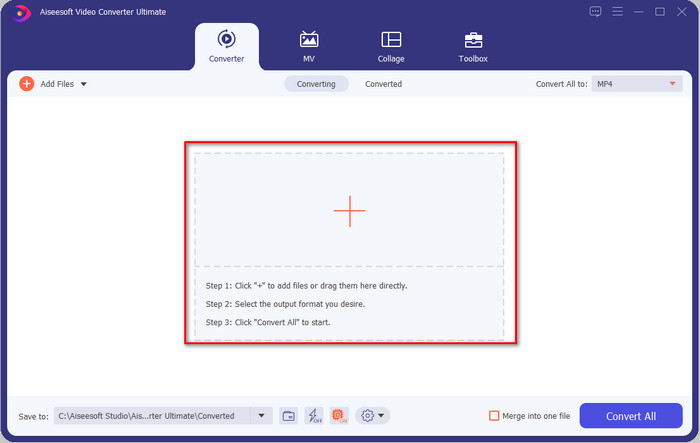
Pas 2. Carrega el vídeo amb la resolució més alta arrossegant-lo i deixant-lo anar a la interfície de l’eina. També pots fer clic al botó + per obrir la carpeta, localitzar el fitxer i fer clic a Obre per carregar el vídeo.
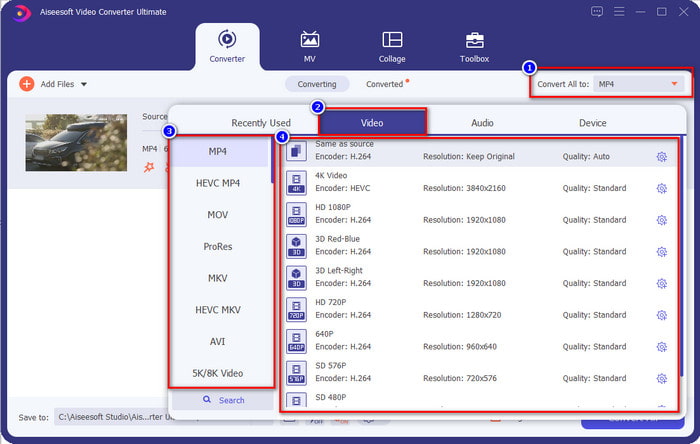
Pas 3. Fes clic a Convertir-ho tot a, i es mostrarà una llista de formats predissenyats. Pots seleccionar diferents formats com MP4, MOV, AVI, MKV i més de 200 més amb diferents resolucions; fes clic al format que vulguis i continua.
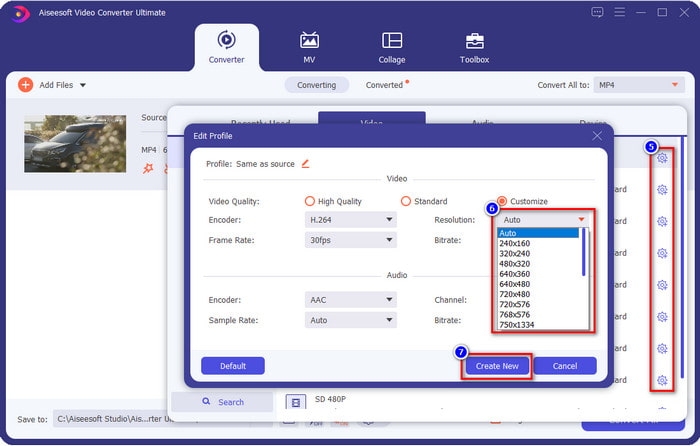
Què passa si la resolució que vols aconseguir no és a la llista predefinida? No et preocupis; pots crear la teva pròpia resolució. Després de fer clic a Convertir-ho tot a, tria el format que vulguis i fes clic a la roda dentada amb una icona de signe més. Fes clic al botó desplegable, selecciona la resolució que vols, fes clic a Crea’n una de nova i després fes clic al predefinit que has creat.
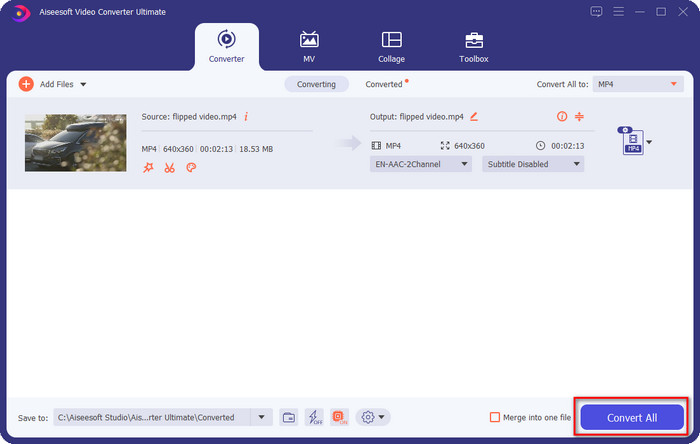
Pas 4. Per començar a reduir la resolució del vídeo, prem el botó Convertir-ho tot. Amb la conversió ultraràpida, la descàrrega trigarà menys d’un minut. I voilà, la resolució del teu vídeo ja s’ha reduït, tot gràcies a aquesta eina definitiva.
Part 3. Manera gratuïta de convertir la resolució de vídeo a una resolució més baixa al web
Si busques una manera de convertir vídeo HD a una resolució més baixa en línia, pots utilitzar el FVC Free Video Converter Online com a solució. Aquesta eina web admet nombrosos formats que pots pujar i exportar. A diferència de l’eina definitiva, no cal descarregar aquesta eina per convertir un vídeo d’alta resolució en un amb resolució més baixa. Tanmateix, l’eina no disposa d’un procés de conversió ultraràpid, i els formats compatibles no són tants com en l’eina definitiva. Per tant, si vols provar i utilitzar aquesta eina web, pots seguir els passos següents.
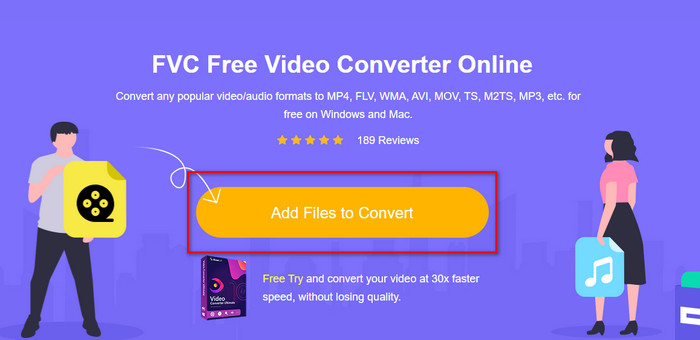
Pas 1. Per anar a la pàgina principal de FVC Free Video Converter Online, fes clic en aquest enllaç.
Pas 2. Prem Add Files to Convert per pujar el vídeo al qual vols reduir la resolució. A més, si és la primera vegada que utilitzes l’eina, hauràs de descarregar el llançador. Després d’això, fes clic de nou a Add Files to Convert per pujar el fitxer.
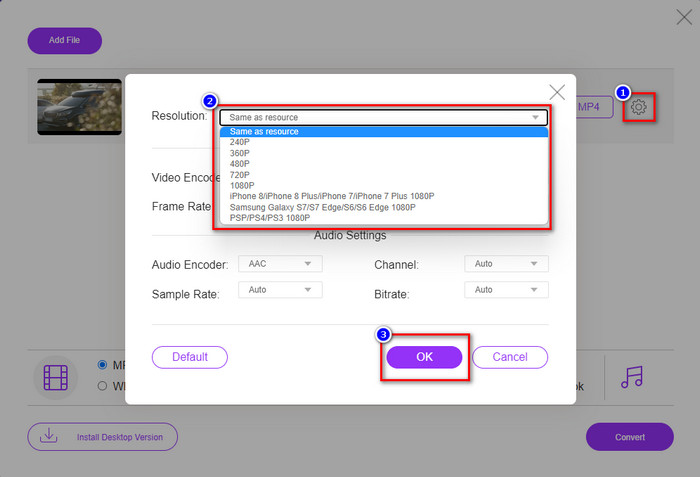
Pas 3. Fes clic a la icona de roda dentada al costat dret de la finestra que es mostrarà. Tria la resolució que vulguis fent clic al botó desplegable i prem OK per desar.
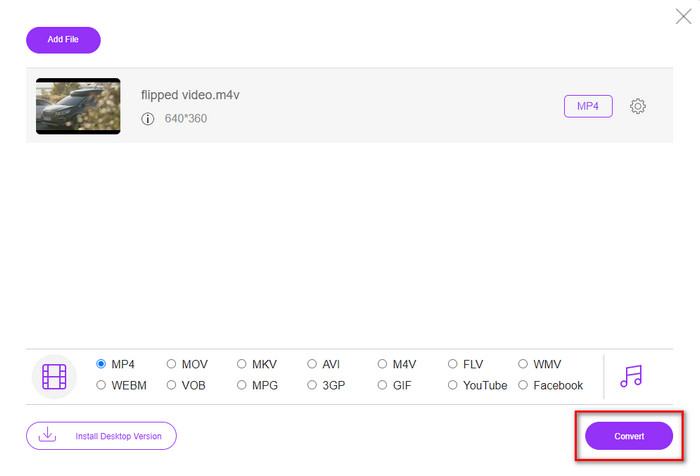
Pas 4. Per exportar el vídeo amb qualitat inferior, fes clic a Convert i espera que es descarregui al teu disc.
Part 4. 2 millors aplicacions per reduir la resolució de vídeo a iPhone i Android
Video Format Factory (només per a usuaris d'Android)
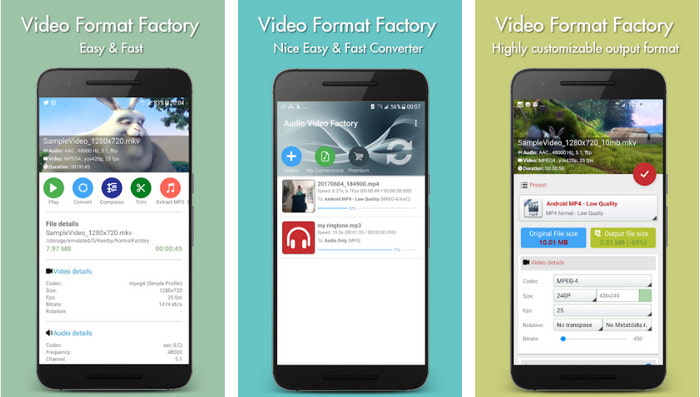
Si necessiteu aprendre a reduir la resolució de vídeo a Android, Audio Video Factory us pot ajudar. Amb aquesta aplicació, podeu convertir fàcilment la resolució de vídeo del vostre vídeo de forma gratuïta. Tanmateix, apareixeran alguns anuncis mentre feu la conversió i no podreu utilitzar tot el potencial de l'eina si no la compreu. Per tant, per ensenyar-vos a utilitzar-lo, seguiu els passos.
Pas 1. Descarrega l’aplicació de la Play Store i obre-la.
Pas 2. Fes clic a Add per pujar el vídeo, tria on es troba el teu vídeo i fes-hi clic. Després, fes clic a Convert; fes clic a Size i tria la resolució que vols.
Pas 3. Desplaça’t cap amunt i fes clic a Convert Now per començar el procés.
Càmera de baixa resolució molt baixa (només per a usuaris d'iOS)
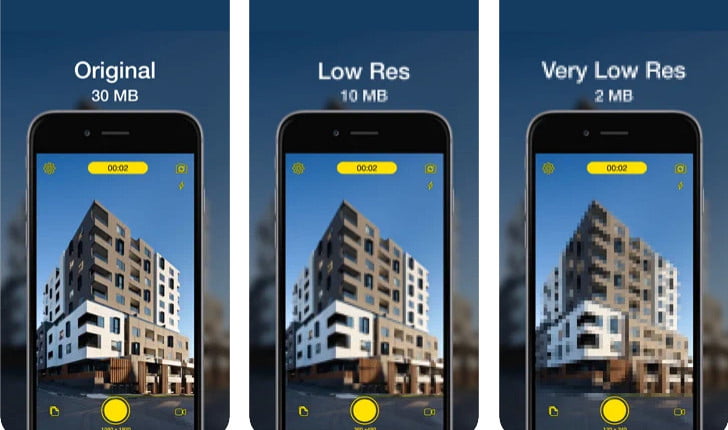
Si ets usuari d’iOS, encara pots aprendre a reduir la resolució del vídeo a l’iPhone utilitzant Lower- Very Low Res Camera. A diferència de les eines d’aquesta llista, pots gravar un vídeo amb una resolució més baixa si et descarregues aquesta aplicació de l’App Store. Tanmateix, l’eina té algunes limitacions i mostra anuncis emergents mentre l’utilitzes.
Pas 1. Descarrega l’aplicació de l’App Store i fes-hi clic per obrir-la.
Pas 2. Fes clic a la icona de fitxers i selecciona el vídeo que vols convertir; després de fer clic al vídeo, prem Resize.
Pas 3. Selecciona la Recording Quality, i començarà el procés de conversió.
Part 5. Preguntes freqüents sobre la reducció de la resolució de vídeo
VLC admet la resolució 4k?
Sí, VLC 3.0 admet la reproducció de vídeos en resolució 4K. Però sabies que VLC pot fer moltes més coses? Si vols explorar més VLC, fes clic en aquest enllaç i descobreix VLC i altres alternatives perfectes per utilitzar.
Quines són les altres eines que puc utilitzar per convertir la resolució de vídeo?
En aquesta ressenya coneixeràs els 8 millors convertidors de resolució de vídeo que pots utilitzar en diferents plataformes. Fent clic en aquest enllaç, tindràs informació més detallada i diferents opcions de convertidors.
Quina és la resolució de vídeo més alta que puc tenir?
La resolució de vídeo de 8k és la resolució de vídeo més alta que podeu utilitzar al televisor. Aquesta resolució és 4 vegades més nítida que la 4k i 16 vegades millor que la 1080.
Conclusió
Finalment, ara ja tenim una idea més clara de com reduir la resolució del vídeo a la teva plataforma; tant si utilitzes Windows, Mac, un servei en línia, Android o iPhone, pots utilitzar els convertidors d’aquesta llista. Però si vols una eina que pugui canviar la resolució sense reduir la qualitat, et recomanem utilitzar el FVC Video Converter Ultimate. Tal com hem presentat més amunt, hi ha molts motius pels quals hauries d’utilitzar aquesta eina, i si encara no ens creus, pots descarregar-la i provar si funciona tal com expliquem en aquesta publicació.
-
 Guia definitiva Com canviar la resolució de vídeo disponible en multiplataforma
 Necessites canviar la resolució del vídeo? Si és així, apreneu les diferents maneres que podeu fer fàcilment per canviar la resolució del vídeo que esteu veient.
-
 Els 8 millors convertidors de resolució de vídeo per utilitzar en multiplataforma [Actualitzat el 2022]
 No tens idea del millor convertidor de resolució de vídeo al teu dispositiu? Si és així, podeu llegir completament aquest article per saber més sobre els convertidors de vídeo disponibles.
-
 Millor reproductor de vídeo HD de 1080p per a Windows / Mac / iOS / Android el 2021
 Si busqueu un reproductor de vídeo per veure vídeos d'alta definició a 1080p a l'ordinador, consulteu les nostres seleccions dels millors reproductors de vídeo HD 1080p per a Mac, PC amb Windows, iOS i Android.
