


 Video Converter Ultimate
 Gravadora de pantalla
 Reparació de vídeo
Revisió sobre la importància de l'editor d'etiquetes ID3 el 2022
Les cançons que has descarregat de llocs web de música tenen metadades, també conegudes com a etiquetes ID3. Normalment, tota la informació que necessites sobre aquella cançó és a la informació de l’etiqueta. En algunes ocasions, la música no porta etiquetes o en porta amb informació incorrecta. En aquest tipus de situació, necessitaràs programari que t’ajudi a gestionar fàcilment aquesta tasca. En aquest context, et presentem amb molt de gust el millor editor d’etiquetes ID3 que pots descarregar a Windows, Mac, iOS i Android per editar les etiquetes de les teves cançons.

Part 1. Què és l'etiqueta ID3
Les etiquetes ID3 són essencials per a qualsevol usuari que vulgui conèixer informació detallada sobre la cançó. Un gran exemple d’etiquetes que pots veure sense obrir-ne els detalls exactes és el nom de l’artista i el títol de la cançó. Encara que no les hàgim afegit manualment al fitxer d’àudio, continuen estant incrustades per ajudar-nos a saber si estem reproduint la música correcta.
No obstant això, si no teniu cap etiqueta a les vostres cançons o podcasts, hi ha la possibilitat que els fitxers estiguin codificats a tota la biblioteca o carpeta on s'emmagatzemen. Afegir les etiquetes al fitxer us pot ajudar a determinar el fitxer i organitzar-lo perquè sembli organitzat. Si el vostre fitxer no en té cap, heu d'afegir dades. Mantingueu la bola rodant per ajudar-vos a buscar l'editor d'etiquetes ID3 que hauríeu d'utilitzar que s'adapti a les vostres necessitats.
Però abans de començar, si us plau, prepareu les metadades que voleu afegir al vostre fitxer d'àudio; aquests inclouen títol, autor, capítol, pàgines, comentaris, lletra, etc. Després de llegir això, us sorprendrà la nostra ressenya sobre els principals editors d'etiquetes que podeu utilitzar en tots els dispositius.
Part 2. El millor editor d'etiquetes ID3 a Windows/Mac per canviar les metadades fàcilment
FVC Video Converter Ultimate: el millor editor d'etiquetes ID3
Un dels aspectes bàsics que has de conèixer a l’hora d’escollir un editor d’etiquetes ID3 per a Mac o Windows és que ha de ser precís, fàcil d’utilitzar i accessible; tot això ho trobaràs a FVC Video Converter Ultimate. És conegut com un editor de metadades de primera classe que és senzill de gestionar fins i tot per als usuaris que no saben ben bé com ajustar-les. A diferència d’altres editors d’etiquetes, no cal fer moltes operacions complicades per afegir o corregir les etiquetes del teu àudio o vídeo. Per tant, si ets nou en aquest camp d’edició o correcció d’etiquetes ID3, sens dubte aquest és el teu programa tot en un.
A més, no el vam anomenar un editor únic sense cap motiu; potser penses per què. Si explorem més sobre l'eina, veureu que podeu fer edició de vídeo avançada i bàsica aquí per fer que el vostre vídeo sembli excepcional afegint efectes i filtres. Encara hi ha massa funcions no esmentades que podeu revelar si descarregueu l'eina. Però avui, ens centrarem a utilitzar aquest programari d'edició d'etiquetes ID3 per ajudar-vos a editar i corregir ràpidament les etiquetes de les vostres cançons.
Pas 1. Primer, descarrega el programari al sistema operatiu que hagis escollit; hi ha dues opcions disponibles, Windows i Mac. A continuació, instal·la’l correctament, segueix el procés de configuració i obre l’eina un cop hagis acabat tot això.
Descàrrega gratuïtaPer a Windows 7 o posteriorDescàrrega segura
Descàrrega gratuïtaPer a macOS 10.7 o posteriorDescàrrega segura
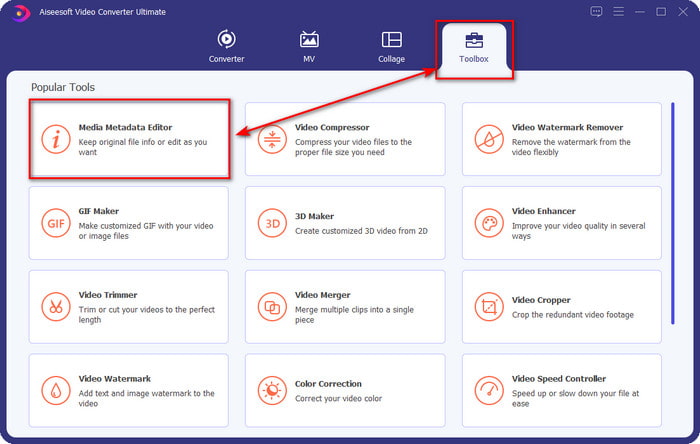
Pas 2. Un cop hagis obert l’eina, has d’anar a la secció Toolbox i obrir el Media Metadata Editor fent-hi clic.
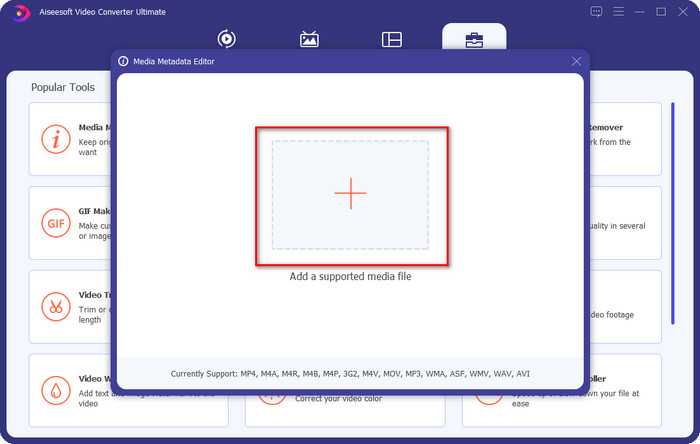
Pas 3. Prem la icona + a la nova finestra que apareixerà a la pantalla, selecciona el fitxer d’àudio al qual vols canviar les etiquetes ID3 i prem Open per pujar-lo.
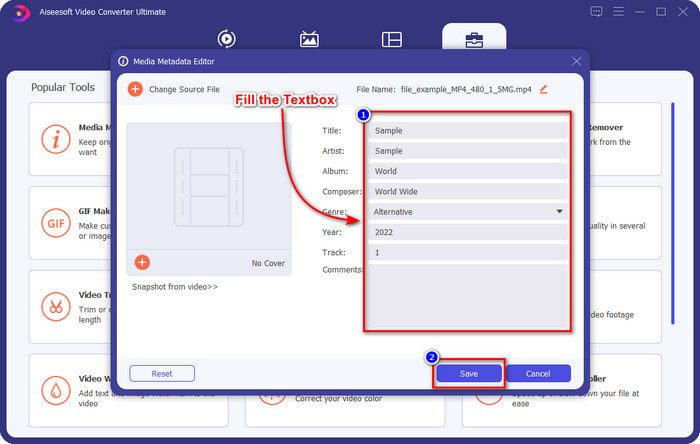
Pas 4. Ara ja pots escriure la informació que vols afegir al teu fitxer d’àudio i fer clic a Desa quan acabis amb cada camp de text. Tan senzill com això: ja hauràs afegit etiquetes al fitxer d’àudio amb l’ajuda d’aquest programari.
Pros
- Admet canviar MP3, WMA, WAV i més de 1000 metadades sense esforç.
- La conversió ultraràpida i l'acceleració de maquinari són compatibles per a un procés de velocitat fulgurant.
- Les funcions d'edició de vídeo principals fins a les avançades estan disponibles a Toolbox.
- És la primera opció de milions d'usuaris a tot el món per assumir aquesta tasca.
Contres
- La compra de l'eina és necessària per tenir totes les funcions d'edició elegants.
- No disponible a Android i iOS.
Reproductor multimèdia VLC
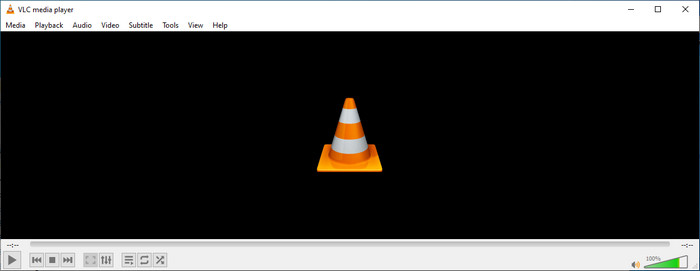
VLC Media Player és un reproductor multimèdia de primera categoria que pots descarregar a Windows i Mac. Aquesta eina pot ajudar-te a reproduir vídeos sense haver de descarregar còdecs al sistema, però també la pots utilitzar per editar les etiquetes ID3 del teu fitxer d’àudio. Tot i que l’eina no és un editor de metadades dedicat, pot corregir etiquetes incorrectes. Per tant, si ja tens aquesta eina, pots ajustar fàcilment les metadades de la teva cançó, però no n’esperis massa, perquè no és tan bona com un editor d’etiquetes ID3 de primera classe per a ordinador.
Pros
- Un reproductor multimèdia i un editor de metadades que podeu utilitzar en qualsevol dispositiu.
- Admet un format mitjà mitjà per canviar les etiquetes.
- La GUI és senzilla i senzilla.
Contres
- No és un editor de metadades professional.
- Admet funcions limitades pel que fa a l'edició de les etiquetes.
Part 3. Els 3 principals editors d'etiquetes ID3 en dispositius mòbils iOS/Android
Editor d'etiquetes de música Star
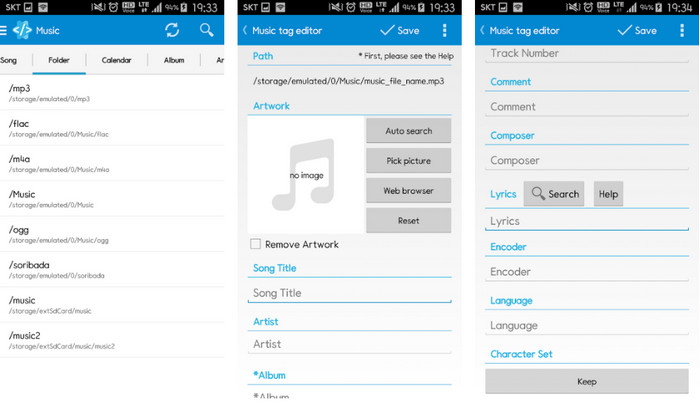
Star Music Tag Editor és un dels editors d’etiquetes ID3 més utilitzats a Android. Aquesta app et pot mostrar informació diversa sobre la teva música, i la pots canviar si cal. La seva interfície és molt senzilla, de manera que pots aprendre fàcilment a fer-la servir encara que no estiguis familiaritzat amb eines per editar etiquetes. Tot i que l’app és excel·lent, encara té algunes mancances a l’hora d’afegir metadades, sobretot pel que fa a la caràtula de l’àlbum. Encara que puguin aparèixer problemes, continua sent un editor d’etiquetes fiable que pots descarregar al teu telèfon Android.
Pros
- L'editor de metadades és gratuït per descarregar a Android.
- La GUI és senzilla i fàcil d'entendre.
- Afegiu les etiquetes al fitxer d'àudio fàcilment.
Contres
- Té un problema per afegir una portada d'imatge al fitxer d'àudio.
- De vegades encara hi ha errors.
Reproductor de música de núvols per a núvols
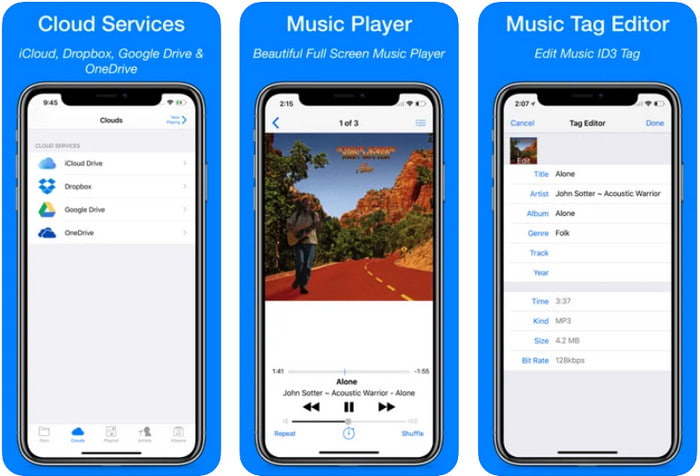
Clouds Music Player for Clouds és una aplicació polivalent que pots descarregar als teus dispositius iOS. Permet editar etiquetes ID3 a l’iPhone, reproduir música i crear tons de trucada a partir de la música. Malgrat totes aquestes funcions, la seva interfície és senzilla i clara, i pots accedir al teu servei al núvol a través de l’app. Tot i la interfície fàcil d’utilitzar, la informació que pots afegir com a metadades al fitxer d’àudio és insuficient, cosa que vol dir que només es poden editar les etiquetes bàsiques. Malgrat això, és una gran opció de descàrrega si ets usuari d’iOS.
Pros
- Disponible a qualsevol dispositiu iOS per descarregar.
- Editor de música multifuncional i editor d'etiquetes.
- Editor de metadades intuïtiu a iOS.
Contres
- No admet afegir més metadades.
- Hi ha errors i problemes de canvi de metadades, però no sovint.
Aplicació Dash- Infotainment
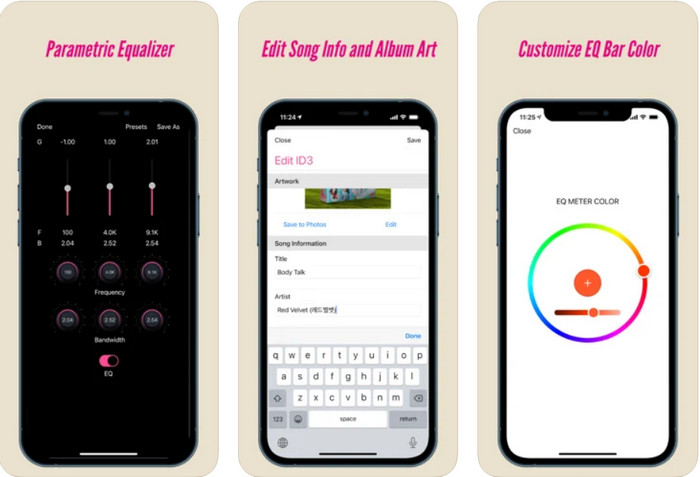
Dash- Infotainment App és una altra eina que pots descarregar per editar etiquetes ID3 a l’iPhone sempre que ho necessitis. No cal aprendre gaire abans de començar a utilitzar l’app, gràcies a la seva interfície simple i depurada. Pots utilitzar aquesta eina per canviar fàcilment els paràmetres dels teus fitxers FLAC i ALAC amb el seu equalitzador fàcil d’usar. A més, pots veure la velocitat i el compàs de la cançó que hi penges. Igual que amb el primer editor d’etiquetes per a iPhone, aquí només pots afegir títol, artista i caràtula de l’àlbum, però recorda que el format ha de ser FLAC o ALAC; si no és en aquest format, no el podràs pujar.
Pros
- La corba d'aprenentatge no és massa dura.
- Hi ha disponible un equalitzador d'àudio multitudinari.
- La GUI no és gaire, i no és menys.
Contres
- Només és compatible amb els formats FLAC i ALAC.
- No hi ha res a oferir pel que fa a l'edició de metadades.
Part 4. Preguntes freqüents sobre ID3 Tag Editor
Quin és el millor editor d'etiquetes ID3 de línia d'ordres que puc utilitzar?
Si busques un editor d’etiquetes ID3 per línia d’ordres, has de saber que FFmpeg és un editor de línia d’ordres. Amb aquesta eina, pots convertir, girar, tallar, retallar i editar les etiquetes de metadades. Si vols saber-ne més sobre FFmpeg, potser t’interessarà llegir com utilitzar-lo fent clic a l’enllaç per editar fàcilment les metadades amb FFmpeg.
Quins són els altres tipus de metadades?
Hi ha sis tipus de metadades: descriptives, administratives, de referència o explicatives, estadístiques, legals i estructurals. Si vols saber-ne més sobre aquests tipus i la seva informació, pots fer clic en aquest enllaç i llegir-ne més detalls.
És possible veure etiquetes sense una aplicació?
Sí, en lloc de descarregar programari, pots utilitzar una eina en línia per veure les etiquetes del teu fitxer. Fes clic en aquest enllaç per veure les metadades al teu ordinador en línia, però també et presentarem algunes eines que segur que t’agradarà descarregar.
Conclusió
Amb la informació que enumerem més amunt, va ser possible editar les etiquetes ID3 mitjançant els editors que vam presentar anteriorment, independentment del dispositiu que utilitzeu actualment. A més, l'aplicació i el programari són perfectes per als usuaris que necessiten editar les seves metadades. Tot i que les eines ofereixen una oportunitat excel·lent perquè els usuaris editin les metadades, encara no hi ha dubte que l'eina definitiva ofereix una manera eficaç d'editar etiquetes ID3 en qualsevol fitxer de música. Si voleu tenir el millor editor d'etiquetes ID3 a Windows i Mac, podeu descarregar-lo directament fent clic al botó de descàrrega que es presenta més amunt i, a continuació, gaudir de la seva grandesa.
-
 2 millors maneres d'editar les metadades OGG que hauríeu de provar gratuïtament
 Necessites editar les metadades OGG? Bé, podeu gestionar fàcilment l'edició de les etiquetes utilitzant el programari correcte. Si no en teniu cap, és imprescindible llegir aquest article.
-
 Una visió general absoluta sobre l'editor de metadades de Pentaho [Actualitzat el 2022]
 No troba cap article fiable sobre l'editor de metadades de Pentaho? Afortunadament, vam revisar l'eina nosaltres mateixos per proporcionar els fets que coneixeu sobre l'eina.
-
 Consells i trucs sobre l'editor de metadades de VLC que heu de conèixer el 2022
 Voleu utilitzar el VLC com a editor de metadades? En aquest cas, podeu llegir aquest article ja que oferim una revisió imparcial de l'editor de metadades de VLC.
