


 Video Converter Ultimate
 Gravadora de pantalla
 Reparació de vídeo
 Baixada segura
2 millors mètodes per unir diversos fitxers ASF a Windows / Mac
És habitual que ens trobem amb una història llarga que, tot i esperar‑la emmagatzemada en un sol fitxer de vídeo complet, apareix dispersa en diversos clips incomplets. Potser acabes de descarregar un vídeo UHD d’un lloc web de cinema i t’has trobat que el vídeo s’ha trencat en diferents fitxers ASF comprimts en paquets ZIP. Com combinar els fitxers ASF per tornar a tenir el vídeo complet i reproduir‑lo sense talls? Aquest article t’hi pot ajudar. Hem resumit els 2 millors mètodes per unir clips de vídeo ASF en un fitxer complet.

Part 1: Combineu diversos fitxers ASF en línia de forma gratuïta
La solució més ràpida és utilitzar FVC Free Online Video Merger, una eina en línia lleugera que et permet unir fitxers ASF gratuïtament. No cal descarregar ni instal·lar cap programa. Només has de pujar els teus fitxers de vídeo i començar a unir‑los amb un sol clic.
Funcions clau
- • Uniu-vos a fitxers de vídeo ASF sense cap pèrdua de qualitat de vídeo
- • No deixeu cap filigrana al vídeo combinat
- • Deseu el vídeo combinat en 9 formats
- • Afegiu els vostres vídeos en 1 segon i no cal que pengeu els fitxers al servidor
Pas 1. Carrega FVC Free Online Video Merger al teu navegador. Veureu un gran botó Upload Videos to Merge al centre de la pàgina web. Fes‑hi clic.
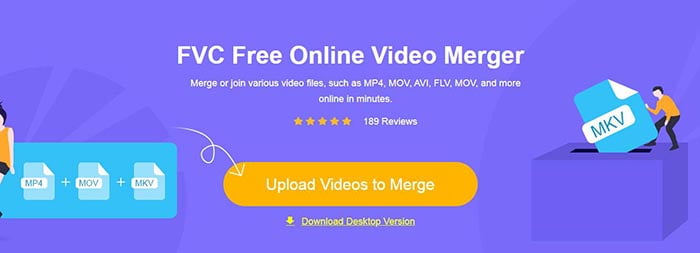
Nota: Si és la primera vegada que utilitzes aquesta eina, hauràs de descarregar i instal·lar un llançador.
Pas 2. Apareixerà una finestra de l’explorador d’arxius. Allà pots seleccionar els fitxers ASF i pujar‑los. Per seleccionar diversos fitxers, només cal que mantinguis premuda la tecla Ctrl del teclat i facis clic als fitxers un per un.
Pas 3. Fes clic al botó Open per afegir els fitxers seleccionats i, a continuació, veuràs la interfície de fusió d’ASF. Aquí pots ordenar els vídeos eliminant els existents i inserint‑ne de nous.
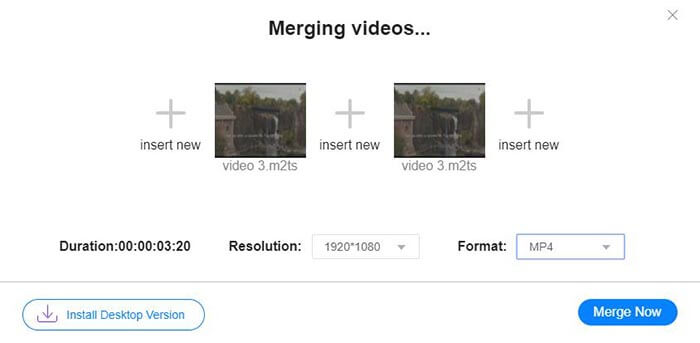
Pas 4. Després pots escollir el format de sortida i la resolució. Pots deixar la resolució com l’original sense problema. No obstant això, aquest fusor ASF en línia no permet exportar el fitxer fusionat en format ASF. Per tant, només pots triar un altre format de la llista per convertir el vídeo.
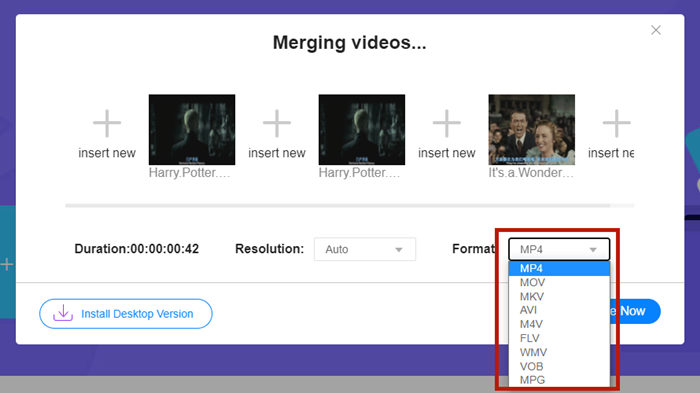
Pas 5. Fes clic al botó Merge Now a l’angle inferior dret de la interfície per fusionar els fitxers ASF. L’eina et demanarà que estableixis una carpeta de destinació per al fitxer exportat.
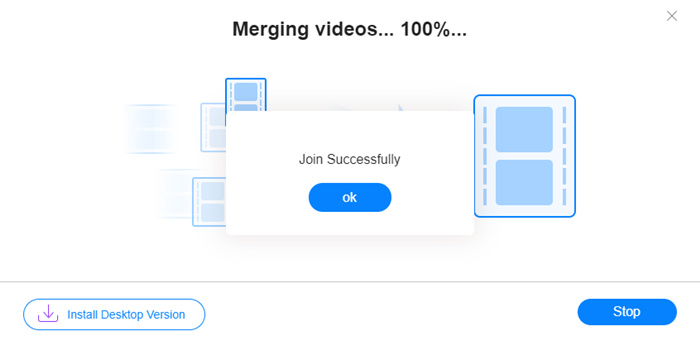
Quan vegis l’avís Join Successfully, podràs anar a la carpeta de destinació i trobar‑hi el fitxer fusionat.
Aquest mètode és realment la forma més ràpida d'unir fitxers ASF. Tot el procés és tan senzill com heu vist. Tanmateix, la facilitat d'ús i la llum limitaven les seves característiques. No podeu organitzar la seqüència dels vídeos convenientment. És possible que no apliqueu la resolució o el format de sortida desitjat. El pitjor és que, quan voleu combinar vídeos ASF de diferents resolucions i orientacions, aquesta eina pot desordenar tot. Aleshores és possible que necessiteu una altra eina per fer-ho.
Part 2: Combinar fitxers ASF sense problemes i amb més rapidesa
Video Converter Ultimate et pot ajudar a girar, retallar, tallar i, sobretot, unir els fitxers ASF. Amb aquesta eina, pots desar el fitxer ASF fusionat en qualsevol format i resolució. El procés de fusió a Video Converter Ultimate també és extraordinàriament ràpid.
Funcions clau
- • Retalleu els inicis i els finals no desitjats abans d'unir-vos als fitxers ASF.
- • Gireu els vídeos en diferents orientacions.
- • Retalleu perquè tots els clips de vídeo tinguin la mateixa resolució.
- • Comprimiu el fitxer ASF a una mida més petita per a YouTube, Facebook, etc.
- • L’acceleració de maquinari us proporciona una velocitat de fusió de vídeo 70 vegades més ràpida.
Descàrrega gratuïtaPer a Windows 7 o posteriorDescàrrega segura
Descàrrega gratuïtaPer a macOS 10.7 o posteriorDescàrrega segura
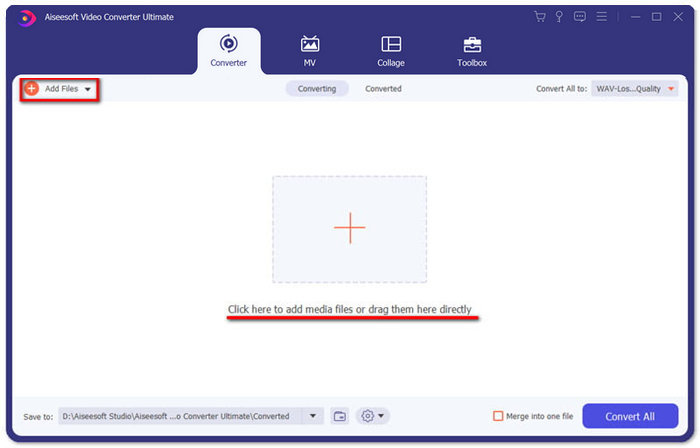
Pas 1. Descarrega, instal·la i inicia Video Converter Ultimate. Fes clic al gran botó + al centre de la interfície principal per afegir els fitxers ASF que vulguis unir. Després d’afegir‑los, pots arrossegar els clips importats per ordenar‑los.
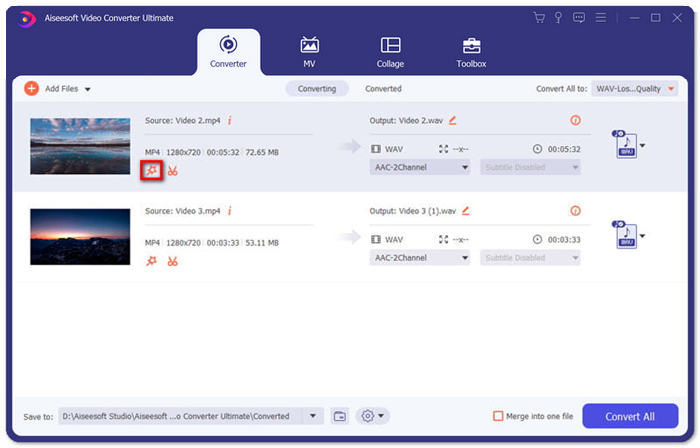
Pas 2. Per als clips que vulguis retallar, girar o canviar‑ne la relació d’aspecte, pots fer clic al botó Edit. Aleshores accediràs a la pàgina Rotate & Crop.
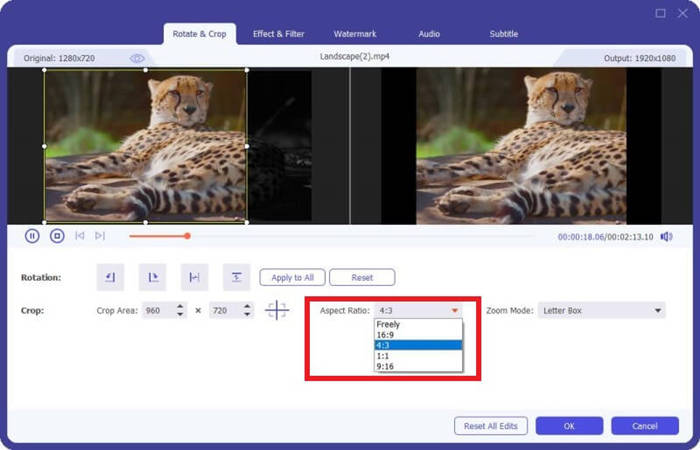
Aquí pots canviar la relació d’aspecte a la secció Aspect Ratio. Per canviar la resolució, pots arrossegar lliurement el marc de la pantalla de previsualització de l’esquerra. També hi tens disponible l’opció de rotació. No t’oblidis de fer clic al botó OK per desar la configuració.
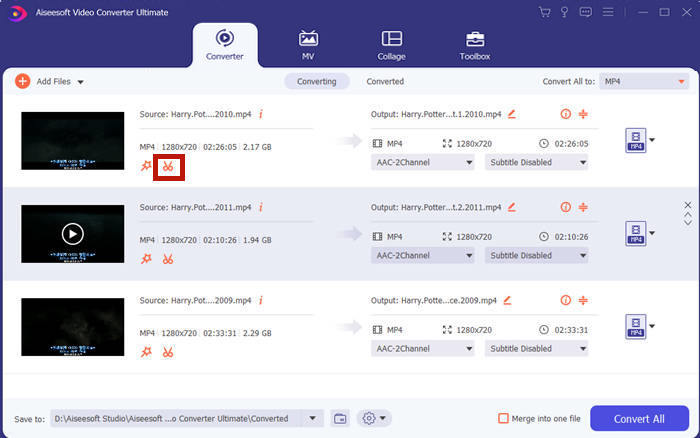
Pas 3. Per tallar els segments no desitjats, has d’utilitzar la funció Cut. Fes clic al botó Cut per accedir a la pàgina Cut.
Aquí pots seleccionar un segment i fer clic al botó Delete (la icona de la paperera) per eliminar‑lo. Finalment, fes clic a desar per tornar enrere.
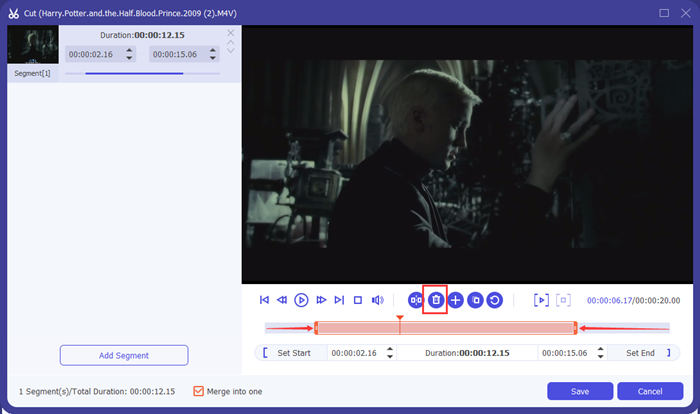
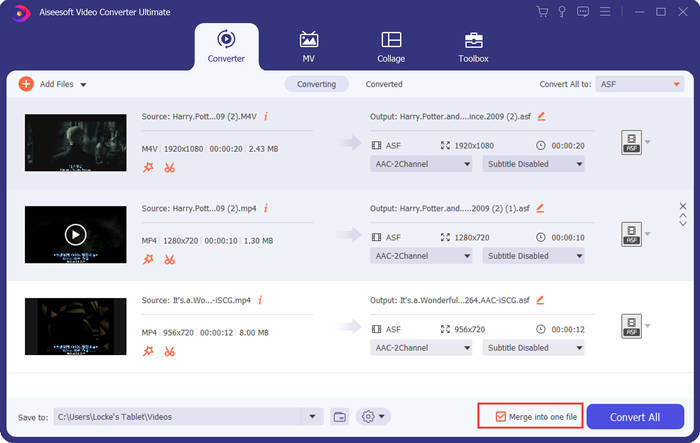
Pas 4. A la interfície principal, marca la casella Merge into one file a l’angle inferior dret.
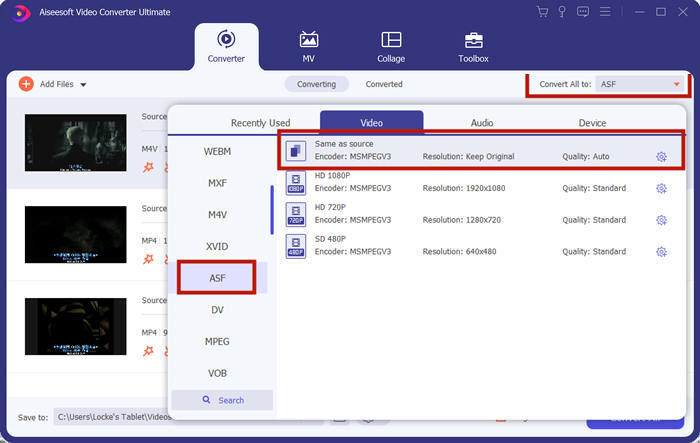
Pas 5. A continuació, pots seleccionar el format de sortida mitjançant l’opció Convert All to a l’angle superior dret de la interfície. Cerca ASF i fes‑hi clic.
Finalment, pots fer clic al botó Convert All per començar a unir els fitxers ASF. Quan acabi, el resultat es desarà a la carpeta que hagis configurat a l’angle inferior esquerre de la interfície principal. Finalment, hem recopilat 3 preguntes freqüents sobre la combinació de fitxers ASF.
Part 3: Preguntes més freqüents sobre la unió de fitxers ASF
Per què no puc reproduir un fitxer ASF en cap aplicació de reproductor?
Hi ha tres tipus de fitxers que utilitzen l'extensió ASF. Són Advanced Systems Format, Acclaim Skeleton File i Electronic Arts Sound File. Potser el vostre ASF no és cap fitxer de vídeo en format de sistemes avançats.
Per què no puc veure cap imatge en reproduir un fitxer ASF?
Per què no puc veure cap imatge en reproduir un fitxer ASF? No tots els fitxers ASF contenen almenys un vídeo. De vegades, un ASF pot contenir només una peça d'àudio WMA. Augmenteu el volum dels altaveus o dels auriculars i comproveu si hi ha so a la reproducció del fitxer.
Puc reproduir un fitxer ASF al meu televisor intel·ligent?
Depèn. Alguns televisors intel·ligents admeten fitxers ASF i d’altres no. Si el teu televisor intel·ligent no reprodueix el fitxer ASF, pots convertir el fitxer a MP4 prèviament.
Conclusió
Un fitxer ASF sovint conté un fitxer WMV o WMA. És àmpliament compatible amb molts dispositius i programes. Aquest article t’ofereix les dues maneres més eficients d’unir diversos fitxers ASF en un de sol sense reduir la qualitat ni afegir cap marca d’aigua. FVC Free Online Video Merger és sens dubte la solució més ràpida. Però si vols retallar o girar els vídeos per combinar‑los de manera totalment fluida, és millor utilitzar Video Converter Ultimate. Has tingut alguna dificultat per unir fitxers ASF? Explica‑ns‑ho als comentaris.
-
 Com combinar vídeos a l'iPhone amb iMovie o sense (d'ús gratuït)
 Tutorial: 4 maneres gratuïtes de combinar vídeos a l'iPhone en un de nou
-
 2 millors maneres d'unir fitxers MKV per veure la pel·lícula sense parar
 Fusió de fitxers de pel·lícules MKV: Com unir diversos fitxers MKV en un de sol
-
 Com unir-se a WMV Clips en línia? Aquí hi ha 3 mètodes provats
 3 millors mètodes per unir fitxers WMV en línia gratuïtament (actualització 2021)
