


 Video Converter Ultimate
 Gravadora de pantalla
 Reparació de vídeo
 Baixada segura
2 mètodes eficients per combinar fitxers WebM sense perdre qualitat
Com es combinen fitxers WebM? Quan baixeu una sèrie de vídeos penjats d'altres usuaris en línia i voleu reproduir-los contínuament per tenir una experiència de visualització millor, podeu considerar la possibilitat de combinar aquests vídeos de WebM en un de sol. Tanmateix, a causa de la seva alta qualitat i mida petita, és millor que uniu fitxers WebM a MKV per mantenir l’alta qualitat dins d’una mida relativament petita. Per tant, hi ha dues maneres eficients d’ajudar-vos a combinar WebM com a fitxers MKV.

Part 1: Com combinar fitxers WebM en línia sense pèrdues
FVC Fusionador de vídeos en línia gratuït és una eina de combinació versàtil que permet unir fitxers de qualsevol format, inclosa la fusió de fitxers WebM gratuïtament en línia. No cal descarregar cap programari, només has de pujar els teus fitxers WebM al navegador i unir-los amb uns quants clics.
- 1. Simples clics per combinar qualsevol quantitat de fitxers de vídeo de WebM en un totalment gratuït en línia.
- 2. Suport per exportar formats de vídeo més populars, inclòs el format MKV amb alta qualitat.
- 3. No hi ha filigrana per penjar directament els vídeos a YouTube, Facebook o altres plataformes.
- 4. Suprimiu permanentment els fitxers penjats en 24 hores per protegir la vostra privadesa.
Pas 1: Ves a FVC Fusionador en línia gratuït i segueix la guia per instal·lar el connector en pocs segons. A continuació, fes clic al botó Puja els vídeos per fusionar per triar un dels fitxers de vídeo WebM desitjats.

Pas 2: Fes clic a la icona de més per afegir altres fitxers de vídeo WebM que vulguis fusionar. Has d’afegir aquests vídeos en l’ordre que vulguis. Després tria el format MKV i la resolució 1920*1080 per mantenir una alta qualitat de vídeo.

Pas 3: Fes clic al botó Fusiona ara i, després de triar la carpeta local, començarà a fusionar automàticament els fitxers de vídeo WebM.
Part 2: la manera més professional d'unir fitxers WebM per crear-ne un de nou
El fusionador en línia gratuït et pot ajudar a combinar vídeos WebM amb facilitat. Però si vols unir algunes parts dels fitxers WebM per crear-ne un de nou, hauries d’utilitzar l’eina professional – Video Converter Ultimate, que no només pot unir fitxers WebM, sinó també editar els vídeos abans de fusionar-los.
- 1. Combineu fitxers de vídeo WebM en un de diversos formats, inclòs MKV.
- 2. Capaç de preservar la qualitat original dels vídeos de WebM, inclosos 1080p HD i 4K.
- 3. Eines d'edició fàcils d'utilitzar per retallar vídeos, afegir filtres, ajustar efectes de vídeo i dividir vídeos.
- 4. Velocitat de fusió ràpida per combinar diversos fitxers de vídeo WebM en pocs minuts.
Descàrrega gratuïtaPer a Windows 7 o posteriorDescàrrega segura
Descàrrega gratuïtaPer a macOS 10.7 o posteriorDescàrrega segura
Pas 1: Descarrega Video Converter Ultimate i obre’l. Fes clic al botó Afegeix fitxers a la cantonada superior esquerra per triar tots els fitxers WebM que vols fusionar.

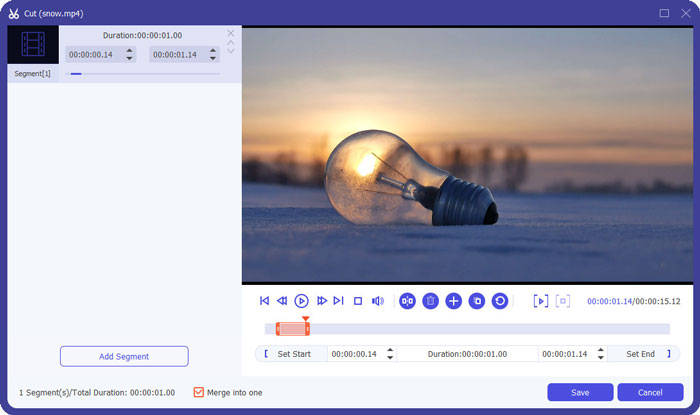
Pas 2: Fes clic al botó Retalla per tallar cada vídeo un per un. Arrossega la línia de temps o introdueix el punt de temps exacte per seleccionar les parts necessàries. Després fes clic al botó Desa per mantenir la configuració.
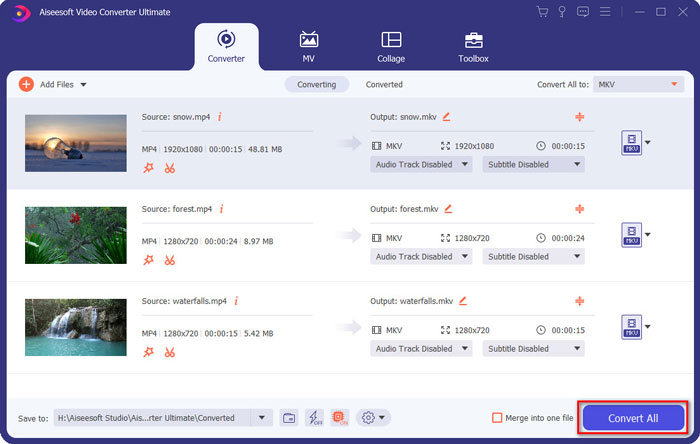
Pas 3: Fes clic al botó Converteix-ho tot a > Vídeo > MKV i tria el botó Igual que l’origen. Encara que augmentarà una mica la mida dels fitxers WebM, la qualitat serà la mateixa que la dels vídeos originals.

Pas 4: Després de triar la ruta d’emmagatzematge, marca Fusiona en un sol fitxer i fes clic al botó Converteix-ho tot per desar.
També et pot interessar: Com fusionar vídeos a l’iPhone.
Part 3: Preguntes més freqüents sobre la unió a fitxers WebM
1. Què és WebM?
WebM és un tipus de format de vídeo que proposa Google. I els vídeos de WebM sempre s’utilitzen al lloc web perquè es poden reproduir amb fluïdesa en gairebé tots els navegadors, inclosos Google Chrome, Firefox, etc., amb alta qualitat i mida petita.
2. La fusió de fitxers WebM reduirà la qualitat del vídeo?
Sí, ho farà, sobretot quan fusioneu diversos fitxers WebM en un fitxer WebM. La millor manera de mantenir la qualitat original és unir fitxers de vídeo de WebM junts com a fitxers MKV.
3. Puc conservar el format WebM després de combinar fitxers de vídeo WebM?
Sí, pots. Però és millor convertir el format a MKV, que és el prototip de WebM. Això és perquè, tot i que WebM pot mantenir una alta qualitat amb una mida reduïda, el format MKV s’utilitza més freqüentment que WebM. Però, si vols, també pots convertir WebM a MP4.
Conclusió
Quan vulgueu combinar fitxers de vídeo de WebM descarregats al lloc web per tenir una experiència de visualització més fluida, la manera més senzilla és utilitzar un combinador de vídeo en línia gratuït per ajudar-vos. Tanmateix, si voleu crear un vídeo nou combinant fitxers de vídeo de WebM, heu de retallar les parts necessàries abans d'unir-vos. En aquest cas, descarregueu el convertidor de vídeo professional - Video Converter Ultimate per retallar i combinar fitxers WebM alhora.
-
 Els 5 millors reproductors de WebM per a Android / iPhone / Windows / Mac
 Si voleu reproduir amb èxit un WebM al vostre dispositiu, heu d’aprendre més informació sobre els 5 millors reproductors de WebM per a Android, iPhone, Windows i Mac d’aquest article.
-
 Comprimir WebM - Com comprimir fitxers WebM en línia
 Com es pot comprimir el fitxer WebM en línia? Quina és la manera més ràpida de comprimir fitxers grans? Aquesta publicació explica dues maneres gratuïtes de comprimir WebM.
-
 Convertidor de MP4 a WebM: 4 millors mètodes per convertir MP4 a WebM
 Quan vulgueu convertir MP4 a WebM de forma gratuïta, podeu obtenir més informació sobre els 4 mètodes més freqüents per obtenir els vídeos desitjats de forma gratuïta a l'article.
