


 Video Converter Ultimate
 Gravadora de pantalla
 Reparació de vídeo
 Baixada segura
Com fer vídeo en blanc i negre: crear efectes de filtres
Els directors de fotografia poden modificar l’aspecte d’una pel·lícula mitjançant filtres. Hi ha molts filtres en diversos tipus d’aplicacions, però el filtre en blanc i negre sempre hi és present. Convertir el teu vídeo a blanc i negre crea una determinada atmosfera, ja que pot mostrar una escena del passat, tristor, nostàlgia i moltes emocions que les imatges o vídeos en color no poden transmetre. Però, com pots posar un vídeo en blanc i negre? Amb les eines adequades a les mans, és perfectament possible. Continua llegint aquesta entrada i t’ensenyarem com fer-ho.

Part 1. Com puc afegir un filtre en blanc i negre
Una eina de conversió multimèdia basada en el web anomenada Video Converter Ultimate converteix pràcticament tots els fitxers de vídeo i àudio populars al format de sortida que triïs. Aquesta eina en línia és més potent del que sembla a primera vista, perquè permet als usuaris editar vídeos amb eines útils, com ara filtres, i realitzar altres tasques de conversió. Tanmateix, aquest programa no està disponible a la Play Store ni a l’App Store. A continuació trobaràs una manera eficaç d’afegir filtres en blanc i negre a un vídeo amb Video Converter Ultimate.
Pas 1. Instal·la el Video Converter Ultimate
Feu clic a la icona següent per descarregar l'eina al vostre ordinador Windows o Mac. Seguiu els passos fàcils de seguir per acabar d'instal·lar l'eina i, a continuació, inicieu-la.
Baixada gratuïtaPer a Windows 7 o posteriorBaixada segura
Descarrega gratisPer a MacOS 10.7 o posteriorBaixada segura
Pas 2. Adjunta els fitxers de vídeo
Seleccionant el botó Plus o Add Files, pots importar el fitxer de vídeo al qual vols aplicar un filtre. Fes clic a Open després de seleccionar el fitxer de vídeo que vols pujar. A més, si ho desitges, pots inserir nombrosos fitxers de vídeo; en altres paraules, no hi ha cap restricció pel que fa al nombre de vídeos que pot filtrar.
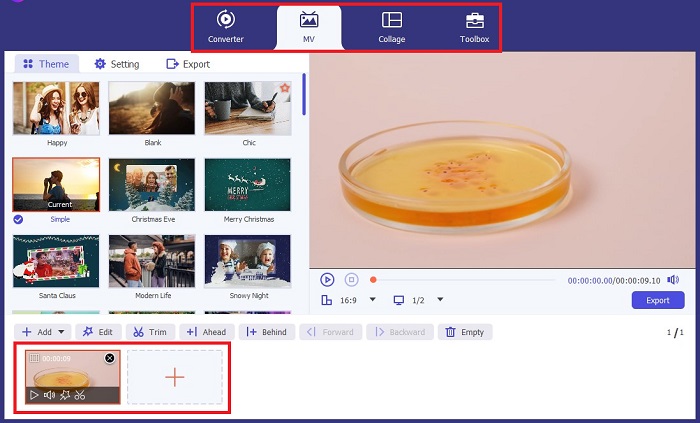
Pas 3. Accedeix a Filters & Effects
Seleccionant el botó Wand, pots obrir una finestra nova per personalitzar el vídeo. Per aplicar un filtre en blanc i negre, fes clic a Filters & Effects i, després, selecciona blanc i negre. A més, el FVC Video Converter Ultimate et permet controlar el to, la saturació, la brillantor i el contrast del teu projecte.
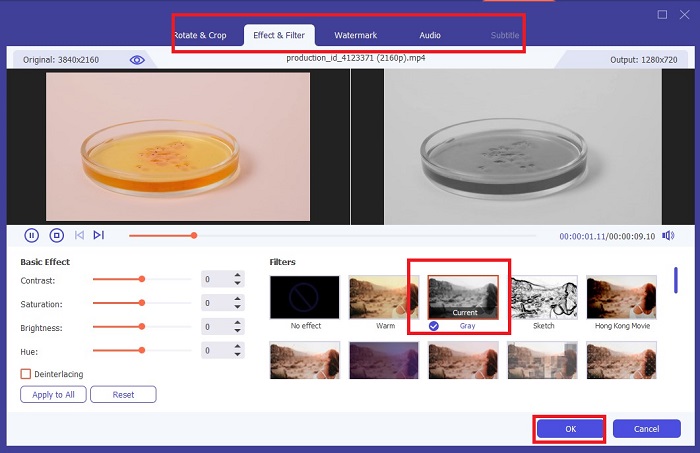
Pas 4. Desa el teu vídeo en blanc i negre.
Si estàs satisfet amb el vídeo, fes clic a OK i converteix-lo al format de fitxer que vulguis. Un cop ho tinguis tot configurat segons les teves necessitats, fes clic al botó Convert per desar el resultat al teu dispositiu.
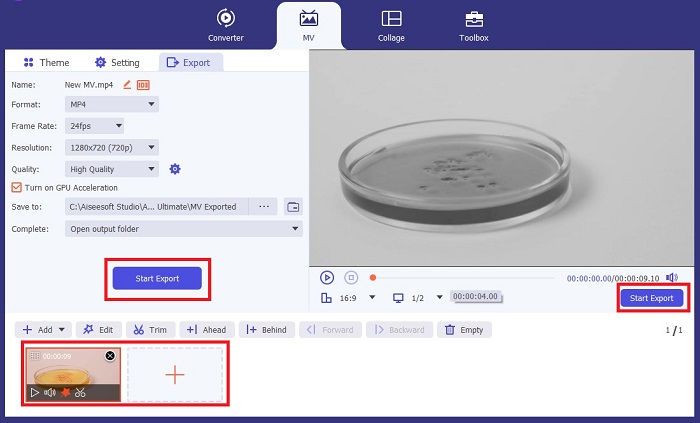
Part 2: Com fer vídeo en blanc i negre amb Premiere Pro
Premiere Pro d'Adobe és el programari d'edició de vídeo líder del sector per a pel·lícules, sèries de televisió, contingut de vídeo i anuncis publicitaris. S'ha convertit en el programari de referència per als cineastes de tot el món perquè, en comparació amb altres programaris d'edició, aquesta eina ofereix moltes eines creatives per fer que el vostre vídeo sembli polit, excel·lent i professional.
Si vols crear un ambient al teu vídeo, posar filtres és el primer que pots fer per aconseguir-ho. Posar filtres als vídeos amb Premiere Pro és relativament fàcil de fer. Aquests són quatre passos senzills per superposar filtres en blanc i negre amb Premiere Pro.
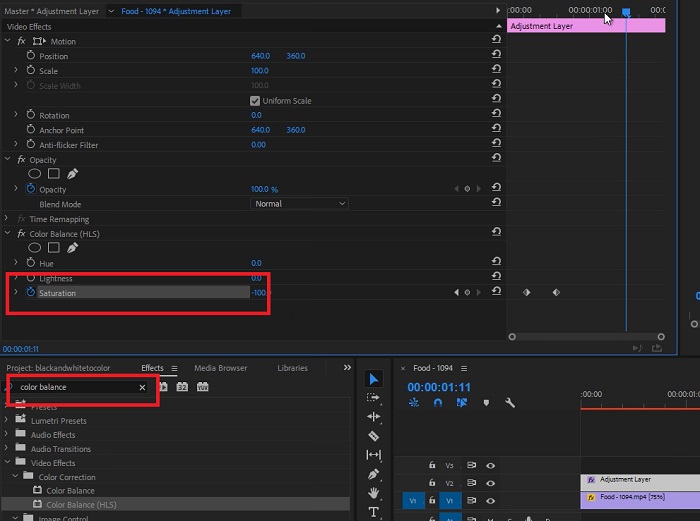
Pas 1. Adjunta el vídeo que vols convertir a blanc i negre. Per fer-ho, ves al panell de projecte o al Timeline Panel, una zona de Premiere Pro considerada l’espai de treball on retalles, afegeixes sons, organitzes vídeos, afegeixes efectes i molt més. Arrossega els vídeos que vulguis convertir a blanc i negre i ja estaràs a punt per al pas següent.
Pas 2. Per accedir al panell d’efectes, selecciona Window > Effects. Ja gairebé tens el filtre en blanc i negre.
Pas 3. Després d’anar al panell Effects, podràs veure Video Effects; selecciona-ho i fes clic a Image Control. Dins d’Image Control, tria el Black and White button i després arrossega’l i deixa’l anar sobre el teu projecte.
Lectures relacionades:
4 maneres sorprenents d’afegir un filtre a un vídeo a Windows i macOS
Mètodes senzills per convertir imatges a blanc i negre
Part 3: Taula de comparació de programari
Ara heu acabat de fer el vostre vídeo en blanc i negre. Per entendre millor quin és el programari d'edició adequat per a vostè, a continuació hem comparat Video Converter Ultimate i Premiere Pro.
| Programari | Preu | Sistema operatiu | Característiques |
| Video Converter Ultimate | La llicència d'1 mes costa $23,20 | Windows 10, Windows 8, Windows 7, Windows Vista, Windows XP (SP2 o posterior) macOS 10.7 o superior. | Deixa zero marca d'aigua de marca. L'eina ofereix una caixa d'eines per a les vostres activitats d'edició d'àudio i vídeo. |
| Premiere Pro | Els programes d'Adobe Cloud ofereixen una subscripció d'1 mes per $52.99 | macOS Monterey v12.0 o posterior. | Eines d'edició avançades Edició de vídeo 3D Editor d'àudio Gestió de continguts |
Part 4: Preguntes freqüents sobre com afegir filtres en blanc i negre
Video Converter Ultimate és una plataforma fiable i segura?
Sí! Video Converter Ultimate us assegura que la plataforma és segura i 100% segura. A més, podeu ometre la sessió al vostre compte per accedir a les funcions de FVC Video Converter Ultimate.
Puc utilitzar Premiere Pro al meu telèfon?
Lamentablement no. Video Converter Ultimate i Premiere Pro només són compatibles amb dispositius de PC perquè requereixen una unitat alta per funcionar i per a un ús fluid.
Puc editar imatges a Video Converter Ultimate i Premiere Pro?
És clar! No obstant això, ja que i Premiere Pro estan més centrats en l'edició de vídeo. És possible que tingueu limitacions en les eines creatives necessàries per editar les vostres fotos.
Premiere Pro té una marca d'aigua?
Premiere Pro no deixa filigranes. Fins i tot si feu un ús de prova amb Premiere Pro, no deixa una marca d'aigua, però és possible que us obliguin a comprar un compte amb llicència al cap d'uns dies.
Canva pot editar el vídeo en blanc i negre?
Absolutament sí! Canva, com altres plataformes, pot editar vídeos i ofereix un munt de filtres per aplicar-los als teus vídeos en brut.
Conclusió
Aquest article mostra els passos i el procediment de com posar un vídeo en blanc i negre amb Video Converter Ultimate i Premiere Pro d’Adobe. Si ets principiant i no necessites una edició complexa, Video Converter Ultimate és perfecte. Però si ets una persona que vol un programa centrat en l’edició i que disposi de moltes eines creatives per donar vida a la teva creativitat, llavors Premiere Pro és l’opció ideal per a tu.
-
 3 mètodes sobre com fer un vídeo més llarg a l'iPhone i altres dispositius
 Fer un vídeo més llarg és bastant difícil de fer. Afortunadament, hem trobat tres mètodes sobre com fer un vídeo més llarg a l'iPhone i altres dispositius.
-
 Mètodes destacats sobre com dividir vídeos de manera eficaç
 En aquest article s'explicarà com dividir un vídeo en parts. Per tant, si esteu interessats, feu clic a aquesta publicació, ja que us oferim les maneres més senzilles de provar-ho.
-
 Les 5 millors reproduccions del generador de vídeo cap enrere a PC i Mac
 Esteu buscant el millor generador de vídeo enrere al web? I si és així, proveu de llegir aquest article, ja que hem reunit diferents programes per triar.
