


 Video Converter Ultimate
 Gravadora de pantalla
 Reparació de vídeo
 Baixada segura
Com combinar vídeos 3GP des del telèfon mòbil en un sol fitxer
Quan feu diversos vídeos durant el viatge amb el telèfon intel·ligent, és possible que vulgueu combinar fitxers 3GP en un sol vídeo. Quins són els millors mètodes per combinar els clips de vídeo? Tant si només us uniu als vídeos 3GP com si feu pel·lícules amb els fitxers del telèfon intel·ligent, podeu obtenir més informació sobre els 2 mètodes més utilitzats a l'article.

Part 1: Com combinar 3GP en línia de forma gratuïta
Per unir els teus fitxers 3GP sense editar-los, només necessites una eina pràctica que pugui ajuntar vídeos 3GP de manera gratuïta en línia. FVC Free Online Video Merger és un dels millors fusionadors de vídeos 3GP, amb una interfície senzilla. Et permet combinar fitxers 3GP sense cap límit de nombre o mida. A més, pots ajustar la resolució i el format del vídeo.
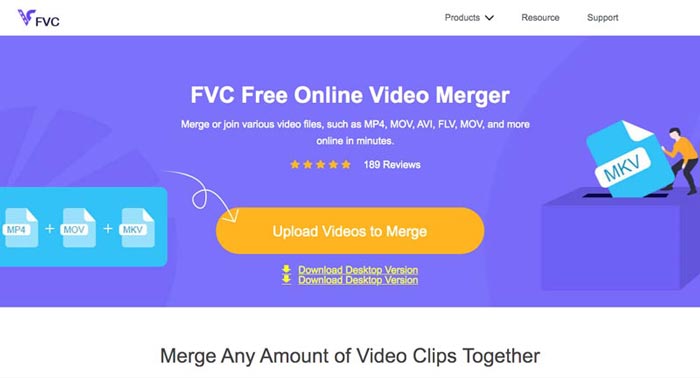
Pas 1: Ves a Free Online Video Merger amb qualsevol navegador web. Pots fer clic al botó Upload Videos to Merge per carregar un fitxer 3GP a l’eina d’unió de vídeos en línia. Se t’adreçarà a una interfície d’unidor de vídeos en línia.
Pas 2: Simplement puja més fitxers 3GP que necessitis combinar. Després pots canviar la resolució i el format del teu vídeo fent clic als camps Resolution i Format. Pots unir els teus fitxers 3GP en fitxers de vídeo populars com MP4 o MKV.
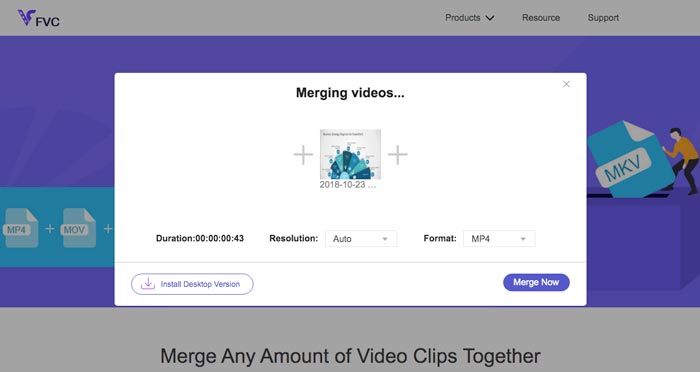
Pas 3: Quan estiguis satisfet amb el vídeo de sortida, pots fer clic al botó Merge Now per començar el procés de combinació. Quan la unió s’hagi acabat, el vídeo ajuntat es desarà al teu disc dur.
És una manera senzilla d’unir fitxers 3GP en línia de forma gratuïta. Però si voleu editar més els fitxers de vídeo, necessiteu una eina més professional.
Part 2. Com combinar vídeos 3GP en una pel·lícula
Tant si necessites combinar vídeos 3GP en una pel·lícula amb alguns filtres espectaculars, com si només vols unir fitxers 3GP en un de sol, Video Converter Ultimate és un convertidor de vídeo versàtil que hauries de tenir en compte. Et permet dividir i unir clips de vídeo, seleccionar temes de vídeo, afegir marques d’aigua als vídeos i fins i tot convertir vídeos 3GP a altres formats de vídeo per a llocs web de xarxes socials directament.
- 1. Permeteu retallar les parts desitjades o combinar múltiples 3GP en una sola.
- 2. Proporcioneu funcions bàsiques d'edició de vídeo, com ara retallar, dividir, retallar i girar.
- 3. Uniu clips de vídeo 3GP a una pel·lícula amb diferents filtres, temes, fitxers de música, etc.
- 4. Afegiu subtítols, pistes d'àudio, efectes 3D, filigrana, comprimeix el vídeo, i més.
Descàrrega gratuïtaPer a Windows 7 o posteriorDescàrrega segura
Descàrrega gratuïtaPer a macOS 10.7 o posteriorDescàrrega segura
Mètode 1: Com combinar diversos vídeos 3GP directament
Pas 1: Descarrega i engega Video Converter Ultimate des del lloc web oficial. Tria la interfície Converter i fes clic al botó Add Files per afegir els fitxers 3GP que vols unir. A més, també pots arrossegar els vídeos 3GP dins del programa.

Pas 2: Un cop hagis importat els fitxers 3GP, has de triar el format del fitxer de sortida. Fes clic a la icona de tisores per retallar la part desitjada. A més, pots girar o retallar els vídeos, aplicar filtres, afegir una marca d’aigua o ajustar les pistes d’àudio per al vídeo de sortida.

Pas 3: Ves a la part inferior de la interfície d’usuari per triar la carpeta de destinació per als fitxers 3GP units. Després, pots fer clic a la casella Merge into One File i fer clic a Convert All per començar a unir els fitxers 3GP.

Mètode 2: Com unir fitxers 3GP a una pel·lícula
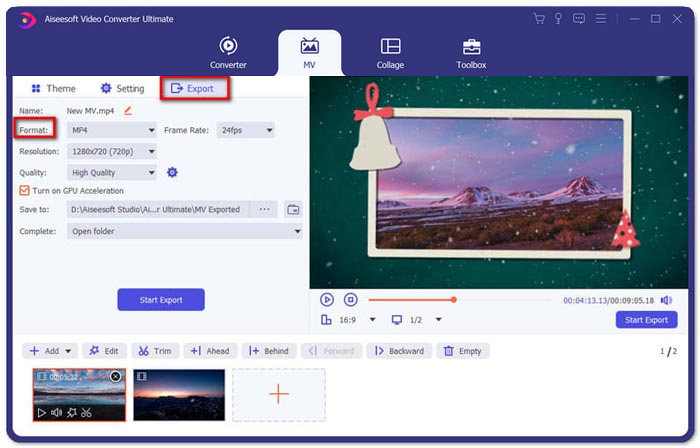
Pas 1: Quan necessitis ajuntar fitxers 3GP en una pel·lícula, pots triar el menú MV, i després entraràs a la interfície de creació de MV. Fes clic al botó Add a la part inferior esquerra de la finestra per importar els teus vídeos i imatges 3GP.
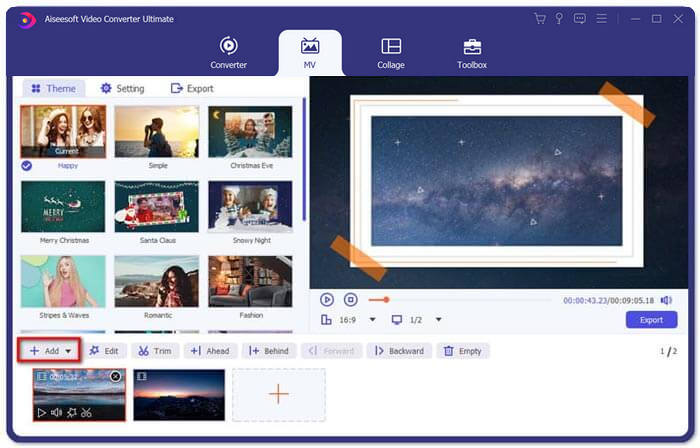
Pas 2: Després, pots fer clic al botó Edit per aplicar els efectes de vídeo. A més, també pots seleccionar un tema per a la teva pel·lícula MV. A la secció de l’esquerra, fes clic a la pestanya Theme i després tria el tema que vulguis per al teu MV.
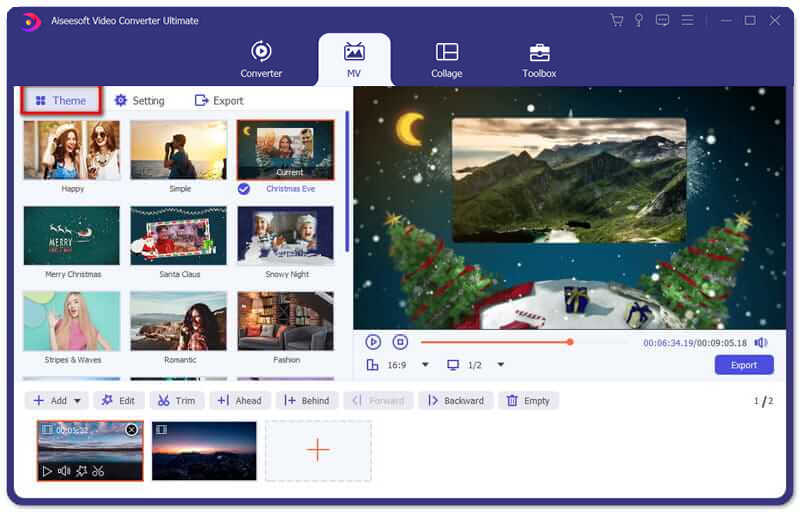
Pas 3: Si estàs satisfet amb el fitxer 3GP combinat, pots fer clic al botó Export per desar el fitxer de vídeo. Per defecte, el format de sortida és MP4. És clar, també pots triar el format de vídeo que prefereixis segons les teves necessitats.
Part 3. Preguntes més freqüents sobre com combinar 3GP
1. Què és un format 3GP?
3GP és un format de fitxer multimèdia dissenyat per estalviar emmagatzematge de dades. S’utilitza àmpliament en dispositius mòbils. Quan feu fotos o feu vídeos amb el telèfon mòbil, normalment el fitxer es desa en format 3GP. Normalment el 3GP s’utilitza en telèfons mòbils 3G i també es pot reproduir en alguns telèfons 2G i 4G.
2. Com combinar fitxers 3GP en un telèfon intel·ligent?
Quan vulgueu combinar fitxers 3GP en un telèfon iPhone o Android, podeu utilitzar Video Merger per a un telèfon Android, VivaVideo per a un iPhone o descarregar altres aplicacions per combinar els vídeos. Però quan cal unir-se als fitxers 3GP com a pel·lícula, encara ha de fer servir una fusió de vídeo professional.
3. Puc combinar vídeos 3GP amb fitxers d'àudio?
Sí. Però no podeu utilitzar els fitxers d'àudio com a fons per al vídeo 3GP. Tant si necessiteu combinar dos fitxers com si utilitzeu l'àudio com a fons d'un vídeo 3GP, el combinador professional 3GP hauria de ser la vostra elecció.
Conclusió
Quan necessitis unir fitxers de vídeo 3GP als teus dispositius mòbils en un sol fitxer de vídeo, pots aprendre 2 mètodes eficients en aquest article. Pots unir 3GP de manera gratuïta en línia mitjançant Free Online Video Joiner. Si necessites editar i afegir alguns efectes especials al teu vídeo, Video Converter Ultimate hauria de ser una eina ideal per a tu. Si tens qualsevol dubte sobre com unir fitxers 3GP, no dubtis a posar-te en contacte amb nosaltres.
-
 3 maneres lliures de convertir FLV a 3GP a Windows / Mac
 No es poden obrir fitxers FLV al telèfon intel·ligent o a la tauleta? No us preocupeu! Aquí compartim tres mètodes per convertir FLV a 3GP sense perdre qualitat per jugar al mòbil.
-
 3 mètodes per convertir MP4 a 3GP sense problemes
 Voleu convertir MP4 a 3GP d’una manera fàcil i ràpida? Aquí compartirem 3 convertidors MP4 a 3GP per canviar MP4 a 3GP per reproduir-los en diversos telèfons mòbils.
-
 3 millors reproductors 3GP gratuïts per a ordinadors i mòbils que hauríeu de conèixer
 Quan vulgueu reproduir fàcilment la vostra pel·lícula 3GP sense instal·lar o convertir cap còdec de vídeo, podeu obtenir més informació sobre els 3 millors reproductors 3GP de Windows, Mac, Android i iPhone en aquest article.
