


 Video Converter Ultimate
 Gravadora de pantalla
 Reparació de vídeo
 Baixada segura
Com combinar fitxers de vídeo MPEG en un o dos mètodes finals que hauríeu de conèixer
Com unir fitxers MPEG? Acabes de descarregar una sèrie antiga de televisió en format MPEG, per exemple, 8 episodis curts i cadascun amb una obertura i un final redundants. Com unir aquests fitxers MPEG en un de sol, com si fos una pel·lícula? Tant si només necessites combinar els vídeos en un de sol, com si vols unir els fitxers MPEG amb funcions avançades, aquí tens 2 mètodes eficients que no t’hauries de perdre.

Primera part: Com combinar fitxers MPEG en línia de forma gratuïta
FVC Free Online Video Merger és un combinador MPEG en línia gratuït que et permet unir fitxers MPEG, MP4, AVI i altres formats de vídeo sense límits de mida. Et permet combinar diversos fitxers MPEG en vídeos impressionants sense afegir-hi cap marca d’aigua. A més, els fitxers pujats s’eliminaran en un termini de 24 hores per protegir la teva privadesa.
Pas 1: Accedeix a FVC Free Online Video Merger amb qualsevol navegador web. Fes clic al botó Upload Videos to Merge al centre de la pàgina web per obtenir l’instal·lador. Després, pots tornar a fer clic al botó per pujar els fitxers MPEG que vulguis combinar al programa en línia.

Pas 2: Quan entris a la interfície de Merging videos, podràs organitzar la seqüència dels vídeos MPEG que vols unir. Et permet gestionar la posició del vídeo, suprimir fitxers o afegir-ne més fent clic al botó insert new al lloc adequat.
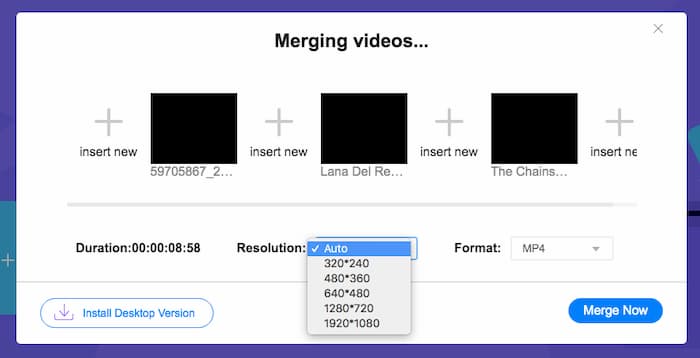
Pas 3: Després, pots triar la resolució i el format del vídeo de sortida. Pots combinar els fitxers MPEG en un fitxer MP4 abans de fer clic al botó Merge now per iniciar el procés. Això et permet obtenir el vídeo desitjat en poc temps.

El combinador de vídeo en línia és fàcil d’utilitzar. Tot i això, si voleu reduir les obertures i finals finals dels episodis, no us pot ajudar més. Cal utilitzar una fusió MPEG més potent.
Lectures relacionades:
Els 4 millors reproductors MPG/MPEG
Part 2: el mètode versàtil per combinar vídeos MPEG
Aiseesoft Video Converter Ultimate és un ajuntador MPEG professional que et permet combinar les parts desitjades de fitxers MPEG en una sola pel·lícula. Et permet retallar la part que vulguis dels fitxers MPEG, ajustar la qualitat del vídeo, personalitzar la marca d’aigua o fins i tot crear una pel·lícula amb diferents temes.
- 1. Combineu fitxers MPEG a formats de vídeo MPEG, MP4 i més de 300.
- 2. Ajusteu la resolució del vídeo o, fins i tot, milloreu la qualitat del vídeo per combinar fitxers.
- 3. Retalleu les parts desitjades dels fitxers MPEG i combineu-les en un sol vídeo.
- 4. Afegiu efectes i filtres i personalitzeu les filigranes als vídeos MPEG.
Descàrrega gratuïtaPer a Windows 7 o posteriorDescàrrega segura
Descàrrega gratuïtaPer a macOS 10.7 o posteriorDescàrrega segura
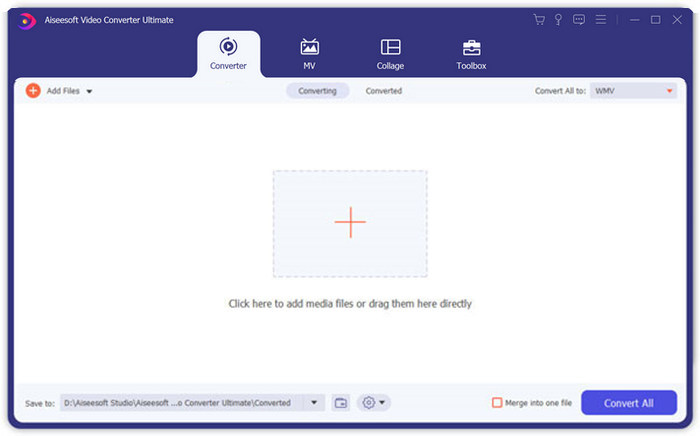
Pas 1: Inicia Aiseesoft Video Converter Ultimate a l’ordinador. Ves al menú Converter i fes clic al gran botó “+” al centre de la interfície principal per afegir els fitxers MPEG que vols unir. Fes clic al botó Add Files per importar tots els fitxers que vulguis combinar.
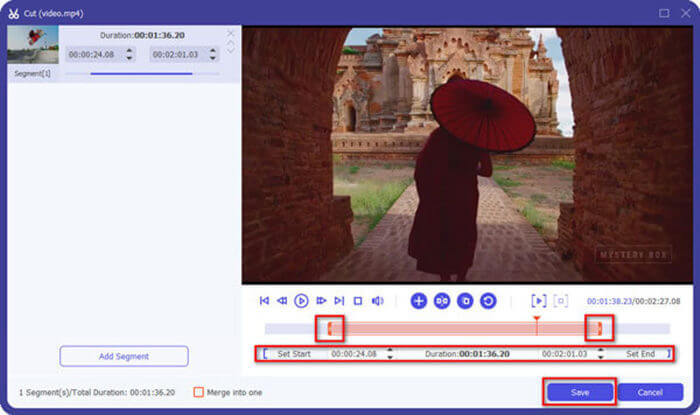
Pas 2: Per als clips MPEG que cal retallar, fes clic al botó Cut al costat del vídeo. Pots configurar els punts d’inici i final per eliminar les obertures i els finals dels teus vídeos MPEG. Després, fes clic al botó Save a la part inferior per desar el fitxer.
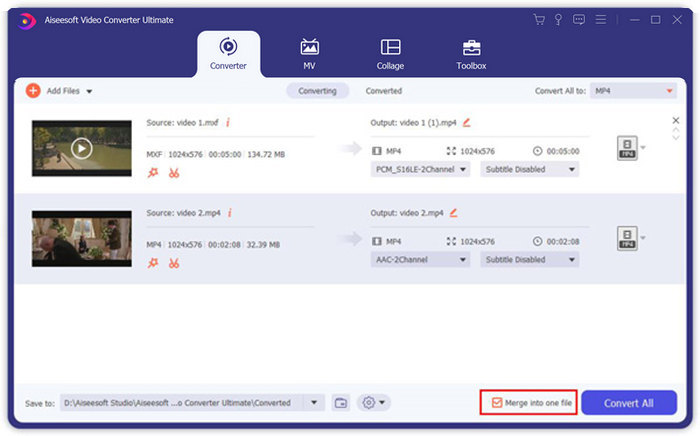
Pas 3: A continuació, pots arrossegar el vídeo retallat dins del programa. Ajusta la seqüència dels vídeos MPEG. Quan ho tinguis tot a punt, has de marcar la casella Merge into one file al costat de Convert All. Fes clic al botó Convert All per començar a unir els fitxers MPEG.
Part 3: Preguntes més freqüents sobre la unió a fitxers MPEG
Com combinar fitxers MPEG amb la millor qualitat?
Quan vulgueu combinar fitxers MPEG amb una qualitat similar, podeu triar els paràmetres com els vídeos originals. Però si els fitxers MPEG tenen una qualitat de vídeo diferent, haureu de millorar prèviament alguns fitxers MPEG de baixa qualitat amb el combinador de vídeo professional.
Puc combinar fitxers MPEG amb un telèfon iPhone o Android?
Sí. Abans de descarregar aplicacions de combinació de vídeo per unir fitxers MPEG, assegureu-vos que l’aplicació sigui compatible amb MPEG o amb altres vídeos que vulgueu combinar. Adobe Premiere Clip, Viva Video i Splice Video són els recomanats que podeu tenir en compte.
Quin és el format de fitxer MPEG?
MPEG és un format de fitxer de vídeo que utilitza compressió de fitxers MPEG-1 o MPEG-2. És un format popular per a les pel·lícules que es distribueixen a Internet que fa que la transmissió i la descàrrega siguin molt més ràpides que altres formats de vídeo populars.
Conclusió
Aquest article presenta dues maneres eficients de combinar fitxers de vídeo MPEG, sobretot quan cal retallar parts addicionals. La FVC Free Online Video Merger és un mètode senzill per combinar els fitxers MPEG en línia, però no podeu editar els clips de vídeo. Per tant, si voleu retallar i editar els vídeos MPEG, Aiseesoft Video Converter Ultimate hauria de ser la solució definitiva.
-
 Els 6 millors fitxers de vídeo MP4 per combinar vídeos MP4 gratis
 Hi ha molts unidors MP4 disponibles per connectar diferents clips MP4. En aquest article, hem seleccionat alguns fitxers MP4 gratuïts per a Windows 10/8/7 i Mac.
-
 Com combinar fitxers M4V? Aquí teniu les 2 solucions més ràpides
 Si busqueu una solució per combinar fitxers de vídeo M4V en un de sol, no us perdeu mai aquest passatge. Aquí parlarem dels dos millors mètodes per combinar fitxers de vídeo M4V.
-
 Com combinar vídeos 3GP des del telèfon mòbil en un sol fitxer
 Quan vulgueu combinar alguns vídeos 3GP del vostre BlackBerry en un sol vídeo, podeu obtenir més informació sobre dos mètodes eficients per combinar fitxers 3GP de l'article.
