


 Video Converter Ultimate
 Gravadora de pantalla
 Reparació de vídeo
 Baixada segura
Com combinar 2 o més clips de vídeo en un fitxer nou a l'ordinador
És molt fàcil combinar diversos vídeos en un fitxer nou. La funció de combinació de vídeo no és professional. Podeu obtenir aquesta funció en gairebé tots els editors de vídeo. Si no cal aplicar altres efectes de vídeo i eines d'edició, n'hi ha prou amb fer una combinació de vídeo gratuïta. Tot el que heu de fer és combinar fitxers de vídeo. Això és tot. No cal pagar la combinació de vídeos. Per tant, aquest article parla principalment de com combinar vídeos de forma gratuïta. Podeu llegir i triar la millor manera de combinar vídeos de forma gratuïta al vostre ordinador.

Primera part: Com combinar vídeos en línia de forma gratuïta
Un combinador de vídeos en línia és sempre la teva primera opció. No cal descarregar cap paquet gran ni registrar-s’hi. Pots unir múltiples vídeos en diferents formats en un vídeo final en qüestió de minuts. És el FVC Free Online Video Merger que permet als usuaris ajuntar o unir diversos fitxers de vídeo en línia de manera gratuïta. No hi ha cap límit de mida ni de nombre d’arxius. Tampoc hi ha marca d’aigua. Així que aquí pots combinar vídeos completament gratis i sense marca d’aigua en línia.
- 1. Combineu vídeos en 1080p, 720p i altres presets.
- 2. Poseu vídeos junts en MP4, MKV, AVI, M4A, FLV, VOB, M2TS, etc.
- 3. Pengeu el vostre vídeo combinat a YouTube / Facebook / Vimeo o exporteu-lo a iPhone, iPad, Samsung i altres dispositius.
- 4.100% d'ús gratuït. No hi ha límit màxim de mida de fitxer. Sense filigrana.
- 5. Combineu videoclips en línia a través del navegador en lloc de descarregar res.
Pas 1. Visita FVC Free Online Video Merger al teu navegador web. Fes clic a Upload Videos to Merge a la interfície principal.

Pas 2. Afegeix vídeos al combinador de vídeos en línia gratuït. Pots fer clic a + per importar més clips de vídeo. Si vols ajustar l’ordre del vídeo, pots passar el ratolí per sobre d’aquell vídeo. Fes clic a x per eliminar-lo. Després, podràs tornar a afegir el vídeo correcte.

Pas 3. Fes clic a Resolution per establir un valor predefinit de resolució de vídeo. A més, pots desplegar la llista Format per combinar i convertir vídeos a MP4 i altres formats.

Pas 4. Fes clic a Merge Now a l’angle inferior dret. Espera una estona perquè es fusionin els vídeos en línia gratuïtament.

Part 2: Com combinar vídeos amb VLC Media Player
El VLC pot combinar dos vídeos? Per descomptat, la resposta és sí. VLC pot ser la vostra aplicació gratuïta i lliure de compressors de vídeo per a usuaris de Windows, Mac, iOS i Android. Podeu consultar aquest tutorial per combinar vídeos a VLC.
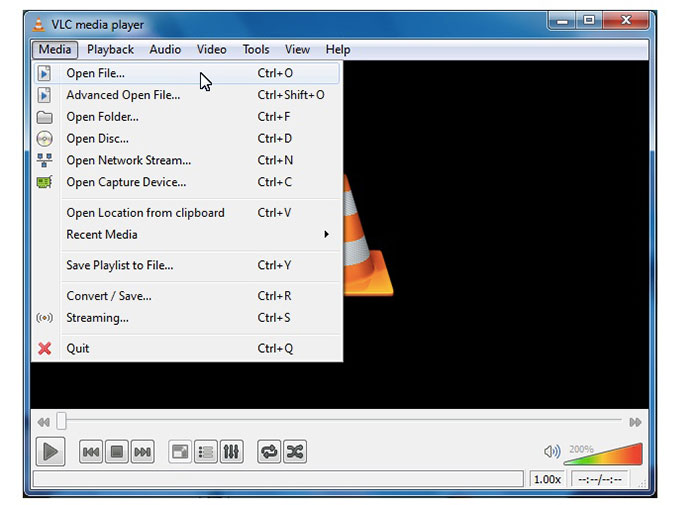
Pas 1. Obre VLC. Tria Open Multiple Files al menú desplegable Media de la part superior.
Pas 2. A la finestra Open Media, fes clic a Add per importar diversos vídeos alhora a VLC.
Pas 3. Fes clic a Browse per establir una carpeta de sortida.
Pas 3. Desplega la llista Play a l’angle inferior dret. Selecciona Convert per unir els vídeos amb VLC Media Player.
Part 3: Com unir-se a vídeos al Windows Movie Maker
Aquí teniu una forma més de combinar vídeos al Windows 10. Podeu utilitzar Windows Movie Maker per combinar clips de vídeo de forma gratuïta a l'ordinador Windows. Independentment que el vostre vídeo sigui capturat per iPhone, Android o càmera de vídeo, podeu combinar vídeos amb Windows Movie Maker amb èxit.
Pas 1. Obre Windows Movie Maker. Fes clic a Add Videos and Photos a la barra d’eines superior.
Pas 2. Navega i afegeix clips de vídeo en WMV, MP4 i altres formats compatibles.
Pas 3. Reordena els teus clips de vídeo arrossegant-los a la línia de temps.
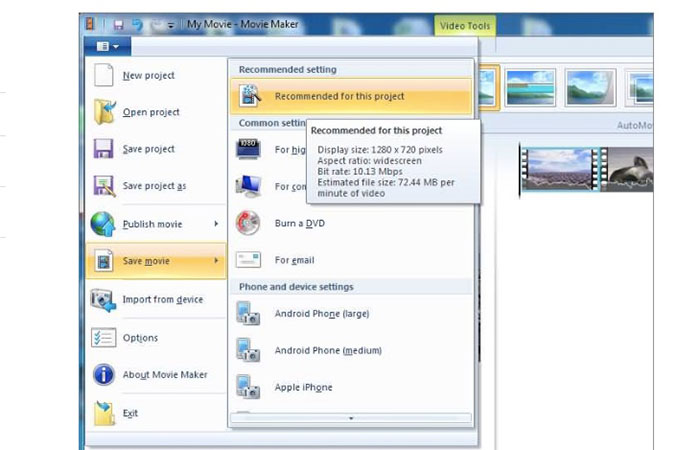
Pas 4. Tria Save movie des de la llista desplegable per exportar el teu vídeo combinat.
Part 4: Com cosir vídeos mitjançant iMovie
Pel que fa als usuaris d'Apple iOS i Mac, podeu combinar dos vídeos al Mac amb iMovie. És un potent editor de vídeo amb una corba d’aprenentatge. Si ja heu instal·lat iMovie, podeu executar iMovie com a combinador de vídeo gratuït a Mac.
Pas 1. Obre iMovie. Desplega el menú File. Tria Import i després Movies.
Pas 2. Selecciona els clips de vídeo que vols unir. A continuació, fes clic a Import.
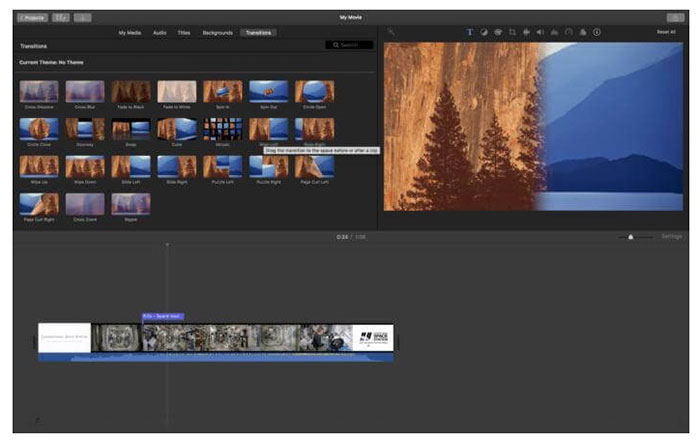
Pas 3. Arrossega i deixa anar els clips de vídeo a la línia de temps d’iMovie en l’ordre correcte.
Pas 4. Fes clic a File a la part superior. Selecciona Share i després tria File per combinar diversos vídeos al Mac amb iMovie.
Part 5: Preguntes més freqüents sobre la fusió de vídeos junts
Podeu combinar vídeos de YouTube?
És impossible combinar els vídeos penjats de YouTube. L'editor de YouTube predeterminat ha desaparegut. Per tant, heu d’utilitzar la combinació i combinació de vídeo de tercers per combinar vídeos a YouTube.
Quines aplicacions cal combinar vídeos?
Per combinar vídeos a iPhone i Android, podeu utilitzar Video Merger Free, Movie Director Pro, Instant Video Editor, VivaVideo, VidTrim, etc. La combinació de vídeo integrada és fàcil d'utilitzar.
Què cal fer quan el vídeo de fusió VLC no funciona?
Força la sortida del VLC i torna a obrir-lo. Comproveu si heu actualitzat VLC a la versió més recent. A més, podeu tornar a instal·lar VLC per combinar vídeo.
Totes les fusions de vídeo esmentades són gratuïtes. Podeu unir vídeos junts en línia de forma gratuïta amb FVC Free Online Video Merger. Sense límit de mida de fitxer ni filigrana. També podeu utilitzar VLC Media Player, iMovie i Windows Movie Maker per combinar vídeos i aplicar altres efectes de vídeo al vostre ordinador.
-
 Com unir fitxers MOV (QuickTime) de forma gratuïta
 Pot ser difícil per als principiants unir-se a diversos videoclips MOV. Per tant, hi ha una manera senzilla i ràpida de combinar fitxers MOV? Si n’hi ha, com s’utilitza? Aquesta publicació us ajudarà a obtenir aquestes respostes.
-
 Com combinar diversos fitxers MP4 en 3 passos
 Voleu combinar els fitxers MP4 en brut per al vostre projecte? Aquesta publicació recull les 6 maneres principals d’ajudar-vos a combinar fàcilment vídeos MP4 a Windows, Mac i en línia.
-
 6 millors gravadors WAV que no us heu de perdre a l'escriptori i en línia
 El millor programari de gravació WAV que compartim en aquest article té diverses funcions útils que us ajudaran a capturar professionals de l'àudio i la veu.
