


 Video Converter Ultimate
 Gravadora de pantalla
 Reparació de vídeo
El 5 millor tallador de MP4: aprèn a retallar vídeos a PC, Mac i dispositius mòbils
Si ets un vlogger o un aspirant, fer un vídeo de tu mateix és tan habitual. Això requeriria molt d'esforç i confiança, així com disparar davant d'una càmera. A més, el més comú que tots els professionals i nous del vlogging són els errors que cometeu. En lloc de tornar a gravar el vídeo, solen tallar-lo i fusionar-lo amb els vídeos originals. Per fer un vídeo completament nou que consta de diferents angles, vistes, muntatges i més, el tallen de diferents vídeos i l'afegeixen en un de sol. Però com a nou en aquest tipus de treball o fins i tot professional, triar el tallador adequat és difícil. Perquè no totes les funcions, com deien a l'anunci de l'eina, no estan a les eines. En lloc d'anar a l'altre article i llegir la recomanació, per què no n'aprèn primer? Com només vam reunir l'evidència real per al vostre propi benefici. Per tant, aquí a la llista hi ha els talladors MP4 que podeu utilitzar per començar a fer vlogging. Mantingueu-vos concentrats per saber quins són els millors retalladors que podeu utilitzar i que proporcionen una visió senzilla però professional als vostres vídeos.

Part 1. Baixeu el millor programari de tall de vídeo MP4 a PC i Mac
Si hem de parlar del millor, aleshores has de prioritzar llegir això primer. Com s’ha dit abans, crear vlogs és molt més difícil del que esperàvem, no només per la confiança de posar-se davant la càmera i publicar-los. També has de pensar a tenir una eina multiús. Això ofereix un vídeo més atractiu a la vista de cada espectador. FVC Video Converter Ultimate proporciona fantàstiques funcions d’edició i de conversió que pot utilitzar qualsevol que ho vulgui. Tant si ets principiant com professional, hem de fixar-nos en el millor del millor del mercat. Encara que sigui una versió de pagament, continua oferint el màxim que voldràs tenir. I si la tries com a opció personal, tens un futur brillant al davant. Vols començar a fer vlogs avui mateix? Aleshores segueix aquests passos per aprendre a utilitzar aquest retallador de vídeos MP4.
Pas 1. Fes clic al botó de descàrrega de sota i instal·la’l al teu PC o Mac. Segueix l’assistent de configuració de l’eina i fes clic a Finalitzar per llançar el programari.
Descàrrega gratuïtaPer a Windows 7 o posteriorDescàrrega segura
Descàrrega gratuïtaPer a macOS 10.7 o posteriorDescàrrega segura
Pas 2. Si això apareix a la teva pantalla, fes clic a la Barra d’eines i busca el Video Trimmer a sota.
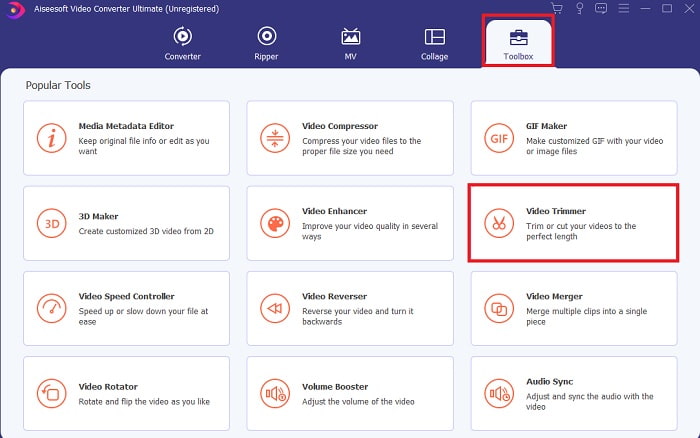
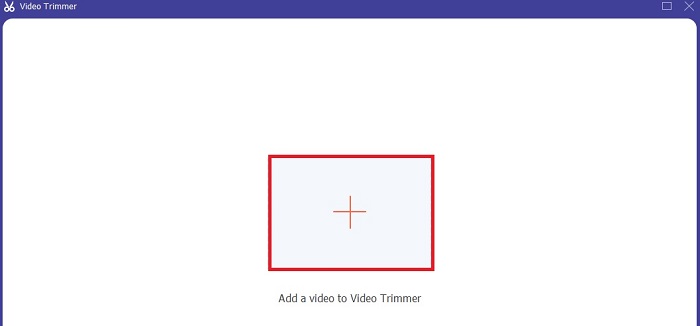
Pas 3. Fes clic al botó del signe més per afegir-hi l’arxiu. Selecciona el fitxer del teu disc que vols retallar i fes clic a Obre per inserir el vídeo.
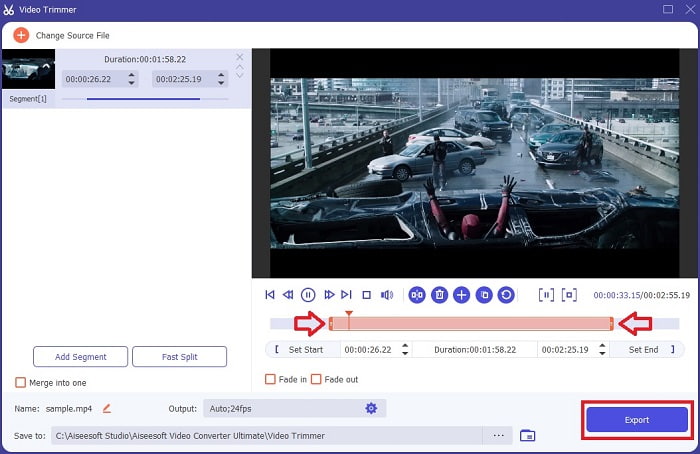
Pas 4. Ajusta el punt d’inici i el final del vídeo manipulant el playback in and out per establir la durada que vulguis. Afegeix-hi esvaïments d’entrada i sortida si ho desitges. També pots canviar el format de sortida si fas clic al botó amb forma de roda dentada. Quan hagis acabat, fes clic al botó Exporta per començar el procés de retall.
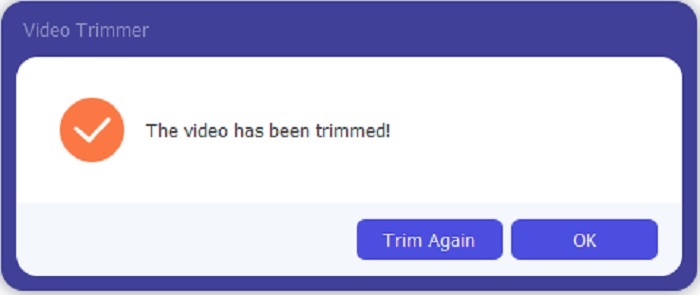
Pas 5. Espera només uns segons i el teu vídeo ja haurà estat retallat. A continuació, fes clic a D’acord o a Retalla de nou si n’has de retallar un altre. Si vols millorar el vídeo que acabes de fer, torna a fer clic a la barra d’eines i busca l’eina d’enfocament o millora de vídeo.
L'avantatge de tenir una eina de fusió proporcionada pel FVC Video Converter Ultimate amb Steps
A diferència de qualsevol altra aplicació, combinar vídeos a FVC Video Converter Ultimate és molt fàcil de fer. Aquesta és una característica addicional si adquireix aquesta eina. Com s'ha dit, aquesta eina és polivalent, així que sense més preàmbuls comencem a combinar diferents vídeos en un de sol.
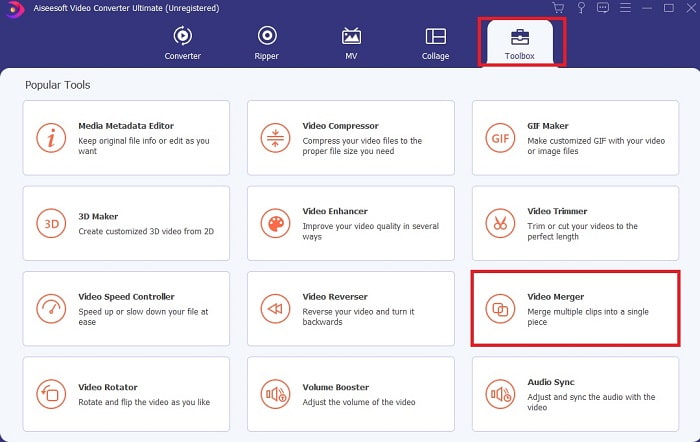
Pas 1. Obre el programari i ves a la Barra d’eines, després localitza el Video Merger i fes-hi clic.
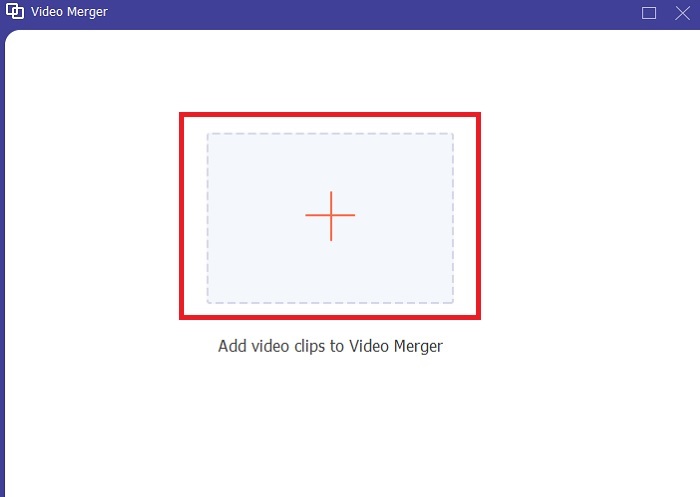
Pas 2. Fes clic al botó Afegeix i selecciona el vídeo que vols unir, després fes clic a Obre per continuar. Després de seleccionar el primer fitxer, fes clic al signe més per afegir-hi l’altre fitxer que vols fusionar.
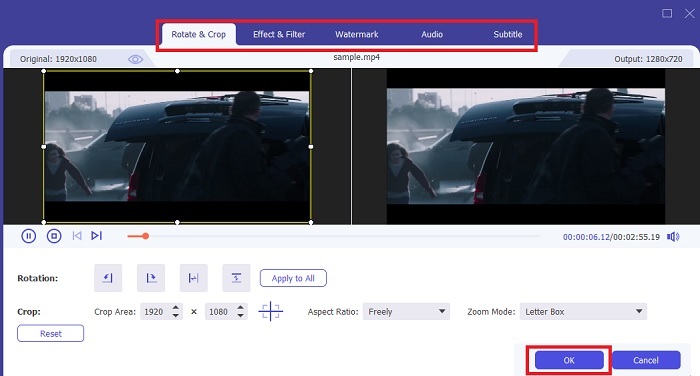
Pas 3. A la interfície, fes clic al botó amb la vareta per afegir efectes, millorar l’àudio, girar o retallar i afegir subtítols. Per desar l’edició que acabes de fer, fes clic a D’acord. Fes el mateix procediment amb la resta de vídeos si ho desitges.
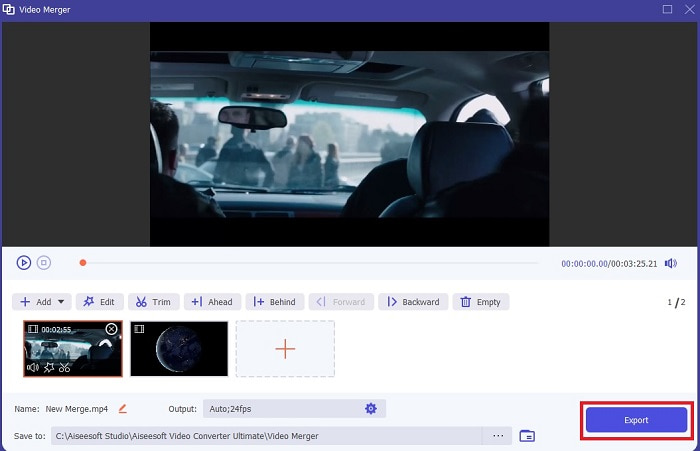
Pas 4. Si ja estàs a punt per començar el procés, fes clic a Exporta. Quan l’exportació acabi, apareixerà un gestor de fitxers emergent a la pantalla. Per veure el vídeo exportat, només cal que hi facis clic i gaudeixis.
Part 2. Millors talladors MP4 en línia
Aquesta pot ser una bona eina per retallar, però no és la millor com el FVC Video Converter Ultimate. Però, com a mínim, val la pena provar aquests retalladors MP4 en línia.
1. 123Apps Online Video Cutter
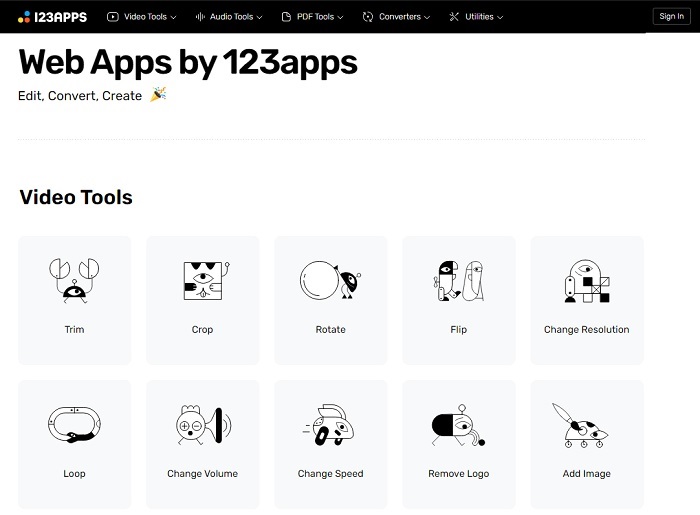
Aquesta primera eina en línia està pensada per millorar els vostres vídeos. Pot ajustar la durada del vídeo, retallar, afegir text i molt més. Però aquesta eina necessita molt de temps a exportar-se. Després d'exportar, l'has de baixar, i aquest procés dependrà de la teva velocitat d'Internet. A més, no pots ajustar la qualitat dels teus vídeos. Per tant, si el vostre vídeo és una mica borrós i necessita ajustar-ne els fps, no ho podeu fer aquí. Però tot i així, val la pena intentar-ho.
2. Clideo
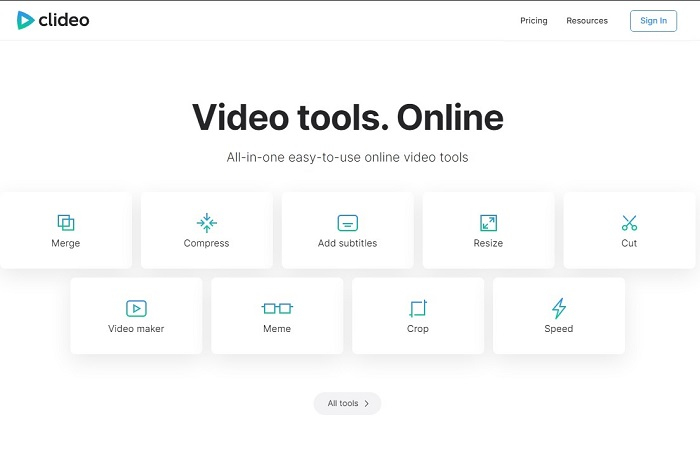
Si parlem de retallar, aquesta també pot ser una bona opció. Clideo és un dels millors retalladors MP4 en línia que pots trobar. Igual que la primera eina en línia esmentada abans, aquesta també ofereix funcions bàsiques d’edició. Encara que admeti edició bàsica, continua sense ser suficient si vols fer un vídeo que cridi l’atenció. Però la pots provar en línia sense preocupar-te, és gratuïta i segura.
Part 3. 3 millors aplicacions MP4 Cutter a Android i iOS
Què passa si no teniu un escriptori per utilitzar les eines anteriors i voleu ser vlogger, encara és possible? Si teniu un telèfon com Android o iOS, podeu utilitzar aquestes aplicacions per fer l'edició als vostres telèfons. Però hi ha algunes funcions disponibles a dalt que no estan aquí. Per tant, continueu llegint a continuació per saber quines són aquestes eines i triar-ne.
1. iMovie per a iOS
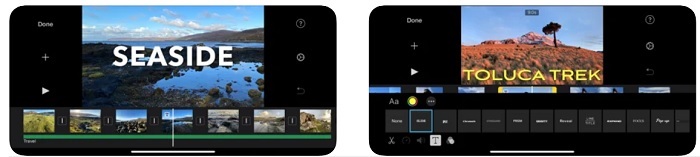
Si vols donar un aire de Hollywood al teu vídeo, aleshores iMovie és el programari adequat. Aquesta app per retallar MP4 ha estat creada només per a usuaris d’iOS. Tot i que l’eina ofereix funcions d’edició d’alt nivell, alguns errors encara no s’han solucionat. En alguns casos, l’app es penja cada cop que intentes editar i la pantalla es queda en negre. De vegades el vídeo i l’àudio no van sincronitzats a causa de fallades. Aquests són alguns exemples d’errors; poden semblar simples, però són molt irritants la major part del temps. Si vols provar iMovie, encara la pots descarregar de l’App Store.
2. Video Editor & Maker – Viva Video per a Android
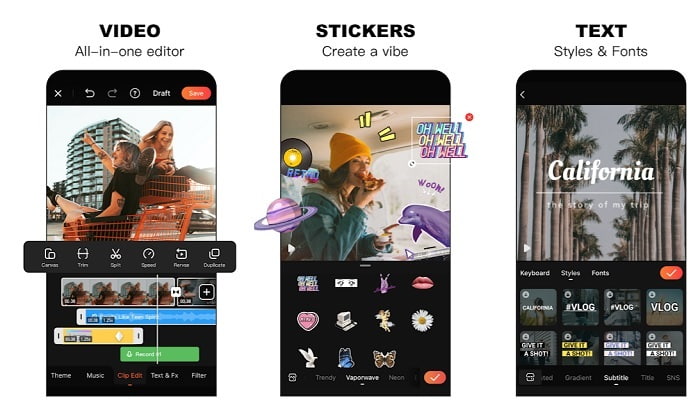
Un dels millors retalladors MP4 gratuïts a Android és Video Editor & Maker – Viva Video. Igual que l’eina anterior, totes dues ofereixen les millors funcions d’edició al mòbil, com transicions per al vídeo, efectes glitch i més, però és una eina de pagament. Hi ha un problema important: no hi ha cap botó de cancel·lació de subscripció dins l’app. Així que la millor idea que potser et ve al cap és esborrar l’aplicació per acabar la subscripció, però no s’acabarà. Continuarà cobrant a la teva targeta de crèdit si has triat aquest mètode de pagament. Però, en conjunt, l’eina és de primera classe, ni més ni menys.
Part 4. Preguntes freqüents sobre MP4 Cutter
Què és un MP4?
MP4 també es coneix com el format multimèdia multiús. En lloc d'emmagatzemar un codi, emmagatzema dades dels vídeos, fotografies, subtítols o textos. A més, és el format de vídeo més utilitzat a tot el món.
L'MP4 té pèrdues o no té pèrdues?
En ser un format polivalent, MP4 és una compressió amb pèrdues.
Quin és el millor format que no sigui MP4?
Hi ha alguns formats que ofereixen una millor qualitat de sortida que l’MP4, però no són tan flexibles com aquest format. Per exemple, WMV: aquest format genera un fitxer més petit que l’MP4, però no és compatible amb dispositius Apple, perquè està pensat per ser un format nadiu del Windows Media Player. Pots optar per convertir els teus fitxers MP4 a WMV per obtenir una millor reproducció.
Conclusió
Per acabar, ara és més fàcil entendre la diferència entre cada eina perquè en puguis fer ús. Però, com s’ha dit abans, no totes ofereixen les excel·lents funcions de retall que pot oferir el FVC Video Converter Ultimate. Especialment si vols crear un vídeo més atractiu per aconseguir més visualitzacions i també més beneficis. Així que, en lloc de conformar-te amb una eina temporal, per què no tries el FVC Video Converter Ultimate per encarar el futur i obtenir la millor versió per a tu mateix?.
-
 Guia sobre com convertir RMVB a MP4 a Windows / Mac (3 formes gratuïtes)
 Voleu convertir RMVB a MP4 per reproduir-lo fàcilment a l'ordinador o al telèfon mòbil? Trobareu maneres senzilles de convertir els vostres fitxers RMVB a MP4 en aquesta guia.
-
 4 millors convertidors de MP4 a M4V per convertir vídeos MP4 en M4V amb facilitat
 Quan hàgiu de canviar els fitxers MP4 a M4V, heu d’aprendre més detalls sobre les diferències entre els dos formats, així com els millors convertidors de MP4 a M4V de l’article.
-
 AMV Converter: 3 millors mètodes per convertir MP4 a AMV a Win / Mac
 Quins són els millors convertidors de MP4 a AMV per convertir els vídeos en Amine Music Video? Podeu obtenir més informació sobre 3 mètodes més eficients per obtenir els vídeos desitjats amb facilitat a l'article.
