


 Video Converter Ultimate
 Gravadora de pantalla
 Reparació de vídeo
 Baixada segura
Com eliminar la marca d'aigua d'Animaker amb les millors eines d'eliminació de la filigrana
Alguna vegada has provat d'utilitzar Animaker per editar el teu vídeo? Si no ho has fet, no has de perdre l'oportunitat. Aquesta plataforma permet que diversos dissenyadors, animadors, principiants, professionals, creadors de contingut i altres puguin crear una pel·lícula d'animació en breu. I sí, és una eina completa; totes les plantilles que necessitareu estan disponibles aquí. Amb totes les funcions d'animació i d'acció en directe, heu d'adquirir el programari per utilitzar-lo regularment sense tenir problemes amb la marca d'aigua i les limitacions.
Estàs trist perquè no pots comprar el programari? Per sort, les eines que afegim aquí poden eliminar la marca d’aigua que s’afegeix a l’animació que has creat. Aquí t’ensenyarem com eliminar la marca d’aigua d’Animaker en menys de 5 minuts. Continua llegint aquest article per entendre’n la idea; després sabràs per què les hem triades.

Part 1. Com eliminar la marca d'aigua d'Animaker a Windows, macOS i en línia [gratis i de pagament]
L'Animaker té una marca d'aigua? Sí, afegeix una marca d'aigua als vídeos animats que heu editat aquí, sobretot si no feu servir la versió comercial. La marca d'aigua que afegeix és evitable si compres la versió comercial, però si no vols gastar-te, has d'utilitzar l'eliminador de filigrana que afegim a continuació.
FVC Video Converter Ultimate [Windows i macOS]
Suposa que necessites una eina robusta per tractar la marca d’aigua de manera eficaç. Hauràs de triar FVC Video Converter Ultimate. Aquesta eina és accessible a tots els ordinadors d’escriptori, tant si ets usuari de Windows com de Mac. Amb aquesta eina, pots eliminar de manera efectiva la marca d’aigua dels teus vídeos animats creats amb Animaker sense que en quedi rastre. Encara que no tinguis experiència a resoldre aquest problema, has de fer servir aquest programari perquè és fàcil d’utilitzar i té una interfície intuïtiva.
Aquesta eina no només és un eliminador de filigranes eficaç, sinó que també és una eina global eficaç per a un propòsit diferent. Podeu descarregar l'eina al vostre escriptori per comprovar quines són les altres funcionalitats. Si voleu tenir el vídeo, exporteu-lo a Animaker sense marca d'aigua; seguiu el procediment següent.
Pas 1. Per tenir aquesta eina multifunció, fes clic al botó de baixada per obtenir-ne la versió per a Windows o Mac. Instal·la el programari i després fes clic a Inicia ara per obrir aquesta eina.
Descàrrega gratuïtaPer a Windows 7 o posteriorDescàrrega segura
Descàrrega gratuïtaPer a macOS 10.7 o posteriorDescàrrega segura
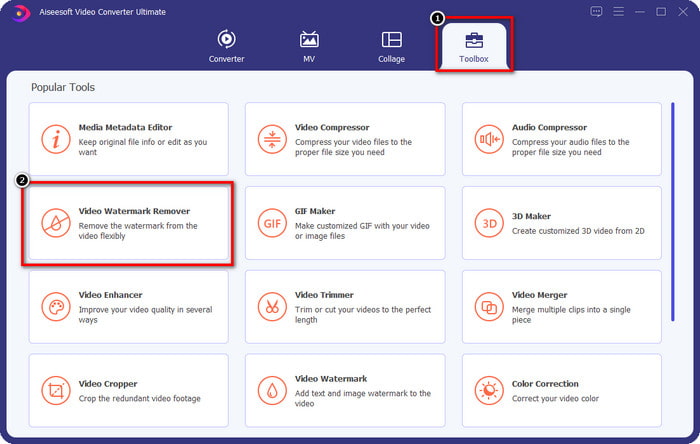
Pas 2. A la part superior esquerra de la interfície, fes clic a Toolbox i obre Video Watermark Remover. A sota de Toolbox, pots veure que aquesta eina disposa d’altres funcions i característiques.
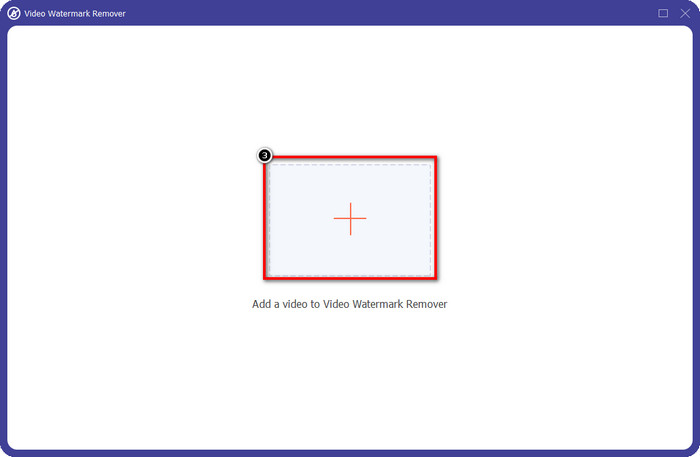
Pas 3. Puja el vídeo animat que has creat a Animaker fent clic a la icona +. Selecciona el fitxer a la teva unitat local, fes-hi clic i després prem Obre.
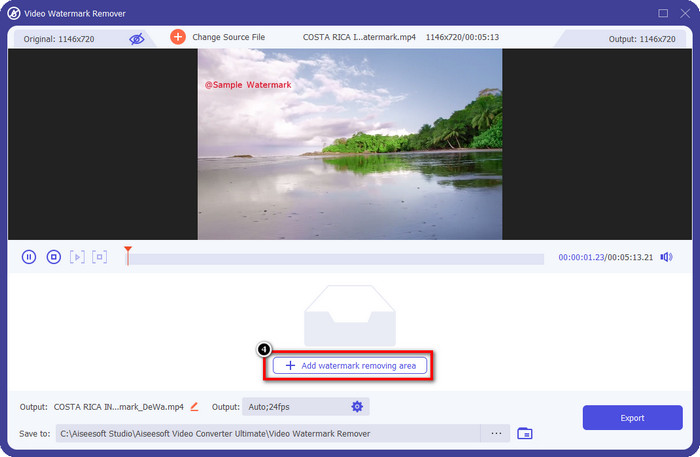
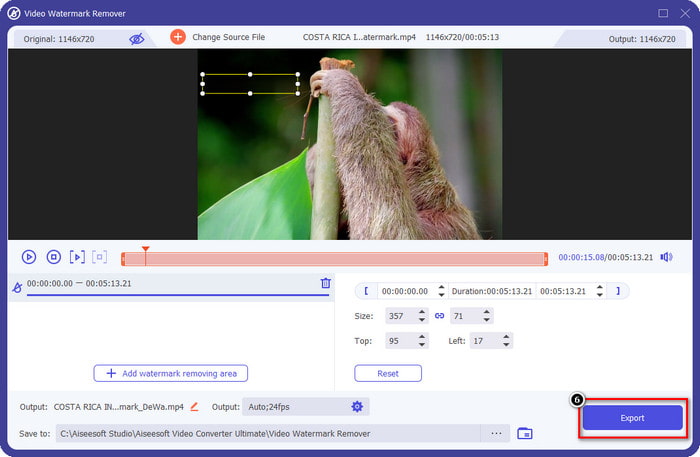
Pas 4. Per continuar fent servir el removedor de marques d’aigua, fes clic a Add Watermark Removing Area.
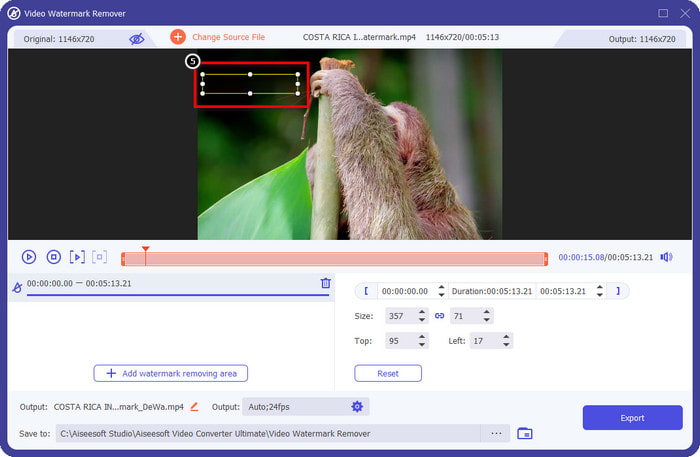
Pas 5. Col·loca el quadre de selecció sobre la zona de la marca d’aigua perquè l’eliminació tingui efecte.
Pas 6. Prem Export per descarregar el vídeo sense la marca d’aigua d’Animaker. Fàcil, oi? Gràcies a la seva interfície intuïtiva, escollir-lo és la millor opció per eliminar la marca d’aigua.
Elimina el logotip dels vídeos mitjançant 123 APPS [en línia]
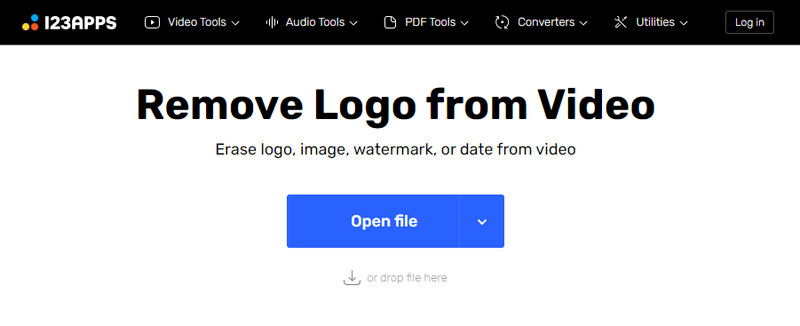
Remove Logo from Videos via 123 APPS et permet gestionar la marca d’aigua del teu vídeo de manera efectiva amb les funcions que ofereix. A diferència del removedor de marques d’aigua que pots descarregar, no necessites cap instal·lador per utilitzar aquest removedor al teu dispositiu, ja que és accessible al web. A més, és segur d’utilitzar; no és d’estranyar que s’hagi convertit en un removedor de marques d’aigua fiable que pot tractar la marca d’aigua del vídeo. Vols utilitzar aquest removedor de marques d’aigua en línia per tenir el vídeo sense la marca d’aigua d’Animaker? Els passos següents t’ensenyaran com fer-ho.
Pas 1. Obre el teu navegador web per obrir el removedor de marques d’aigua en línia.
Pas 2. A la pàgina oficial, fes clic a Open File per pujar el vídeo que vols utilitzar i eliminar-ne la marca d’aigua.
Pas 3. Selecciona l’àrea on hi ha la marca d’aigua del teu vídeo.
Pas 4. Fes clic al botó Save per descarregar el film animat sense la marca d’aigua.
Gilisoft Video Watermark Removal Tool [Windows]
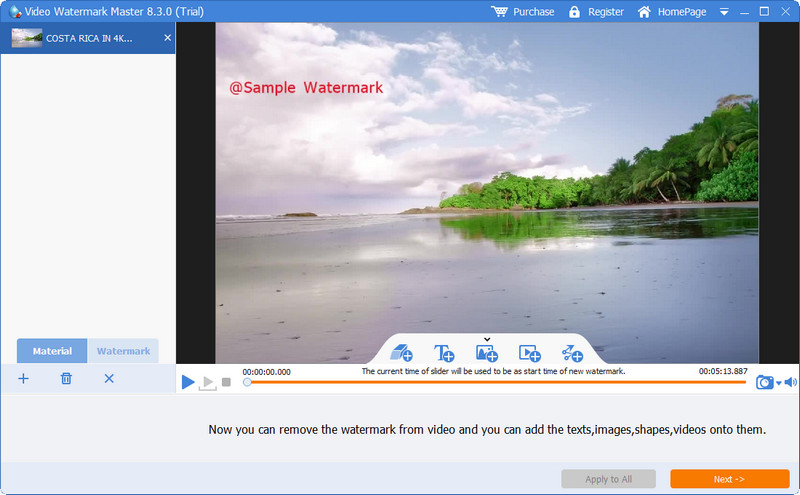
Gilisoft Video Watermark Removal Tool és un removedor de marques d’aigua per a Windows que pots utilitzar per eliminar la marca d’aigua del film animat que has creat amb Animaker. És una eina que has de descarregar al teu Windows per eliminar la marca d’aigua desada a la teva unitat local. Per als usuaris de Mac, aquest programari no està disponible al vostre sistema operatiu. Amb aquesta eina, també hi pots afegir una marca d’aigua en forma d’imatges, text i formes si ho necessites. Continua llegint per saber com eliminar la marca d’aigua del millor removedor de marques d’aigua d’Animaker a Windows.
Pas 1. Descarrega l’eina de supressió de marques d’aigua al teu Windows, segueix el procés de configuració i després fes clic a Launch Video Watermark Master.
Pas 2. Prem Add File/s per importar el vídeo animat que has editat a Animaker gratuïtament amb marca d’aigua.
Pas 3. Fes clic a la icona de eraser per afegir una àrea de supressió de marca d’aigua i aplica-la a la zona amb la marca d’aigua.
Pas 4. Quan hagis acabat d’aplicar l’àrea de supressió al vídeo, fes clic a Next i apareixeran finestres petites a la pantalla. Pots ajustar-ne el format, canviar la carpeta de sortida si vols, i després fer clic a Start per iniciar el procés.
Lectures relacionades:
Com eliminar la marca d’aigua de B612 de les teves imatges
Com eliminar gratuïtament la marca d’aigua de WOW Slider
Part 2. Preguntes freqüents sobre com eliminar la marca d'aigua d'Animaker
Per què no puc utilitzar les altres plantilles d'Animaker?
És perquè la versió gratuïta té un accés limitat a les plantilles disponibles a Animaker. Les plantilles premium no estan disponibles per a Animaker no registrat; si voleu accedir a la versió pro, haureu de veure els plans de preus que ofereix aquesta eina.
Quantes vegades puc descarregar la plantilla a la versió gratuïta d'Animaker?
La versió gratuïta d'Animaker permet als usuaris crear i descarregar vídeos animats cinc vegades amb la marca d'aigua a cadascun. Suposem que voleu crear més vídeos animats amb aquesta plataforma. En aquest cas, haureu de comprar la versió bàsica, inicial, professional o empresarial.
Per què no puc crear un vídeo animat de 6 minuts a Animaker?
Suposem que esteu utilitzant la versió gratuïta de l'Animaker. En aquest cas, tindreu problemes per penjar o crear un vídeo amb una durada de 6 minuts. Podeu resoldre aquest problema fent servir un pla d'aquesta eina o utilitzant FVC Video Converter Ultimate per crear un vídeo sense limitacions de durada.
Conclusió
Aleshores, quina eina prefereixes utilitzar? Podeu seleccionar les eines aquí ara que heu llegit els detalls de cadascuna i us hem ensenyat com eliminar la marca d'aigua d'Animaker de cadascuna. Tens problemes amb què triar? Si és així, escollir el FVC Video Converter Ultimate és el programari més segur que podeu utilitzar. Com que fa la feina en diferents problemes de manera eficaç, un cop feu servir aquesta eina, ho faria; us heu de preocupar més per qualsevol marca d'aigua que tingueu al vostre vídeo. La solució està a la vostra mà si trieu el programari definitiu a Windows i Mac.
-
 3 enfocaments per eliminar la marca d'aigua de vídeo Viva als vídeos [forma més ràpida]
 Necessitareu un eliminador de filigrana dedicat per eliminar la marca d'aigua de Viva Video als vídeos. Llegeix aquest article per saber-ne més!
-
 Eines últimes per eliminar la filigrana dels vídeos exportats de Renderforest
 Per eliminar la marca d'aigua de Renderforest, necessitareu un eliminador de filigrana al vostre dispositiu, totes les eines que podeu utilitzar aquí.
-
 Revisió completa dels eliminadors de marques d'aigua efectius de PlaceIt [2022]
 L'eliminador de filigrana de PlaceIt que revisem aquí són eines efectives que podeu utilitzar per eliminar la marca d'aigua del vídeo que exporteu a PlaceIt.
