


 Video Converter Ultimate
 Gravadora de pantalla
 Reparació de vídeo
 Baixada segura
Elimineu la filigrana de Bandicam amb els 3 millors removedors de filigrana per utilitzar
Bandicam és una eina que tothom estima utilitzar, especialment per gravar acció rere acció allò que passa mentre jugues, estàs en una reunió, mires vídeos, etc. A diferència d’altres competidors de gravació de pantalla, aquest enregistrador pot ajudar-te a filmar un vídeo a 480 FPS amb hooking DirectX/OpenGL/UWP/Vulkan i altres tecnologies avançades d’acceleració. Encara que no hagis adquirit la versió premium, el pots fer servir igualment i gravar vídeos a 60 o 120 FPS, preferiblement alts, però amb marca d’aigua. La manera d’**estalviar un vídeo a Bandicam sense marca d’aigua** és comprant-ne la versió completa.
Afortunadament, les eines que incloem en aquest article poden eliminar la marca d'aigua que Bandicam afegeix al vídeo exportat. Vols saber què són? Aleshores, heu de seguir llegint aquest article per entendre la idea!

Part 1. Com eliminar la filigrana de Bandicam utilitzant el 3 removedor de filigrana més eficaç
FVC Video Converter Ultimate
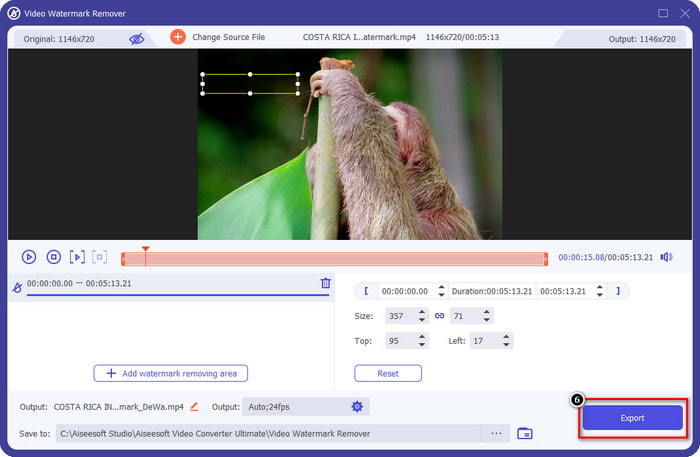
La forma més efectiva d’eliminar la marca d’aigua de Bandicam és utilitzar una eina que t’hi pugui ajudar, com ara FVC Video Converter Ultimate. Aquesta eina pot detectar la marca d’aigua del teu vídeo situant-hi el quadre de selecció a sobre; i, puff, desapareix. Funciona com per art de màgia: no hi haurà cap rastre de la marca d’aigua al vídeo un cop hagis exportat el fitxer. Ara ja podràs gaudir de la gravació que vas fer amb Bandicam sense la molèstia del logotip.
Les característiques més probables d'aquesta eina són els convertidors, els potenciadors, els editors de Toolbox i molt més. Podeu tenir totes aquestes característiques i funcions si feu servir aquesta eina i la descarregueu al vostre escriptori ara mateix. Per ensenyar-vos a eliminar la marca d'aigua de Bandicam amb aquest programari definitiu, podeu seguir el tutorial escrit complet que afegim a continuació.
Pas 1. En primer lloc, has de descarregar el programari oficial a l’ordinador fent clic al botó de descàrrega que hem afegit aquí. No cal que et preocupis, perquè l’enllaç de descàrrega és segur tant per a usuaris de Windows com de Mac. Després de descarregar el fitxer, fes-hi clic per instal·lar-lo, segueix el procés de configuració WinRAR i prem Inicia ara per llançar l’eina.
Descàrrega gratuïtaPer a Windows 7 o posteriorDescàrrega segura
Descàrrega gratuïtaPer a macOS 10.7 o posteriorDescàrrega segura
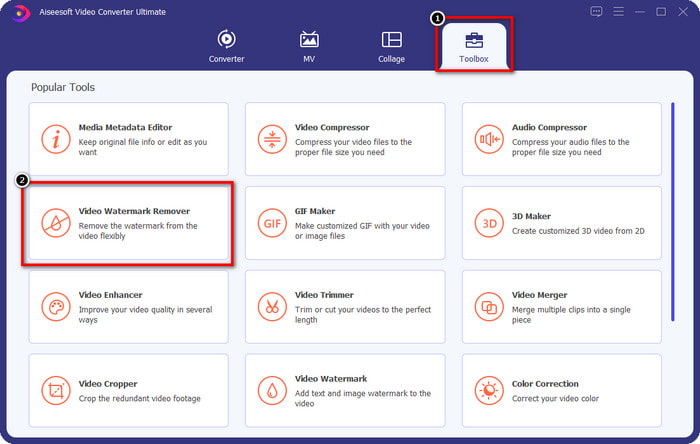
Pas 2. A la interfície principal de l’eina, has d’anar a la Caixa d’eines i, a sota, hi veuràs Video Watermark Remover; fes-hi clic per obrir aquesta funció.
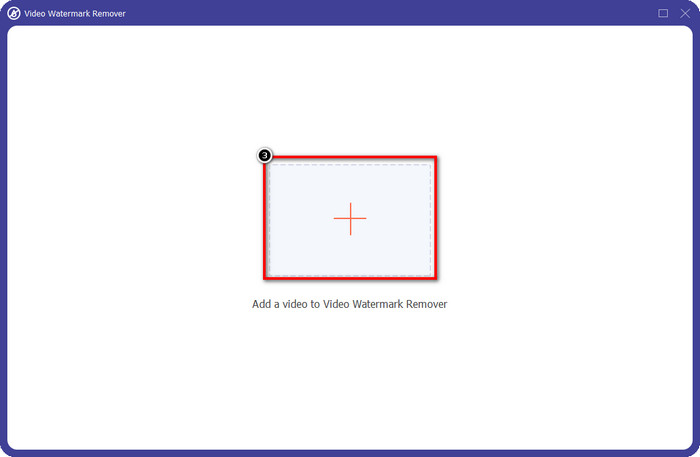
Pas 3. Es mostrarà una nova finestra a la pantalla; fes clic a la icona + per pujar-hi el fitxer de vídeo que té la marca d’aigua. Cerca el fitxer de vídeo al teu disc local i, tot seguit, fes clic a Obrir.
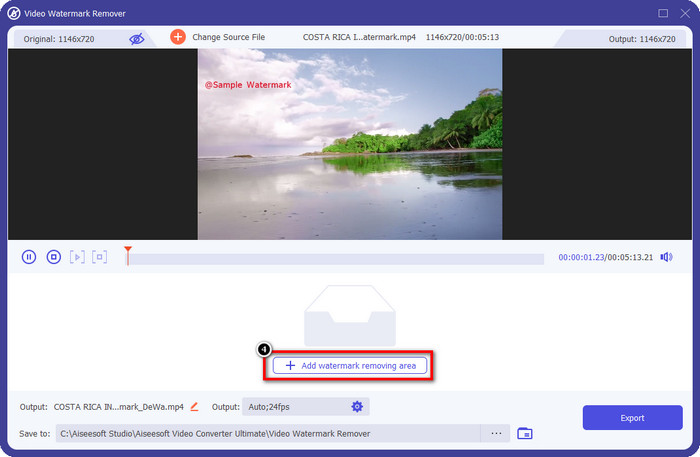
Pas 4. Després de tot això, fes clic a Add Watermark Removing Area per començar a utilitzar-la i així poder tenir els vídeos de Bandicam lliures de marca d’aigua.
Pas 5. A la previsualització, col·loca el quadre de selecció sobre la marca d’aigua; pots canviar-ne la mida perquè la imatge s’ajusti a la marca d’aigua.
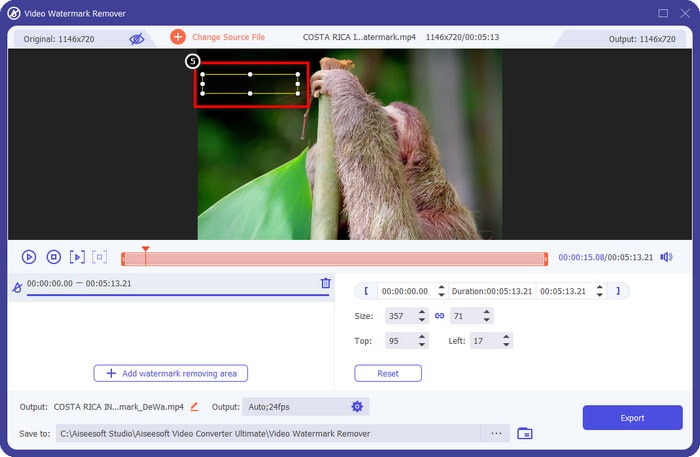
Pas 6. Un cop hagis col·locat el quadre de selecció sobre la marca d’aigua, fes clic a Export per descarregar el vídeo sense la marca d’aigua que Bandicam hi afegeix.
Elimina el logotip ara!
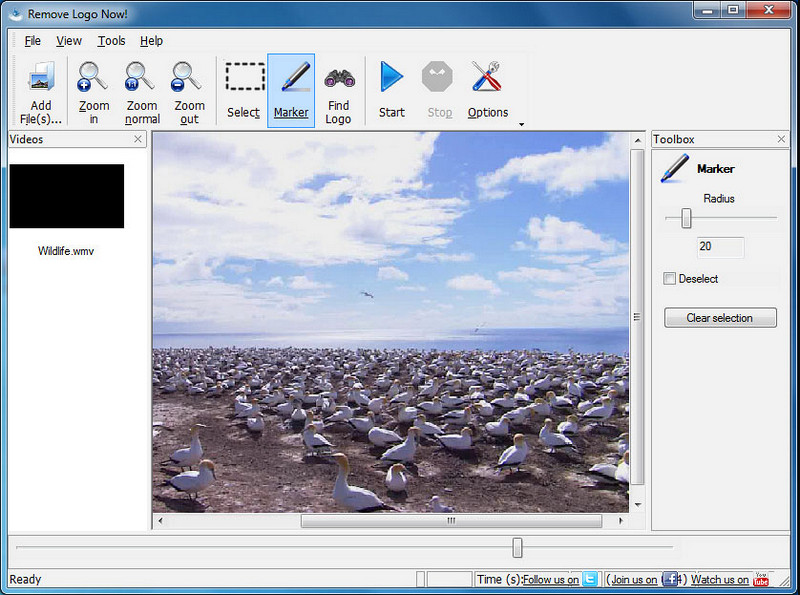
Remove Logo Now! és un eliminador de marques d’aigua complet que pots utilitzar per treure els logotips fixats als teus vídeos. Aquesta eina pot detectar automàticament la marca d’aigua amb l’ajuda d’algoritmes, però també hi pots fer un rastreig manual. Pots utilitzar aquesta eina per eliminar qualsevol tipus de marca d’aigua sense esforç. Tanmateix, el programari només està disponible per a usuaris de Windows i la interfície és una mica antiquada. Però si el vols provar al teu PC amb Windows, t’ensenyarem com eliminar gratis la marca d’aigua de Bandicam.
Pas 1. Pots visitar el seu lloc web per descarregar Remove Logo Now! Comprova amablement la seguretat del lloc per veure si és la pàgina oficial de l’eina esmentada.
Pas 2. Obre el programari que has instal·lat i, tot seguit, fes clic a File per pujar el vídeo de Bandicam amb marca d’aigua.
Pas 3. Ara que el vídeo ja s’ha pujat, fes clic a l’opció Find Logo per detectar automàticament la marca d’aigua del teu vídeo.
Opcional: Si Find Logo no detecta la marca d’aigua del teu vídeo mitjançant l’algoritme, hauràs d’utilitzar Marker per ressaltar manualment la marca d’aigua i, tot seguit, fer clic a Clear Selection per eliminar-la.
Pas 4. Fes clic a l’opció Start per exportar el vídeo i obtenir una versió de la teva gravació sense la marca d’aigua de Bandicam.
Eliminador de marques d'aigua en línia Apowersoft
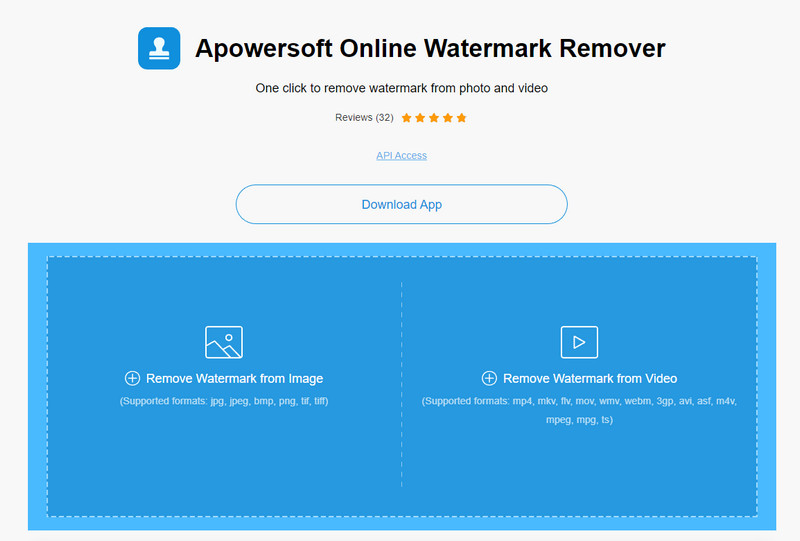
Apowersoft Online Watermark Remover és una eina fiable i sense descàrrega que pots utilitzar per eliminar eficaçment la marca d’aigua d’imatges i vídeos. L’eina és ben coneguda per les seves funcions d’eliminació de marques d’aigua, perquè fa la feina sense deixar residus al vídeo exportat. Encara que sigui una eina web, no s’hi perd qualitat de vídeo un cop exportat. En lloc de comprar la versió completa de Bandicam lliure de marca d’aigua, pots passar directament als passos següents per eliminar-la.
Pas 1. Pots obrir el teu navegador web preferit i cercar el nom d’aquest eliminador de marques d’aigua en línia.
Pas 2. Aquí hi haurà dues opcions disponibles: fes clic a Remove Watermark from Video. Tria el fitxer de vídeo que tingui el logotip de Bandicam al teu disc i, després, prem Obre. Espera al procés de pujada; pot trigar, especialment si el vídeo és molt llarg.
Pas 3. Dibuixa un quadre de selecció sobre el vídeo i assegura’t que la marca d’aigua quedi dins la forma rectangular.
Pas 4. Fes clic a Erase per descarregar el fitxer de vídeo, però ara ja sense la marca d’aigua.
Relacionat:
Com eliminar la marca d’aigua dels vídeos exportats de Renderforest
Com eliminar la marca d’aigua de Viva Video als vídeos
Part 2. Preguntes freqüents sobre com eliminar la filigrana de Bandicam
Bandicam té una marca d'aigua?
Per als usuaris que utilitzen la prova gratuïta, hi haurà una marca d'aigua un cop l'exporteu. Per evitar aquest problema, podeu comprar l'eina al lloc web oficial de Bandicam.
Hi ha limitacions per utilitzar la versió gratuïta de Bandicam?
Hi ha moltes limitacions si utilitzeu la versió gratuïta de Bandicam, la gravació de 10 minuts, l'addició de marca d'aigua, 60 a 120 FPS compatibles, els formats de fitxer i la velocitat de processament. Tot i que això podria ser un problema per a la majoria, encara es considera un dels millors gravadors de pantalla que podeu utilitzar al vostre Windows.
Com eliminar la marca d'aigua a Bandicam?
No hi ha cap altra manera d'eliminar la marca d'aigua a Bandicam, i això és tot comprant-ne la versió professional. Obriu el lloc web oficial de Bandicam, feu clic a Obtén la versió completa, trieu la llicència que voleu i feu clic a Comprar ara.
Conclusió
De fet, Bandicam és un gravador de pantalla de primer nivell que podeu utilitzar gratuïtament. Però una cosa és segura; utilitzar la versió gratuïta afegirà una marca d'aigua al vídeo exportat. Amb les maneres que afegim en aquest article, podeu eliminar amb èxit la filigrana amb l'eliminador de filigrana ideal que podria ser la vostra elecció. Què passa si no voleu utilitzar una eina per eliminar la marca d'aigua? Aleshores, us suggerim que compreu Bandicam per eliminar la marca d'aigua dels vídeos. Us costarà, però val la pena utilitzar la versió professional. Esperem que aquest article proporcioni la informació que necessitareu per eliminar la marca d'aigua a Bandicam.
-
 Revisió completa dels eliminadors de marques d'aigua efectius de PlaceIt [2022]
 L'eliminador de filigrana de PlaceIt que revisem aquí són eines efectives que podeu utilitzar per eliminar la marca d'aigua del vídeo que exporteu a PlaceIt.
-
 5 maneres d'eliminar la filigrana B612 amb les millors eines
 Vols saber com eliminar les filigranes B612 de les teves fotos? Podeu eliminar sense esforç la filigrana B612 de les vostres imatges utilitzant aquestes eines excepcionals.
-
 Passos senzills sobre com eliminar la marca d'aigua del control lliscant WOW [Resolt]
 WOW Slider és una aplicació per crear una presentació de diapositives fantàstica. Tanmateix, incrusta marques d'aigua a la seva sortida. Llegiu a continuació per saber com eliminar la filigrana de WOW Slider.
