


 Video Converter Ultimate
 Gravadora de pantalla
 Reparació de vídeo
 Baixada segura
Mètodes sense desafiament sobre com eliminar el logotip d'iSkysoft del vídeo
iSkysoft és una aplicació excel·lent amb moltes funcions magnífiques que la fan destacar d’altres aplicacions. És una aplicació senzilla que et permet convertir un format de vídeo a un altre i fer algunes edicions bàsiques. Tanmateix, la part més decebedora d’aquest programari és que obtens una gran marca d’aigua d’iSkysoft als teus vídeos després d’utilitzar aquesta aplicació. Tenir una marca d’aigua o un logotip tan gran al vídeo no és gens satisfactori de veure. Afortunadament, hi ha aplicacions fiables que pots utilitzar per eliminar elements que molesten, com el logotip o la marca d’aigua d’iSkysoft. Has de llegir aquest article si tens ganes de descobrir els millors mètodes per eliminar el logotip d’iSkysoft del teu vídeo.

Part 1: elimina el logotip d'iSkysoft del vídeo a l'escriptori
El logotip d’iSkysoft a la pantalla és realment irritant, especialment si estàs mirant els teus vídeos preferits. Però ja no t’has de preocupar. Pots desfer-te d’aquest logotip utilitzant el Video Converter Ultimate. Aquest programari fiable pot ajudar-te a eliminar el logotip d’iSkysoft dels teus vídeos de dues maneres senzilles: amb l’eina Video Watermark Remover i amb l’eina Video Cropper. Amb aquestes eines, pots eliminar fàcilment el logotip d’iSkysoft del teu vídeo. Si el logotip d’iSkysoft es troba en una cantonada del vídeo, es recomana utilitzar l’eina Video Cropper. Però si el logotip està situat al mig, pots utilitzar l’eina Video Watermark Remover. D’aquesta manera, podràs mirar les teves pel·lícules o vídeos preferits sense que el logotip t’irriti.
A més, a més d'eliminar les marques d'aigua dels teus vídeos, Video Converter Ultimate té més funcions. Té un potenciador de vídeo, fusió de vídeo, retallador, retallador, rotador, convertidor i molt més. A més, una de les funcions principals d'aquesta aplicació és convertir diversos formats de fitxer de vídeo. Els usuaris no professionals també poden utilitzar aquesta aplicació perquè té una interfície senzilla. Si voleu aprendre a eliminar el logotip d'iSkysoft del vostre vídeo, us mostrarem les dues maneres senzilles que ofereix aquesta aplicació.
Utilitzant Video Watermark Remover
Pas 1: Primer has de descarregar el Video Converter Ultimate a l’ordinador per utilitzar aquest magnífic programari. Després de descarregar-lo, segueix el procés d’instal·lació i inicia l’aplicació.
Descàrrega gratuïtaPer a Windows 7 o posteriorDescàrrega segura
Descàrrega gratuïtaPer a macOS 10.7 o posteriorDescàrrega segura
Pas 2: Quan ja hagis iniciat el programari, ves al panell Toolbox i selecciona l’eina Video Watermark Remover. Preveu que apareixerà una altra interfície a la pantalla.
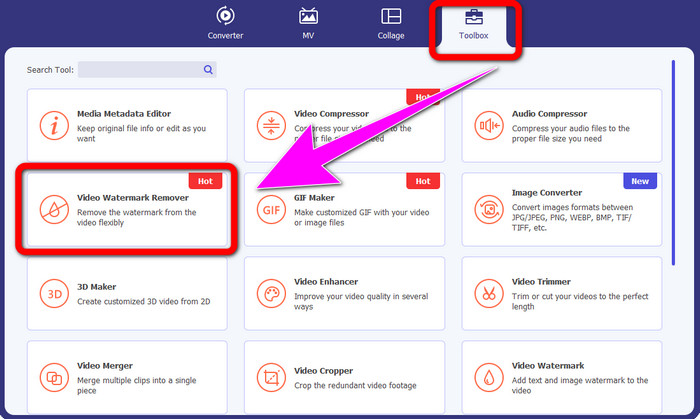
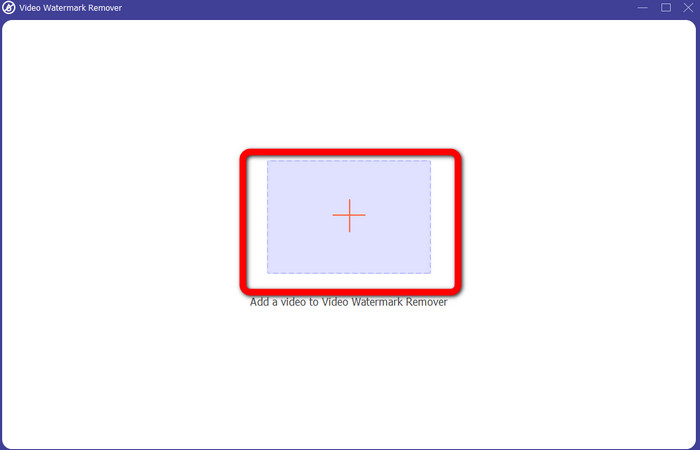
Pas 3: Quan ja vegis la nova interfície, fes clic a la icona del signe més i adjunta-hi el vídeo amb el logotip d’iSkysoft que vols eliminar.
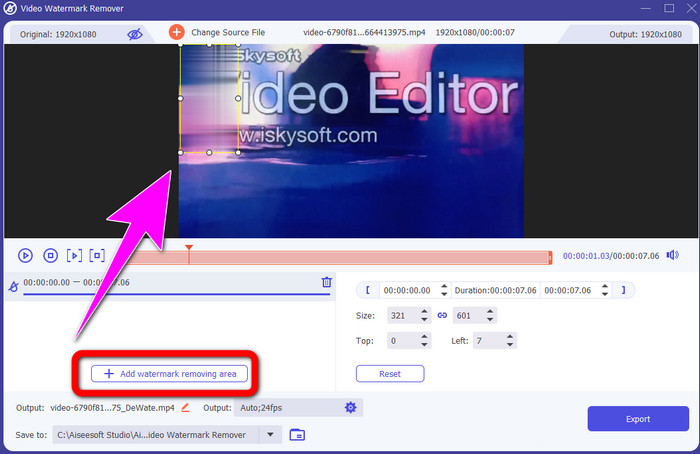
Pas 4: A continuació, fes clic al botó Add Watermark Removing Area. Mou el quadre sobre el vídeo i cobreix el logotip d’iSkysoft.
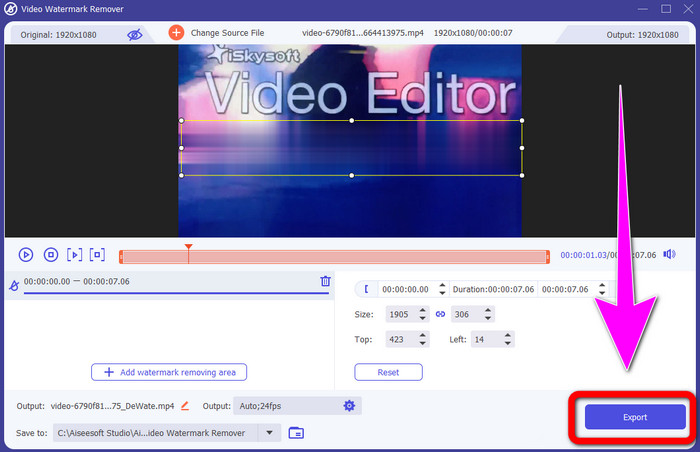
Pas 5: Finalment, fes clic al botó Export per desar el vídeo final.
Utilitzant Video Cropper
En aquesta part, us mostrarem com eliminar el logotip d'iSkysoft del vostre vídeo mitjançant l'eina Video Cropper.
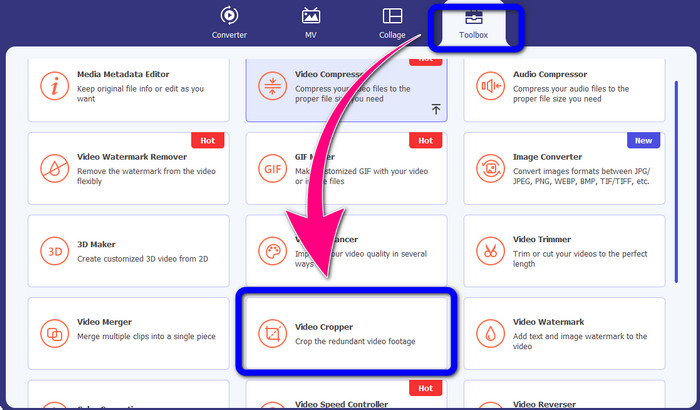
Pas 1: Executa l’aplicació a l’ordinador. Al panell Toolbox, has de fer clic a l’eina Video Cropper. Igual que amb l’altra eina anterior, preveu que apareixerà una altra interfície a la pantalla.
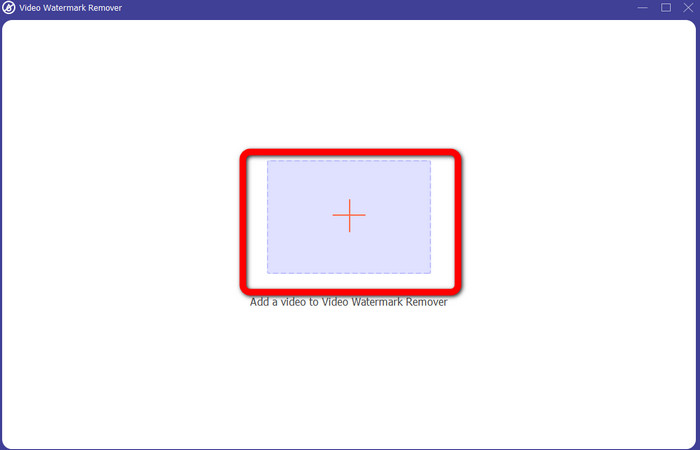
Pas 2: Fes clic al botó amb el signe Plus per importar el vídeo amb el logotip d’iSkysoft.
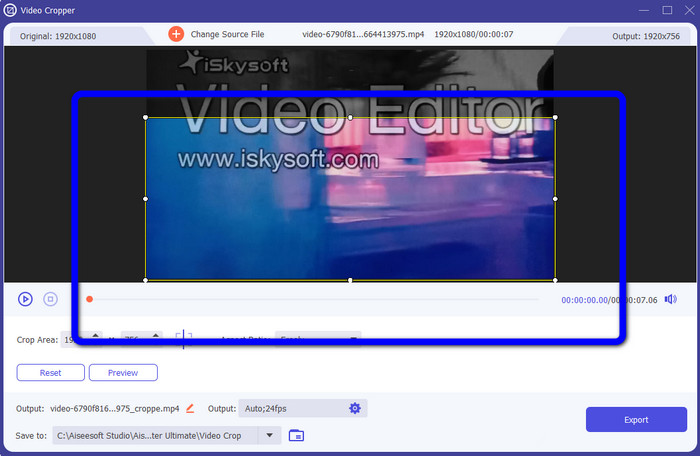
Pas 3: En aquesta part, ja pots retallar el vídeo per eliminar el logotip d’iSkysoft del teu vídeo. Utilitza el ratolí per moure la vora del vídeo.
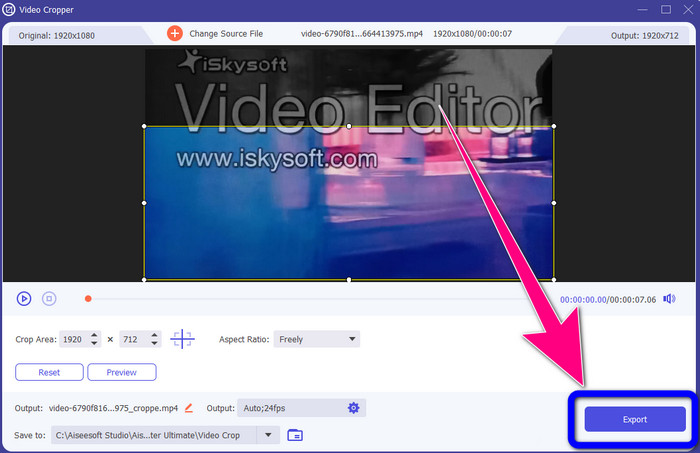
Pas 4: Per a l’últim pas, fes clic al botó Export i desa el resultat a l’ordinador.
Part 2: Com eliminar el logotip d'iSkysoft del vídeo en línia
Utilitzant HitPaw
També pots eliminar el logotip d’iSkysoft en línia. Una de les millors eines que pots utilitzar és HitPaw. Aquesta aplicació en línia pot eliminar fàcilment el logotip del teu vídeo. La pots utilitzar tant a l’escriptori com en línia, cosa que és pràctica per a tothom. A més, HitPaw és segura d’utilitzar. Garanteix que els vídeos només puguin ser editats i visualitzats per tu mateix. A més, no t’has de preocupar per les limitacions d’aquest programari: no té límits pel que fa a l’eliminació de logotips dels teus vídeos. No cal comprar aquesta aplicació perquè és gratuïta. Tanmateix, si elimines el logotip o qualsevol
elements innecessaris del vostre vídeo, haureu d'esperar una mica més. Aquesta aplicació té un procediment d'eliminació lent, que requereix molt de temps per als usuaris. A més, depèn de la teva connexió a Internet. Funcionarà bé si teniu una connexió ràpida. Però, si teniu una connexió lenta, espereu algun retard. Seguiu els senzills passos següents per eliminar el logotip d'iSkysoft dels vostres vídeos.
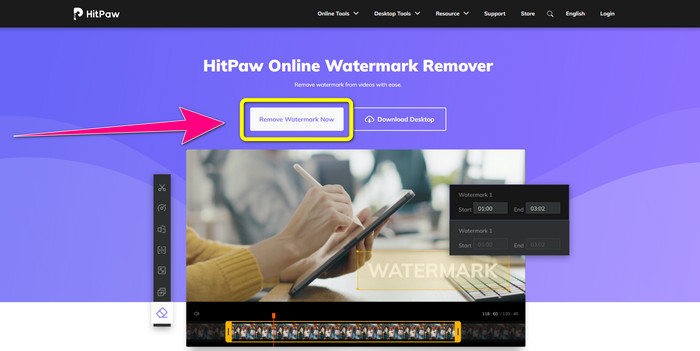
Pas 1: Visita el lloc web de HitPaw. Fes clic al botó Remove Watermark Now - Choose File per inserir el vídeo amb el logotip d’iSkysoft que vols eliminar.
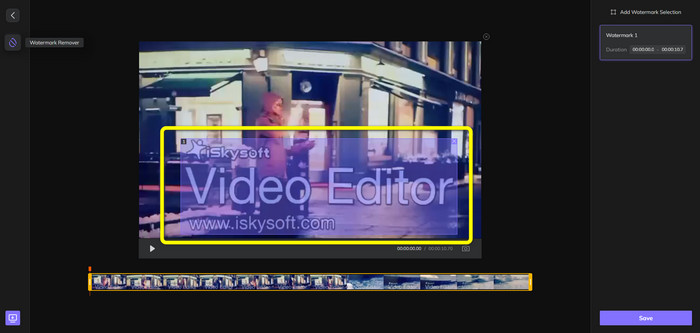
Pas 2: Quan ja hagis adjuntat el fitxer de vídeo, apareixerà a la pantalla un quadre de color blau. Utilitza aquest quadre per cobrir el logotip d’iSkysoft. Pots canviar-ne la mida.
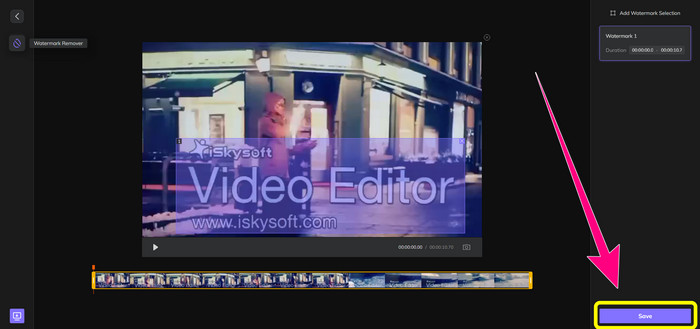
Pas 3: Quan hagis acabat de cobrir el logotip d’iSkysoft al vídeo, fes clic al botó Save. Espera el procés d’eliminació i desa el vídeo.
Ús de Video Watermark Remover en línia
Una altra eina en línia que pots utilitzar és Video Watermark Remover Online. Amb aquesta aplicació, pots eliminar el logotip d’iSkysoft dels teus vídeos. També és un programari fàcil d’utilitzar, adequat per a usuaris no professionals. També pots eliminar qualsevol element irritant dels teus vídeos sense perdre qualitat. Tanmateix, si utilitzes la versió gratuïta hi ha una limitació en l’eliminació de logotips: només pots eliminar logotips o marques d’aigua de 5 vídeos. Has de comprar una subscripció si vols adjuntar més vídeos amb Video Watermark Remover Online. A més, no pots desar el resultat en un altre format: només el pots desar en el mateix format, cosa que no és ideal. Finalment, té un processament de fitxers lent. Segueix les instruccions senzilles que tens a continuació per eliminar el logotip d’iSkysoft dels teus vídeos.
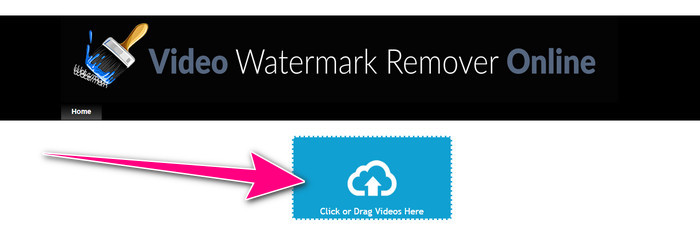
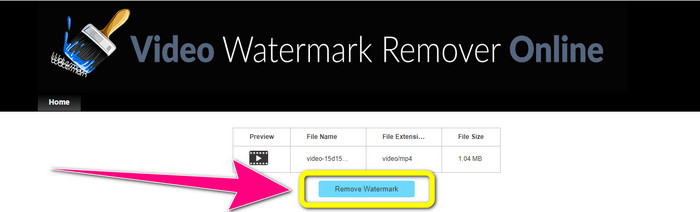
Pas 1: Ves al lloc web de Video Watermark Remover Online. Selecciona el botó Click or Drag Videos Here per importar el fitxer de vídeo amb el logotip d’iSkysoft que vols esborrar.
Pas 2: A continuació, fes clic al botó Remove Watermark i espera el procés d’eliminació.
Relacionat amb:
La manera més ràpida d’eliminar un logotip d’un vídeo a Adobe Premiere Pro
Com eliminar un logotip d’un vídeo amb Windows Movie Maker
Part 3: Preguntes freqüents sobre l'eliminació del logotip d'iSkysoft
Es pot eliminar un logotip d'una imatge?
Sí, pots utilitzar FVC Free Watermark Remover per esborrar fàcilment i ràpida el logotip de la teva imatge.
És il·legal eliminar la marca d'aigua?
D'acord amb la Llei de drets d'autor dels EUA, secció 1202, eliminar les marques d'aigua sense el permís del propietari és il·legal.
Com puc eliminar el logotip de forma gratuïta?
Podeu utilitzar la prova gratuïta de Video Converter Ultimate per eliminar un logotip del vostre vídeo de manera gratuïta.
Conclusió
Aquest article ha proporcionat excel·lents mètodes per eliminar el logotip d’iSkysoft del teu vídeo utilitzant eines per a l’escriptori i en línia. Però si vols trobar un excel·lent eliminador de logotips que puguis utilitzar, aleshores pots descarregar Video Converter Ultimate. Aquesta aplicació ofereix un procés d’eliminació ràpid. També és accessible per a tots els usuaris.
-
 8 eliminadors de filigrana de vídeo destacats en línia i fora de línia
 Si esteu buscant el millor programari gratuït per eliminar la filigrana de vídeo que podeu utilitzar als vostres telèfons Windows, Mac, iPhone i Android, aquest article és per a vosaltres
-
 Millors mètodes sobre com eliminar la marca d'aigua que es pot mossegar del vídeo
 Aquest article us mostrarà un eliminador de filigrana més fiable i fantàstic. Aquestes meravelloses aplicacions us ajudaran a resoldre aquest tipus de problemes
-
 Procediments fàcils d'aprendre per eliminar el logotip del vídeo
 Esteu buscant el millor i fàcil eliminador de logotips de vídeo? Aleshores, aquest article és bo per a tu. Aprofiteu l'oportunitat per obtenir informació sobre com eliminar un logotip d'un vídeo.
