


 Video Converter Ultimate
 Gravadora de pantalla
 Reparació de vídeo
 Baixada segura
Com eliminar la marca d'aigua dels vídeos exportats de Renderforest en última instància
Renderforest és un pacte complet d'excel·lents plantilles animades per a intros, altres, títols, anuncis o altres. Podeu començar des de zero o utilitzar les plantilles disponibles aquí. Tot i que no ets un expert en edició de vídeo, pots aconseguir superar-ho fent servir aquesta plataforma web. A causa del seu ús i avantatge òptim, molts usuaris van triar aquesta plataforma per crear un disseny d'alta qualitat, eficient, compatible i fiable si es disposa d'una subscripció.
Així, pots descarregar gratuïtament aquí el vídeo que hi edites si et registres, però amb una marca d’aigua. La marca d’aigua suposa un problema per a molts de nosaltres que ja exportem el vídeo aquí i per a aquells que no poden assumir la quota de subscripció d’aquesta eina. Més avall llistarem tutorials sobre com eliminar la marca d’aigua de Renderforest utilitzant les eines més valuoses que hem reunit durant la nostra investigació. Te les podem compartir si continues llegint la següent part d’aquest article.

Part 1. 3 maneres efectives de com eliminar la marca d'aigua del vídeo de Renderforest
FVC Video Converter Ultimate
FVC Video Converter Ultimate és un fenomenal eliminador de marques d’aigua de vídeo que pot guiar-te pas a pas sobre com eliminar la marca d’aigua de Renderforest. Pots confiar en aquesta eina per eliminar la marca d’aigua del teu vídeo sense complicacions. Si hem de comparar aquesta eina definitiva amb d’altres, aquesta té la capacitat d’eliminar la marca d’aigua del teu vídeo amb el suport de la tecnologia d’IA. A més, és la millor eina per eliminar la marca d’aigua del teu vídeo, sigui quin sigui el format que hi carreguis. Què fa que aquesta eina sigui excel·lent? No cal que siguis gaire expert en tecnologia per utilitzar-la; amb una guia senzilla i els passos següents, podràs eliminar la marca d’aigua que Renderforest afegeix al vídeo.
Pas 1. Descarrega el programari a l’ordinador fent clic al botó de descàrrega adequat. Fes clic al fitxer de descàrrega, instal·la’l i prem Start Now per iniciar el programari immediatament.
Descàrrega gratuïtaPer a Windows 7 o posteriorDescàrrega segura
Descàrrega gratuïtaPer a macOS 10.7 o posteriorDescàrrega segura
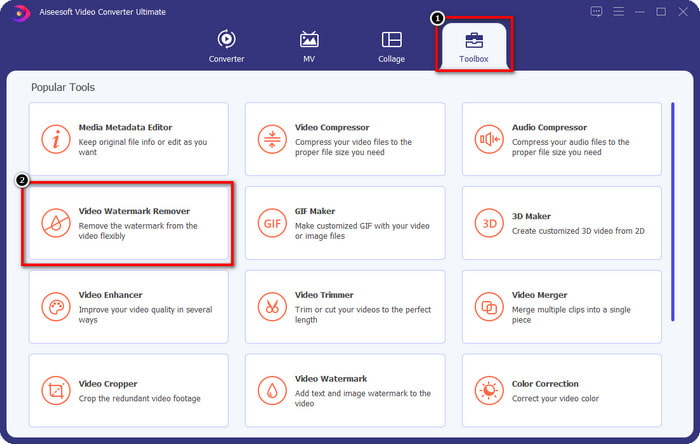
Pas 2. Després d’iniciar el programari, obre la Toolbox i fes clic a Video Watermark Remover que trobaràs a dins.
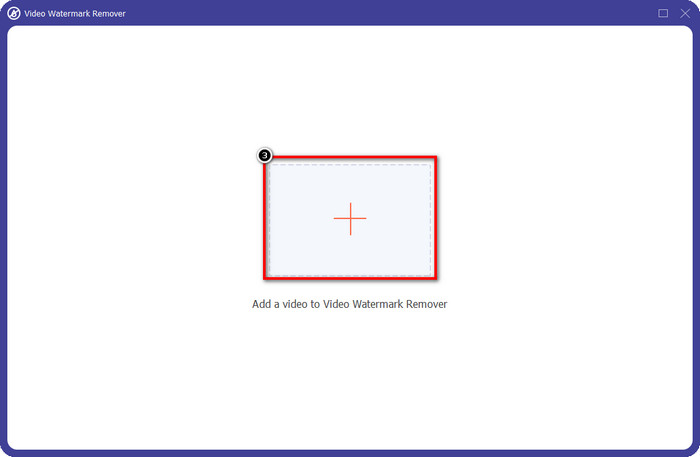
Pas 3. Fes clic a la icona + a la pantalla per pujar-hi el vídeo de Renderforest que has exportat amb marca d’aigua.
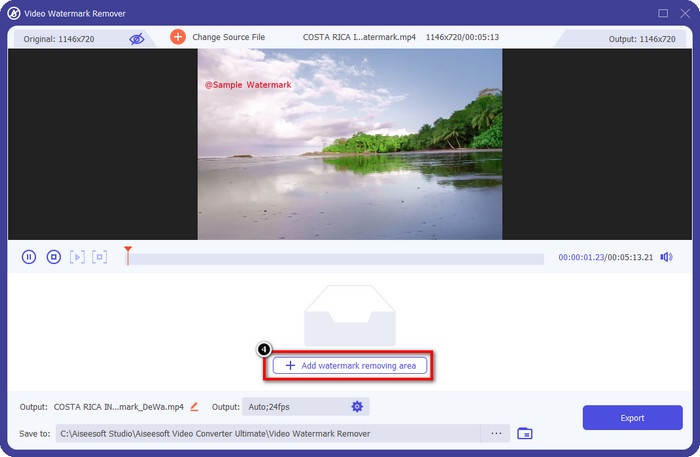
Pas 4. Prem Add Removing Watermark Area per començar a eliminar la marca d’aigua de Renderforest.
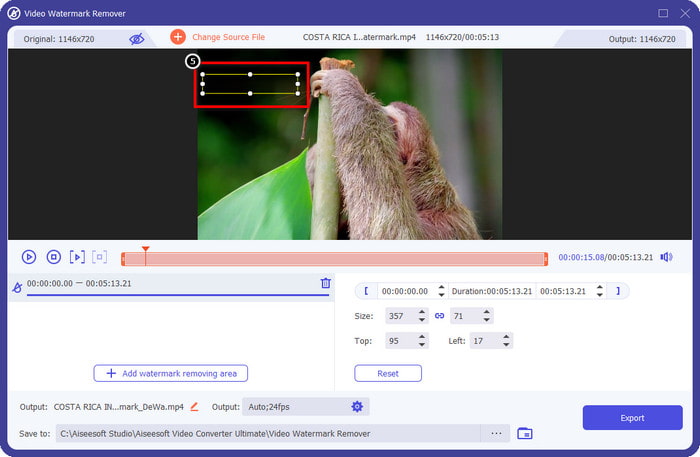
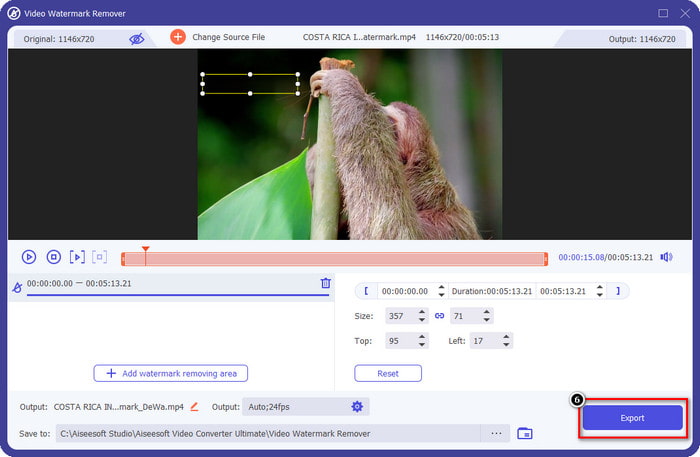
Pas 5. A la nova finestra de la pantalla, arrossega el quadrat de selecció i adapta’l a la marca d’aigua. Pots ajustar lliurement el quadre de selecció si ho necessites.
Pas 6. Ara que el quadre de selecció detecta la marca d’aigua al teu vídeo, fes clic a Export per començar a eliminar-la i desar el vídeo sense marca d’aigua. Processarà el vídeo ràpidament, i ja podràs utilitzar el vídeo sense la marca d’aigua molesta.
Relacionat:
Eliminar la marca d’aigua de DeviantArt
Eliminar la marca d’aigua de Video Helper
Elimina el logotip ara
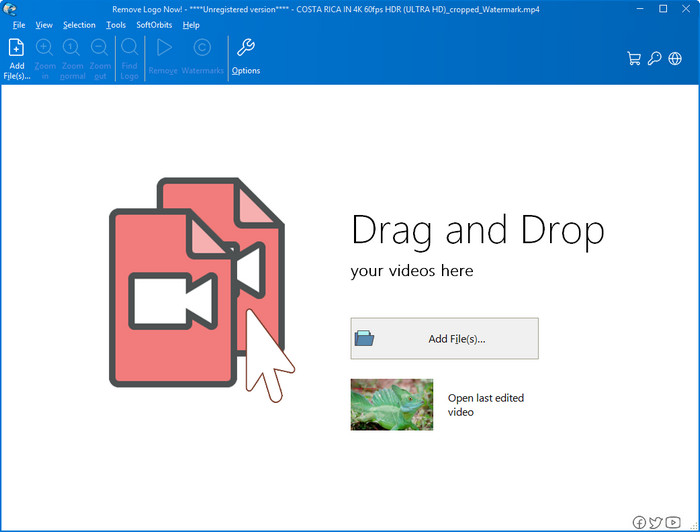
A continuació a la nostra llista, Remove Logo Now ha construït una excel·lent reputació per eliminar marques d’aigua superposades a Windows. Amb aquesta eina no et caldrà tenir coneixements avançats per saber com eliminar la marca d’aigua de Renderforest a l’ordinador. Després d’eliminar la marca d’aigua, si t’hi fixes de prop, hi poden quedar restes al lloc on es trobava la marca d’aigua. Però si no ho mires amb molta atenció, no notaràs ni la marca d’aigua ni el rastre al vídeo exportat. El tutorial següent t’ensenyarà com eliminar la marca d’aigua del teu vídeo als dispositius amb Windows.
Pas 1. Descarrega i instal·la el Remove Logo Now a l’ordinador, i després segueix el procés d’instal·lació.
Pas 2. Inicia el programari i fes clic a Add Files per pujar-hi el vídeo. També pots arrossegar i deixar anar el vídeo aquí per fer la càrrega del fitxer més eficient.
Pas 3. Tria quina eina vols utilitzar per marcar la marca d’aigua. Després de seleccionar-ne una, ressalta la marca d’aigua i fes clic a Remove.
Pas 4. Fes clic a Start per començar el procés d’eliminació de la marca d’aigua que ofereix aquesta eina.
Eliminador de filigrana de vídeo en línia

No t’agrada descarregar programari a l’ordinador però encara vols saber com eliminar la marca d’aigua de Renderforest? Aleshores prova d’utilitzar el Video Watermark Remover Online. Pots utilitzar aquest eliminador de marques d’aigua totalment automatitzat per eliminar la marca d’aigua del teu vídeo de franc i sense haver-lo de descarregar a l’ordinador. Igual que amb l’eina esmentada aquí, encara que siguis principiant en l’edició de vídeo o en l’eliminació de marques d’aigua, podràs dominar aquesta eina en pocs minuts. Pots seguir el tutorial de sota per saber com utilitzar-la.
Pas 1. Obre l’eliminador de marques d’aigua en línia cercant-lo al teu navegador web preferit.
Pas 2. Fes clic a la icona del núvol de pujada a la pàgina principal per inserir-hi el vídeo que has exportat des de Renderforest.
Pas 3. Espera que acabi el procés de pujada, ja que elimina automàticament la marca d’aigua del teu vídeo, i després fes clic a Download per obtenir el vídeo sense la marca d’aigua.
Part 2. Preguntes freqüents sobre com eliminar la marca d'aigua de Renderforst
Quant costa la subscripció a Renderforest?
Renderforest admet tres tipus diferents de preus dels quals podeu fer servir; $ 14,99 per a Lite, $24,99 per a Pro i $29,99 per a Business cada mes. Aquest preu té una finalitat diferent entre si; podeu anar al seu lloc web principal per veure quins són els inscrits disponibles a la subscripció que voleu utilitzar.
És possible eliminar la marca d'aigua de Renderforest Video sense una eina?
Sí, podeu eliminar la marca d'aigua del vostre Renderforest sense utilitzar cap eina, i d'aquesta manera és comprant una quota mensual o anual al programari. De manera que quan exporteu el fitxer de vídeo, no hi haurà cap filigrana afegit.
Quin és el millor pla per a Renderforest; Mensual o Anual?
La subscripció mensual és una bona opció si voleu utilitzar l'eina unes quantes vegades, però si decidiu utilitzar el programari durant molt de temps, és millor fer servir un pla anual perquè us costarà menys que la renovació de cada mes. Però abans d'aprofitar, podeu utilitzar Renderforest de manera gratuïta iniciant sessió al vostre compte aquí i, a continuació, provar d'utilitzar les altres plantilles que ofereix de manera gratuïta.
Conclusió
De fet, aquest article proporciona proves sòlides per eliminar la filigrana de Renderforest de forma gratuïta amb els tres eliminadors de filigranes més útils que podeu utilitzar. Si sou un usuari de Windows i voleu eliminar la filigrana de l'escriptori, heu de provar d'utilitzar Elimina el logotip ara. Però si no us agrada baixar programari, heu de provar d'utilitzar Video Watermark Remover Online perquè podeu utilitzar aquesta eina per eliminar les marques d'aigua de manera eficaç.
Però si sou un usuari de Windows o Mac que voleu un eliminador de filigrana eficaç, sens dubte, el millor eliminador de filigrana que podeu utilitzar és FVC Video Converter Ultimate. És l'últim eliminador de filigrana que podeu utilitzar per eliminar la marca d'aigua que molesta el vostre vídeo Renderforest de manera eficient i professional.
-
 2 maneres d'eliminar la marca d'aigua VSDC a Windows i Mac ràpidament
 Esteu buscant una manera d'eliminar la marca d'aigua VSDC dels vostres vídeos? Amb aquest article, oferim eines que podeu utilitzar per desfer-vos de la marca d'aigua.
-
 Elimineu la marca d'aigua d'Animoto als vídeos de manera fàcil i eficaç
 Com eliminar la marca d'aigua d'Animoto al vídeo? Continueu llegint aquest article ja que us oferim un tutorial complet sobre com fer-ho.
-
 Com eliminar la filigrana del vídeo amb Final Cut Pro [Guia completa]
 Tens algun problema amb la marca d'aigua dels vídeos? No hem dit més, perquè vam oferir un tutorial sobre com eliminar la filigrana del vídeo amb Final Cut Pro.
