


 Video Converter Ultimate
 Gravadora de pantalla
 Reparació de vídeo
 Baixada segura
Procediment sense esforç per eliminar les marques d'aigua dels vídeos MP4
Tens problemes perquè no saps com eliminar marques d’aigua dels teus vídeos MP4 quan fas servir dispositius com el Mac i el Windows? Aleshores, aquest article té la millor solució per a tu. Si ets d’aquelles persones que estimen veure pel·lícules, clips i més, segurament entendràs com pot ser de molest i irritant mirar els teus vídeos preferits amb marques d’aigua o altres objectes innecessaris al teu MP4. A més, pot ser que ni tan sols vegis tota la pantalla perquè aquestes marques d’aigua la tapen. I la part més frustrant és que alguns vídeos tenen marques d’aigua enormes i no pots ni gaudir de mirar els teus vídeos preferits.
Afortunadament, ja hi ha una aplicació de programari tremenda i notable amb un eliminador de filigrana de vídeo que podeu utilitzar per eliminar aquells objectes innecessaris dels vostres vídeos, com ara marques d'aigua, logotips, textos, imatges i molt més. Pots esborrar o eliminar ràpidament aquests objectes i gaudir mirant o reproduint els teus vídeos amb aquestes aplicacions. Amb aquestes aplicacions, mai més us sentireu frustrats o irritats. Aleshores, si us captiva aquest tema, heu de llegir aquest article per donar-vos informació suficient, especialment per eliminar fàcilment les marques d'aigua dels vostres vídeos MP4.

Part 1: la millor manera d'eliminar la marca d'aigua del vídeo MP4
Si estàs buscant l’aplicació més destacada i sorprenent per eliminar marques d’aigua dels vídeos MP4, Video Converter Ultimate és la millor eina. Aquesta aplicació és capaç d’eliminar objectes molestos dels teus vídeos, com marques d’aigua, logotips, textos o imatges. A més, no hauràs d’esperar gaire durant el procés de desament, perquè podràs desar els teus vídeos ràpidament després d’eliminar les marques d’aigua.
A més, Video Converter Ultimate té moltes eines d'edició que podeu utilitzar, com ara un potenciador de vídeo, eliminar marques d'aigua, afegir filigranes, un controlador de velocitat de vídeo, creador de GIF, creador de collage, gravador de vídeo i àudio, compressor de vídeo/àudio, conversió de diversos fitxers. formats com MP4, FLV, MOV, TRP, MTS, M2TS, MKV, AAC, MP3 i molt més. A més, la millor part és que ja no cal comprar ni comprar aquesta aplicació. Podeu operar això de forma gratuïta. A més, aquesta aplicació és molt senzilla i fàcil d'utilitzar. Si voleu eliminar les marques d'aigua dels vostres vídeos MP4, Video Converter Ultimate us pot oferir dues maneres. Llegiu contínuament per aprendre aquestes dues maneres d'esborrar les marques d'aigua als vostres vídeos.
1. Ús de Video Watermark Remover
Pas 1: Visita el lloc web de Video Converter Ultimate. Descarrega l’aplicació gratuïtament. Després, procedeix a instal·lar-la.
Descàrrega gratuïtaPer a Windows 7 o posteriorDescàrrega segura
Descàrrega gratuïtaPer a macOS 10.7 o posteriorDescàrrega segura
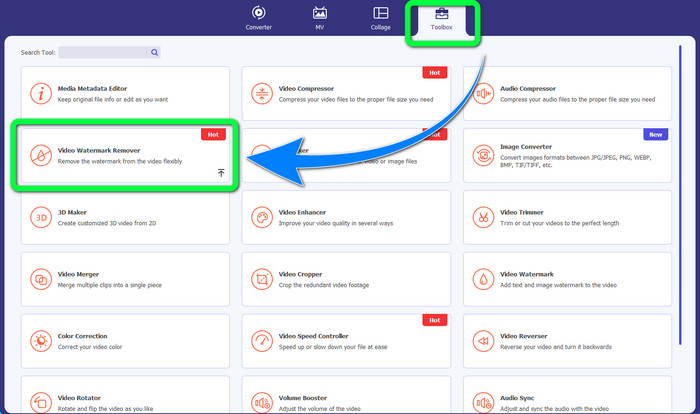
Pas 2: Obre l’aplicació. Selecciona Toolbox > Video Watermark Remover.
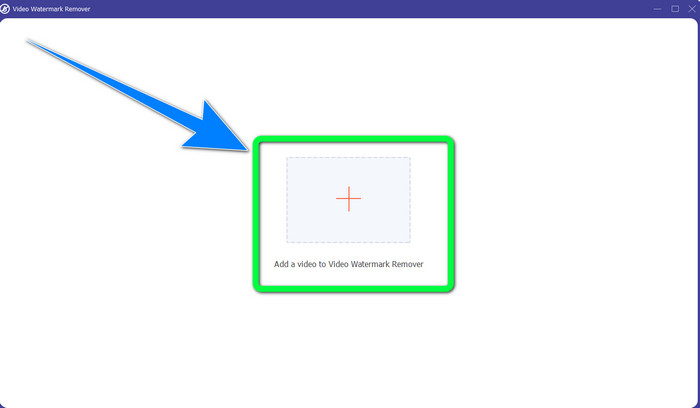
Pas 3: Apareixerà una altra interfície. Selecciona el botó amb el signe Plus i afegeix el teu vídeo MP4 amb marca d’aigua.
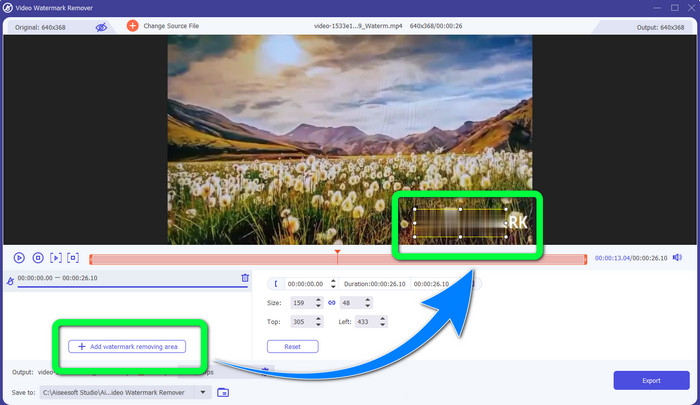
Pas 4: Fes clic al botó Add Watermark Removing Area. Aleshores, apareixerà un petit quadre al vídeo; arrossega aquest quadre i utilitza’l per cobrir les marques d’aigua del vídeo.
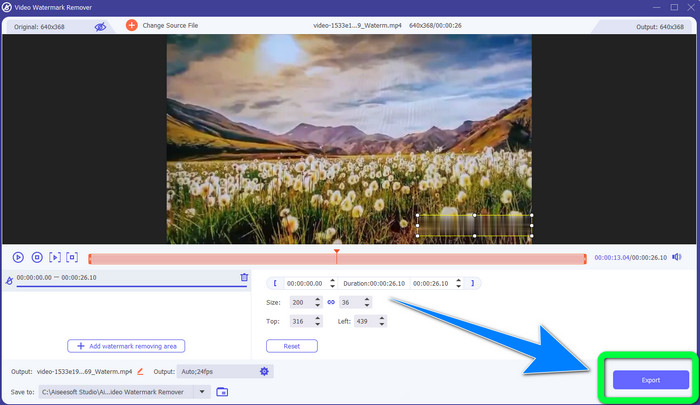
Pas 5: Quan hagis acabat d’eliminar la marca d’aigua, fes clic al botó Export per desar els teus vídeos. Ara pots gaudir mirant les teves pel·lícules preferides sense marques d’aigua.
2. Ús de Video Cropper
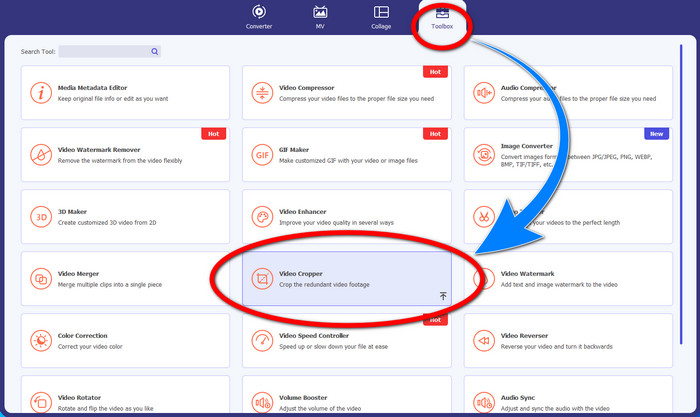
Pas 1: Obre el Video Converter Ultimate. Després, fes clic a Toolbox > Video Cropper.
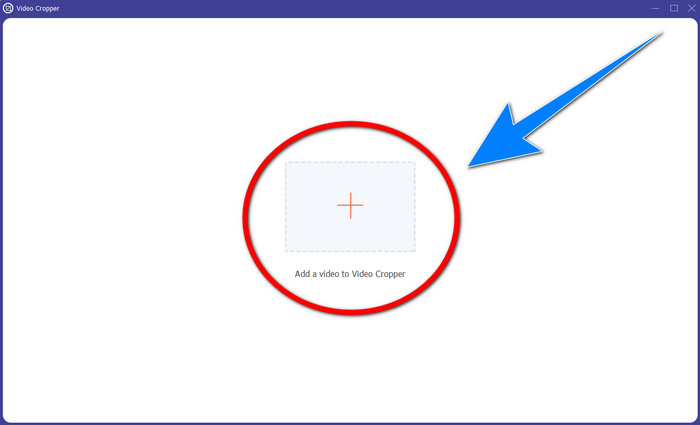
Pas 2: Després de fer clic a Video Cropper, apareixerà una altra interfície. Fes clic al símbol Plus per afegir el teu vídeo MP4 amb marca d’aigua.
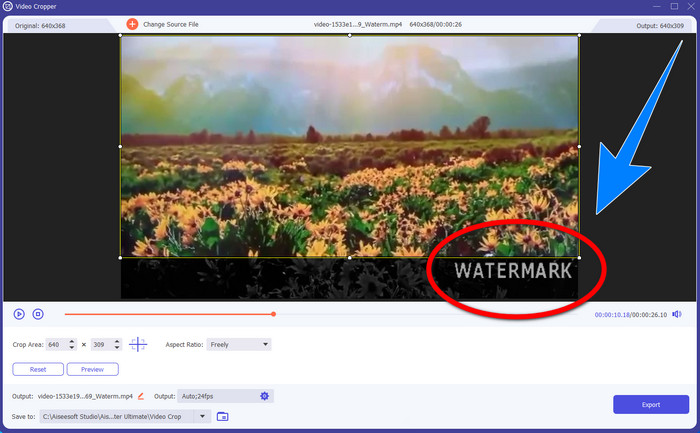
Pas 3: Quan ja hagis adjuntat el teu vídeo, pots retallar el vídeo MP4 i eliminar la marca d’aigua.
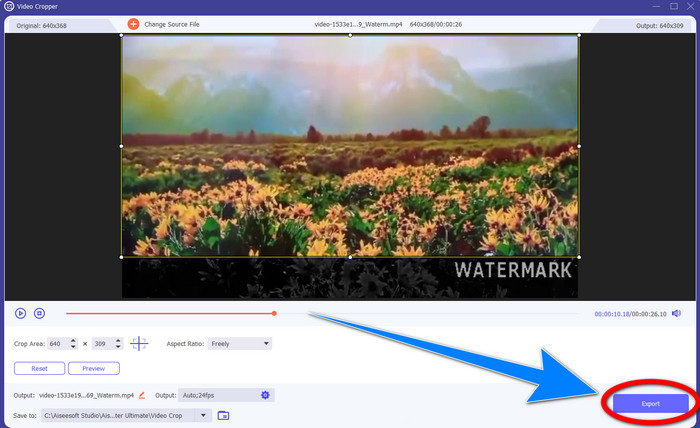
Pas 4: Si ja has acabat de retallar el vídeo per eliminar la marca d’aigua, fes clic al botó Export per desar-lo. D’aquesta manera, podràs mirar el teu vídeo sense cap marca d’aigua.
Part 2: elimina la marca d'aigua del vídeo MP4 en línia
Busques una aplicació excel·lent que puguis utilitzar per eliminar marques d’aigua del teu vídeo MP4 en línia i gratuïtament? Aleshores, HitPaw Online Watermark Remover és l’aplicació en què pots confiar. A més, pots fer servir aquesta aplicació sense comprar res perquè és totalment gratuïta. A més a més, pots eliminar marques d’aigua, logotips i signatures sense cap límit, i no té anuncis. També és senzilla i fàcil d’utilitzar. Pots eliminar les marques d’aigua dels teus vídeos en només tres passos, ideal per a principiants.
HitPaw Online Watermark Remover és accessible a qualsevol dispositiu, com Windows, Mac, iPhone i Android. Aquesta aplicació també és segura i garanteix que sou l'únic que pot veure i editar els vostres vídeos. Tanmateix, si elimineu les marques d'aigua dels vostres vídeos, la zona es tornarà borrosa i molesta de vegades. A més, el procés d'estalvi és lent. Si voleu eliminar les marques d'aigua dels vostres vídeos MP4 en línia, seguiu els passos següents.
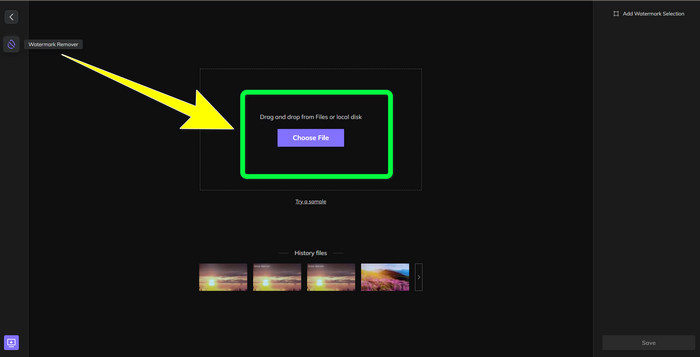
Pas 1: Ves al lloc web de HitPaw Online Watermark Remover. Fes clic a Remove Watermark Now i després selecciona Choose File per afegir el teu vídeo MP4 amb marques d’aigua.
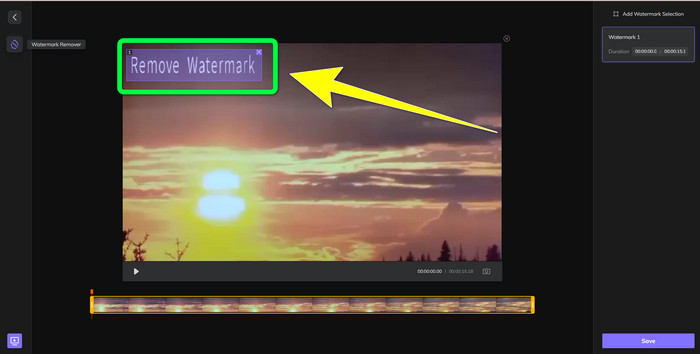
Pas 2: Després d’afegir el vídeo, apareixerà una forma rectangular als teus vídeos. Arrossega-la per cobrir i eliminar les marques d’aigua.
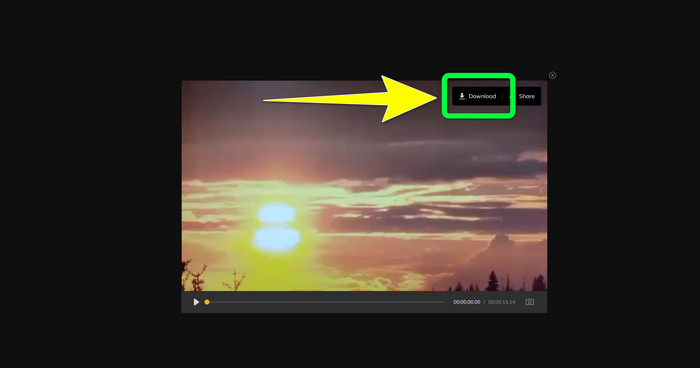
Pas 3: Després d’eliminar les marques d’aigua del vídeo, fes clic al botó Save. Espera el procés de desament i després fes clic al botó Download per guardar-lo al teu dispositiu.
Part 3: Preguntes freqüents sobre l'eliminació de la filigrana de MP4
També és possible eliminar les signatures dels meus vídeos?
Sí, és possible. Video Converter Ultimate també és capaç d’eliminar signatures dels teus vídeos. Qualsevol objecte innecessari que resulti molest en els teus vídeos es pot eliminar fàcilment amb aquesta aplicació.
Es necessita molt de temps eliminar les filigranes dels vídeos MP4?
Depèn de les aplicacions que utilitzeu. Si voleu eliminar les marques d'aigua dels vostres vídeos MP4, utilitzeu Video Converter Ultimate. Pot eliminar les marques d'aigua a l'instant.
Quin és el millor eliminador de filigrana de vídeo que puc utilitzar?
Si estàs buscant una aplicació fiable que pugui eliminar marques d’aigua del teu vídeo, Video Converter Ultimate és un programari excel·lent que pots utilitzar. Pots eliminar marques d’aigua i desar els teus vídeos sense perdre qualitat.
Puc utilitzar l'eina de retall a HitPaw Online Watermark Remover per eliminar les marques d'aigua?
Absolutament sí! També podeu utilitzar l'eina de retall d'aquesta aplicació si voleu eliminar les filigranes dels vostres vídeos, especialment si les marques d'aigua estaven a la cantonada o a la vora dels vostres vídeos.
A part d'eliminar les filigranes, és possible afegir marques d'aigua amb Video Converter Ultimate als meus vídeos?
Definitivament sí! Video Converter Ultimate no només es limita a eliminar les marques d'aigua dels vostres vídeos. Aquesta aplicació també pot afegir marques d'aigua als teus vídeos, sobretot si vols posar text, logotips, signatures, etc.
Conclusió
Tal com s’ha explicat més amunt, pots eliminar fàcilment les marques d’aigua dels teus vídeos MP4 amb Video Converter Ultimate. A més, aquest article et mostra diversos programes que pots utilitzar per eliminar objectes innecessaris dels vídeos MP4 en línia.
-
 Com eliminar la filigrana de Filmora als vostres vídeos o projectes de forma gratuïta
 Com eliminar la filigrana de Filmora? Aquesta pregunta passa per la web, i aquí enumerem diferents enfocaments que podeu utilitzar!
-
 El truc més ràpid per eliminar la marca d'aigua d'Adobe Stock d'un vídeo [Tutorial]
 Tens algun problema amb la marca d'aigua d'Adobe Stock? Llegiu això i apreneu a treure la marca d'aigua d'Adobe Stock del vídeo.
-
 5 maneres d'eliminar una marca d'aigua d'un vídeo d'una manera professional
 Necessites eliminar una marca d'aigua d'un vídeo per fer-lo semblar professional? Bé, llegiu aquest article mentre afegim un tutorial sobre com fer-ho!
