


 Video Converter Ultimate
 Gravadora de pantalla
 Reparació de vídeo
 Baixada segura
Com eliminar la marca d'aigua de vídeo Viva als vídeos de manera fàcil i eficaç
Viva Video és una aplicació d'edició i creació de vídeos que podeu descarregar als vostres dispositius mòbils per crear un vídeo excepcional que no podeu aconseguir amb l'altre editor de vídeo. Amb això, podeu utilitzar la seva versió gratuïta o l'edició de vídeo premium al vostre avantatge. Així, els usuaris troben problemes amb la versió gratuïta perquè deixa una marca d'aigua i altres funcions d'edició no són les mateixes que la versió professional. La marca d'aigua incrustada al vídeo podria dificultar la visualització i eliminar-la és millor.
Tot i això, pots utilitzar algunes eines per eliminar la marca d’aigua que pots trobar a la Play Store i a l’App Store, però quina és la millor? Continua llegint aquest article, ja que t’indiquem l’eina que pots utilitzar per eliminar la marca d’aigua amb una guia pas a pas per eliminar la marca d’aigua de Viva Video del teu vídeo.

Part 1. Com eliminar la marca d'aigua de vídeo Viva amb les millors aplicacions per eliminar la filigrana
Esborrador de vídeo: elimina la marca d'aigua/logotip del vídeo [Android]
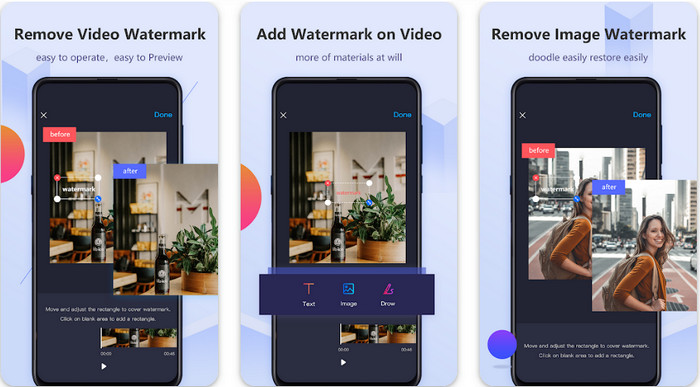
Video Eraser - Remove Watermark/Logo from Video és un potent eliminador de marques d’aigua que pots descarregar al teu dispositiu Android per treure la marca d’aigua incrustada al teu vídeo. Aquesta aplicació pot ajudar-te a eliminar qualsevol tipus de marca d’aigua del vídeo, com ara logotips, text, segells, etc. També la pots aprofitar si vols afegir la teva marca d’aigua personalitzada, retallar, tallar, reproduir a l’inrevés, comprimir i canviar la velocitat del vídeo. Tot i que té funcions molt completes, pots descarregar aquesta eina de manera gratuïta. Així que, per eliminar la marca d’aigua de Viva Video al teu Android, pots seguir els passos següents.
Pas 1. Primer, descarrega l’aplicació al teu Android anant a la Play Store i, tot seguit, prem Descarregar.
Pas 2. Obre l’eliminador de marques d’aigua, prem Remove Watermark from Video, permet que l’eina accedeixi als teus vídeos i, després, puja el vídeo amb la marca d’aigua.
Pas 3. Col·loca el rectangle sobre la marca d’aigua per cobrir-la.
Pas 4. Prem Fet per desar el vídeo sense la marca d’aigua.
Relacionat:
Eliminar la marca d’aigua de Pond5
Eliminar la marca d’aigua de Dxtory
Esborrador de vídeo: eliminació de retocs [iOS]
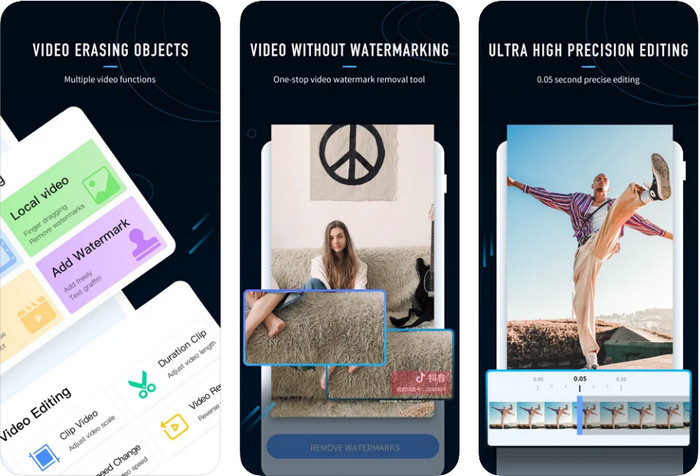
Per a iOS, pots descarregar des de l’App Store l’aplicació Video Eraser- Retouch Removal. Es troba entre els eliminadors de marca d’aigua de Viva Video que pots descarregar gratuïtament i que et permeten treure de manera efectiva la marca del teu vídeo. Igual que l’eliminador de marques d’aigua per a Android que t’hem presentat aquí, també admet altres funcions d’edició que pots utilitzar, com ara augmentar la resolució del vídeo, afegir una marca d’aigua, tallar, retallar, comprimir i girar. Tot això ho tens aquí. Tot i que té funcions semblants a l’aplicació d’Android, el seu funcionament és diferent i, abans de poder utilitzar aquesta eina per eliminar la marca d’aigua, l’hauràs de comprar. Pots seguir els passos següents per aprendre a eliminar la marca d’aigua del Viva Video que exportes; segueix els passos indicats a continuació.
Pas 1. Descarrega l’aplicació des de l’App Store i, un cop descarregada, obre-la.
Pas 2. Després d’obrir el programa, prem Local Video/GIF per pujar el vídeo amb la marca d’aigua. Assegura’t de permetre que l’aplicació tingui accés a Fotos.
Pas 3. Toca la part del teu vídeo on hi ha la marca d’aigua; a continuació, apareixerà una forma rectangular a la pantalla.
Pas 4. Toca Eliminate Watermark per exportar el vídeo i desar-lo sense la molèstia de la marca d’aigua.
Part 2. Com eliminar la marca d'aigua de vídeo Viva a Windows i Mac [programari final]
Com a usuari de Windows i Mac, necessitaràs un programari eficaç per eliminar la marca d’aigua del teu vídeo de manera eficient i sense deixar cap rastre. FVC Video Converter Ultimate et pot ensenyar com eliminar la marca d’aigua de Viva Video de franc amb un resultat professional al final. Igual que les aplicacions d’eliminació de marques d’aigua que pots descarregar a Android i iOS, aquesta eina també admet més funcions i característiques de què pots treure profit. Aquesta eina ofereix més que les dues aplicacions d’eliminació de marques d’aigua que hem esmentat.
Què fa que aquesta eina sigui impressionant? Les funcions d'eliminació que admet aquesta eina són millors que altres eliminadors de filigranes que podeu utilitzar al vostre vídeo. Per tant, si ho feu servir, podeu gaudir mirant el vídeo sense la marca d'aigua després d'eliminar-lo aquí. Necessites un tutorial sobre com utilitzar això? Els detalls següents us permetran saber com utilitzar aquesta eina amb la mateixa facilitat que 1-2-3.
Pas 1. Per descarregar aquest programari definitiu, pots fer clic al botó de descàrrega de més avall i després instal·lar el programa al teu dispositiu. Segueix l’assistent d’instal·lació de WinRAR i, tot seguit, prem Inicia ara.
Descàrrega gratuïtaPer a Windows 7 o posteriorDescàrrega segura
Descàrrega gratuïtaPer a macOS 10.7 o posteriorDescàrrega segura
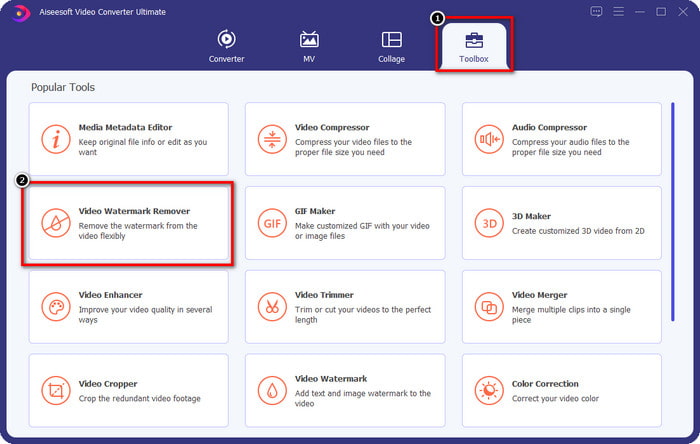
Pas 2. Ves a la Caixa d’eines (Toolbox) i, després, prem Video Watermark Remover per començar a utilitzar l’eficaç eliminador de marques d’aigua d’aquesta eina.
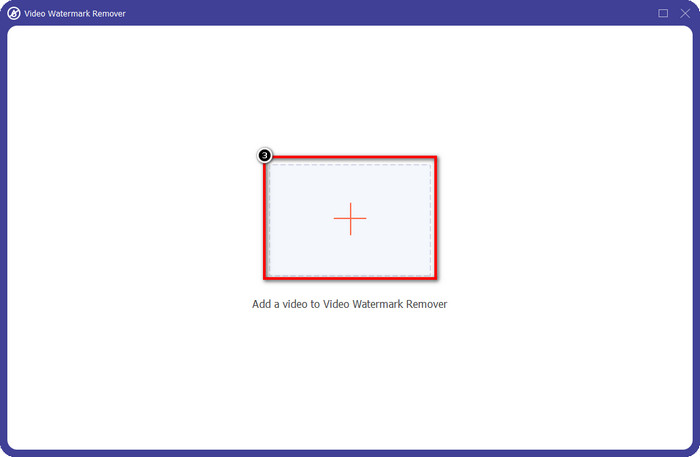
Pas 3. Pots pujar el vídeo de Viva Video amb marca d’aigua desat a l’escriptori fent clic a la icona +. Localitza el fitxer de vídeo a la carpeta que apareixerà a la pantalla i prem Open per pujar-lo correctament.
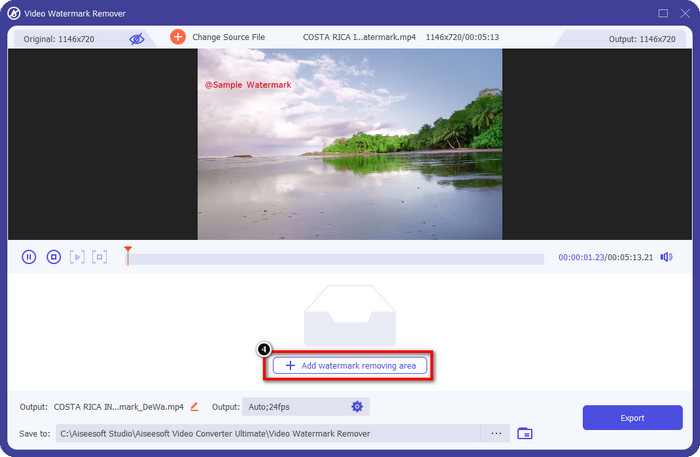
Pas 4. Fes clic a Add Watermark Removing Area per començar a utilitzar la funció d’eliminació de la marca d’aigua.
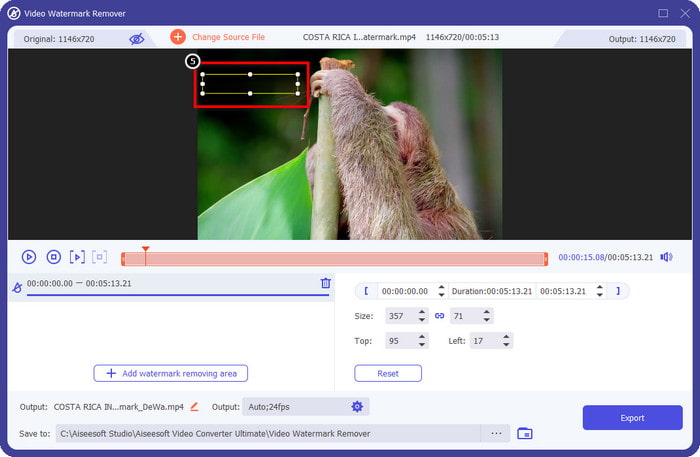
Pas 5. Arrossega i col·loca la forma rectangular sobre la marca d’aigua del vídeo i cobreix-la completament. És important cobrir-la del tot, perquè si no, en quedarà un rastre; pots canviar la mida de la forma segons les teves necessitats.
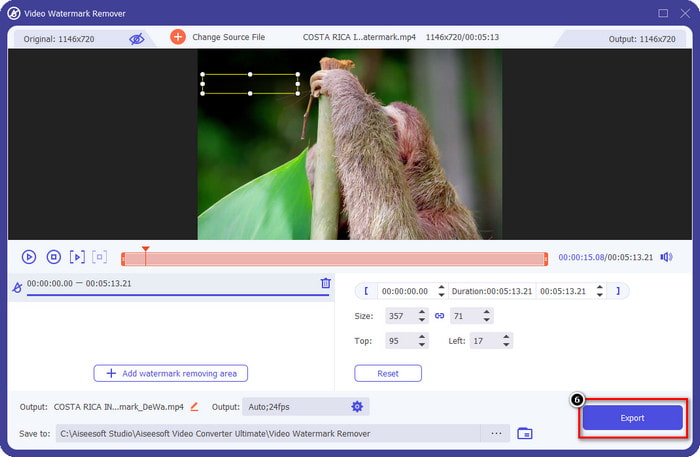
Pas 6. Després d’això, fes clic a Export per desar el vídeo sense la marca d’aigua. Fàcil, oi? Doncs per això s’ha creat aquesta eina definitiva: fàcil, però efectiva en tots els aspectes.
Part 3. Preguntes freqüents sobre com eliminar la marca d'aigua de vídeo Viva
Puc descarregar Viva Video sense marca d'aigua?
Sí, podeu comprar la versió professional d'aquesta eina perquè quan exporteu el vídeo que editeu aquí no deixi una marca d'aigua al vídeo. A més, després de comprar la versió professional d'aquesta eina, utilitzareu l'altra funció premium que té aquesta eina que no està disponible de forma gratuïta.
Viva Video té una versió d'escriptori?
Només podeu descarregar la versió de Viva Video a Android i iOS. Per tant, si voleu descarregar la versió d'escriptori, no en trobareu cap, però podeu cercar les millors alternatives per a l'edició de vídeo com les que ofereix Viva Video.
Viva Video té programari espia?
El 2017, els informes sobre aquesta aplicació van confirmar més tard que tenia programari maliciós. Per tant, les persones que van baixar aquest programari van suprimir aquesta aplicació de manera forçada als seus dispositius per evitar conseqüències addicionals.
Conclusió
Amb l'eliminador de filigranes de Viva Video d'aquest article, podeu eliminar la marca d'aigua que Viva Video incrusta al vídeo exportat. Podeu provar d'utilitzar les aplicacions esmentades anteriorment i seguir les instruccions que incloem sobre com eliminar la marca d'aigua. Però per als usuaris de Windows i Mac amb una marca d'aigua de Viva Video, és millor utilitzar el programari definitiu per eliminar la marca d'aigua de manera ràpida i eficaç i obtenir un resultat professional. A què estas esperant? Feu clic al botó de descàrrega per eliminar la marca d'aigua definitiva del vostre dispositiu ara mateix i utilitzeu-la seguint els passos anteriors.
-
 Com eliminar la marca d'aigua de Lomotif utilitzant aquestes eines increïbles
 Vols aprendre a eliminar la marca d'aigua de Lomotif del teu vídeo? Llegiu aquest article per conèixer els mètodes més destacats per eliminar-lo en línia i fora de línia.
-
 Com eliminar turistes de les fotos amb els eliminadors de filigrana
 Com eliminar els turistes de les fotos? Si voleu aprendre a eliminar coses no desitjades de la vostra foto, aquestes eines us ajudaran. Llegeix aquest article per saber-ne més.
-
 Eliminadors de filigrana 123rf: revisió exhaustiva de les eines definitives
 Si voleu saber quins són els eliminadors de filigrana 123rf més destacats, llegiu aquest article detingudament. Aquest article ofereix una revisió en profunditat de les eines.
