


 Video Converter Ultimate
 Gravadora de pantalla
 Reparació de vídeo
Comprensió profunda sobre els 5 editors de vídeo a càmera lenta disponibles
T’agrada veure esports d’alt impacte i gran velocitat com les curses, la boxa, el beisbol, el voleibol i molts més? Tots aquests esports necessiten una càmera d’alta velocitat només per poder-ne analitzar el moviment. Si vols analitzar cada gest de cada esportista, llavors mira quins són els millors creadors de vídeos a càmera lenta que pots fer servir. A més, amb l’ajuda de les eines que tens a continuació, no necessitaràs cap equip addicional més enllà del teu ordinador d’escriptori, internet o el telèfon. A mesura que avancem, llegeix amb atenció les eines i tria la que s’adapti millor al que necessites.

Part 1. 3 Millor creador de vídeos a càmera lenta per a Windows PC, Mac i en línia
1. Video Converter Ultimate
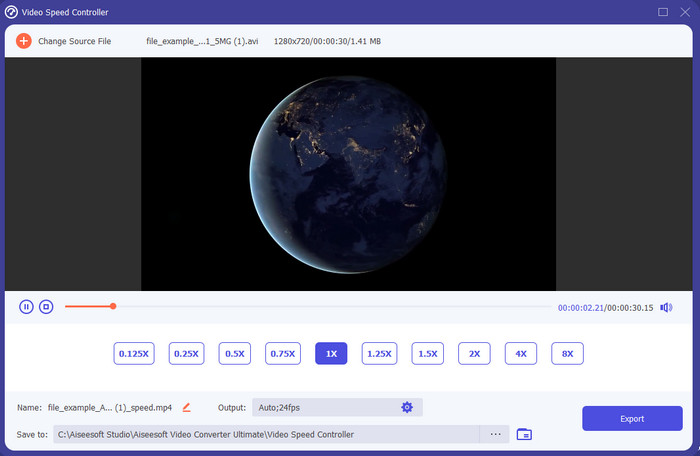
Vols saber quin és el millor editor de vídeos a càmera lenta per convertir-ne la reproducció en càmera lenta? Llavors prova Video Converter Ultimate, perquè aquesta eina no només és la millor, és realment excepcional. Ja incorpora moltes funcions avançades que t’agradarà utilitzar encara que no siguis un professional de l’edició. I fins i tot si ho ets, aquest programari és igualment la millor elecció, sigui quin sigui el teu nivell d’habilitat. A més, pots afegir-hi efectes de càmera lenta al vídeo de manera ràpida sense haver de llegir manuals ni mirar tutorials. L’eina ofereix instruccions molt més senzilles que les d’altres opcions d’aquí sota. Encara que calgui pagar per accedir-hi, el preu no és gaire elevat. Si en vols saber més, llegeix les característiques clau que trobaràs a continuació.
Característiques principals de Video Converter Ultimate:
◆ Aplicació avançada de creació de vídeos a càmera lenta amb instruccions bàsiques.
◆ Interfície d'eina fàcil d'utilitzar.
◆ Ajusteu la velocitat del vídeo fàcilment al Video Speed Controller.
◆ Admet més de 200 formats de vídeo i àudio.
◆ Es pot descarregar i accedir-hi en sistemes operatius PC i Mac.
Descàrrega gratuïtaPer a Windows 7 o posteriorDescàrrega segura
Descàrrega gratuïtaPer a macOS 10.7 o posteriorDescàrrega segura
2. Unitat de temps Boris Continuum
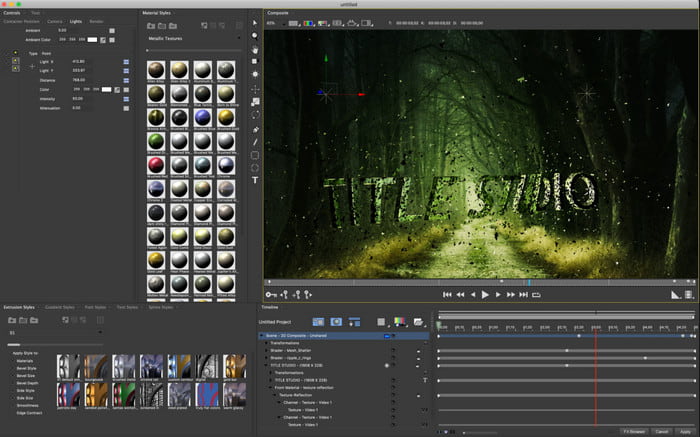
Boris Continuum Time Unit és la millor opció si vols disposar d’una aplicació de creació de vídeos a càmera lenta de gran potència. No hi ha cap altra eina capaç d’oferir el mateix nivell de resultats professionals. A més, aquesta eina té funcions d’edició molt detallades que et vindrà de gust provar. Tot i que és superior a moltes altres, també és literalment molt cara. A més, si la vols fer servir, necessites un ordinador d’escriptori de gamma alta, perquè no la podràs utilitzar en equips antics.
Pros
- La millor eina per fer edició intensa.
- És compatible amb totes les plataformes.
- La interfície de l'eina sembla més una eina professional.
Contres
- Aquest programari és el més car d'aquest escrit.
- Necessitava una unitat de sistema d'alta qualitat.
- No és la millor opció per a un principiant que no té formació en edició.
3. VEED.IO
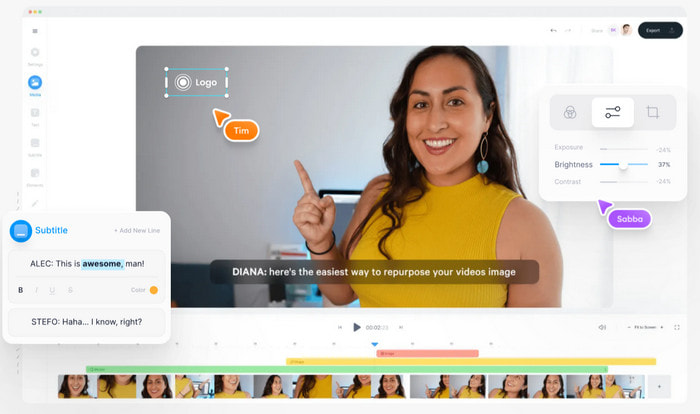
Així doncs, si no vols gastar ni un cèntim i disposes de connexió a internet, prova d’accedir a VEED.IO. És el millor programari per fer vídeos a càmera lenta en línia, perquè és senzill i fàcil d’utilitzar. La interfície general de l’eina és molt neta i amb instruccions clares, de manera que és molt còmoda per a tothom. Tanmateix, només hi pots pujar fitxers de menys de 50 MB, i si vols pujar-hi arxius més grans, l’eina et demanarà que actualitzis el pla. A més, si no compres la versió de pagament, el vídeo final tindrà una marca d’aigua.
Pros
- Pot accedir-hi fàcilment qualsevol persona amb connexió a Internet.
- No hi ha anuncis molestos al lloc web.
- Fàcil de ser tractat pels novells a l'edició.
Contres
- Les funcions de l'eina són molt limitades a la versió gratuïta de l'eina.
- Dependent d'Internet. Per tant, si la vostra Internet és lenta, espereu un ritme lent de càrrega, descàrrega i edició. A més, no podeu accedir a aquesta eina si no teniu connexió a Internet.
Part 2. 2 de la millor aplicació de vídeo a càmera lenta a Android i iOS
1 SloPro
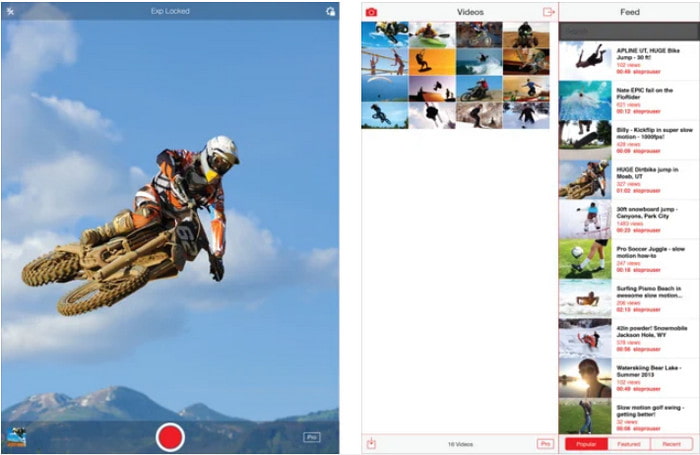
SloPro és la millor aplicació de vídeo a càmera lenta que pots descarregar gratuïtament a iOS. L’app pot reproduir el vídeo a càmera lenta fins a 500 o 1000 fps. A més, pots manipular el vídeo passant de reproducció ràpida a càmera lenta o a l’inrevés. Tot i que pugui semblar una gran opció, encara té diversos inconvenients. Per exemple, el vídeo s’emmagatzema a la galeria de l’app i no al carret de la càmera. A més, segons alguns usuaris que ja l’han provat, quan s’utilitza la funció de 1000 fps, el vídeo es torna inestable i presenta errors. Tot i així, continua sent una bona eina, perquè és gratuïta i permet alentir el vídeo amb molta facilitat.
Pros
- La millor reproducció a càmera lenta que podeu utilitzar gratuïtament a iOS.
- Ja rep una qualificació justa i 3,3 estrelles.
- Simple i fàcil d'utilitzar.
Contres
- La sortida final no es desa directament a la galeria.
- Tots els vídeos desats a la galeria SloPro són aleatoris i no es classifiquen correctament.
- Si utilitzeu 1000 fps, espereu una sortida de vídeo amb errors.
2. Creador de vídeos a càmera lenta
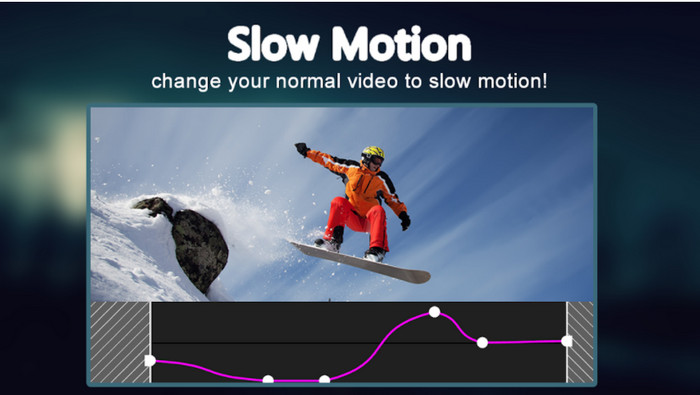
Una de les millors eines per crear vídeos a càmera lenta que pots descarregar gratuïtament al telèfon Android és Slow Motion Video Maker. Amb l’ajuda d’aquesta app, pots avançar ràpid o reproduir a càmera lenta els teus vídeos amb facilitat. No obstant això, l’aplicació té molts anuncis molestos que apareixen de sobte. A més, la reproducció a càmera lenta només es pot ajustar fins a 0,5. Però, en conjunt, és una bona opció per alentir un vídeo a Android, encara que els anuncis en perjudiquen força l’experiència.
Pros
- L'aplicació es pot descarregar gratuïtament a Play Store.
- És fantàstic utilitzar-lo per alentir el vídeo sense problemes.
- L'aplicació és fàcil de gestionar.
Contres
- Té molts anuncis molests que apareixen del no-res.
- La baixada del vídeo pot trigar molt de temps perquè no s'accelera el processament.
Part 3. Preguntes freqüents sobre Slow Motion Video Maker
Quin és el paper dels FPS?
S'utilitza per calcular la sèrie consecutiva de fotogrames que es mostren al panell de visualització. Això es veu amb més freqüència en cada captura de moviment, com en videojocs, càmeres, pel·lícules, i fins i tot el nostre ull pot veure de 30 a 60 fps.
Quina és la millor velocitat d'FPS en càmera lenta?
L'FPS ideal que podeu utilitzar per veure vídeos en reproducció a càmera lenta és d'entre 120 o 240 fps. Per tant, si voleu tenir una reproducció a càmera lenta més detallada, feu que el FPS sigui més alt.
Com reproduir un vídeo en moviment ràpid?
Si vols fer-te una idea de com reproduir un vídeo a gran velocitat, fes clic en aquest enllaç. Descobreix quines són les 5 millors eines que pots utilitzar per accelerar un vídeo.
Conclusió
En conclusió, totes les eines presentades aquí són els millors creadors de vídeos a càmera lenta que pots trobar a la xarxa. A més, aquest article t’ha ajudat i t’ha facilitat la cerca com mai abans. Tot i això, hi ha una eina en concret que probablement voldràs utilitzar per millorar els teus vídeos: Video Converter Ultimate. Totes les funcions avançades que ofereix són extraordinàries i, al mateix temps, fàcils d’utilitzar. I si encara no n’estàs convençut, descarrega l’eina i prova-la tu mateix.
-
 La millor aplicació d'Android per reproduir fitxers MOV als vostres telèfons mòbils
 Teniu dificultats perquè la vostra gravació MOV no es pot reproduir al vostre Android? Per tant, en aquest cas esteu buscant quin és el millor reproductor MOV per a Android.
-
 5 potents reproductors AVI per veure i reproduir fitxers AVI [Web i escriptori]
 Descobriu quins reproductors AVI podeu utilitzar per reproduir i veure els fitxers .avi. Continueu llegint a continuació i trieu quin és el millor reproductor multimèdia que l'altre.
-
 Formes efectives sobre com fer fitxers MKV a Xbox One S 2021
 Descobriu maneres que us poden ajudar a reproduir fitxers MKV a la vostra Xbox One S mitjançant alguns dels millors convertidors.
