


 Video Converter Ultimate
 Gravadora de pantalla
 Reparació de vídeo
Accelera els vídeos a Android amb aplicacions útils a Android [2025]
Avui en dia els telèfons són la tecnologia més versàtil que fem servir cada dia. Aquest dispositiu ens ajuda a comunicar-nos, gravar, editar coses com retallar, escurçar, accelerar i molt més, fins i tot si no tenim gaire equipament per muntar. Així que avui veurem com accelerar un vídeo a Android amb l’ajuda d’una app de tercers que pots descarregar. Informació addicional: el teu telèfon Android no té cap funció integrada per accelerar vídeos que puguis usar per veure’ls més de pressa. Per tant, si en vols tenir una, continua llegint aquest article, on hem reunit diferents apps en què pots confiar.

Part 1. Com accelerar el vídeo a Android
1. FilmoraGo
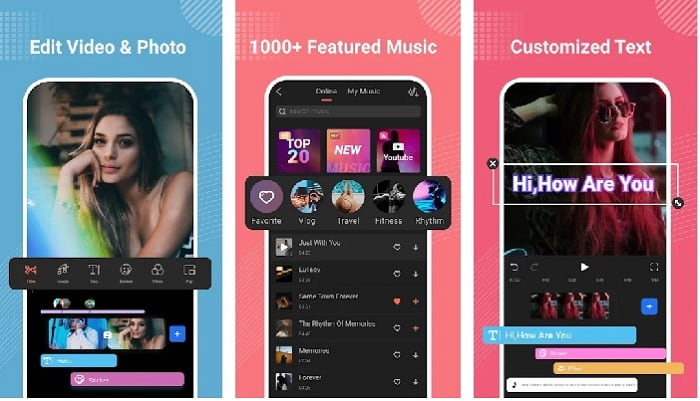
Filmora ha desenvolupat una app que es pot descarregar al teu Android per gaudir de gairebé les mateixes funcions que ofereix l’eina d’escriptori. Filmora Go és un dels millors editors de vídeo gratuïts que pots fer servir per crear un vídeo esplèndid. A més, aquesta eina té un conjunt complet de funcions que probablement faràs servir encara que no tinguis experiència editant vídeos. Tanmateix, la versió gratuïta només admet un seguit de funcions de mostra que pots usar. Com la funció per accelerar vídeos a Android, que és gratuïta però té una limitació. Tot i que l’eina sembla perfecta, hi ha alguns aspectes que els usuaris voldrien que es resolguessin segons les ressenyes de l’app.
Pros
- És un editor de vídeo gratuït però potent que podeu utilitzar als vostres dispositius Android.
- L'eina rep una de les millors ressenyes que hem vist mai i rep 4,6 estrelles.
- L'eina ja té una reputació com un dels millors editors d'escriptori.
Contres
- La pèrdua de fitxers de vegades es produeix aquí.
- De vegades, l'exportació dels fitxers surt malament encara que l'editeu.
- La majoria de les vegades l'àudio i el vídeo no es sincronitzen.
2. Hyper Timelapse
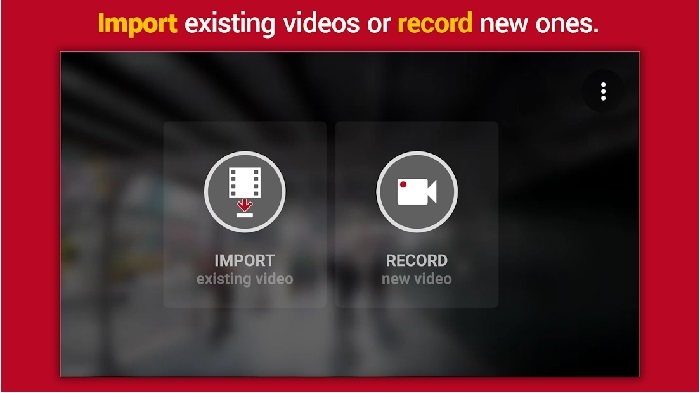
Hyper Timelapse és una de les apps per accelerar la reproducció de vídeo a Android que pots descarregar gratuïtament. Aquesta app ja ha assolit una puntuació de 4,1 estrelles, cosa que està molt bé. No obstant això, les ressenyes d’aquesta app són força desagradables de llegir perquè hi ha moltes queixes. Quan vam provar l’app, la interfície no era tan dolenta, l’acceleració era bona, però en exportar el vídeo l’app es bloquejava. Després vam provar el time lapse i la mida del fitxer del vídeo augmentava a mesura que passaven els minuts. Bàsicament, aquí no pots gravar un vídeo de time lapse gaire llarg.
Pros
- L'aplicació és molt senzilla d'utilitzar fins i tot si sou un principiant.
- Té un lapse de temps integrat.
- La interfície de l'eina no està bé.
Contres
- Encara es produeixen errors i errors en aquesta eina.
- No desa la sortida final perquè cada vegada que ho feu es bloqueja.
3. Lapsus It
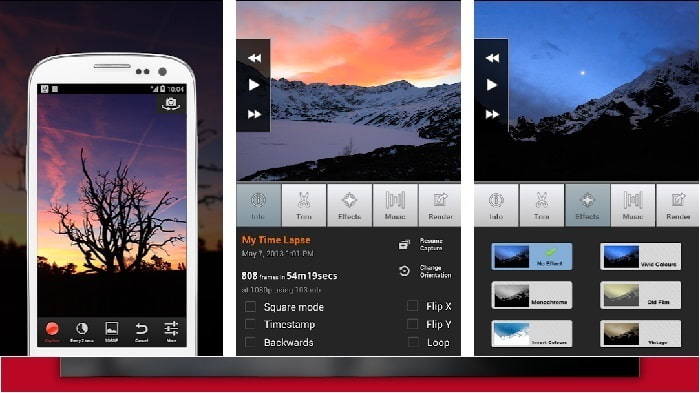
Si busques una app per accelerar vídeos a Android, prova de fer servir Lapse It. Aquesta eina combina les dues anteriors, perquè hi pots fer time lapse, stop motion i funcions d’edició. Tot i que l’eina sembla fantàstica per fer-la servir a Android, és la que ha obtingut la puntuació més baixa d’aquest article. L’app només té 3,5 estrelles i molts comentaris de les ressenyes pensen que aquesta app no serveix per a res. I alguns comentaris diuen que aquesta eina era la seva app preferida per fer vídeos esplèndids, però que ara hi ha moltes apps millors que aquesta.
Pros
- Té una característica única i potent que molts usuaris els agrada utilitzar.
- Aquesta aplicació pot tenir la millor representació a Android.
- La personalització del vídeo es pot fer fàcilment amb l'ajuda d'aquesta aplicació a Android.
Contres
- L'eina ha canviat de la classe S a la D perquè encara es produeixen errors i errors fins i tot després que s'hagi fet l'actualització.
- Les instruccions no estan clares sobre com executar-lo.
- A cada final de vídeo sempre hi ha un anunci emergent.
Part 2. Vols un controlador de velocitat més professional? Proveu Video Converter Ultimate!
Video Converter Ultimate és l’eina més única que probablement faràs servir si vols obtenir un resultat espectacular. Accelerar un vídeo aquí es pot fer fàcilment amb l’ajuda d’aquesta eina. A més, el conjunt global de funcions d’aquesta eina és encara millor que el d’aquestes eines per a Android. Tanmateix, aquest programari no es pot fer servir en dispositius Android perquè no és compatible. Encara que es pot fer servir al telèfon, no hi experimentaràs penjaments, bloquejos ni errors mentre l’uses. Per tant, si vols aprendre com accelerar un vídeo a Android, segueix els passos següents.
Pas 1. Primer de tot has de descarregar l’eina. Un cop acabada la descàrrega, instal·la-la, fes la configuració ràpida i fes clic a «Acaba» per continuar.
Descàrrega gratuïtaPer a Windows 7 o posteriorDescàrrega segura
Descàrrega gratuïtaPer a macOS 10.7 o posteriorDescàrrega segura
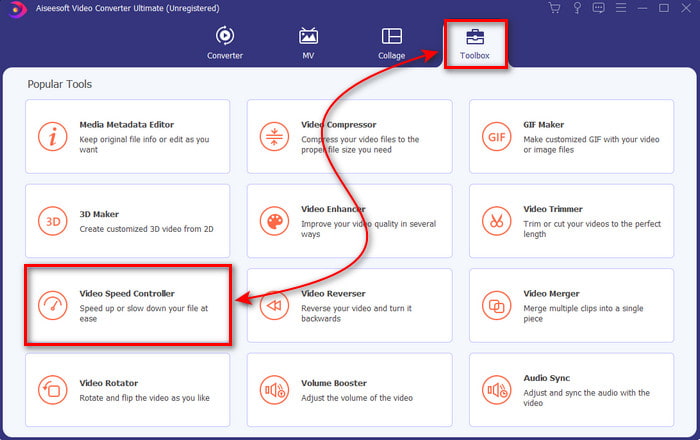
Pas 2. A continuació, ves a la Caixa d’eines i localitza el Controlador de velocitat de vídeo, i fes-hi clic per obrir-lo.
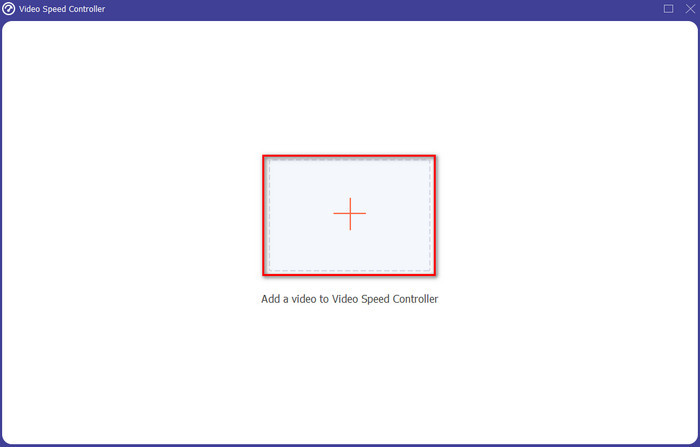
Pas 3. Tot seguit apareixerà una interfície; fes clic al botó + per inserir el fitxer. Després de fer-hi clic, s’obrirà una carpeta; selecciona el fitxer que vols accelerar i fes clic a Obre.
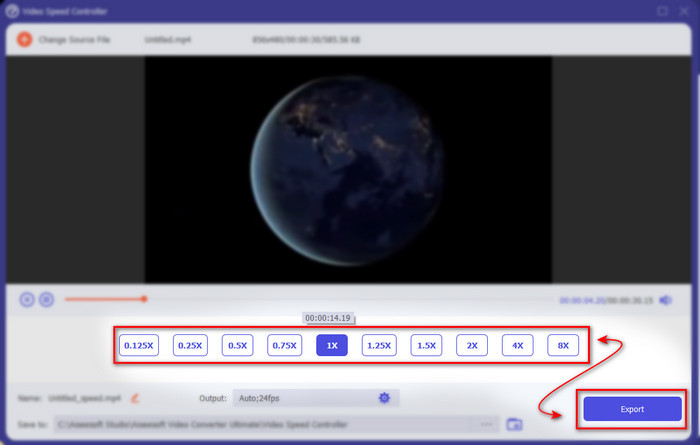
Pas 4. Tornarà a aparèixer una interfície nova; després, selecciona la velocitat que vols en aquests quadrets petits. Quan estiguis a punt per exportar el fitxer accelerat, fes clic a Exporta.
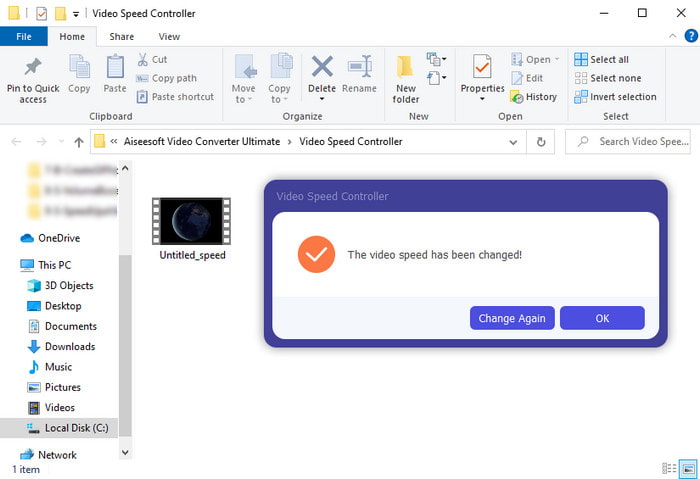
Pas 5. Espera uns instants i, quan el vídeo estigui llest, apareixerà una carpeta amb el fitxer accelerat que acabes de crear. Fes clic al fitxer de vídeo per veure’n la versió accelerada.
Part 3. Preguntes freqüents sobre l'acceleració d'un vídeo a Android
L'acceleració del meu vídeo en destrueix la qualitat?
Si esteu a punt d'accelerar un vídeo, no espereu cap canvi en la qualitat del vídeo. Tanmateix, si l'aplicació que utilitzeu no admet la sortida de vídeo d'alta qualitat, espereu que la sortida de vídeo es redueixi automàticament.
Puc veure un vídeo a càmera lenta?
I tant que sí! Amb l’ajuda dels 5 millors reproductors de vídeo a càmera lenta pots fer-ho; fes clic en aquest enllaç per accedir a un nou article.
Per què he d'accelerar el meu vídeo?
Hi ha molts motius pels quals necessites reproduir un vídeo a 2x o més. Si vols descobrir-ne els motius, llegeix aquest article que parla de què és un vídeo a 2x.
Conclusió
Per acabar, totes les opcions presentades aquí són molt bones si tens un telèfon Android; tanmateix, hi ha una eina que destaca per sobre de les altres. I aquesta eina excepcional és Video Converter Ultimate, perquè, si la fas servir, no experimentaràs errors ni problemes. Però aquesta eina no està disponible en telèfons Android, així que, si la vols provar, descarrega-la ara a l’ordinador. Per gaudir de totes les funcions d’aquest magnífic programari.
-
 Com reproduir fitxers MKV a l'iPad 2025
 Com es reprodueixen fitxers MKV a l'iPad 2? Puc convertir MKV a MP4 per reproduir-lo a l'iPad Pro / Air / 2? Aquesta publicació comparteix 2 maneres fàcils de reproduir MKV a l'iPad.
-
 [Resolt] VLC no reprodueix DVD, com solucionar-ho
 El VLC pot reproduir un DVD? Per què VLC & #039; no reprodueixo el meu DVD? Com puc aconseguir que VLC reprodueixi un DVD a Windows 10? Aquesta publicació comparteix 3 consells per solucionar el problema de DVD de VLC que no reprodueix.
-
 [Resolt] Reprodueix fitxers MP4 a Chromebook 2025
 Podeu reproduir vídeos a Chromebook? Com es reprodueixen fitxers MP4 des d’USB a Chromebook? Aquesta publicació comparteix 3 maneres de reproduir MP4 a Chromebook.
