


 Video Converter Ultimate
 Gravadora de pantalla
 Reparació de vídeo
Com accelerar els vídeos de TikTok a Tiktok o utilitzar l'altre programari alternatiu
Una de les aplicacions d’entreteniment de vídeo que creix més ràpidament i que pots fer servir al teu telèfon mòbil és TikTok. Encara que TikTok es va llançar el 2016, ràpidament es va fer molt popular en pocs mesos des de la data de llançament. A més, una de les edicions populars que s’hi fan és accelerar el vídeo per crear un efecte visual. Així doncs, si ets un d’ells i vols saber com fer-ho, ets al lloc adequat. Tractarem diferents eines que t’ajudaran a aprendre com accelerar un vídeo a TikTok.

Part 1. Com accelerar un vídeo a TikTok
Com s’ha dit abans, TikTok s’ha convertit en una de les plataformes de clips de vídeo curts més famoses, així que editar-hi un vídeo es pot fer fàcilment. Tingues en compte que pots accelerar el vídeo mentre l’estàs gravant i no pas un cop el vídeo ja està acabat. A més, si intentes accelerar un vídeo a TikTok hauràs d’estimar la velocitat total sense saber si és exactament la velocitat que vols aconseguir. Tanmateix, si no vols descarregar una eina de tercers per accelerar un vídeo, TikTok ja et farà el servei. Per tant, segueix ara els passos següents per accelerar un vídeo a TikTok.
Passos per gravar un vídeo accelerat a TikTok:
Pas 1. Primer descarrega TikTok al teu telèfon mòbil i obre-la un cop hagi acabat el procés de descàrrega.
Pas 2. Prem el signe + per començar a gravar. Després fes clic a Afegir so per inserir música de fons i, si vols, filtres. Ara, per accelerar el vídeo, fes clic a Velocitat i tria les opcions que hi apareixen. Per començar la gravació prem el botó rodó i torna’l a prémer si la vols aturar.
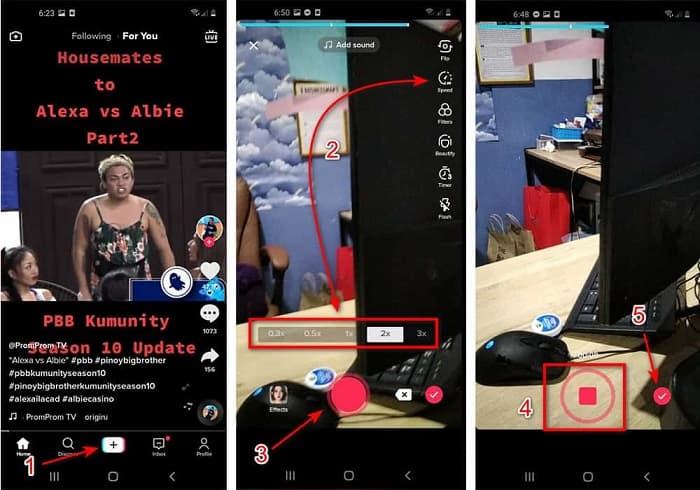
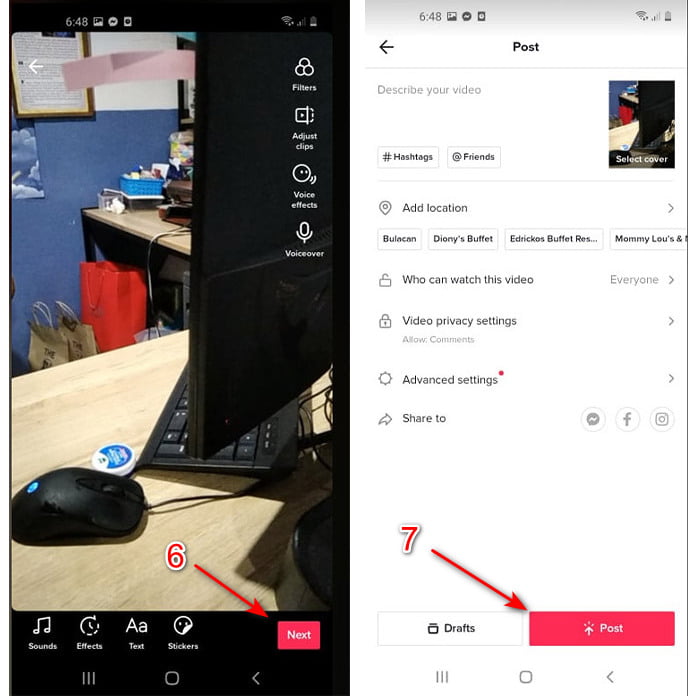
Pas 3. Per revisar el vídeo, prem el botó de verificació i fes clic a Següent. Després prem Publica per pujar-lo a TikTok.
Part 2. Com accelerar qualsevol vídeo de TikTok a Video Converter Ultimate
A diferència de la funció d’edició integrada que et proporciona TikTok, Video Converter Ultimate et permet accelerar manualment però d’una manera més senzilla. A més, mentre estàs accelerant hi haurà una previsualització per determinar si la velocitat del vídeo s’ajusta al teu gust. A sobre, aquest programari fenomenal ja permet als usuaris gaudir de funcions d’edició avançades de nivell professional però amb uns passos simplificats. A causa de les funcions avançades que t’ofereix aquesta eina, hauràs de pagar uns quants dòlars. Però no t’amoïnis, perquè no et costarà ni mil ni tan sols cent. Si vols saber quins són els avantatges o les funcions clau que obtindràs si tens aquesta eina, dona un cop d’ull a la llista.
Millors funcions clau que trobaràs a Video Converter Ultimate:
◆ Aquest és un programari independent de la plataforma, el que significa que el podeu descarregar al vostre PC, Mac o Linux.
◆ Tota l'edició avançada, el convertidor, el creador de GIF i més estan disponibles en aquesta eina.
◆ La usabilitat de l'eina és molt útil per a qualsevol, fins i tot per a professionals o principiants en l'edició.
◆ Permet als usuaris expressar el seu costat creatiu mitjançant diverses funcions d'edició disponibles aquí.
◆ Encara que l'eina es paga encara és menys cara i molt assequible per a qualsevol que vulgui provar-la.
Així doncs, si vols saber com accelerar vídeos de TikTok amb aquest editor alternatiu tan fenomenal, llegeix i segueix les instruccions següents per aconseguir un èxit total.
Passos per accelerar vídeos de TikTok amb Video Converter Ultimate:
Pas 1. Per utilitzar el programari, primer l’has de descarregar al teu PC o Mac. Després instal·la’l, fes la senzilla configuració manual i fes clic a Finalitza per continuar.
Descàrrega gratuïtaPer a Windows 7 o posteriorDescàrrega segura
Descàrrega gratuïtaPer a macOS 10.7 o posteriorDescàrrega segura
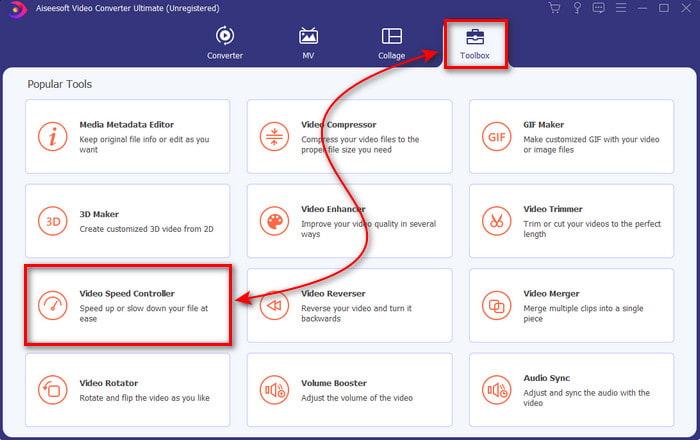
Pas 2. Prem Caixa d’eines i selecciona Control de velocitat de vídeo que trobaràs a sota.
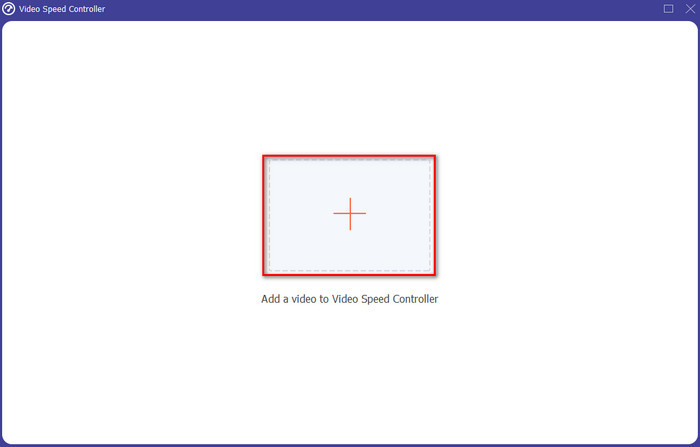
Pas 3. Per afegir el fitxer que vols accelerar, fes clic al botó +. Després tria el fitxer a la carpeta que es mostrarà a continuació i fes clic a Obre per continuar.
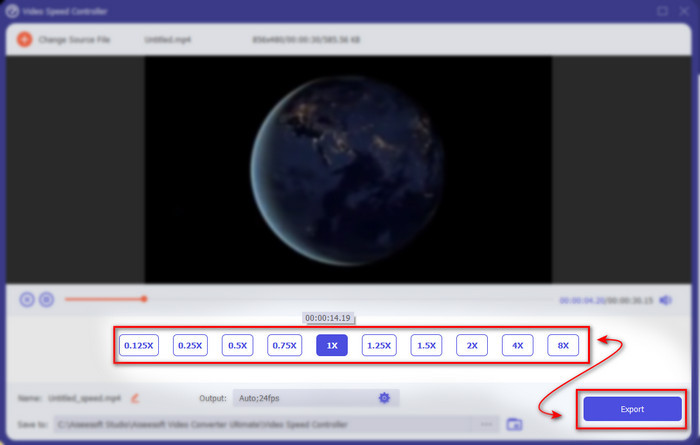
Pas 4. Per tant, per ajustar la velocitat del vídeo, tria l’opció de velocitat que hi ha a sota. I per descarregar el fitxer, fes clic a Exporta per iniciar el procés de descàrrega.
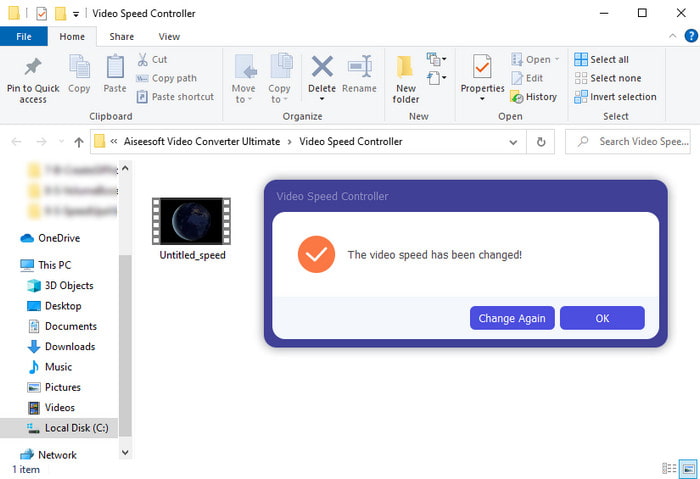
Pas 5. No cal esperar ni un minut perquè el fitxer estarà llest al cap de pocs segons. Així que, si apareix una carpeta a la teva pantalla, això vol dir que el fitxer ja s’ha exportat. Fes clic al fitxer per veure el vídeo que has accelerat.
Relacionat:
Part 3. Preguntes freqüents sobre l'acceleració d'un vídeo a Tiktok
Com accelerar un vídeo de TikTok que no sigui el teu?
Si vols accelerar un vídeo que no és teu, primer has de descarregar els vídeos de TikTok. Fes clic al botó + i a Puja, després tria el vídeo a la galeria. Selecciona l’opció de velocitat i fes clic a Següent per pujar-lo. O bé fes servir Video Converter Ultimate per accelerar-lo seguint els passos indicats més amunt.
Puc gravar un vídeo de 3 minuts a Tiktok?
Absolutament Sí, ho podeu fer si s'enregistren per separat, però no podeu gravar un vídeo de 3 minuts directes. Com que la durada de la gravació amb aquesta aplicació és de 15 a 60 segons complets. Per tant, si la durada del vídeo que voleu gravar és de més d'un minut, és millor gravar-lo per separat. Tanmateix, si sou un dels usuaris que ha estat seleccionat per Tiktok per provar la gravació de 3 minuts, teniu sort perquè només es va provar per a un grup reduït de persones.
Puc afegir MP3 als meus vídeos a Tiktok?
Quan es va llançar TikTok, els usuaris podien afegir música al seu vídeo, però ara han eliminat aquesta funció. A causa del problema dels drets d'autor que s'ha arxivat a TikTok. Per tant, per evitar el problema, l'eliminen i afegeixen una mostra de música disponible o podeu utilitzar una altra aplicació per fer-ho per vosaltres.
Tiktok té una restricció d'edat?
Segons els termes i condicions de TikTok, 13 anys o més ha de ser l'edat de l'usuari que utilitzarà aquesta aplicació. A més, Tiktok no té verificació d'edat quan us registreu, així que espereu que apareguin continguts de més de 16 anys al vostre feed.
Conclusió
I ara que ja saps com accelerar un vídeo a TikTok, és el moment de gaudir-ne. A més, tria la solució que creguis que s’ajusta millor al que necessites. Si penses que les funcions integrades d’acceleració que ofereix TikTok són prou bones, fes-les servir. Però si vols experimentar una acceleració molt millor amb previsualitzacions, fes servir Video Converter Ultimate. Sigui quina sigui l’opció que triïs, pots esperar un resultat excel·lent gràcies a la seva funció i al rendiment general.
-
 7 passos senzills sobre com solucionar els problemes de retard d'àudio OBS [Resolt]
 Teniu problemes per veure el vostre videoclip després de la gravació a causa del retard d'àudio quan feu servir OBS Studio? Llegiu l'article següent per saber com arreglar l'àudio fora de sincronització de manera eficaç.
-
 Excel·lents maneres possibles | Com solucionar el retard d'àudio de VLC [2021]
 Et costa veure la teva pel·lícula preferida al teu reproductor multimèdia VLC a causa de la incertesa d'àudio? Continueu llegint aquest article per conèixer totes les maneres possibles d'arreglar el retard d'àudio VLC.
-
 Les millors maneres d'augmentar el volum de MP4 en línia i fora de línia
 Et costa escoltar els sons del teu videoclip? Llegiu l'article següent per saber com augmentar el volum mp4 de diferents maneres.
