


 Video Converter Ultimate
 Gravadora de pantalla
 Reparació de vídeo
Tutorial simplificat sobre com sincronitzar àudio i vídeo a Adobe Premiere Pro
Si ets un professional, segur que ja has fet servir Adobe Premiere Pro com a editor de vídeo, un programari que ofereix un rendiment excel·lent. Molts usuaris d’Adobe estimen aquest programa perquè proporciona un resultat final de gran qualitat que t’agradarà inserir al teu vídeo. Però sabies que també pots fer servir aquesta eina per sincronitzar l’àudio amb el vídeo? Si no tens ni idea de com fer-ho, avui és un dels teus dies de sort. Et mostrarem pas a pas com sincronitzar-ho fàcilment. Així que ja no caldrà que llegeixis un manual, perquè aquest text et fa molt més fàcil entendre com sincronitzar l’àudio al Premiere de manera senzilla i efectiva, amb una altra eina alternativa.

Part 1. Com sincronitzar àudio i vídeo a Adobe Premiere Pro
Abans de començar, fem una breu introducció a Adobe Premiere Pro. Com hem indicat més amunt, aquesta eina ja ha estat molt utilitzada per editors professionals a qui els agrada crear vídeos sorprenents. Tanmateix, aquesta eina et requerirà molt temps d’aprenentatge, perquè incorpora moltes funcions avançades que els principiants no entendran. Encara que aprendre a utilitzar-la segurament et portarà força temps, val la pena fer-ho si disposes d’estones lliures. A més, els passos indicats a continuació són més simples perquè entenguis i aprenguis com sincronitzar àudio i vídeo al Premiere si els segueixes tal com s’expliquen.
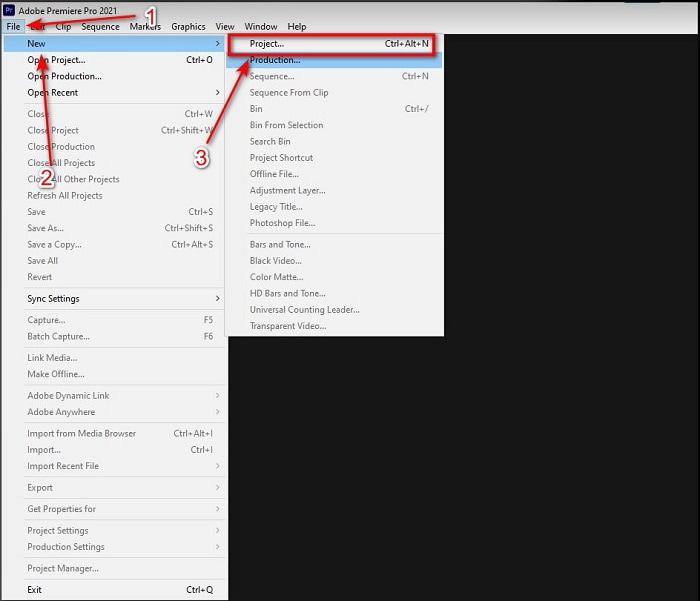
Pas 1. Primer, has de comprar el programa i descarregar-lo al disc de l’ordinador. Obre’l un cop s’hagi completat el procés de descàrrega. Després fes clic a File i, dins d’aquest menú, a New, tot seguit fes clic a Project per continuar i prem OK a la nova finestra emergent.
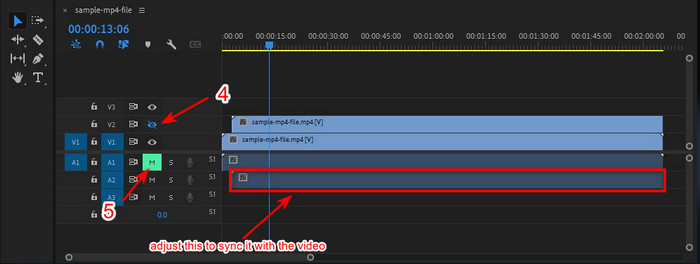
Pas 2. Afegeix el mateix vídeo i el mateix àudio a la Timeline dues vegades. Després fes clic a Toggle Track Output del segon vídeo i silencia’l fent clic a Mute Track. Ajusta la pista d’àudio per assegurar-te que quedi sincronitzada amb el vídeo.
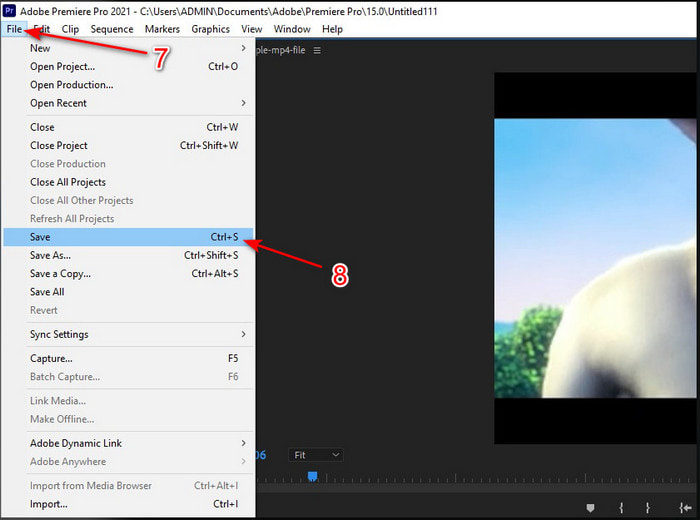
Pas 3. Torna a fer clic a File a la part superior i busca l’opció Save per exportar finalment el fitxer multimèdia al disc de l’ordinador.
Pros
- Aquesta eina ofereix una funció d'edició avançada.
- L'editor de primera línia que podeu descarregar.
- La millor opció per tenir una sortida professional.
Contres
- No és la millor opció per al principiant que no té ni idea de l'edició.
- El programari és totalment car en comparació amb els altres editors que ofereixen gairebé la mateixa característica.
Part 2. El mètode més fàcil per sincronitzar àudio per a principiants i professionals amb Video Converter Ultimate
Igual que Adobe Premiere Pro, aquest convertidor extraordinari també ofereix funcions d’edició avançades i de gran qualitat que t’encantaran. Però és molt més fàcil d’utilitzar que Premiere Pro. El Video Converter Ultimate és el millor amic dels editors a qui els agrada crear vídeos, millorar-los, potenciar-los, crear GIF i molt més. Aquest programari resol gairebé tots els problemes habituals dels usuaris d’internet, fins i tot els de sincronització. I com que és tan fàcil d’utilitzar, més d’un milió d’usuaris ja l’han descarregat i se n’han enamorat. Per tant, si vols simplificar-te la vida en lloc de fer servir premiere pro sync audio, per què no fas servir aquesta eina? Segueix els passos següents.
Passos sobre com sincronitzar àudio i vídeo amb el Video Converter Ultimate:
Pas 1. Descarrega el programa a l’ordinador i tria si és per a PC o per a Mac. Instal·la’l, fes la configuració inicial i fes clic a Start Now per continuar.
Descàrrega gratuïtaPer a Windows 7 o posteriorDescàrrega segura
Descàrrega gratuïtaPer a macOS 10.7 o posteriorDescàrrega segura
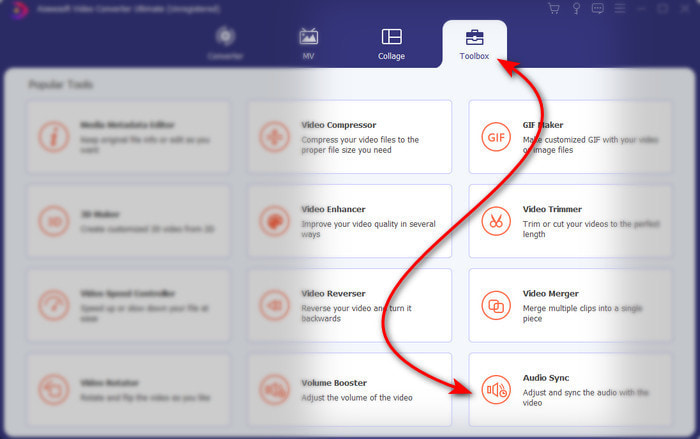
Pas 2. Obre l’eina després del primer pas, ves a la secció Toolbox i prem Audio Sync a la part inferior.
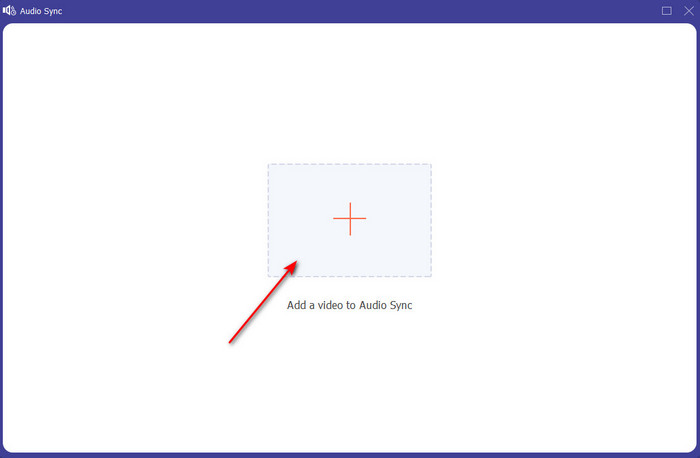
Pas 3. Prem el botó + per inserir el vídeo i l’àudio que vols sincronitzar. Un cop els hagis localitzat a la carpeta, fes clic a Open per continuar.
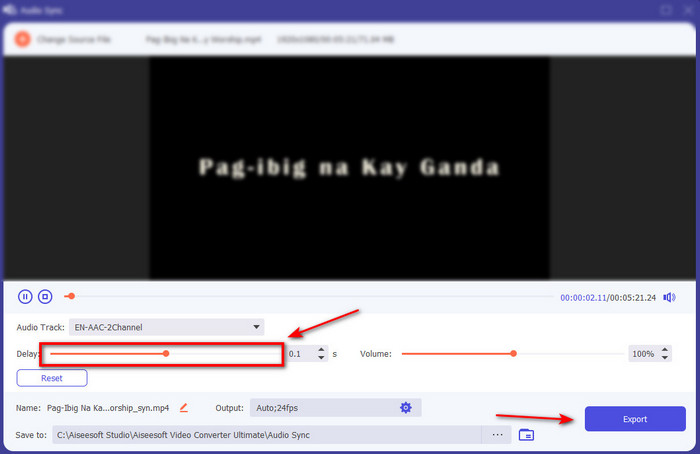
Pas 4. Per aconseguir que l’àudio quedi sincronitzat, ajusta el Delay slider fins que coincideixi amb el vídeo. A més, també hi pots augmentar el volum ajustant el control lliscant de volum. Quan ho tinguis llest, fes clic a Export per desar el resultat final.
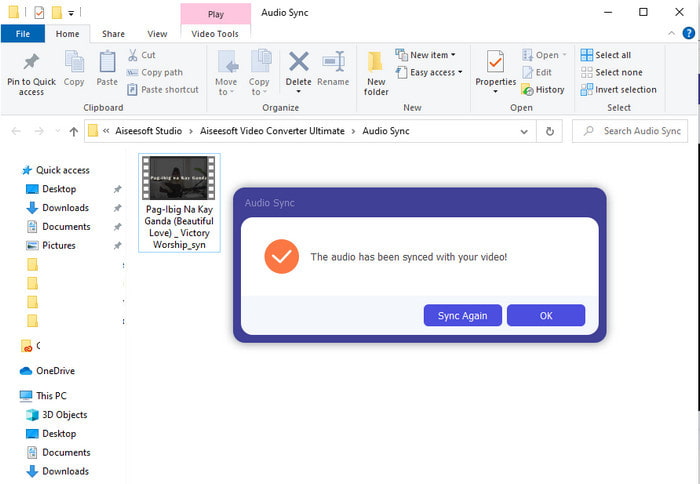
Pas 5. Quan acabi el procés, s’obrirà una carpeta a la pantalla amb l’àudio i el vídeo sincronitzats que has creat. Fes clic al fitxer per veure’l, reproduir-lo i gaudir del vídeo amb l’àudio sincronitzat.
Pros
- La millor opció per fer que el vostre vídeo sembli fenomenal.
- L'experiència general durant l'ús d'aquesta eina és literalment definitiva i, alhora, fàcil d'utilitzar.
- Està disponible en totes les plataformes ja sigui un PC o Mac.
Contres
- Igual que Premiere Pro, aquesta eina es paga, però és molt més barata que la Premiere Pro.
- Primer cal que us descarregueu a la vostra unitat per poder accedir-hi.
Part 3. Preguntes freqüents sobre la sincronització d'àudio i vídeo a Premiere
Puc utilitzar l'estrena com a gravador de pantalla?
Si intentes gravar la pantalla amb Premiere Pro, és millor que ho deixis estar perquè no ho pots fer directament des d’aquí. Tot i això, et podem revelar un gravador de pantalla 'secret' que pots triar. Si vols saber quins són els 5 millors programes de screencast que pots utilitzar a PC, Mac, en línia, iOS i Android, dona-hi un cop d’ull.
Adobe Premiere Pro és gratuït?
De fet, és un sí, podeu descarregar aquesta eina de forma gratuïta, però només podeu accedir a aquesta eina durant 7 dies de prova. Per tant, si la prova ha finalitzat, haureu de tornar a subscriure-us a Adobe Premiere Pro per gaudir de tota la capacitat d'edició que ofereix aquest Premiere Pro.
Puc utilitzar un altre lloc web per descarregar Premiere Pro?
No, perquè és il·legal descarregar totes les aplicacions amb l'altre lloc web. A més, si utilitzeu un altre lloc web per descarregar el Premiere Pro, hi ha la possibilitat que contingui programari espia, virus o fins i tot molt pitjor. Per tant, si voleu garantir la vostra seguretat, descarregueu el programari només als llocs web principals oficials.
Puc comprar un accés de per vida a Adobe Premiere Pro?
Tot i que podeu comprar un accés mensual a Adobe Premiere Pro, encara no podeu comprar-hi un accés de per vida. Però podeu comprar-lo amb un altre lloc web, però això és il·legal i hi haurà la possibilitat que el fitxer que descarregareu estigui malmès, tingui un virus o sigui una estafa. Per tant, si voleu utilitzar i comprar l'Adobe Premiere Pro, suggerim a tothom que el compri al seu lloc web principal.
Conclusió
Després de 5 minuts de llegir aquest article, ja sabem com utilitzar l'Adobe Premiere pro per sincronitzar l'àudio amb el vídeo. Tanmateix, hi ha una manera més senzilla de sincronitzar-lo mitjançant Video Converter Ultimate. Com que aquesta eina ofereix molt més ràpid ajustant el vídeo i l'àudio sense sincronitzar alhora que té la millor qualitat. Així que ara, si teniu molts diners, aneu amb l'Adobe Premiere Pro, però si voleu estalviar molt mentre teniu la mateixa funció, heu de ser Video Converter Ultimate.
-
 Com reduir la velocitat d'un vídeo: consells perfectes [escriptori/telèfon mòbil]
 Estàs cansat de buscar les millors eines que ajudin a frenar un vídeo en línia? Llegiu aquest article en particular perquè us il·lumineu amb la informació que s'enumeren a continuació.
-
 Reproductor de Windows Media | Aprèn a accelerar els vídeos [provat]
 Voleu alentir el vostre videoclip amb el Windows Media Player, però teniu problemes per fer-ho? Aquest article és ideal per llegir i pot il·lustrar el vostre punt de vista sobre com accelerar els vídeos amb Windows Media Player.
-
 Com canviar el vídeo a càmera lenta a la velocitat normal [Passos fàcils]
 Voleu saber com revertir un vídeo a càmera lenta que heu baixat d'Internet o que heu gravat accidentalment a càmera lenta? Obteniu informació sobre com convertir vídeos a càmera lenta a velocitat normal a Mac, Windows, iOS i Android.
