


 Video Converter Ultimate
 Gravadora de pantalla
 Reparació de vídeo
6 millors controladors de velocitat de vídeo per a Windows/Mac/Android/iOS
Accelerar o alentir un vídeo pot crear una il·lusió increïble si estàs cansat d’utilitzar altres efectes. Aquesta tècnica d’edició de vídeo és simple però efectiva. Si busques per internet, hi ha moltes opcions diferents de controladors de velocitat al mercat, i sabem que és difícil triar. Però si llegeixes aquest article, analitzarem l’app de control de velocitat que pots utilitzar per canviar la velocitat de reproducció. T’interessen les millors aplicacions de controladors de velocitat? En aquest cas, continua llegint per saber-ne més sobre el controlador de velocitat de vídeo disponible a les teves plataformes.

Part 1. Els 6 millors controladors de velocitat de vídeo per a Windows, Mac, Chrome, iOS i Android
Top 1. Video Converter Ultimate (Windows i Mac)
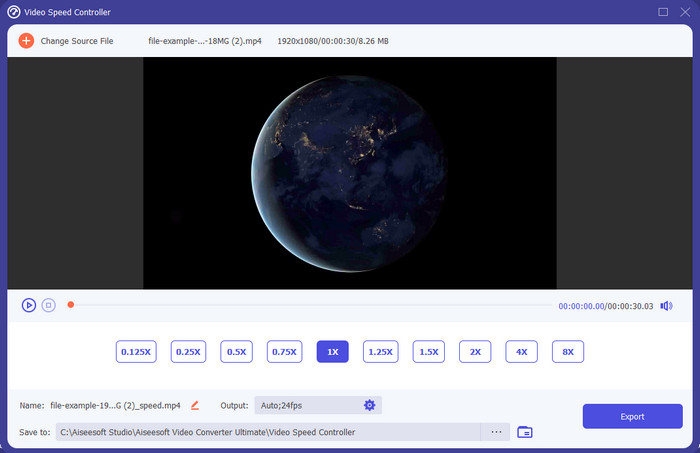
Necessites un controlador de velocitat de vídeo que sigui molt efectiu i eficient per accelerar i alentir el vídeo? En aquest cas, el Video Converter Ultimate és l’ajuda per a aquest tipus de problema. És l’eina més accessible que pots utilitzar per canviar la velocitat del vídeo sense esforç, tant si la necessites a gran velocitat com a càmera lenta. Encara que n’alteris la velocitat, la qualitat original del vídeo es mantindrà, però no així el moviment del vídeo, perquè n’has canviat la velocitat.
A part d'això, podeu fer moltes coses com ara convertir, fusionar, tallar i molt més; bàsicament, és una eina tot en un. Vols conèixer les altres ofertes que pots tenir amb aquesta aplicació de vídeo accelerada? Si és així, llegiu les funcions de l'eina per obtenir més informació, o podeu descarregar el programari al vostre escriptori ara mateix per provar-lo.

Video Converter Ultimate
Més de 5.689.200 descàrregues- Pot canviar amb precisió els fotogrames de vídeo cap amunt o cap avall ràpidament en qualsevol format de vídeo, com ara MP4.
- Hi ha disponibles nombroses funcions i efectes d'edició de vídeo.
- És flexible en totes les plataformes com Windows o macOS.
- El procés ultraràpid fa que descarregueu o exporteu el procés en un obrir i tancar d'ulls.
- Exportar o baixar el vídeo que editeu no tindrà una marca d'aigua.
Descàrrega gratuïtaPer a Windows 7 o posteriorDescàrrega segura
Descàrrega gratuïtaPer a macOS 10.7 o posteriorDescàrrega segura
Pros
- Canvieu el fotograma per fotograma del vídeo fins i tot si sou un professional o no.
- Opcions de reproducció de vídeo fàcils d'entendre.
- Una capacitat excepcional per compartir a les xarxes socials.
- Es pot descarregar gratuïtament, però ofereix compres des de l'aplicació.
Contres
- Necessiteu comprar si voleu tenir tota la capacitat de l'eina.
Top 2. Clipchamp (Windows)
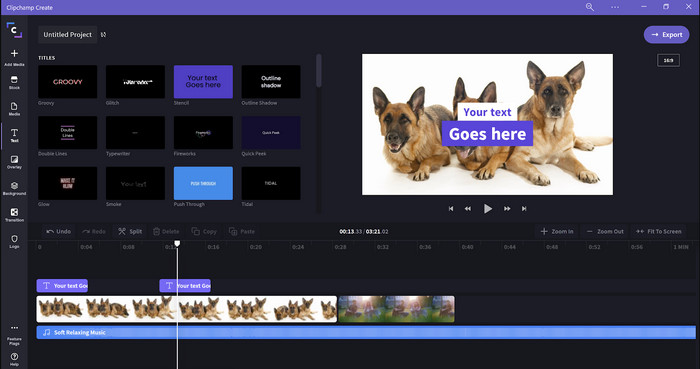
El Clipchamp és un editor de velocitat de vídeo que pots utilitzar a Windows. Aquesta eina ofereix una corba d’aprenentatge poc pronunciada, així que pot ser interessant si ets nou en l’edició. També admet diverses funcions que segurament t’agradaran. Tanmateix, un gran inconvenient d’aquesta eina és la qualitat de sortida del vídeo. Només pots exportar el fitxer en qualitat de vídeo 480, que és baixa en comparació amb altres eines gratuïtes. Però si necessites exportar en 720 o 1080, hi pots subscriure pagant la quota de subscripció. A més, l’eina és molt bona, però continua sense ser tan completa com el primer editor.
Pros
- GUI senzilla i fàcil d'utilitzar.
- Ofereix funcions addicionals per a l'edició.
- Controleu la reproducció de vídeo fàcilment.
Contres
- Per a la versió gratuïta, la sortida final és 480.
- De vegades, l'eina es va tornar inflexible amb la tasca.
Principal 3. Controlador de velocitat de vídeo (Chrome)

Vols utilitzar una extensió de controlador de velocitat de vídeo a Chrome? Llavors pots fer servir el Video Speed Controller. Aquesta eina està disponible a qualsevol navegador Chrome per accelerar o alentir el vídeo que estiguis mirant. És fàcil d’utilitzar per a tothom i també és segura d’accedir-hi, ja que és una extensió de Chrome. No obstant això, si exportes el vídeo, la reproducció es mantindrà igual encara que l’hagis canviada. Això és perquè l’eina només funciona sobre el vídeo que estàs veient en aquell moment al teu Chrome i no fora d’aquest. Com a informació addicional, un cop acceleres el vídeo amb aquesta extensió, tots els vídeos que reprodueixis a Chrome es veuran a la mateixa velocitat.
Pros
- Controlador de velocitat puntual que podeu utilitzar a Chrome.
- És capaç de rebobinar o restablir la velocitat de reproducció del vídeo a Chrome fàcilment.
- Admet l'ordre de tecles curtes.
Contres
- El tauler del controlador de vídeo no és visible.
- No pots canviar la velocitat del vídeo fora de Chrome.
Top 4. Accelera per a Safari (iOS i Mac)
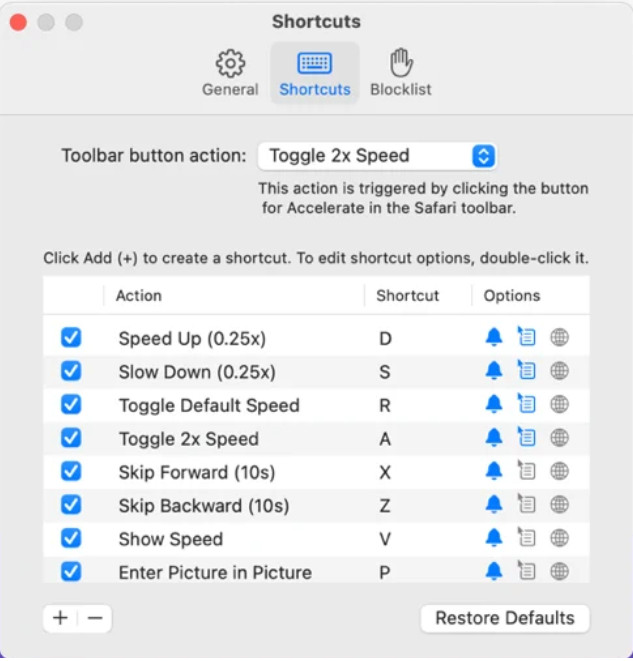
Necessites un controlador de velocitat de vídeo a Safari? L’Accelerate for Safari està disponible a tots els Safari dels dispositius Apple. Aquesta eina pot canviar la reproducció de cada vídeo HTML 5 a Safari. Igual que l’extensió de Chrome anterior, està limitada als dispositius Apple. Per tant, si ets usuari d’Apple, potser t’agradarà utilitzar aquesta extensió de control de velocitat per accelerar o alentir el vídeo. A més, pots utilitzar les tecles del teclat per donar ordres a l’eina i canviar la reproducció del vídeo.
Pros
- És segur d'utilitzar en tots els Safari.
- També admet Picture-in-Picture i AirPlay.
- Les tecles de drecera estan disponibles per prendre el control de l'eina.
Contres
- No és compatible amb un altre navegador web que no sigui Safari.
- Limitat als vídeos HTML 5.
Top 5. Lent Ràpid Lent: controleu la velocitat dels vostres vídeos (iOS)
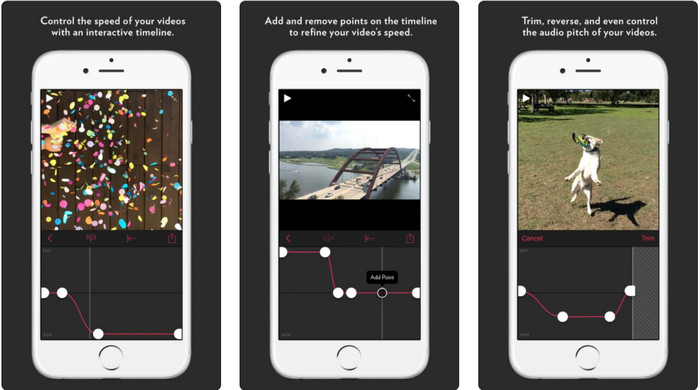
Per a un controlador de velocitat de vídeo a l’iPhone, pots utilitzar Slow Fast Slow. Aquesta eina ajuda els usuaris d’iOS a manipular instantàniament la velocitat de reproducció del vídeo; funciona especialment bé per al càmera lenta. A més, disposa d’una línia de temps integrada molt interactiva per ajustar-ne la velocitat. També admet altres funcions com el canvi de to i la inversió del clip. Tanmateix, aquesta eina requereix el sistema iOS 10, de manera que no la pots utilitzar si el teu sistema no és el 10.
Pros
- Admet altres funcions per al vostre vídeo.
- Fàcil d'utilitzar.
- Pot reduir la velocitat dels vídeos fins a 1/16 de velocitat.
Contres
- No admet la sortida 4k i l'elecció d'FPS.
- No funciona en alguns dels nous dispositius iOS.
Top 6. Video Speed Controller Pro (Android)
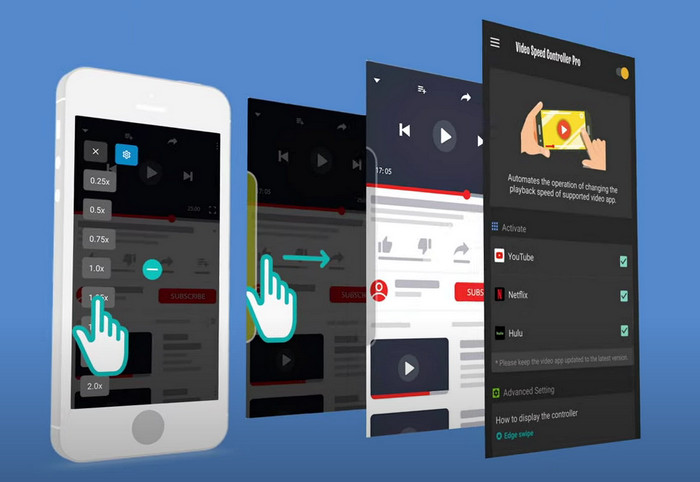
Si necessites un controlador de velocitat de vídeo a Android, endevina què? Pots utilitzar el Video Speed Controller Pro instal·lant-lo des de la Play Store. Amb l’ajuda d’aquesta eina, pots accelerar qualsevol vídeo que es reprodueixi al teu Android amb facilitat. A més, aquesta eina funciona com una extensió de control de velocitat a Android. Tot i que l’eina pot accelerar el teu vídeo, la velocitat màxima és només 2x. No obstant això, si necessites accelerar la visualització de vídeos, la pots utilitzar a YouTube, Netflix i altres plataformes de vídeo a Android.
Pros
- És senzill d'utilitzar.
- L'eina en si està a punt.
- Hi ha una barra de menú disponible per mostrar les opcions de la reproducció.
Contres
- Les opcions de velocitat de reproducció són limitades.
- De vegades no funciona bé.
Part 2. Quadre de comparació
| Característiques | Video Converter Ultimate (Windows i Mac) | Clipchamp (Windows) | Controlador de velocitat de vídeo (Chrome) | Accelera per a Safari (iOS i Mac) | Slow Fast Slow: controleu la velocitat dels vostres vídeos (iOS) | Video Speed Controller Pro (Android) |
| Control de velocitat |  | | | | | |
| Sortida de vídeo d'alta qualitat | |  | | | | |
| Funcions d'edició | | | | | | |
| Procés d'exportació ultraràpid | | | | | | |
Part 3. Preguntes freqüents sobre Video Speed Controller
Per què necessito utilitzar un controlador de velocitat?
En alguns casos, haureu de veure un vídeo a gran velocitat o alentir-lo. Un bon exemple de veure un vídeo accelerat és acabar el vídeo que esteu veient immediatament o igual. Accelerar els vídeos és una gran ajuda per a aquests usuaris. Tot i que és a càmera lenta, normalment s'utilitza en una reproducció instantània d'esports de ritme ràpid com ara curses, bàsquet, voleibol i molt més. Sigui dels dos, necessitareu un controlador de velocitat eficaç per anul·lar la velocitat normal a les vostres necessitats manualment.
Puc accelerar els vídeos a Tiktok?
Sí, pots gravar vídeos accelerats a TikTok. Però no pots veure els vídeos de TikTok a gran velocitat. Així doncs, si necessites l’ajuda d’una bona eina per accelerar, fes clic i llegeix aquest article per saber com accelerar un vídeo a TikTok.
Com frenar els vídeos?
A diferència d’accelerar vídeos, pots crear un efecte de càmera lenta en els teus vídeos amb l’ajuda dels editors disponibles al mercat. Quin eina hauries d’utilitzar? Cap problema, perquè et presentem el millor programari de vídeo a càmera lenta que pots utilitzar per crear aquest efecte. Si en vols saber més, pots fer clic en aquest enllaç.
Conclusió
Avui ja tens un bon coneixement sobre les aplicacions de pagament i gratuïtes per accelerar vídeos en diferents plataformes. Els controladors de velocitat ofereixen un conjunt únic de funcions per ajudar diversos usuaris a accelerar vídeos. Si ho llegim detingudament, podem veure que el FVC Video Converter Ultimate ho ofereix tot als usuaris que necessiten ajuda. Així que, si vols descarregar l’eina definitiva a l’escriptori, pots fer clic al botó de descàrrega i gaudir d’una experiència completa amb l’eina.
-
 Com accelerar un vídeo amb els 5 millors programes disponibles [Windows/Mac/Linux]
 Vols saber com accelerar el vídeo fàcilment? A continuació, llegiu aquest escrit mentre expliquem com accelerar de manera eficaç a Windows, Mac i Linux.
-
 Les maneres més fàcils de com accelerar un vídeo als vostres dispositius Android [2021]
 Sabíeu que podeu accelerar un vídeo al vostre Android? Per tant, si voleu saber com accelerar un vídeo al vostre telèfon Android, llegiu aquest escrit.
-
 Excel·lents consells del 2021: com accelerar un vídeo a iMovie
 El teu amic et suggereix que iMovie t'ajudi amb el teu problema de com accelerar un vídeo amb el sistema operatiu iOS, però no saps què fer? Vegeu més sobre això a mesura que llegiu més a través d'aquest article.
