


 Video Converter Ultimate
 Gravadora de pantalla
 Reparació de vídeo
 Baixada segura
Què és una correcció de color i com es porta a terme
Alguna vegada t'han quedat insatisfets amb les imatges avorrides o amb tons apagats que no fan justícia a la teva creativitat? Digues adéu a les teves inquietuds! S'ha desenvolupat amb precisió una correcció de color impulsada per IA per donar vida a les vostres pel·lícules o imatges de vídeo, assegurant-vos que cada color, ombra i to surti com voleu. Aquesta tecnologia innovadora és una tecnologia d'avantguarda que equipa el poder de la intel·ligència artificial per millorar i donar perfeccions de color als teus vídeos.
Tant si es tracta de modificar imperfeccions de color, crear una atmosfera específica o simplement perfeccionar l’atractiu visual global, una correcció de color de vídeo amb IA simplifica el procés i ofereix resultats excepcionals. Donem vida als teus vídeos amb colors vius i realistes que captivin el públic i deixin una impressió duradora. Prepara’t per pintar el teu món amb brillantor mentre aprofundim en aquest article.
Part 1. Què és una correcció de color al vídeo?
Entendre quina és la definició de correcció de color al vídeo és bastant senzill. Es refereix a millorar i modificar els colors i els tons d'un vídeo per aconseguir l'aspecte desitjat o per garantir la precisió i la coherència. És com afinar els colors d'una fotografia però per a imatges en moviment. Imagineu-vos que feu una foto i els colors semblen una mica apagats, apagats o massa vibrants. Això també pot passar en un vídeo, però sovint hi ha milers de fotogrames. La correcció del color ajuda a solucionar aquestes inconsistències, assegurant que els colors coincideixin bé durant tot el vídeo. Per exemple, si es va rodar una escena en un dia ennuvolat, els colors podrien semblar tranquils i blavosos. La correcció de color pot escalfar els tons per fer-los semblar més naturals o fer que el blau aparegui per obtenir un efecte artístic. També pot ajustar el contrast, la saturació, la brillantor i altres aspectes per crear un estat d'ànim o estil específic en un vídeo.
Part 2. Diverses situacions amb correcció de color
La correcció del color és crucial en diverses situacions dins de la producció de vídeo. Això és per aconseguir l'impacte visual desitjat i mantenir la coherència. A continuació es mostren algunes situacions que impliquen la correcció de color en un vídeo.
Entorns amb Il·luminació Mixta - la correcció de color és útil quan es grava en espais amb diferents fonts de llum, com ara llum natural, fluorescent i incandescència. La correcció de color ajuda a equilibrar i unificar els colors perquè tot sembli natural i coherent en tots els plans.
Problemes amb el Balanç de Blancs - corregir el balanç de blancs garanteix que els blancs apareguin fidels al seu color i no tenyits amb tons indesitjats, cosa que sovint passa per ajustos incorrectes de la càmera o per condicions de llum variades.
Problemes d’Exposició - la correcció de color de vídeo pot tractar tant el material sobreexposat, quan és massa clar, com el subexposat, quan és massa fosc, ressaltant detalls i mantenint un equilibri adequat entre les zones fosques i les clares.
Color Grading per a l’Estètica - la correcció de color també inclou el color grading, on es modifiquen els colors del vídeo per crear un estat d’ànim o un estil específic. Això inclou augmentar el contrast i la saturació o donar al vídeo un aspecte vintage.
Recreació del Moment del Dia - ajustar els colors del vídeo és útil per simular un moment concret, com fer que una escena de dia sembli que plou, que ha estat enregistrada durant la posta de sol o bé modificar els colors per transmetre la llum del matí o del vespre.
Part 3. Com fer la correcció de color al vídeo?
La correcció de color en l’edició de vídeo és un procés essencial, ja que millora la qualitat visual global del teu vídeo. Una de les millors eines en què pots confiar és Video Converter Ultimate. Aquesta potent eina de paleta de correcció de color et permet corregir ràpidament els colors dels teus vídeos, potenciant-ne l’atractiu visual i la qualitat. Amb aquesta eina, pots experimentar amb diverses opcions de correcció de color per aconseguir l’aspecte que desitges per al teu vídeo. Les seves funcions d’edició permeten retallar, editar, enquadrar i afegir efectes als teus vídeos.
A més, permet una conversió perfecta entre diversos formats de vídeo, facilitant l'adaptació del contingut de vídeo a diferents dispositius. Una altra cosa lloable d'aquesta eina és que és fàcil d'utilitzar. Amb Video Converter Ultimate, podeu ajustar i corregir els colors fàcilment per fer que el vostre vídeo sigui més atractiu. Aquí teniu una guia pas a pas per saber com utilitzar aquesta eina:
Pas 1: Descarrega i Instal·la Video Converter Ultimate
Si encara no tens l’eina, pots descarregar i instal·lar Video Converter Ultimate a l’ordinador. Per fer-ho, fes clic en un dels botons de Descàrrega Gratuïta de més avall, segons el sistema operatiu del teu ordinador, i segueix les instruccions d’instal·lació.
Baixada gratuïtaPer a Windows 7 o posteriorBaixada segura
Baixada gratuïtaPer a macOS 10.7 o posteriorBaixada segura
Pas 2: Obre Video Converter Ultimate
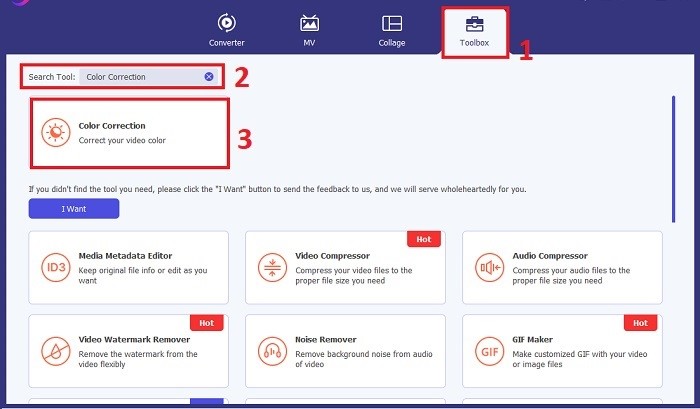
Un cop instal·lat, obre l’aplicació de correcció de vídeo a l’ordinador per accedir a la interfície principal. Al menú global, ves a la Caixa d’eines. Des d’aquí, pots trobar o cercar la funció de Correcció de Color de l’eina i fer-hi clic.
Pas 3: Importa el Vídeo per Corregir el Color
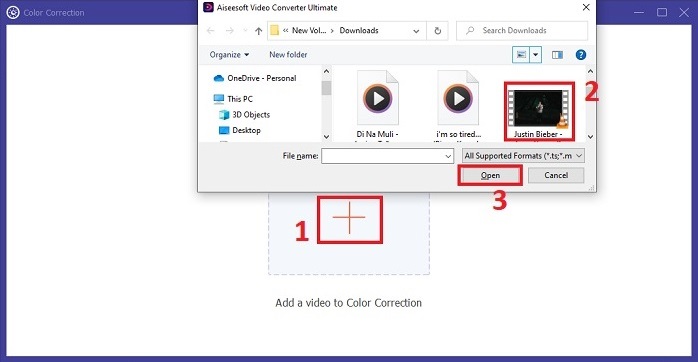
Fes clic al botó amb el signe Plus per importar el vídeo al qual vols corregir el color. Localitza el fitxer de vídeo a l’ordinador i fes clic a Obre per importar-lo al programari.
Pas 4: Ajusta els Paràmetres de Color del Vídeo
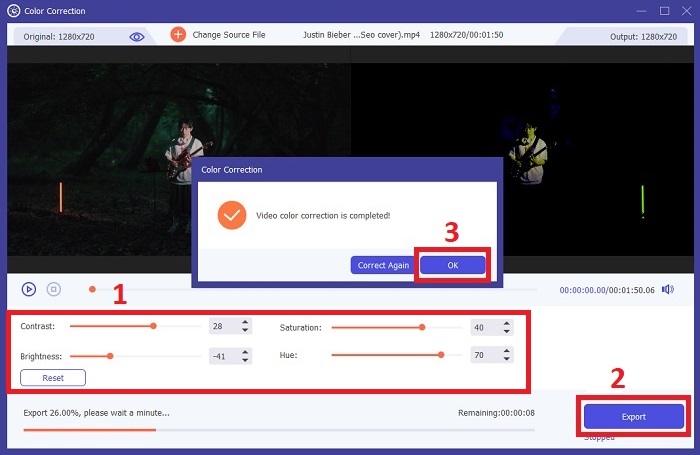
Un cop s’hagi importat el vídeo, ajusta paràmetres com la brillantor, el contrast, la saturació i el to per assolir la correcció de color desitjada. Mentre edites el vídeo amb l’eina, et permet previsualitzar els canvis en temps real al panell de la dreta. Quan estiguis satisfet amb els ajustos de color, fes clic a Exporta. Deixa que l’eina processi el vídeo i desi el resultat a la ubicació que vulguis.
Lectures relacionades:
Filtre de vídeo: millora el teu vídeo amb filtres i efectes a l’escriptori
Què és el 3D? Tot el que Has de Saber sobre el 3D i Com Crear-ne un
Part 4. Preguntes freqüents sobre la correcció del color del vídeo
Com sé si necessito una correcció de color?
No esteu segur de si el vostre vídeo necessita correcció de color? La correcció del color és necessària si els colors semblen desiguals, estranys o no coincideixen amb l'estat d'ànim o el tema desitjat del vostre vídeo.
És realment necessària la correcció del color?
Absolutament! Una correcció de color de vídeo AI és essencial en la producció de vídeo per garantir que els colors siguin precisos i visualment atractius. Millora la uniformitat visual i pot elevar un vídeo decent a extraordinari.
Què és un corrector de color a la pel·lícula?
Un corrector de color en pel·lícula és una eina, ja sigui maquinari o programari, utilitzada en postproducció per modificar i equilibrar els colors. Ajuda els cineastes a aconseguir una aparença, un estat d'ànim o una atmosfera particulars, fent que les imatges siguin més atractives i unificades dins de la història.
Conclusió
En conclusió, la correcció de color de vídeo és la clau per obtenir una experiència visual captivadora. Es tracta d’afinar colors i tons per adaptar-los a la teva visió creativa, assegurant que cada fotograma reflecteixi la brillantor desitjada. Fer servir la correcció de color impulsada per IA transforma els teus vídeos, incorporant colors vius i realistes que generen un impacte memorable. Des de corregir il·luminacions mixtes fins a crear estats d’ànim específics, aquesta innovació eleva la teva manera d’explicar històries. Video Converter Ultimate es consolida com un aliat potent, simplificant el procés de correcció de color i alliberant tot el teu potencial artístic.
-
 Què és FPS? Tot el que necessiteu saber al respecte
 Què és FPS? Apreneu tota la informació que necessiteu sobre fotogrames per segons (FPS) i què pot fer en diferents situacions. Llegiu aquest article per a tots els detalls.
-
 L'aplicació de millora de color fotogràfica superior al vostre Android i iOS de forma gratuïta
 Voleu tenir una aplicació de millora del color fotogràfic al vostre telèfon? Bé, tria quins potenciadors creus que s'adaptaran millor a les teves necessitats.
-
 Guia definitiva per canviar la resolució de vídeo disponible en multiplataformes
 Necessites canviar la resolució del vídeo? Si és així, apreneu les diferents maneres que podeu fer fàcilment per canviar la resolució del vídeo que esteu veient.
