


 Video Converter Ultimate
 Screen Recorder
 Oprava videa
Zjednodušený návod, jak synchronizovat zvuk a video v Adobe Premiere Pro
If you are a pro then you've already used the Adobe Premiere Pro as your video editor software that performs really well. A lot of Adobe users really love this software because it provides the best output you would love to insert on your video. But did you know that you can also use this tool to sync your audio with video? So, if you don't have an idea on how to do it then this is one of your lucky days. As we try it for yourself on how to sync it easily. So now, you will not need to read a manual because this write-up makes it simple for you to understand how to sync audio in Premiere easily and effectively with another alternative tool.

Část 1. Jak synchronizovat zvuk a video v Adobe Premiere Pro
Before we start, let's have a brief introduction to the Adobe Premiere Pro. As we indicate above, this tool has already been used a lot by the professional editors who love to make amazing videos. However, this tool will take a lot of your time to learn because it provides a lot of advanced features that beginners will not understand. Although learning how to use it will surely take a lot of time, it is worth it to learn how to use it if you have free time. Moreover, the indicated steps below are simpler for you to understand to learn how to sync audio and video in Premiere if you follow the steps below.
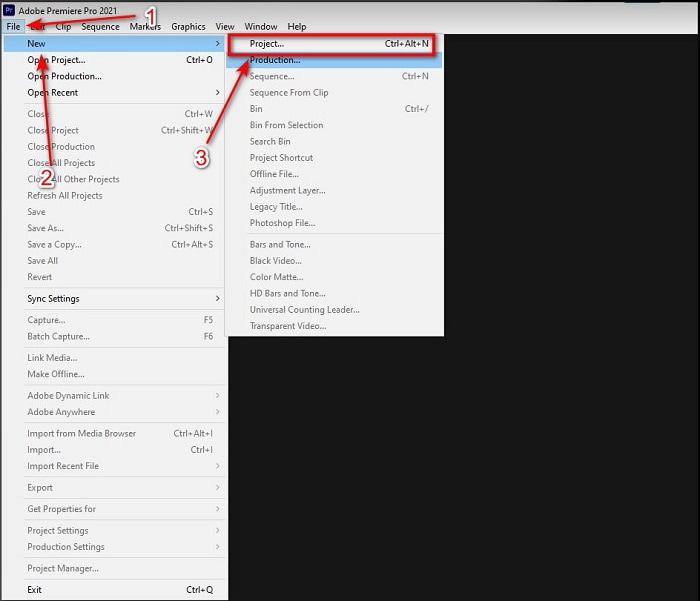
Step 1. First, you must buy the tool first and download it on your computer drive. Launch it after the downloading process has already been taken in place. Then click the File and under it is the New then click the Project to proceed then press OK on the new interface will be going to pop-up.
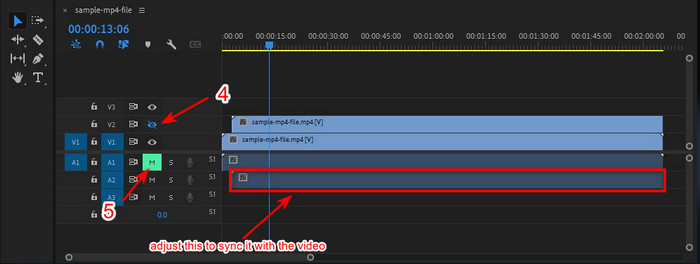
Step 2. And add the same video and audio to the Timeline twice. Then click the Toggle Track Output of the second video and mute the second by clicking the Mute Track. Adjust the audio track to make it sure that it will sync with the video.
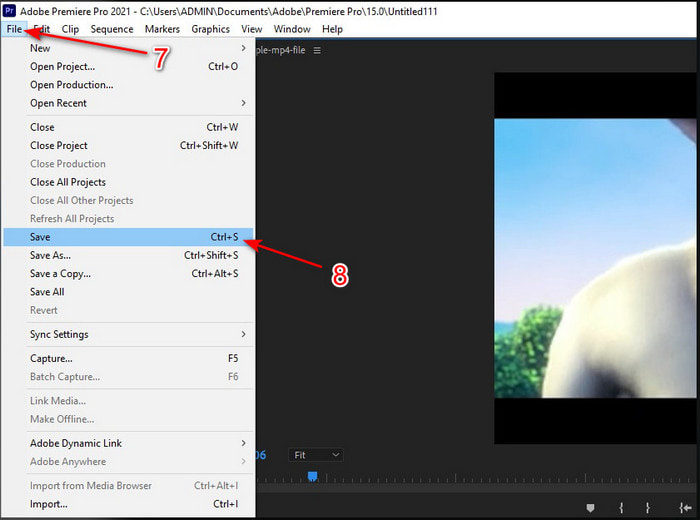
Step 3. Re-click the File above and locate the Save to finally export the media file into your computer drive.
Klady
- Tento nástroj poskytuje pokročilou funkci úprav.
- Top of the line editor si můžete stáhnout.
- Nejlepší volba pro profesionální výstup.
Nevýhody
- Není to nejlepší volba pro začátečníky, kteří nemají ponětí o úpravách.
- Software je zcela drahý ve srovnání s jinými editory, které poskytují téměř stejnou funkci.
Část 2. Nejjednodušší způsob synchronizace zvuku pro začátečníky a profesionály s Video Converter Ultimate
Just like Adobe Premiere Pro this phenomenal converter also produces high-quality and advanced editing features that you would love to use. But this is way easier to use compared to the premiere pro. The Video Converter Ultimate is the best friend of the editors who loves to make a video, enhance, boost, create Gif and more. This software specialized almost all of the internet user's problems even in syncing. And because of how easy it is to use, more than a million users have already downloaded and fell in love with it. So, if you want to make your life easier instead of using premiere pro sync audio why don't you use this? Follow the step below.
Steps on How to Sync Audio and Video with the Video Converter Ultimate:
Step 1. Download the software on your computer and choose whether it is a PC or Mac. Install it later on, do the set-up and click the Start Now to proceed.
Zdarma ke staženíPro Windows 7 nebo novějšíBezpečné stažení
Zdarma ke staženíPro MacOS 10.7 nebo novějšíBezpečné stažení
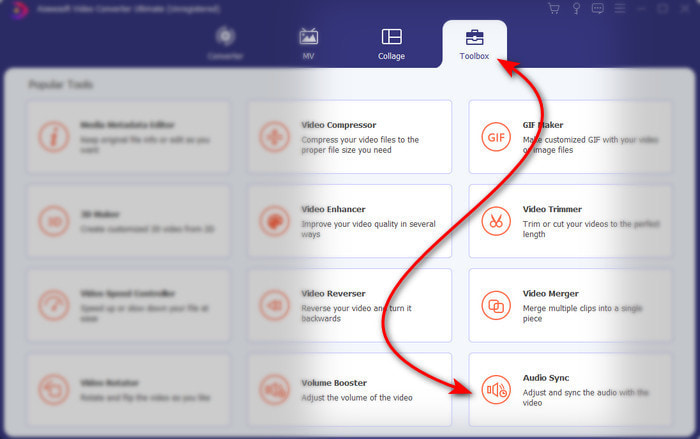
Step 2. Launch the tool after the first step and go next to the Toolbox section and press the Audio Sync in the lower part.
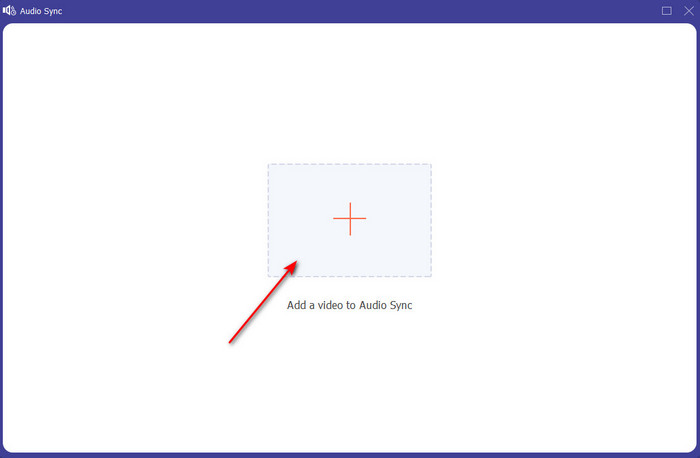
Step 3. Press the + button to insert the video and audio you want to be synced. After locating it on the folder click Open to proceed.
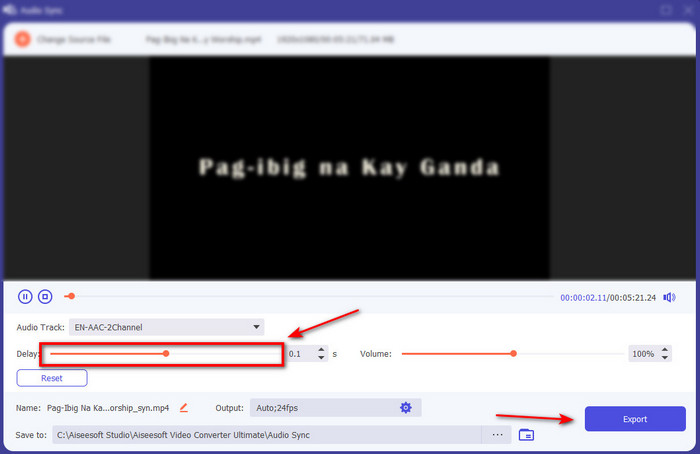
Step 4. To make the audio sync adjust the Delay slider to match it with the video. In addition, you can also boost the audio there as well by adjusting the volume slider. After it is done click Export to save the final output.
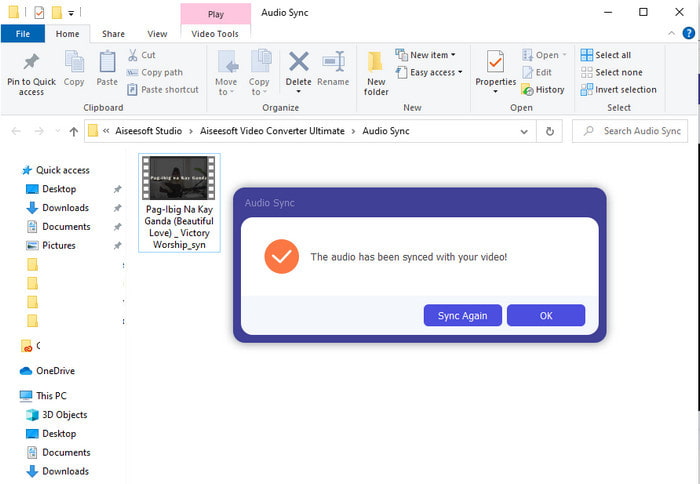
Step 5. After it is done, a folder will be going to show on your screen with synchronized audio and video you've made. Click the file to watch, play and enjoy the audio-video in sync.
Klady
- Nejlepší volba, aby vaše video vypadalo fenomenálně.
- Celkový zážitek při používání tohoto nástroje je doslova ultimátní a přitom snadno použitelný.
- Je k dispozici na všech platformách, ať už jde o PC nebo Mac.
Nevýhody
- Stejně jako Premier pro je tento nástroj placený, je však mnohem levnější než Premier pro.
- Než k němu budete mít přístup, musíte si jej nejprve stáhnout na disk.
Část 3. Časté dotazy o synchronizaci zvuku a videa v premiéře
Mohu používat Premiere jako záznam obrazovky?
If you're trying to record a screen on the Premiere pro then you must surrender now because you can't do it here. However, we can tell you a secret screen recorder you can choose on. So, if you want to know what are the Top 5 Best Screencasts you can use on PC, Mac, online, iOS, and Android.
Je Adobe Premiere Pro zdarma?
Ve skutečnosti ano, tento nástroj si můžete stáhnout zdarma, ale můžete k němu přistupovat pouze po dobu 7 dnů ve zkušební verzi. Pokud tedy zkušební verze skončila, musíte se znovu přihlásit k odběru Adobe Premiere Pro, abyste si mohli užít plnou kapacitu funkcí úprav, které tato premiéra poskytuje.
Mohu ke stažení Premier pro použít jiný web?
Ne, protože je nezákonné stahovat všechny aplikace z jiných webových stránek. Také, pokud ke stažení premiéry pro používáte jinou webovou stránku, existuje šance, že bude obsahovat spyware, viry nebo ještě mnohem horší. Pokud tedy chcete zajistit svou bezpečnost, stáhněte si software pouze na oficiální hlavní webové stránky.
Mohu si zakoupit doživotní přístup k Adobe Premiere Pro?
Ačkoli si můžete koupit měsíční přístup k Adobe Premiere Pro, stále si k němu nemůžete koupit doživotní přístup. Můžete si jej však zakoupit na jiné webové stránce, která je však nelegální a existuje možnost, že soubor, který se chystáte stáhnout, je poškozený, obsahuje virus nebo je podvod. Pokud tedy chcete používat a kupovat Adobe Premiere Pro, doporučujeme všem, aby si jej koupili na jeho hlavním webu.
Závěr
Po 5 minutách čtení tohoto článku již víme, jak používat Adobe Premiere pro k synchronizaci zvuku s videem. Existuje však jednodušší způsob, jak jej synchronizovat pomocí Video Converter Ultimate. Protože tento nástroj poskytuje mnohem rychlejší úpravu nesynchronizovaného videa a zvuku a zároveň má nejlepší kvalitu. Takže teď, pokud máte hodně peněz, použijte Adobe Premiere Pro, ale pokud chcete hodně ušetřit a přitom mít stejnou funkci, musíte jít na Video Converter Ultimate.
-
 Jak zpomalit video: Perfektní tipy [Počítač/mobilní telefon]
 Už vás nebaví hledat ty nejlepší nástroje, které pomáhají zpomalit video online? Přečtěte si tento konkrétní článek, abyste získali informace o níže uvedených informacích.
-
 Windows Media Player | Naučte se, jak zrychlit videa [Osvědčeno]
 Chcete zpomalit svůj videoklip pomocí přehrávače Windows Media Player, ale nevíte, jak na to? Tento článek je ideální pro čtení a může objasnit váš pohled na to, jak zrychlit videa pomocí Windows Media Player.
-
 Jak změnit zpomalené video na normální rychlost [Snadné kroky]
 Chcete vědět, jak vrátit zpomalené video, které jste si stáhli z internetu nebo omylem nahráli zpomaleně? Přečtěte si, jak převést zpomalené video na normální rychlost v systémech Mac, Windows, iOS a Android.
