


 Video Converter Ultimate
 Screen Recorder
 Oprava videa
Nejpohodlnější způsoby, jak převést MP3 na M4R pro zařízení Apple
Už jste někdy přemýšleli o tom, že byste si z oblíbené písničky udělali na iPhonu vyzvánění? Je to vůbec možné? Rozhodně ano. Jen je potřeba soubor převést. Proč ho musíme nejdřív převést? Abychom ho mohli nastavit jako vyzvánění. Hlavní důvod je ten, že aby bylo možné konkrétní skladbu použít jako vyzváněcí tón, musí být v M4R formátu. To znamená, že si musíte najít nejlepší převodník MP3 na M4R pro iTunes, který vám bude vyhovovat. Tento článek nabízí různé způsoby, jak můžete svůj MP3 soubor převést, včetně hromadného převodu MP3 na M4R. Stačí si přečíst obsah níže.

Část 1. Nejschůdnější způsob, jak převést MP3 na M4R
Video Converter Ultimate je zdaleka nejpřesvědčivější nástroj, který můžete použít k převodu MP3 na M4R. Nejen jeden soubor, ale umí i dávkovou konverzi z MP3 do MP4. Jde o konvertor, který dokáže produkovat HD videa a bezeztrátový zvuk. Ve skutečnosti je pro něj ideální a doporučené převést soubor bez ztráty původní kvality. Rychlost je 30x vyšší než u běžného převodníku. Navíc, pokud převádíte seznam skladeb, abyste jej uložili do telefonu, tento nástroj to určitě udělá za vás. Bez námahy a bez potu. Mezitím jsou zde některé z dalších funkcí, které si kromě převodu zvuku můžete také užít. Níže byl také napsán podrobný průvodce pro vaši referenci, pokud se jej rozhodnete použít.
◆ Upravit metadata.
◆ Vysokorychlostní akcelerace GPU.
◆ Technická podpora v reálném čase.
◆ Je podporována komprese videa.
Krok 1. Abyste jej mohli použít, stáhněte si aplikaci kliknutím na tlačítko ke stažení níže. Jakmile je aplikace stažená do vašeho Windows nebo Macu, spusťte ji.
Zdarma ke staženíPro Windows 7 nebo novějšíBezpečné stažení
Zdarma ke staženíPro MacOS 10.7 nebo novějšíBezpečné stažení
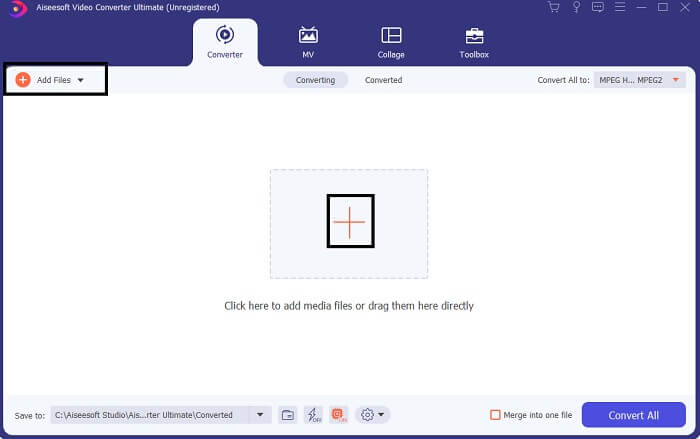
Krok 2. V hlavním rozhraní nástroje uvidíte dvě možnosti, jak nahrát soubor. Buď kliknete na ikonu Plus uprostřed, nebo na tlačítko Add Files vlevo nahoře. Vyberte požadovaný soubor a nahrajte ho.
Krok 3. Abyste získali požadovaný výstup, změňte formát kliknutím na rozbalovací nabídku vpravo nahoře v rozhraní.
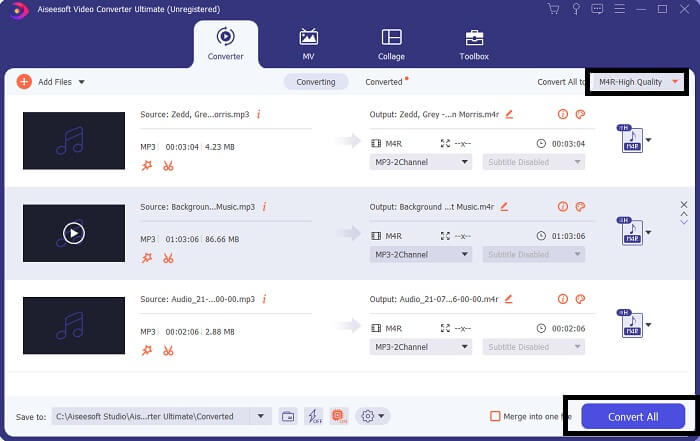
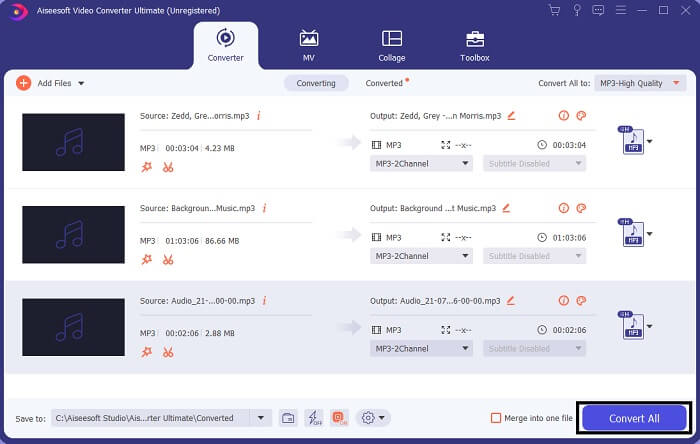
Krok 4. Nakonec klikněte na tlačítko Convert All vpravo dole v hlavním rozhraní. Poté vyčkejte, než se soubor převede.
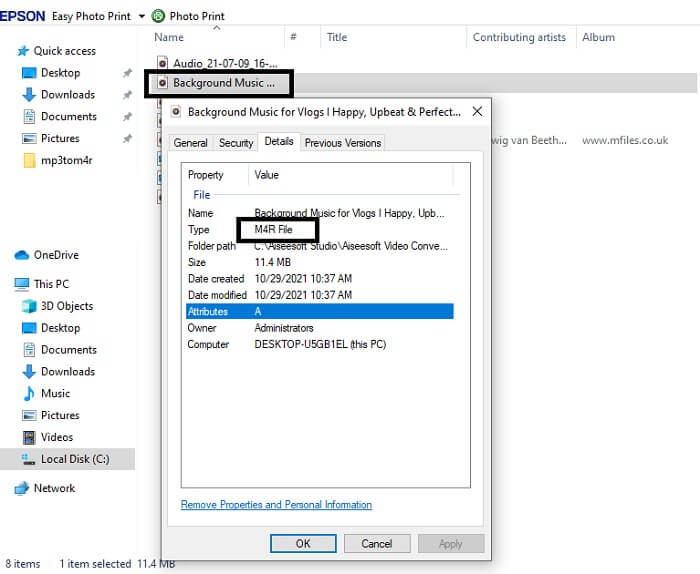
Krok 5. Nakonec otevřete složku, do které se uložil výstupní audio soubor, a přeneste jej do svého iPhonu. Můžete k tomu použít přenosový nástroj nebo aplikaci. Doporučení najdete na internetu. Stačí vyhledat návod, jak z něj na iPhonu udělat vyzvánění.
Část 2. Některé z nejlepších nástrojů pro převod MP3 na M4R online
FVC Free Online Audio Converter
Prémiový převodní nástroj je skvělý, ale nic nepřekoná praktický nástroj. S ohledem na vaše potřeby vytvořil FVC bezplatnou verzi programu. FVC Free Audio Converter je váš bezplatný nástroj dostupný kdykoli a odkudkoli. Potřebujete jen funkční internet a podporovaný prohlížeč. Tento MP3 na M4R převodník pro vyzvánění iPhonu dokáže vytvořit vysoce kvalitní, bezztrátový zvuk. Výsledky jsou uspokojivé a nemusíte za ně platit. A pozor, ještě něco navíc: věděli jste, že zvládá i hromadné převody? Ano, zvládá! Níže jsou také některé výrazné funkce, které získáte, pokud jej použijete. Pro vaše pohodlí je navíc přiložen i návod.
◆ Převedený soubor má podobnou kvalitu jako originál.
◆ 100% zdarma a bezpečné použití.
◆ Bez omezení velikosti při převodu.
◆ Je podporována dávková konverze.
Krok 1. Abyste získali přístup k nástroji, navštivte oficiální web FVC Free Audio Converter.
Krok 2. Zde klikněte na Add Files to Convert. Jako nový uživatel musíte povolit přístup kliknutím na Open FVC Launcher. Poté se na obrazovce objeví okno, ve kterém můžete vyhledat soubor, který chcete převést.
Stáhněte si desktopovou verzi a převádějte soubory hromadně.
Krok 3. Po nahrání souboru se objeří další okno. Ve spodní části změňte výstupní formát zaškrtnutím možnosti M4R.
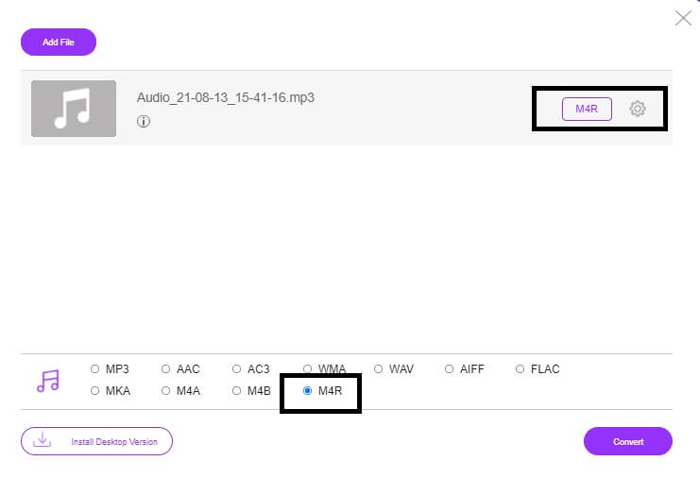
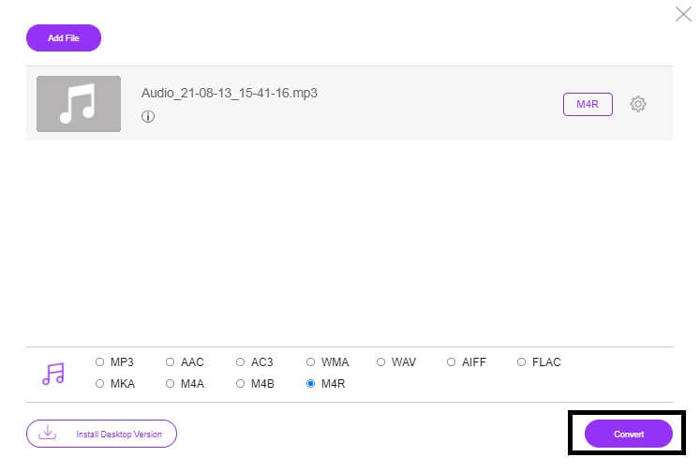
Krok 4. Poté klikněte na tlačítko Convert a spusťte převod.
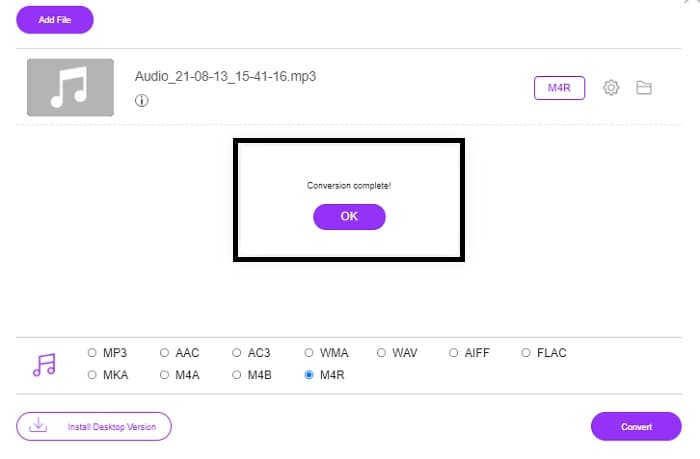
Krok 5. Nakonec vyberte složku, do které se má soubor uložit, a ten se do ní automaticky uloží. Potom jej přeneste do svého iPhonu. Vězte, že můžete provádět i hromadné převody, takže se v ničem neomezujte.
Související:
M4ROnline od File Converter
Jednoduchý, ale spolehlivý – tak tento online nástroj popisují jeho uživatelé. Ve výchozím nastavení je určen speciálně k převodu MP3 na M4R. Jak už napovídá jeho název, přesně k tomu byl vytvořen. Funguje v různých webových prohlížečích, takže ho nemusíte stahovat ani kupovat. Když navštívíte jeho web, všimnete si jednoduchého rozhraní. Je velmi přímočaré – stačí kliknout na tlačítko Browse a začít nahrávat a převádět. Pokud ho chcete vyzkoušet, doporučuje se navštívit oficiální web a udělat si vlastní zkušenost. Proto je tento nástroj dobrá alternativa. Níže si můžete projít podrobný postup, jak s ním pracovat.
Krok 1. Nejprve přejděte na oficiální stránku M4R Online a klikněte na Browse.
Krok 2. Vyberte soubor ze své složky a klikněte na tlačítko Upload File.
Krok 3. Jakmile se zobrazí zpráva o dokončení, klikněte na soubor a stáhněte si ho.
Online-convert.com
Tento nástroj poskytuje služby už delší dobu. Dá se říct, že mnoho lidí považuje tento online nástroj za velmi užitečný pro své potřeby převodu souborů. Jinak by pravděpodobně už dávno neexistoval, pokud by se neosvědčil. Po vstupu na domovskou stránku uvidíte všechny dostupné nástroje: audio převodník, video převodník, převodník obrázků, dokumentů i e‑knih, všechny pohromadě na hlavní stránce. Jejich soustředění na jednom místě uživateli usnadňuje najít potřebný nástroj. Proto si zaslouží být zařazen do tohoto seznamu MP3 na M4R iTunes převodníků. Níže najdete návod, jak nástroj používat.
Krok 1. Navštivte oficiální stránku nástroje a zvolte Audio Converter.
Krok 2. Klikněte na Drop down, vyberte výstupní formát a klikněte na GO.
Krok 3. Poté se objeví nové okno. V něm klikněte na tlačítko Choose Files a nahrajte soubor. Pro zahájení převodu klikněte na Start Conversion. Jakmile je soubor připraven, automaticky se stáhne do vašeho počítače.
MP3 vs. M4R
Formát MP3 byl vydán v roce 1993 Moving Picture Experts Group (MPEG). Byl to standard pro ukládání hudby, protože dokázal komprimovat zvuk na mnohem menší velikost než jiné nekomprimované formáty. V dnešní době je stále široce používán, zejména pro distribuci zvuku online.
Soubor M4R se používá k uložení vlastního vyzváněcího tónu pro iPhone vytvořeného pomocí Apple iTunes. Obvykle můžete tento formát vidět při přenosu části vyzváněcího tónu z počítače do zařízení iOS. Soubory M4R vytvořené pomocí iTunes obvykle obsahují ochranu autorských práv.
Část 3. Časté dotazy o převodu MP3 na M4R
Co je M4R?
Jedná se o příponu souboru speciálně vytvořenou společností Apple a striktně používanou jako vyzváněcí tón pro iPhone a další zařízení Apple. To je stejně dobré jako M4A a MP4, pokud jde o kvalitu.
Existuje konvertor MP3 na M4R kromě iTunes?
Určitě existují. Můžete si vybrat z výše uvedených nástrojů nebo zvážit použití Windows Media Player ripováním. Pokud nechcete procházet všemi procesy, stačí použít bezplatné nástroje dostupné online. Přímo převádějí zvuk do požadovaného formátu místo toho, aby procházeli zdlouhavým procesem ripování.
Proč musím svůj soubor převést z MP3 na M4R, abych jej mohl použít jako vyzváněcí tón?
Je to povinnost. Aby byl soubor považován za vyzváněcí tón, musí být soubor ve výchozím nastavení ve formátu M4R, aby se mohl přehrávat jako vyzváněcí tón.
Závěr
S tím vším se jistě můžete spolehnout na výše uvedené nástroje. Musíte mít přístup k tomu, který nástroj vám může být užitečný v závislosti na vašich potřebách. Pokud jste student a běžný občan, který chce převést a chcete převést MP3 na M4R na Mac zdarma nebo na jakémkoli zařízení, které používáte, můžete se obrátit na bezplatné nástroje. Pro profesionální použití se doporučuje používat Video Converter Ultimate. Vždy se můžete vrátit na tuto stránku, pokud se chcete dozvědět více o dalších nástrojích ke konverzi.
-
 [Zdarma a online] 3 způsoby převodu MP3 na MP4 s obrázkem
 Jak převést MP3 na MP4 ve vysoké kvalitě? Tento příspěvek ukazuje 3 efektivní a bezplatné metody pro změnu MP3 na MP4 s obrázky ve Windows a Mac.
-
 Zjistěte, jak převést MP3 do formátu WAV
 Chcete vědět, jak převést MP3 do WAV? Určete, který z nástrojů vytváří nejkvalitnější konverzi, kterou můžete získat.
-
 Pokyny, jak převést M4A na WAV [PC a Mac]
 Zjistěte více o tom, jak převést M4A na WAV pomocí podrobných kroků a různých nástrojů, ze kterých si můžete vybrat.

